What Shopify's
built-in inventory
can't do.
Shopify's native inventory has no demand forecasting, no PDF purchase orders, and no low-stock alerts. EZstock has all three — free to start, one-click PO to supplier.
Shopify's built-in inventory doesn't include demand forecasting, PDF purchase orders, or low-stock alerts. EZstock does — plus supplier management, sales velocity tracking, and auto-inventory update on receipt.
Free plan available · No credit card required · Paid plans from $19/month
"Finally a Shopify inventory app that actually works. Set up my first purchase order in 4 minutes and the demand forecasting is exactly what I needed."
Verified Shopify merchant · Read reviews →
Shopify knows what you have.
It has no idea what you're about to run out of.
See it in action
Every screen built for Shopify merchants — not warehouse managers.
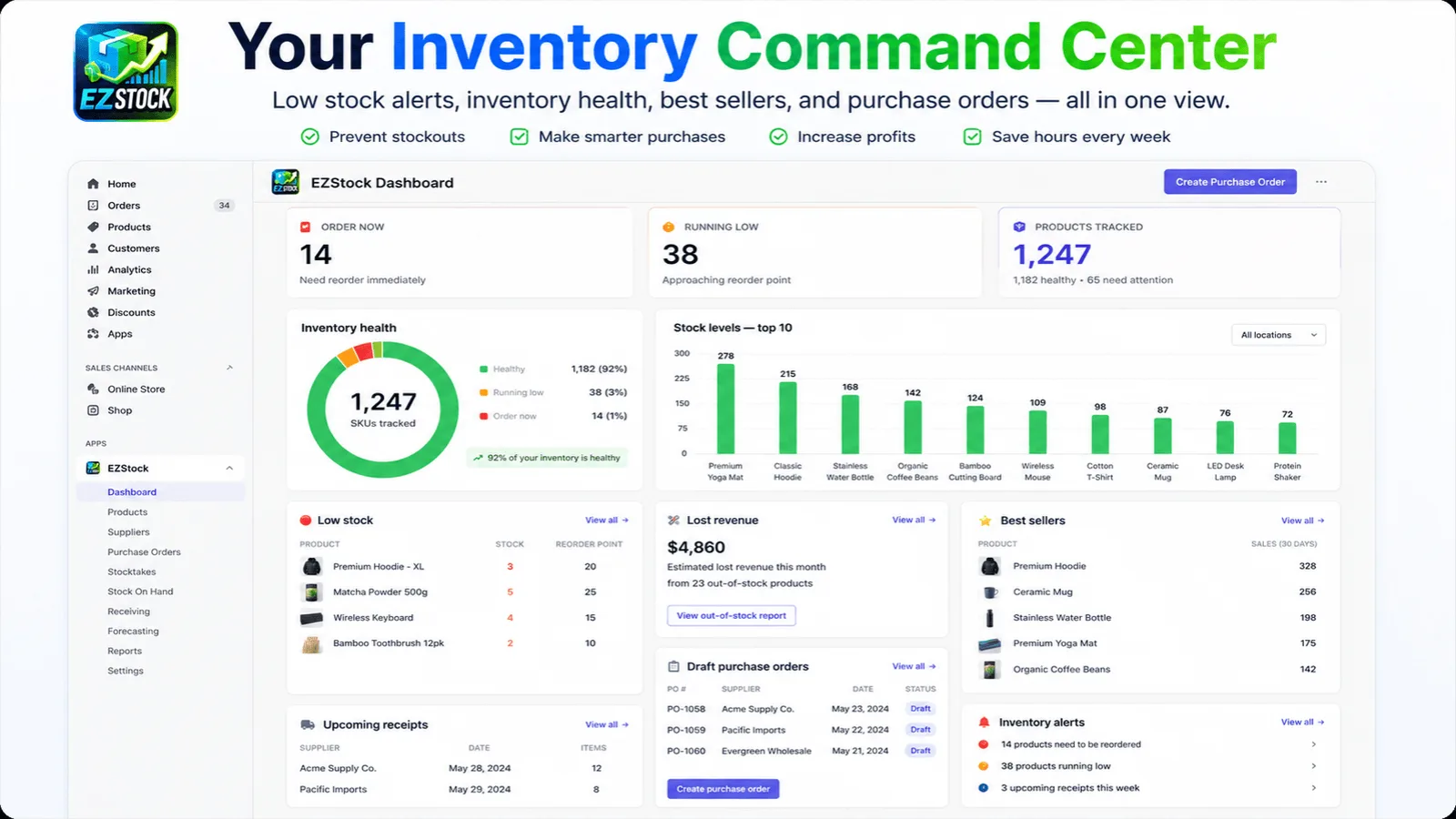
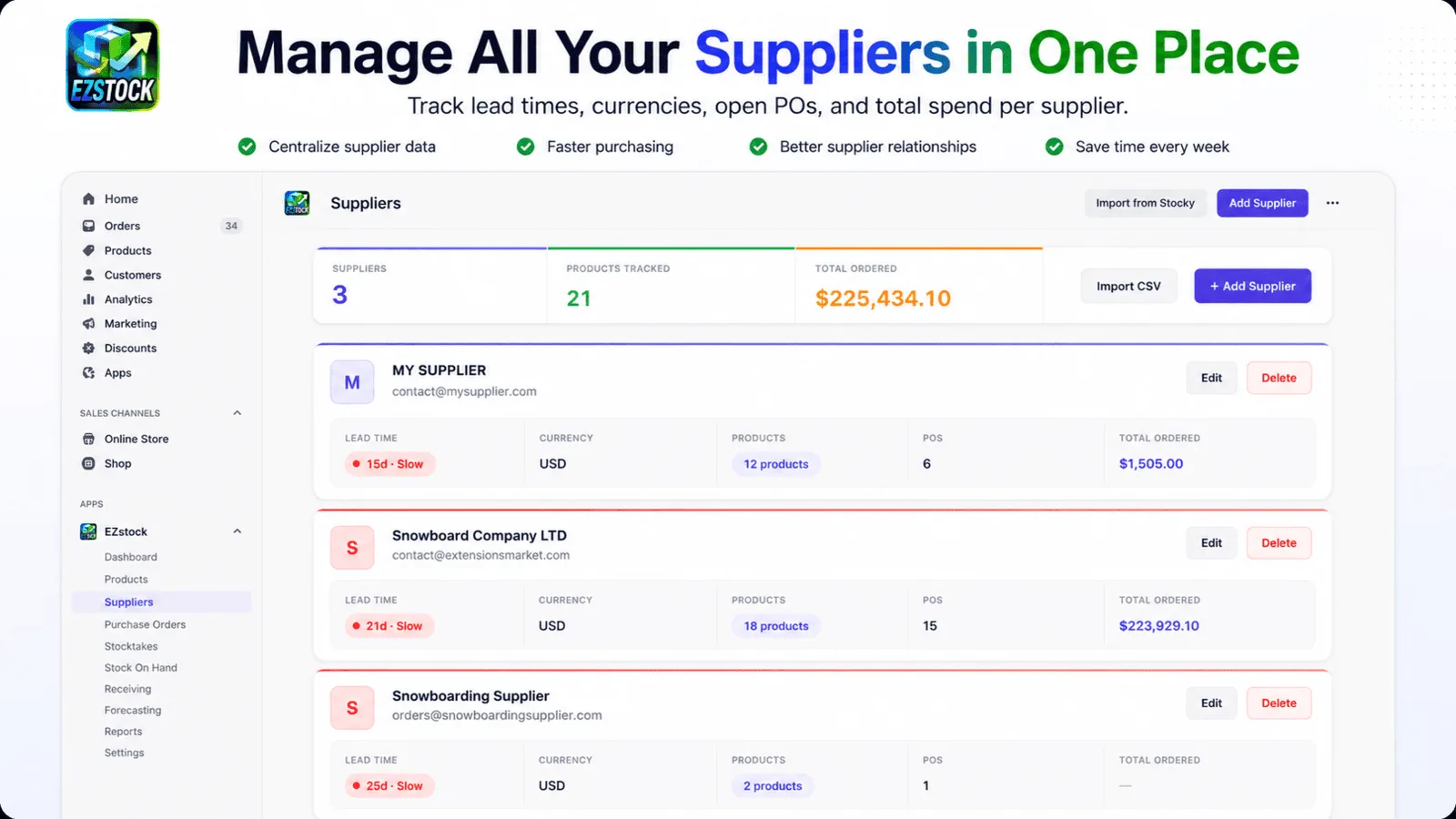
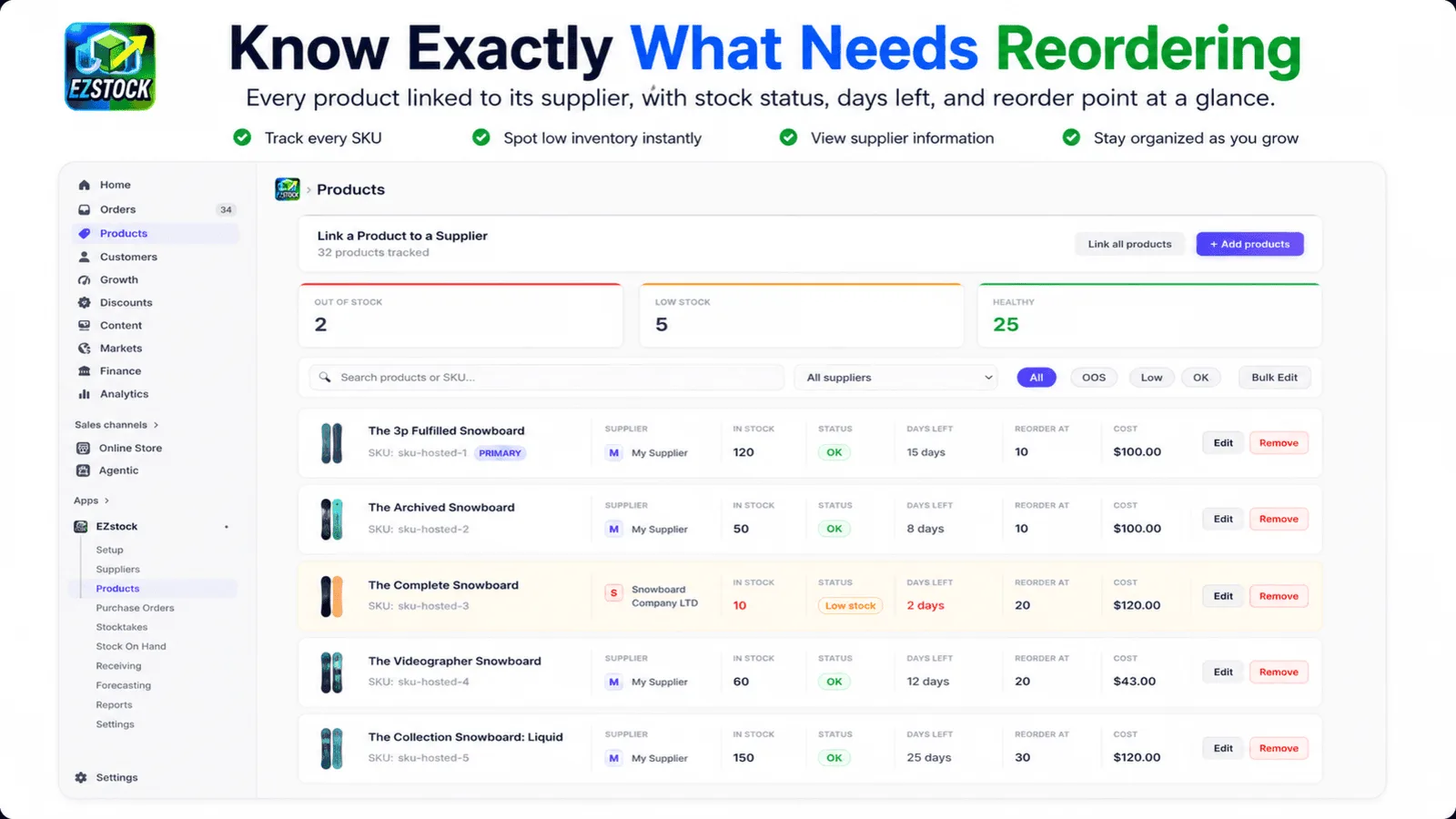
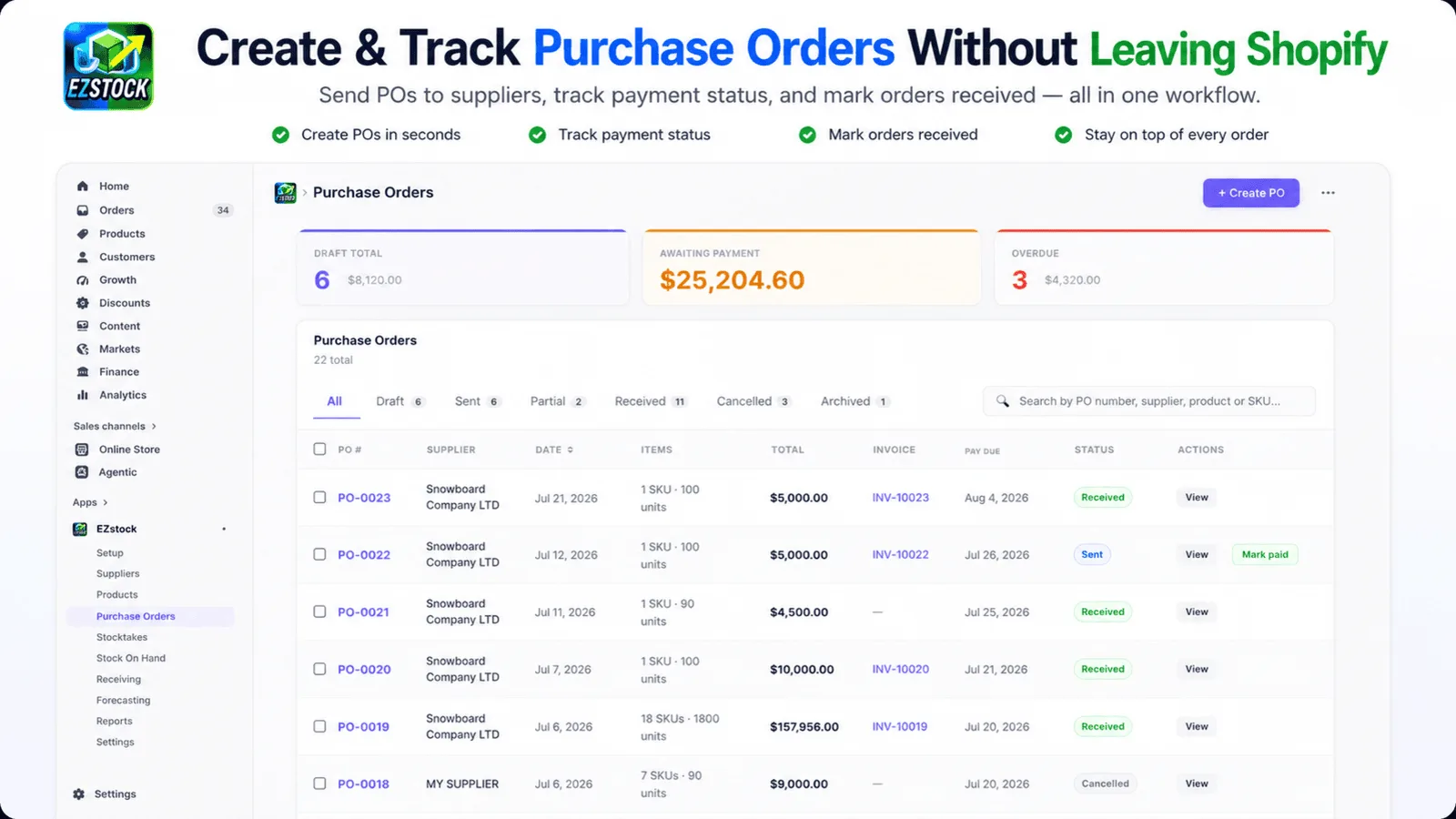
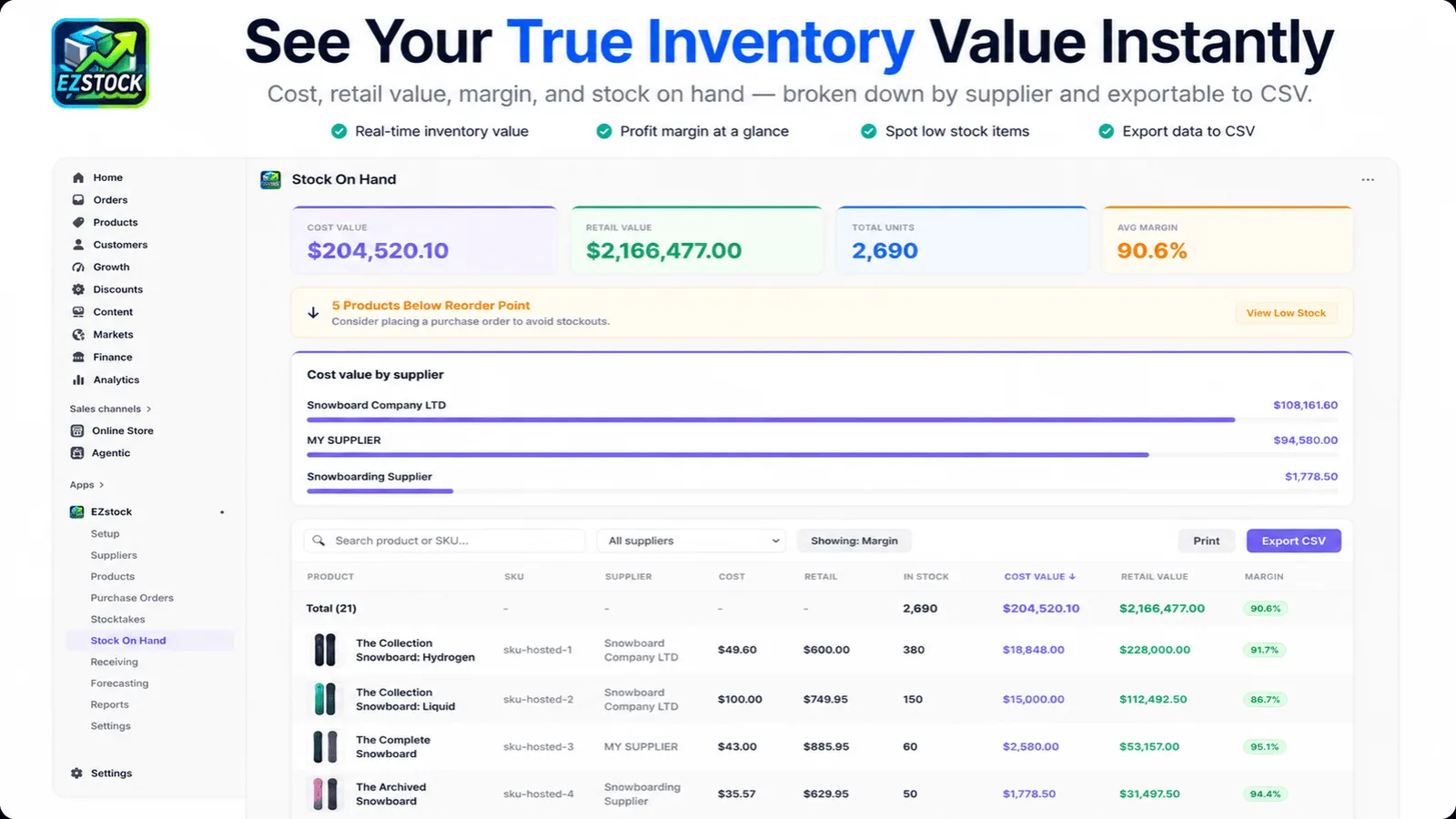
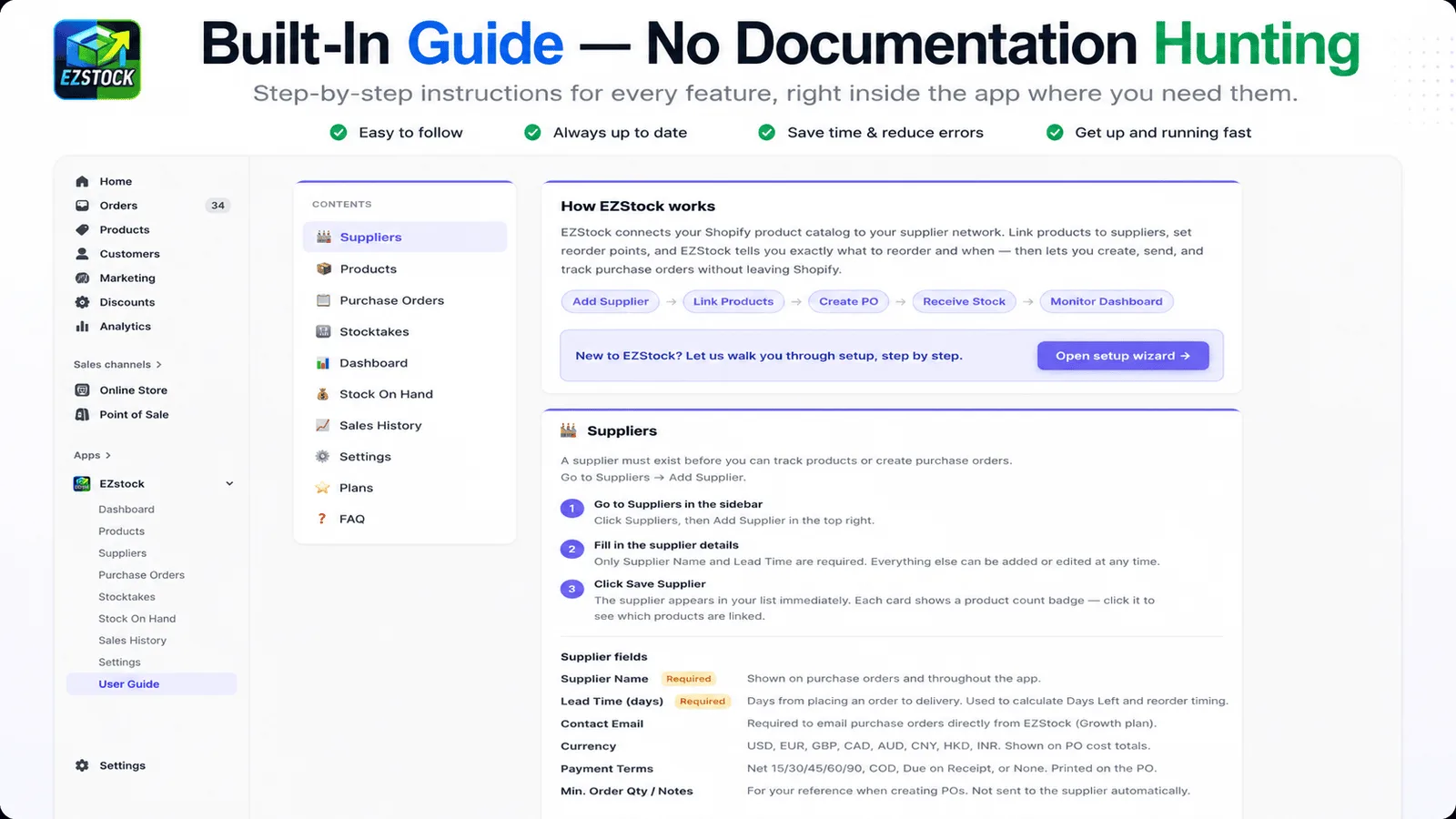
It reads up to a year of your Shopify orders and tells you the one number that matters: days left.
EZstock calculates daily sales velocity per variant from up to 365 days of order history, factors in your supplier's lead time, and sorts every product by how close it is to zero — so the urgent decision is always at the top.
PDF purchase orders, one click
Auto-incrementing PO numbers, download as PDF, email to your supplier. Status tracked Draft → Sent → Partial → Received.
Auto-update inventory on receipt
Click Confirm Receipt and EZstock writes the new quantity straight to Shopify's Admin API at your location. No manual stock adjustments, ever.
Supplier database with lead times
Name, email, lead time, currency. Link any variant to a supplier with a cost price and reorder point — lead time feeds the forecast.
Barcode stock counting Growth & Pro
Scan with a handheld or your phone camera to count, build a PO, or receive a shipment — matched by barcode with a SKU fallback. No typing.
Partial receipt support
Confirm line items as they arrive across multiple shipments. Only received items update Shopify; the PO stays open until it's complete.
Low-stock alerts by reorder point
Set a reorder point per variant; the dashboard flags it and sorts by days remaining, so the most urgent decisions are always front and centre.
The 6 gaps Shopify's
inventory doesn't fill
Shopify's Admin has basic stock counts — but no replenishment tools. Here's exactly what's missing and what EZstock adds.
| Feature | Shopify Built-in | EZstock |
|---|---|---|
| Demand forecasting (days of stock left) | ✗ | ✓ |
| Low-stock alerts by reorder point | ✗ | ✓ |
| PDF purchase orders with email to supplier | ✗ | ✓ |
| Supplier database with lead times & cost prices | ✗ | ✓ |
| Sales velocity tracking per variant | ✗ | ✓ |
| Auto inventory update when stock arrives | Manual only | ✓ |
What happened to Shopify's built-in inventory management — and what should merchants do now?
Shopify announced in February 2026 that it was removing its built-in inventory management tool from the App Store. The hard shutdown date is August 31, 2026 — after that date, purchase orders, supplier records, and forecasting data will no longer be accessible through the app.
The tool was free and deeply embedded in thousands of merchants' daily workflows: creating POs, emailing suppliers, and confirming received stock to update inventory. Shopify's decision left a gap that no native Shopify feature fills. The Admin API still supports inventory adjustments — EZstock is the UI layer that makes it accessible.
Merchants should migrate before August 31, 2026. EZstock imports your supplier list, replicates the purchase order workflow, and auto-updates Shopify inventory on receipt — no CSV uploads, no manual adjustments. Free plan available with no credit card required.
Coming from Stocky? Use our free Stocky Export Converter to turn your Stocky purchase orders, suppliers, and stocktakes into a clean file you can import into EZstock in one step — it runs in your browser, nothing uploaded.
How does EZstock calculate suggested reorder quantities?
EZstock pulls up to 365 days of your Shopify order history and calculates a daily sales velocity per variant. It multiplies that velocity by your supplier's lead time (in days) to determine the stock you'll need to cover the replenishment window, then adds enough to cover your target coverage period (60 days by default, adjustable in settings). The result is a suggested order quantity per line item when you create a new purchase order.
For example, if a variant sells 10 units per day on average, and your supplier has a 14-day lead time, EZstock suggests ordering at minimum 140 units — enough to arrive before you run out — plus 60 days of buffer stock (600 units) for a total suggested order of 740 units. You can override the quantity on any line item before sending the PO.
Demand forecasting runs in real time: each time you open the dashboard or start a new purchase order, EZstock recalculates velocity from up to a year of your most recent sales data.
How does EZstock compare to other Shopify inventory apps?
Since Shopify removed its built-in inventory tool in February 2026, merchants have evaluated alternatives including Inventory Planner, Cin7, Linnworks, and general spreadsheet workflows. EZstock delivers the same core workflow (suppliers → purchase orders → inventory update on receipt) at a price point small and mid-size Shopify stores can afford.
| Feature | EZstock | Inventory Planner | Cin7 |
|---|---|---|---|
| Supplier management | ✓ | ✓ | ✓ |
| Purchase orders with PDF | ✓ | ✓ | ✓ |
| Auto inventory update on receipt | ✓ | ✓ | ✓ |
| Demand forecasting | ✓ (Growth+) | ✓ (core feature) | ✓ |
| Shopify-native (no external system) | ✓ | ✓ | ✗ (separate system) |
| Starting price | Free (then $19/mo) | ~$99/mo | ~$349/mo |
Does EZstock work for merchants with multiple locations or suppliers?
Yes. EZstock supports multiple suppliers per store — each with its own lead time, email address, and currency. You can assign individual product variants to different suppliers, so a purchase order created for Supplier A will only include that supplier's variants.
For inventory updates, EZstock confirms received stock to the Shopify location you specify on each purchase order. Multi-location merchants can route different POs to different warehouse locations. The app uses Shopify's standard inventory adjustment API, so stock levels update the same way a manual Shopify adjustment would — reflected immediately across all your sales channels.
Partial receipt is also supported: if a supplier ships part of an order, you confirm only the received quantities. The PO status changes to Partial and stays open until the remaining items are confirmed, ensuring your inventory never shows stock that hasn't physically arrived.
Simple pricing for
merchants, not enterprises
Start free — no credit card required. 14-day trial on all paid plans.
- Unlimited suppliers & products
- Up to 5 purchase orders / month
- Low-stock dashboard with reorder points
- On Order column on purchase orders
- Email support
- 14-day full-feature trial included
- Unlimited suppliers & products
- Unlimited purchase orders
- Low-stock dashboard with reorder points
- Lost revenue panel
- Payment tracking
- Stocktakes with Shopify inventory sync
- 14-day free trial
- Everything in Starter
- Demand forecasting
- ABC product grading
- PDF purchase orders
- Inventory auto-update on receipt
- Stock On Hand report
- Barcode scanning (scanner or camera)
- 14-day free trial
- Everything in Growth
- Multi-location inventory support
- Priority support
- Early access to new features
- Barcode scanning (scanner or camera)
- 14-day free trial
Common questions
EZStock Guides & Resources
Step-by-step guides for getting the most out of EZStock.
Stop managing inventory
in spreadsheets
Built-in Shopify inventory is gone. EZstock is here. 14-day free trial, no credit card required.
Install EZstock free