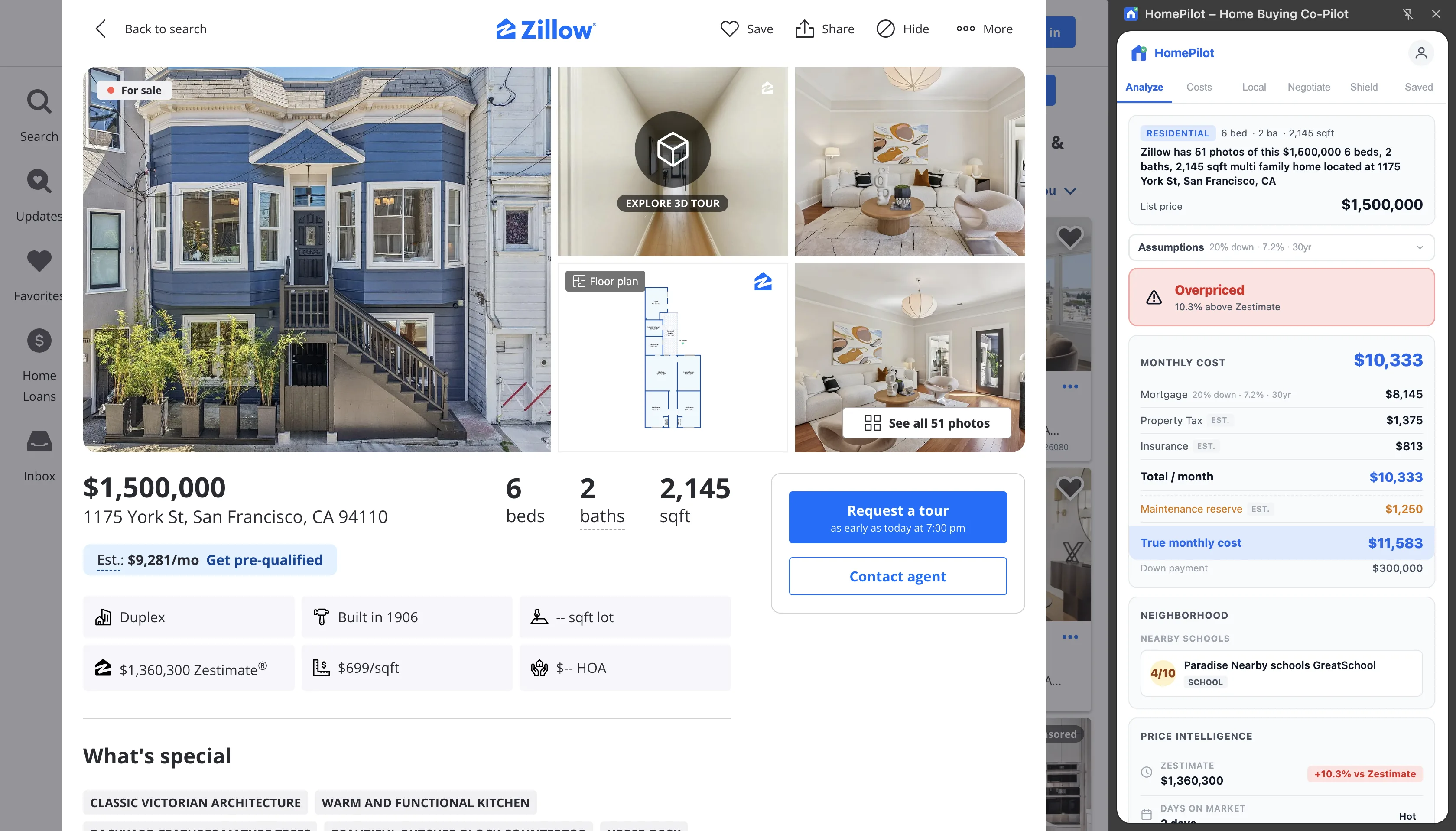
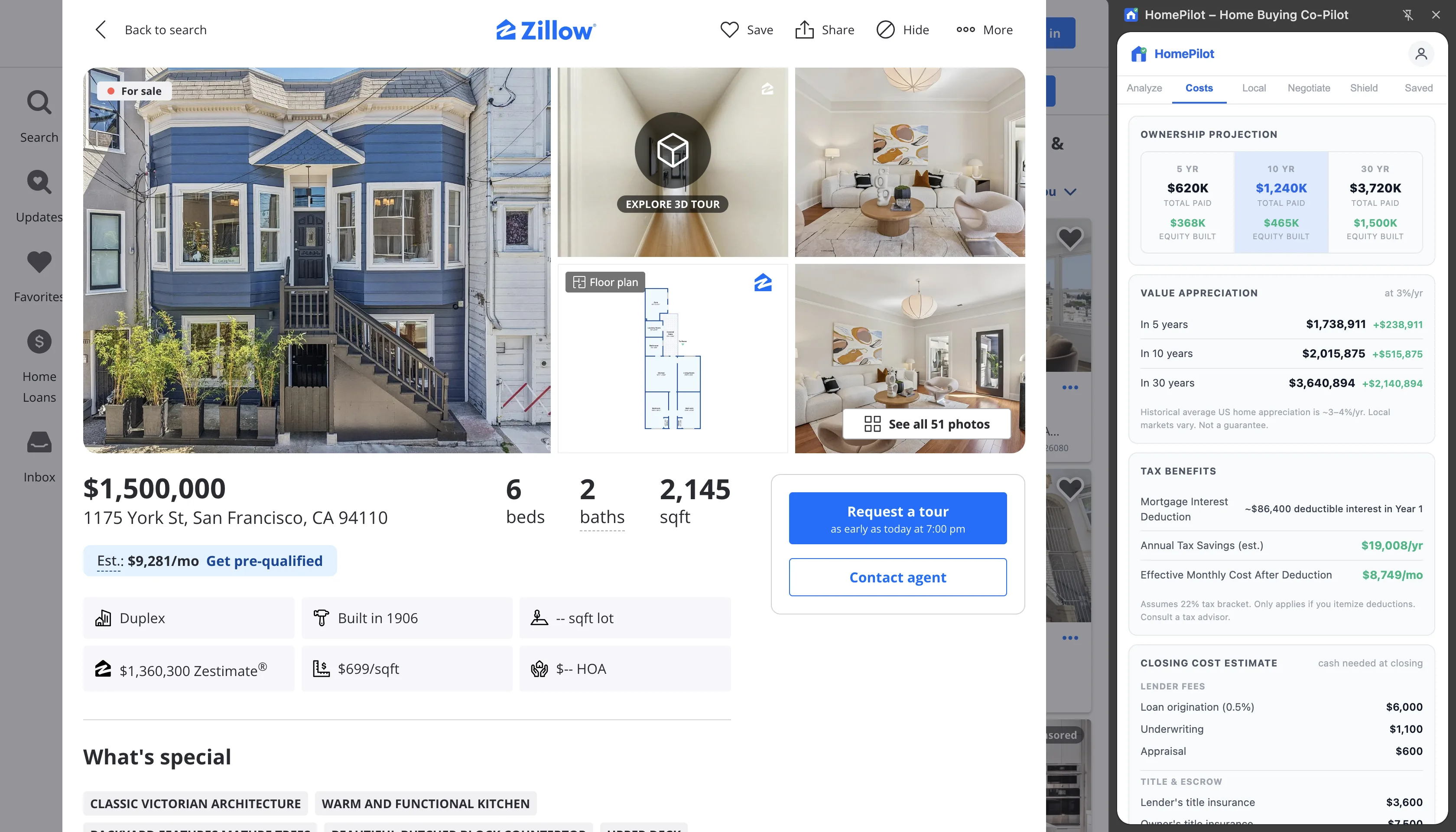
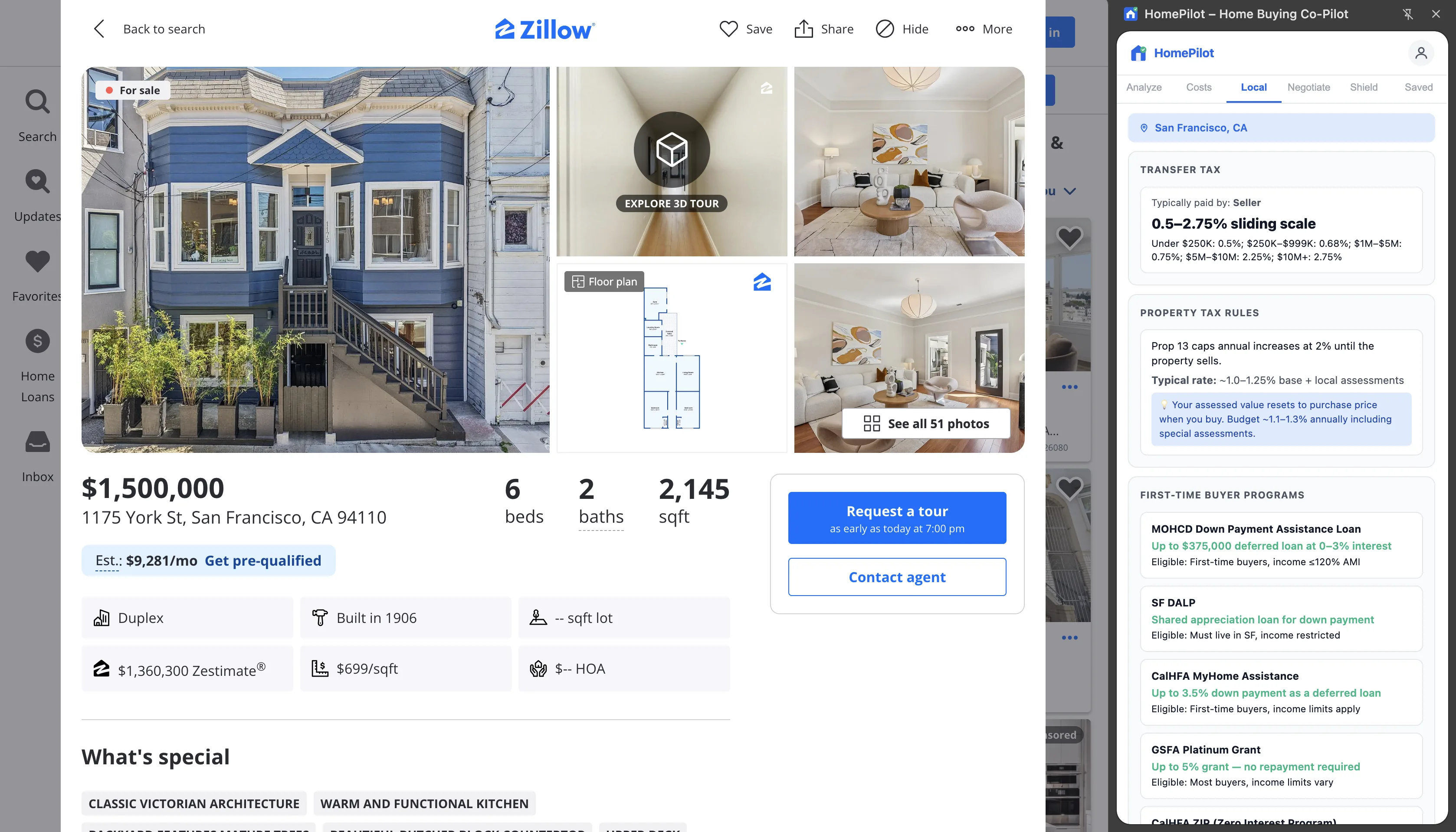
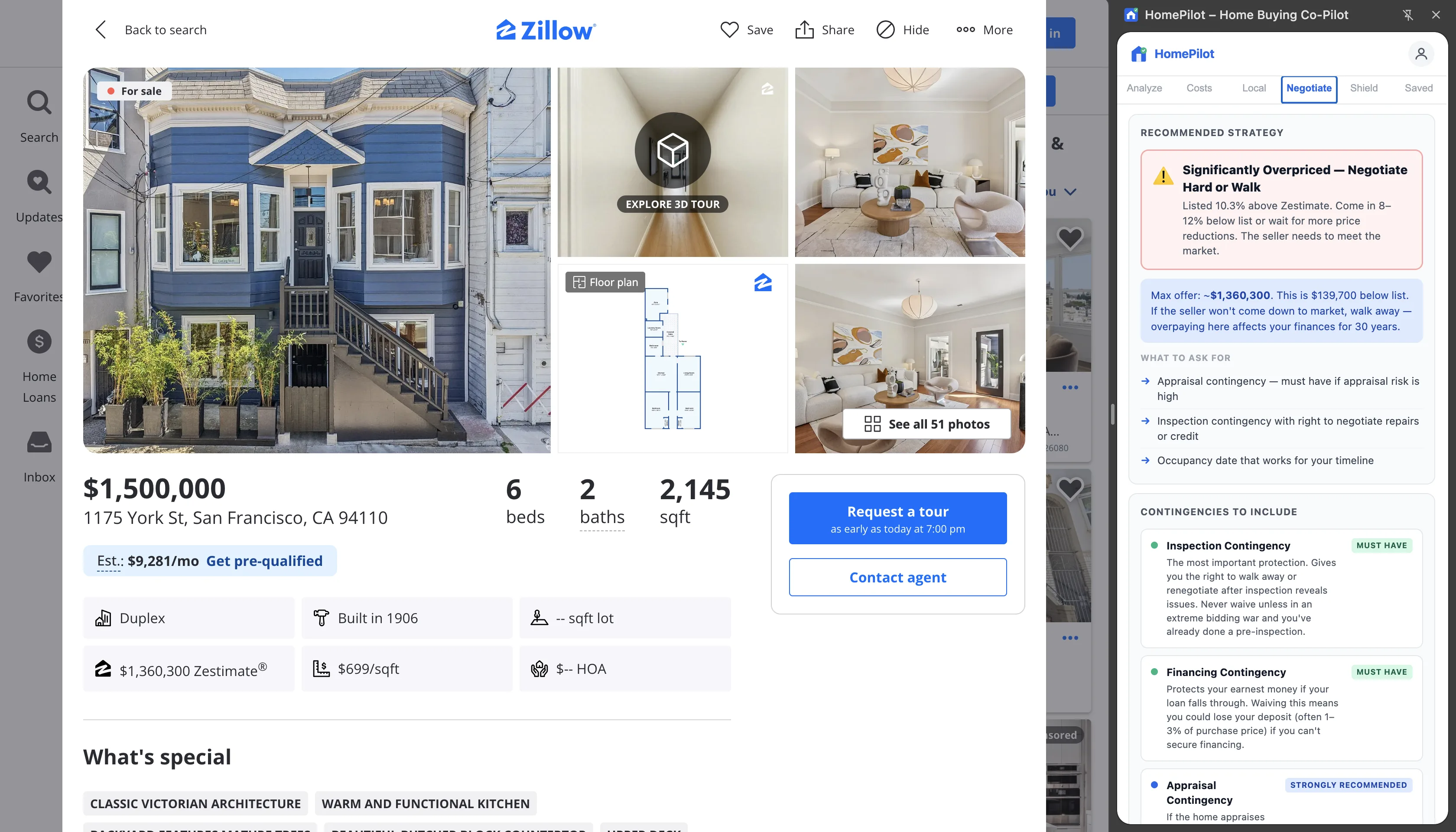
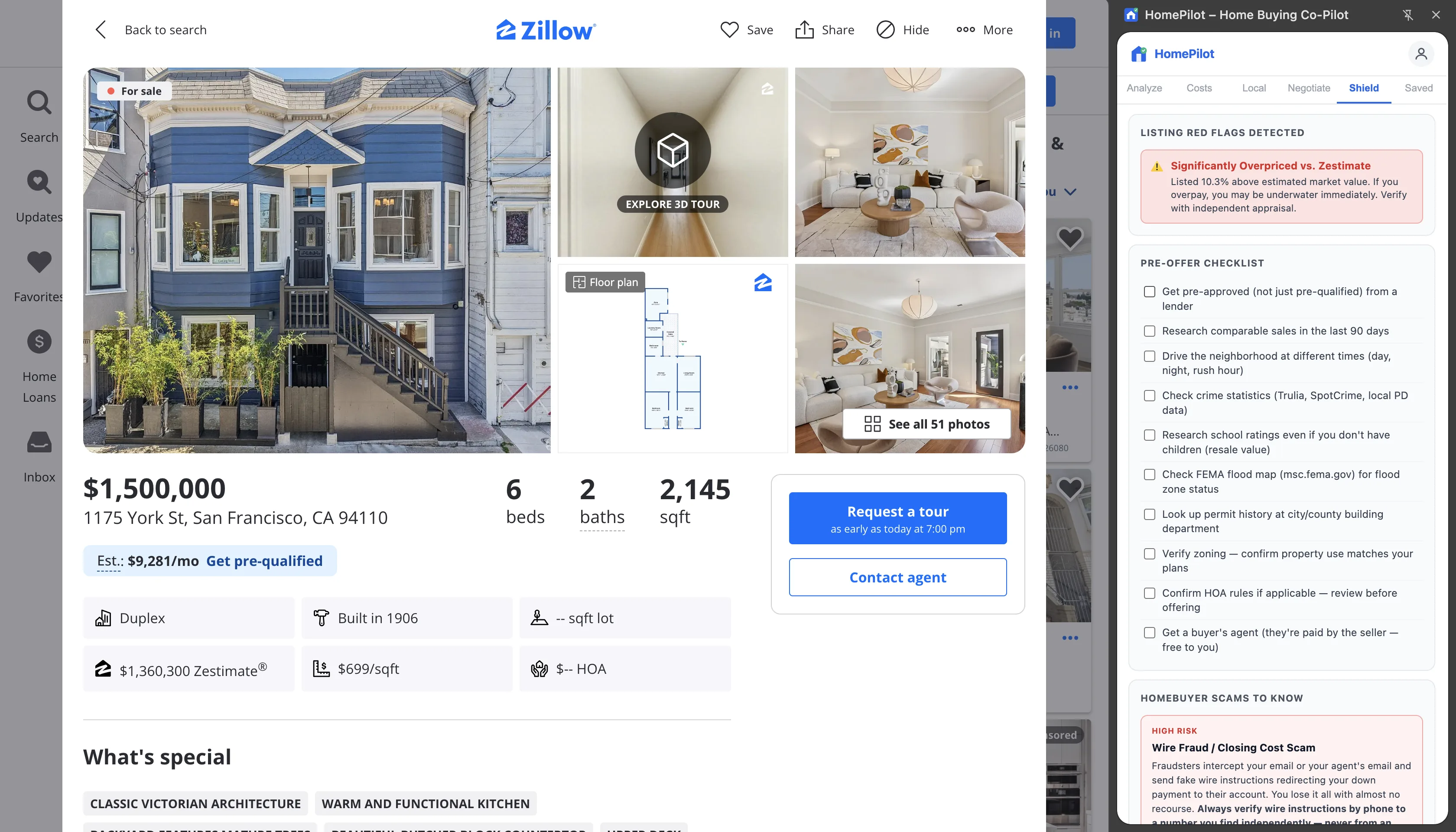
Open any listing on Zillow, Redfin, or Realtor.com and instantly see your true monthly cost, price vs. Zestimate, negotiation strategy, and local buyer laws — before you make an offer.
Open any property on Zillow, Redfin, or Realtor.com. HomePilot detects the address, price, tax, HOA, and Zestimate automatically.
2
Click Calculate Monthly Cost
Enter your down payment and interest rate. HomePilot runs the full mortgage math — PITI, PMI, maintenance reserve, closing costs, and income required.
3
Get your full buyer analysis
See a deal score, negotiation strategy, nearby comps, seller equity estimate, local transfer taxes, and first-time buyer programs — all in one panel.
Features
Everything you need to make a confident offer
💰
True Monthly Cost
Mortgage, property tax, homeowner's insurance, HOA, PMI, and the maintenance reserve most buyers forget. See the real number before you fall in love.
📊
Price Intelligence
Zestimate delta, days on market signal (Hot / Active / Cooling / Slow), price history, and reduction count — so you know what the market thinks.
🎯
Offer Calculator
Drag a slider from 85% to 110% of list price and watch your monthly payment update in real time. Know exactly what you can afford to offer.
🧾
Closing Cost Estimator
Full itemized breakdown: origination, underwriting, appraisal, title insurance, escrow, prepaids, and state-specific buyer transfer taxes. Total cash needed at closing.
🤝
Negotiation Strategy
Deal score (Great / Good / Fair / Above / Overpriced), offer range guidance, what to ask for, and a nearby comps table to anchor your position.
⚖️
Local Buyer Laws
Transfer taxes, property tax rules, first-time buyer programs, HOA regulations, and mandatory disclosures — for 40+ states and cities.
🏘️
Seller Intelligence
Estimates when the seller bought, what they paid, how much equity they have, and whether they have room to negotiate — all from public price history.
🛡️
Buyer Protection
Red flag detector, pre-offer checklist, contingency guide, and a homebuyer scam awareness panel — so you close with confidence.
📁
Saved Homes
Save up to 20 properties with their full analysis snapshot and compare monthly costs, deal scores, and assumptions side by side.
What does HomePilot show that Zillow's mortgage calculator doesn't?
Zillow's built-in mortgage calculator shows principal and interest only — sometimes with an estimated property tax. HomePilot calculates the full true monthly cost: mortgage payment (with your actual down payment and rate), property tax at local assessment rates, homeowner's insurance estimate, HOA fee from the listing data, PMI for down payments under 20%, and a maintenance reserve (typically 1–1.5% of purchase price annually).
The difference matters significantly at the purchase decision level. A $895,000 home at 7.2% with 20% down has a principal-and-interest payment of ~$4,876/month. With property tax ($747/month), insurance ($485/month), and maintenance reserve ($746/month), the true monthly cost is over $6,850/month — nearly 40% higher than the mortgage payment alone. Zillow shows $4,876; HomePilot shows $6,854.
HomePilot is a free Chrome extension that calculates the true monthly cost of any Zillow, Redfin, or Realtor.com listing — including mortgage, property tax, insurance, HOA, PMI, and maintenance reserve. It also shows how the listing price compares to Zestimate, gives a negotiation strategy, and estimates closing costs and income required.
How does HomePilot compare to Zillow's mortgage calculator and Redfin's estimates?
Zillow's built-in mortgage calculator shows principal and interest — sometimes with estimated property tax. Redfin's estimate tool does similar. Neither shows the full picture of what a home actually costs per month to own. HomePilot calculates everything Zillow and Redfin omit: HOA, PMI, homeowner's insurance, maintenance reserve, closing costs, income required, and how the listing price compares to the automated valuation.
Feature
HomePilot
Zillow Calculator
Redfin Estimate
Mortgage P&I payment
✓
✓
Estimate only
HOA, PMI, insurance included
✓
Partial
✗
Maintenance reserve
✓
✗
✗
Price vs. Zestimate deal score
✓
✗
✗
Negotiation strategy
✓
✗
✗
Closing cost itemization
✓
✗
✗
Cost
Free (5/mo)
Free
Free
How does HomePilot calculate the negotiation strategy for a listing?
HomePilot generates a deal score — Great, Good, Fair, Above Market, or Overpriced — based on the delta between the list price and Zestimate (Zillow's automated valuation), combined with days on market. A listing priced 5% below Zestimate that has been on the market for 8 days scores as Good Deal. The same listing priced 10% above Zestimate that's been sitting for 60 days scores as Overpriced.
The negotiation strategy panel adds seller equity intelligence: using the listing's price history, HomePilot estimates when the current seller bought, what they likely paid, and how much equity they have. A seller with 40% equity has more room to negotiate than one who purchased at peak pricing with 10% equity. HomePilot surfaces this context as a plain-language recommendation: whether to offer at list, below list, and what contingencies to include based on the market conditions in that city.
See it in action
Real analysis. Real listings.
Analysis — True monthly cost, price vs Zestimate & the full breakdown, right on the listing
HomePilot works on Zillow (zillow.com/homedetails/...), Redfin, and Realtor.com listing pages. Navigate to any property listing and the extension activates automatically in the side panel.
HomePilot reads data directly from the listing page you're already viewing — list price, property tax, HOA, Zestimate, days on market, price history, walk scores, and school ratings. No external API calls, no extra fees.
Mortgage math is exact given your inputs. Property tax uses the actual figure from the listing when available, otherwise estimates at 1.1% annually. Insurance is estimated at 0.65%/yr. Maintenance reserve uses the industry standard 1%/yr. Always verify with your lender's Loan Estimate.
All analysis runs locally in your browser. Saved properties are stored in Chrome's local storage on your device. The only data sent to our servers is your account email and usage count. No property data, search history, or financial information is ever stored on our servers.
Yes, cancel anytime from the account panel inside the extension or directly through Stripe's customer portal. You keep Pro access until the end of your billing period.
HomePilot Guides & Resources
Step-by-step guides for getting the most out of HomePilot.
 Chrome Extension for Home Buyers