System liveLine 01 · BundlingBundles/min 42 ▲Assembled 1,204
Shopify Bundle Builder
Build the bundle. See the true margin.
Loose products go in, one bundle comes out — and EZBundle shows the true margin after the discount, before you publish. Combo deals, product kits and mix-and-match, with the discount applied automatically at checkout.
Free plan available · Starter $9/mo · Growth $19/mo · 7-day free trial
👕
🧢
🧦
BUNDLED ✓
−20%
TRUE MARGIN 39%
loose items in →← bundle out
See your true margin before you discount
Works with every Shopify theme
Discounts auto-apply at checkout
Free plan — no credit card needed
Fixed & mix-and-match bundles
See it in action
Watch EZBundle in action
Create both bundle types in under 5 minutes and see exactly how discounts appear on the storefront and at checkout.
How it works
Live on your store in 3 steps
Install, create a bundle, and go live. No theme editor steps, no code, no developer needed.
1
📲
Install EZBundle
Install from the Shopify App Store. The bundle widget automatically registers across all your product pages — no theme editor steps required.
2
✏️
Create a bundle
Pick your products (or a collection for mix & match), set your discount, add a title, and click Save & Activate. Takes under 2 minutes.
3
🛒
Customers buy, discount applies
Your bundle widget appears live on product pages. When customers click Add Bundle to Cart, all items are added and the discount applies automatically at checkout.
Bundle types
Two ways to bundle. One app.
Fixed bundles for curated product sets. Mix-and-match for collections where customers choose their own items.
Free plan
📦
Fixed Bundles
Curate a specific set of products and sell them together at a discount. Perfect for starter kits, seasonal bundles, frequently-bought-together offers, and multipacks.
Pick any 2+ products from your store
Set quantities per item (e.g. 2× socks)
Percentage off or fixed amount off
Widget shows on every included product's page
Discount applies automatically at checkout
Starter+
🎨
Mix & Match Bundles
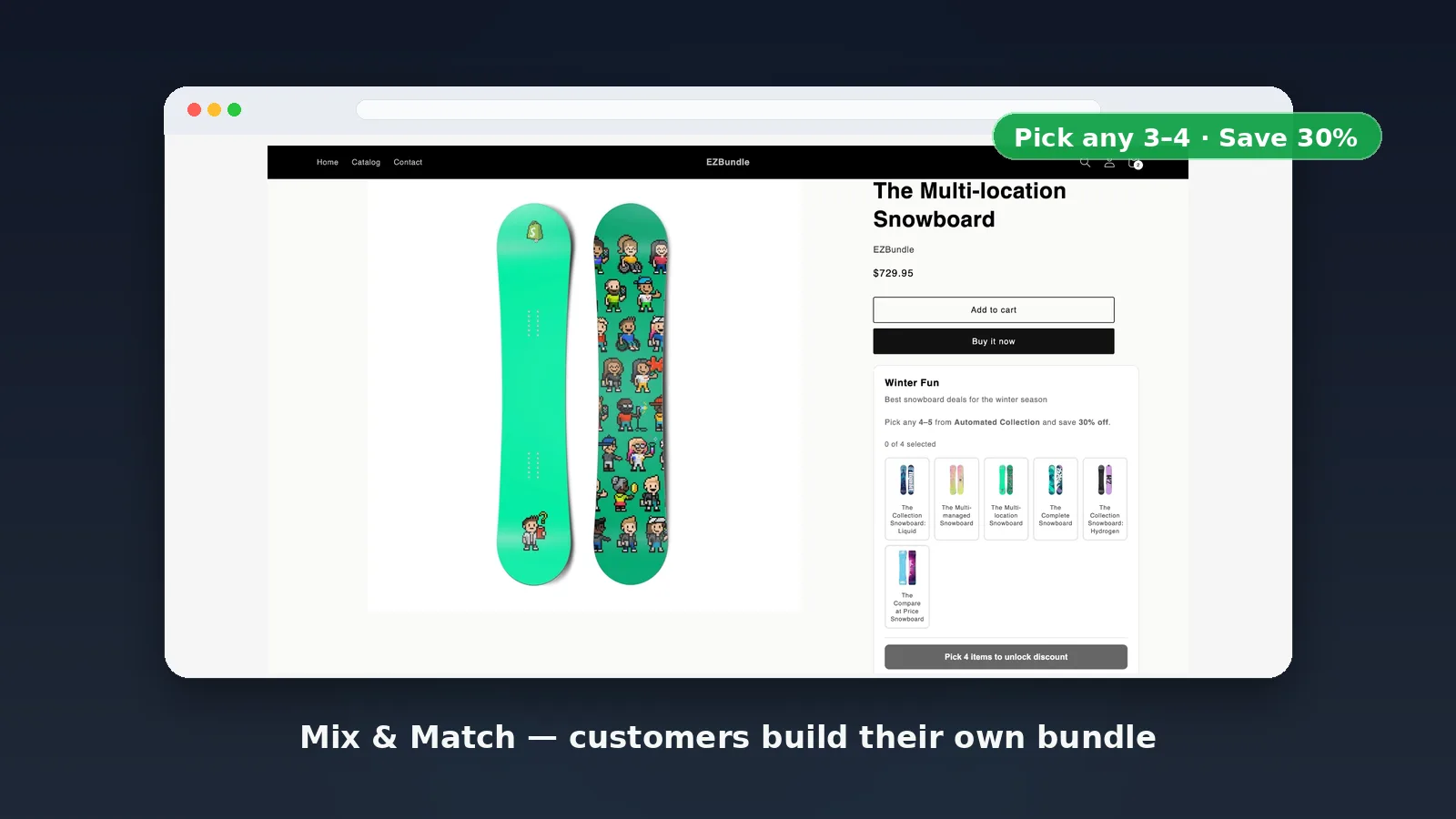
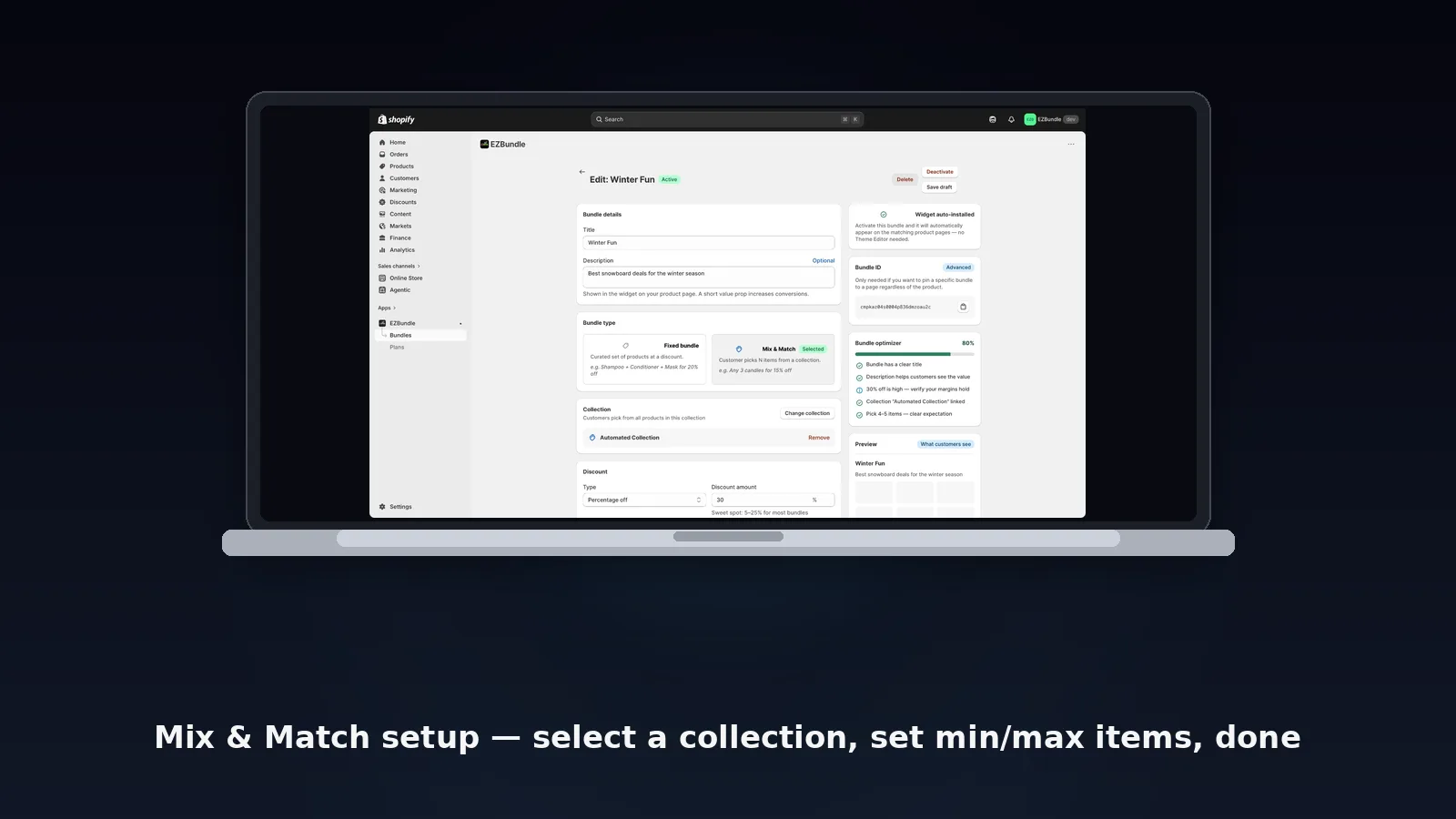
Let customers build their own bundle by picking any items from a collection. Set a minimum quantity to unlock the discount — great for "pick any 3" or "build your own box" offers.
Link any Shopify collection
Set min and max item count
Customers browse and pick on the product page
Discount unlocks when minimum is reached
Widget shows on all product pages
See your true margin before you discount a bundle into a loss.
Features
Everything you need. Nothing you don't.
EZBundle is focused on one thing: reliable product bundles with discounts that actually work.
⚡
Auto-install widget
The bundle widget registers on your store the moment you open the dashboard. No theme editor, no App Blocks to configure, no code.
🏷️
Automatic discount codes
Shopify discount codes are created automatically when you activate a bundle and applied at checkout without any customer input.
🎯
Smart product detection
The widget only shows on product pages where a matching bundle exists. Invisible elsewhere — no empty widgets cluttering your store.
📊
True margin guardrail
EZBundle reads your component cost from Shopify and shows the true margin after the discount as you build. Set a minimum margin and it warns you before you discount a bundle into a loss.
🔄
Instant updates
Edit bundle products, discount, or title at any time. Changes go live immediately. Deactivate or delete bundles with one click.
🎨
Theme-adaptive styling
The widget inherits your store's font family and blends naturally with any theme. Clean, minimal design that matches modern Shopify storefronts.
How does EZBundle compare to BOLD Bundles and other Shopify bundle apps?
Shopify has several bundle apps at different price points. Here's how EZBundle stacks up against the most common alternatives:
App
Starting price
Free plan
Bundle types
True margin at build time
EZBundle
Free – $19/month
Yes (1 bundle)
Fixed + Mix-and-match
Yes
BOLD Bundles
$19.99/month
No (trial only)
Fixed + Mix-and-match
No
Bundler
$9.99/month
Yes
Fixed + Mix-and-match + Quantity
No
Fast Bundle
$19/month
Yes
Fixed + Mix-and-match + Volume
No
Kaching Bundles
$14.99/month
Yes
Fixed + Mix-and-match + Volume
No
Easy Bundles
$29/month
Yes
Fixed + Mix-and-match + Build-a-box
No
EZBundle is a Shopify bundle builder app that creates fixed and mix-and-match product bundles with automatically applied discount codes. What sets it apart: EZBundle reads your component cost from Shopify and shows the true margin after the discount before you publish — a profit check that BOLD Bundles, Bundler, Fast Bundle, Kaching Bundles and Easy Bundles do not offer. Plans start free (1 bundle) and scale to $19/month for unlimited bundles, with the widget auto-installing on all product pages and no theme editor setup.
What is the difference between a fixed bundle and a mix-and-match bundle on Shopify?
A fixed bundle groups specific product variants together at a discount. The merchant defines exactly which products are in the bundle — for example, a "Starter Kit" containing SKU A, SKU B, and SKU C. When customers click Add Bundle to Cart, all three items are added automatically. Fixed bundles work best for curated sets and gift boxes where the combination has proven value.
A mix-and-match bundle lets customers pick from a collection of products to build their own bundle. You set the minimum and maximum number of items, and the discount unlocks when the required quantity is reached. Mix-and-match is ideal for "pick any 3 for 15% off" promotions on a product category, allowing customers to personalize their order while still being incentivized to buy more.
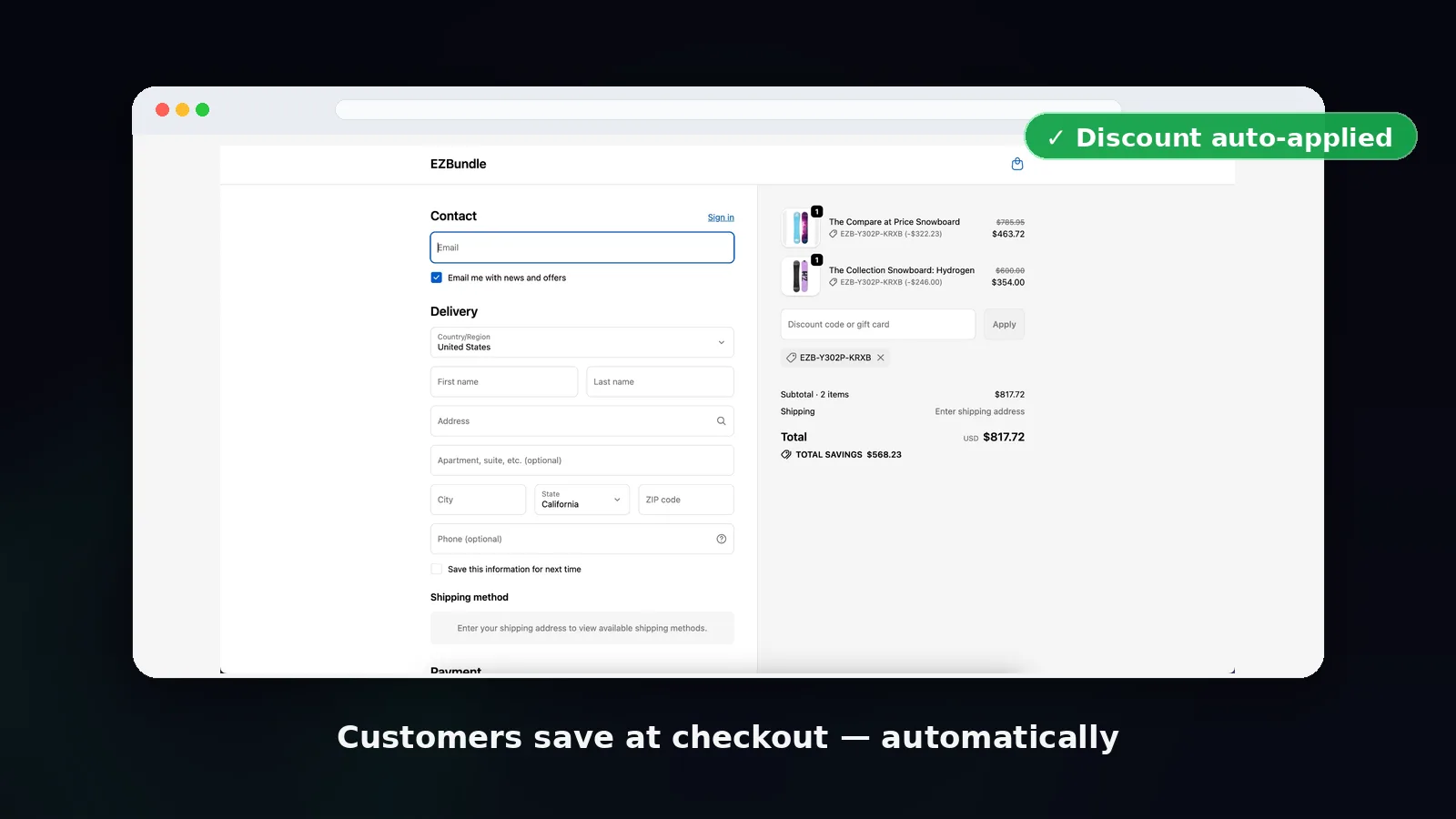
Both types in EZBundle generate a Shopify native discount code automatically. The code is pre-applied when the customer hits checkout — they never need to copy or enter a code manually.
Screenshots
Built for merchants. Loved by customers.
Real screenshots from the EZBundle storefront widget and admin dashboard.
Fixed bundle widget on the product page
Mix & match widget — customers pick their own products
Discount code auto-applied at checkout
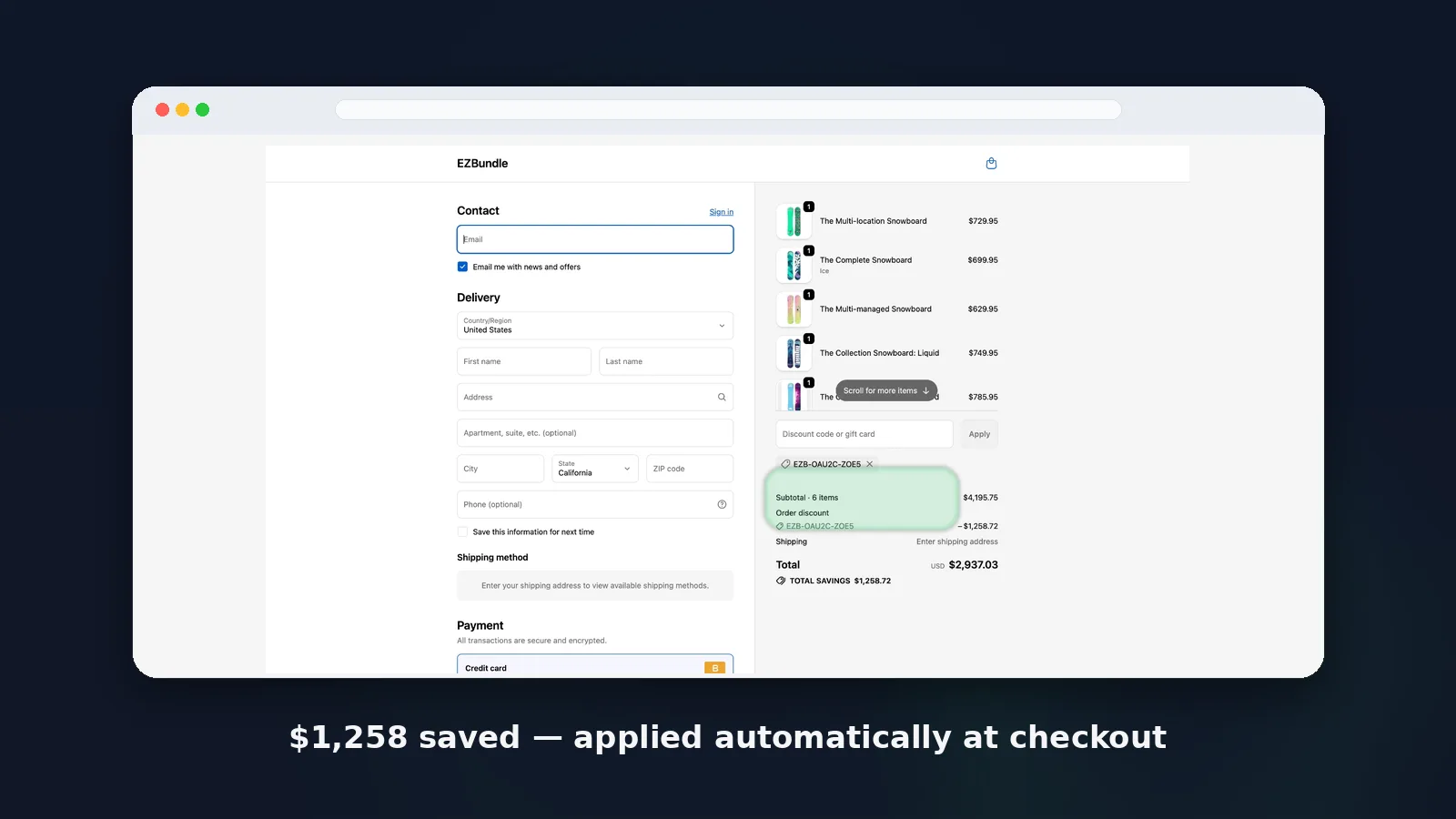
Mix & match discount saves $1,258 at checkout
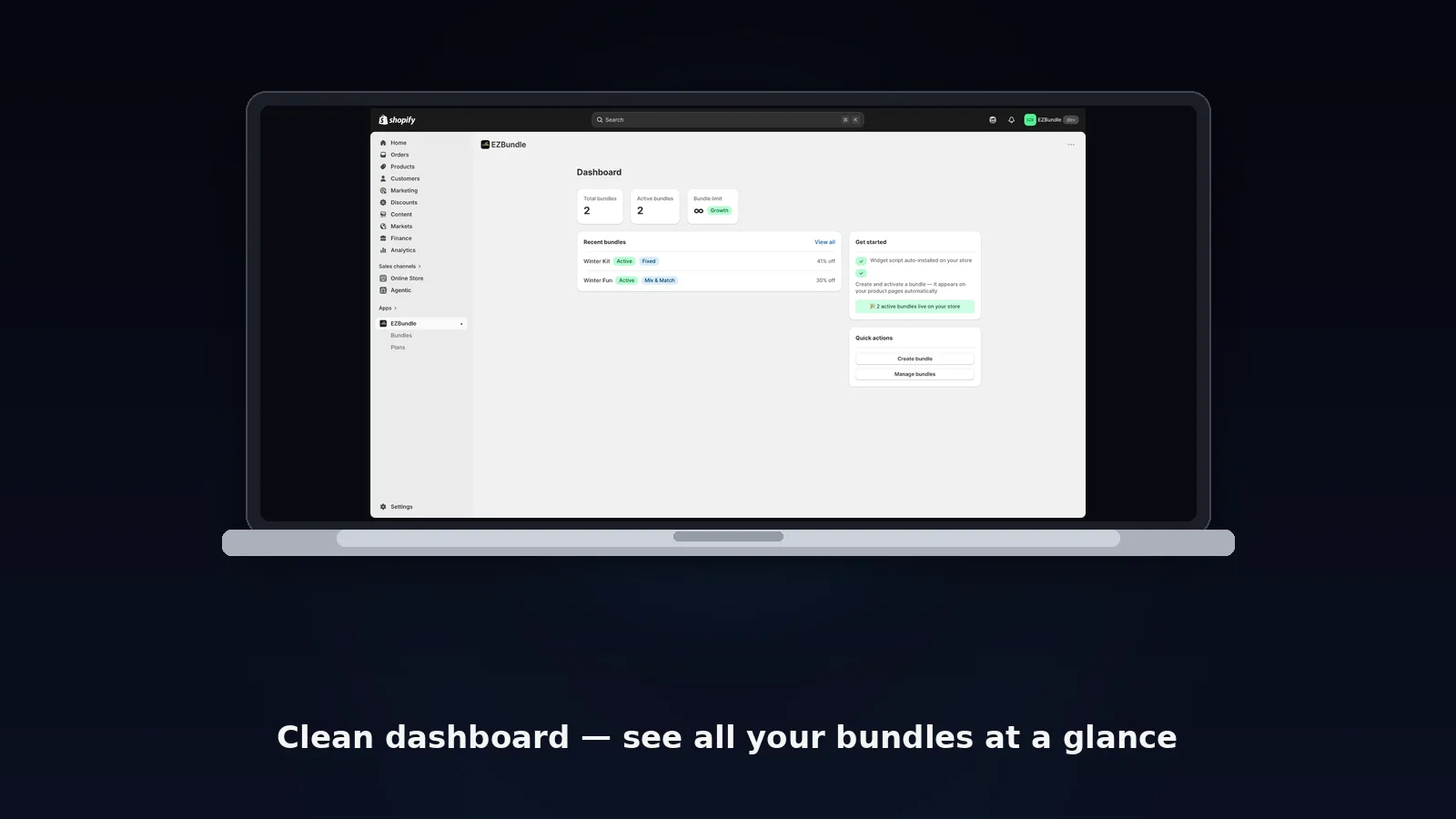
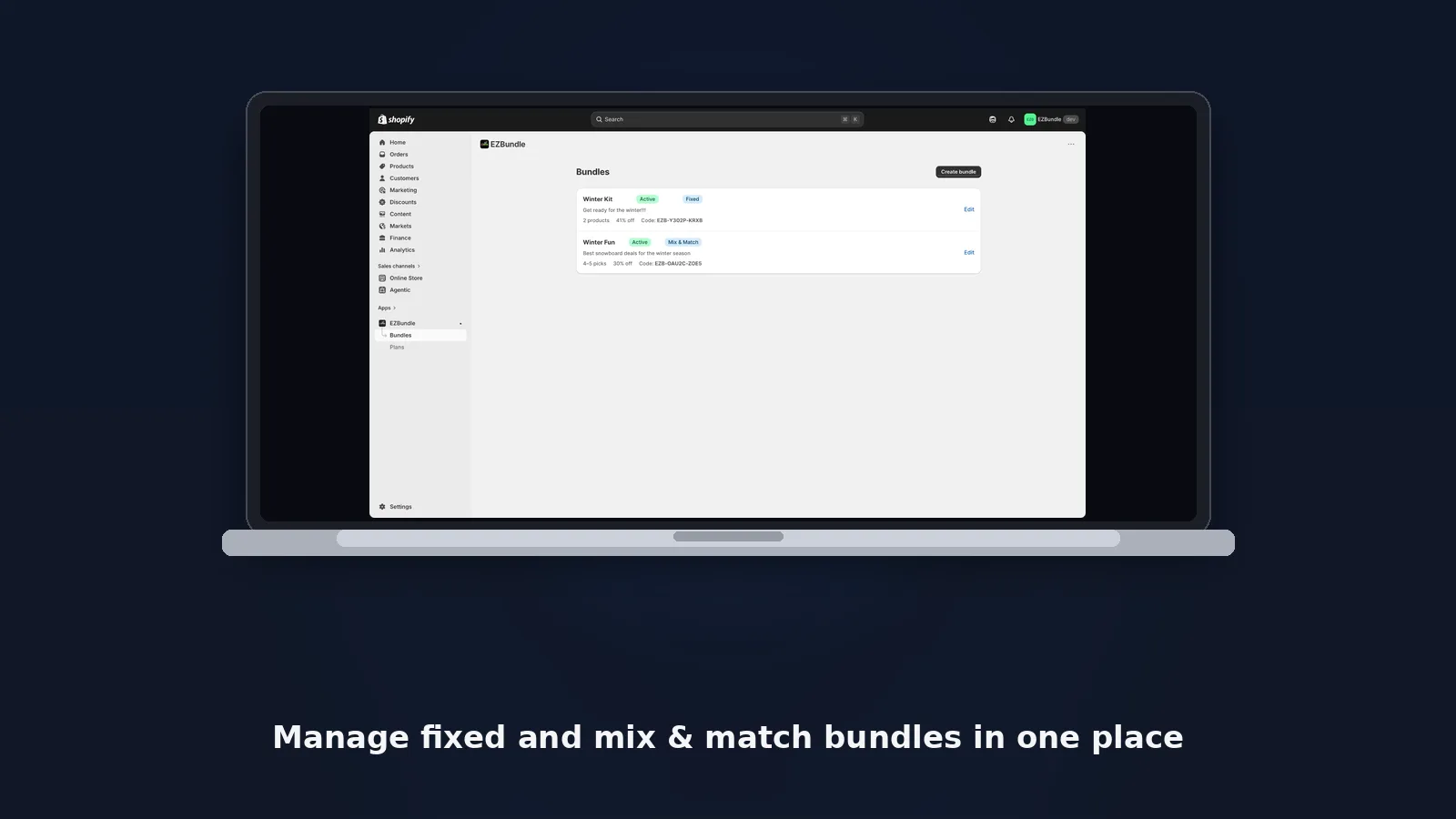
Admin dashboard — manage all bundles
Bundles list with status, type, and discount info
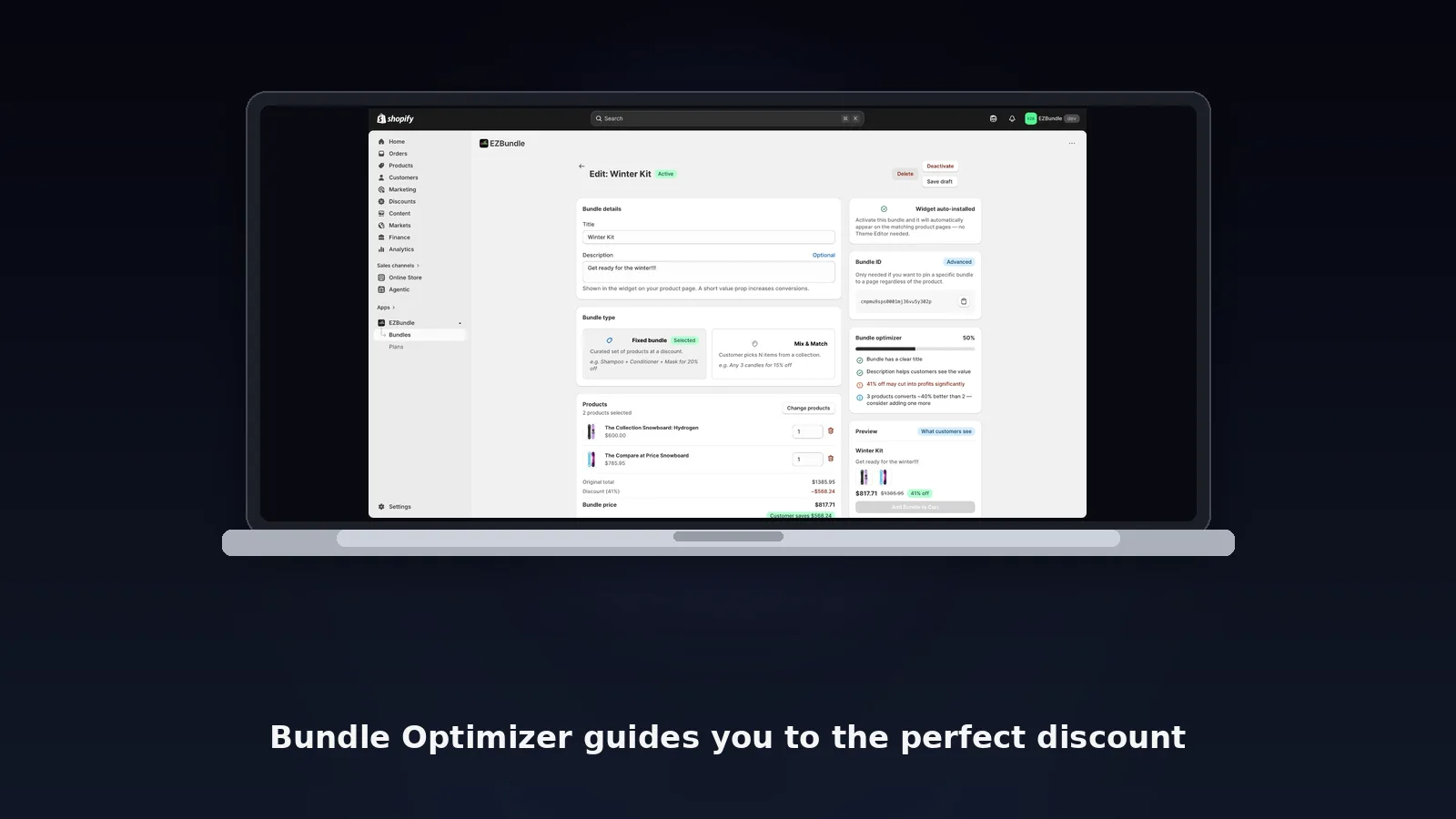
Fixed bundle editor with Bundle Optimizer score
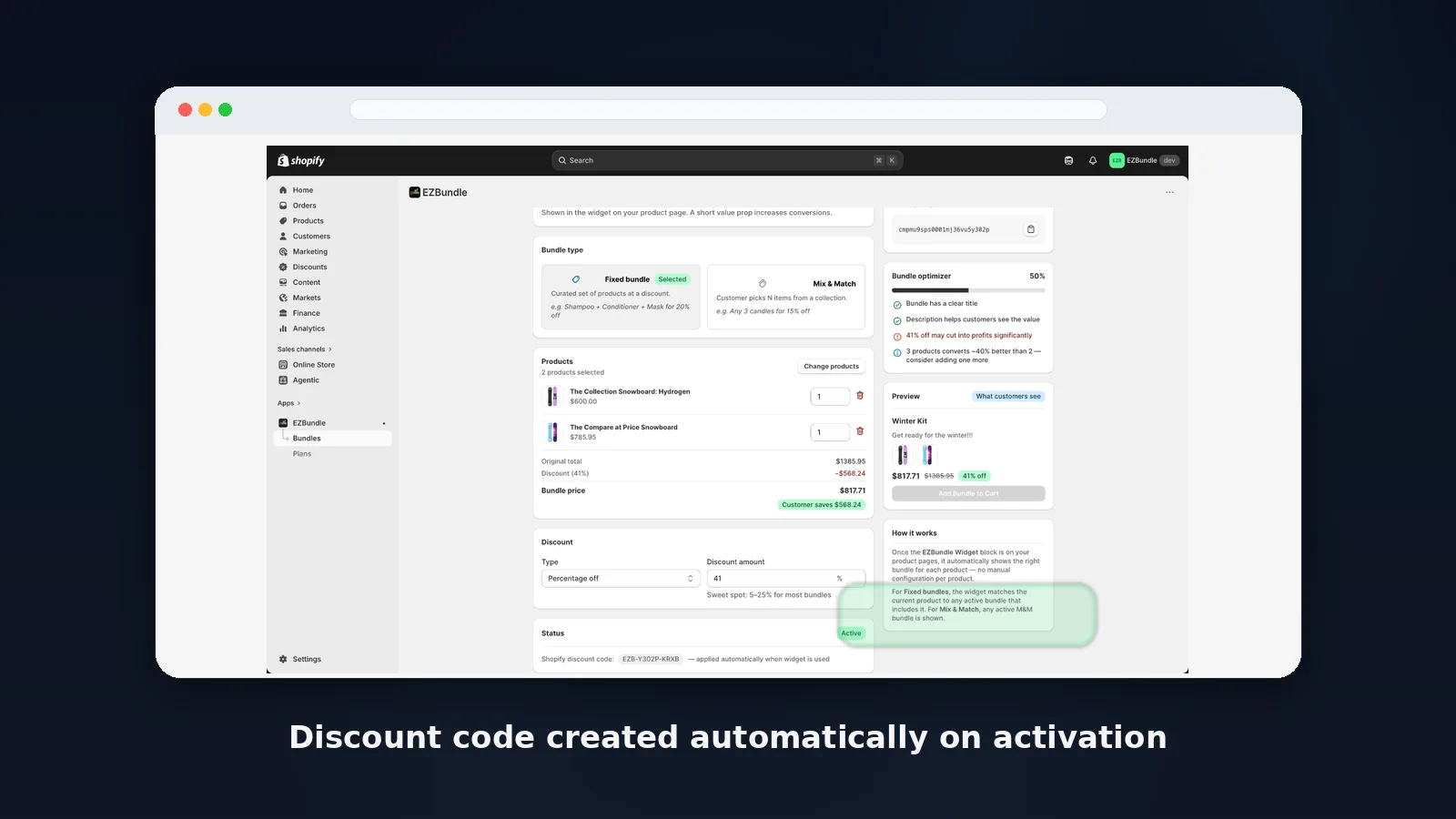
Products, discount type, and bundle activation
Mix & match editor — link a collection, set min/max items, configure discount
Pricing
Start free. Scale when you're ready.
No revenue share. No percentage of sales. Flat monthly rate — keep more of what you earn.
Everything you need to know before installing EZBundle.
As you build a fixed bundle, EZBundle reads each product's cost from Shopify's "Cost per item" field (you can also enter a cost manually). It then shows the true margin after your discount — green when it's healthy, amber when it's thin, red when the bundle loses money. Set a minimum margin target and EZBundle warns you before you publish, naming the product dragging the margin down and the exact price or discount that brings it back above your floor.
No. EZBundle uses a ScriptTag that auto-installs across all your product pages the first time you visit the dashboard. It works with every Shopify theme — both Online Store 2.0 and older themes — without any App Blocks, theme code, or developer setup required.
When you activate a bundle, EZBundle automatically creates a Shopify discount code. When a customer clicks "Add Bundle to Cart," all items are added and the customer is redirected to the cart with the discount code pre-applied. No manual code entry needed — the discounted total appears before they check out.
Fixed bundles let you curate a specific set of products sold together at a discount (e.g. "Buy Product A + B + C and save 15%"). Mix-and-match bundles let customers choose any items from a Shopify collection to build their own bundle and unlock a discount (e.g. "Pick any 3 from this collection and save 20%").
Yes. The Free plan supports 1 active bundle. Starter ($9/month) supports 5 active bundles. Growth ($19/month) supports unlimited active bundles. All plans let you create as many draft bundles as you want — only active bundles count toward the limit.
No. The widget script is lightweight, self-contained, and only runs on product pages. It makes a single API call to check for a matching bundle. If no bundle matches the product, the script exits silently — nothing is rendered and no layout shift occurs.
When you uninstall EZBundle, the widget script is removed from all pages and all active Shopify discount codes created by EZBundle are deleted. Your store returns to its original state with no leftover code, scripts, or discount codes.
EZBundle Guides & Resources
Step-by-step guides for getting the most out of EZBundle.
 Shopify Bundle Builder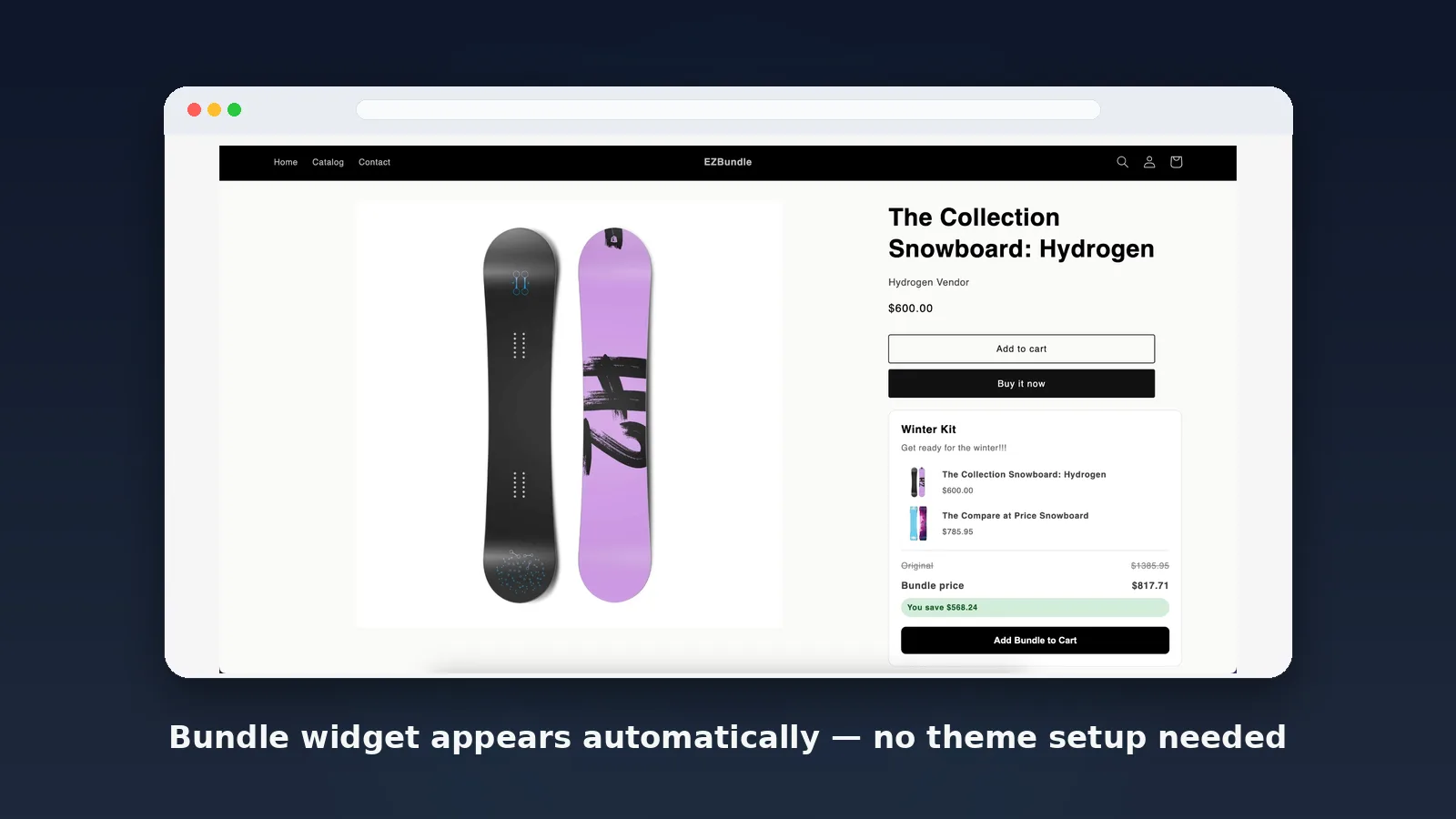
 Free Store Audit