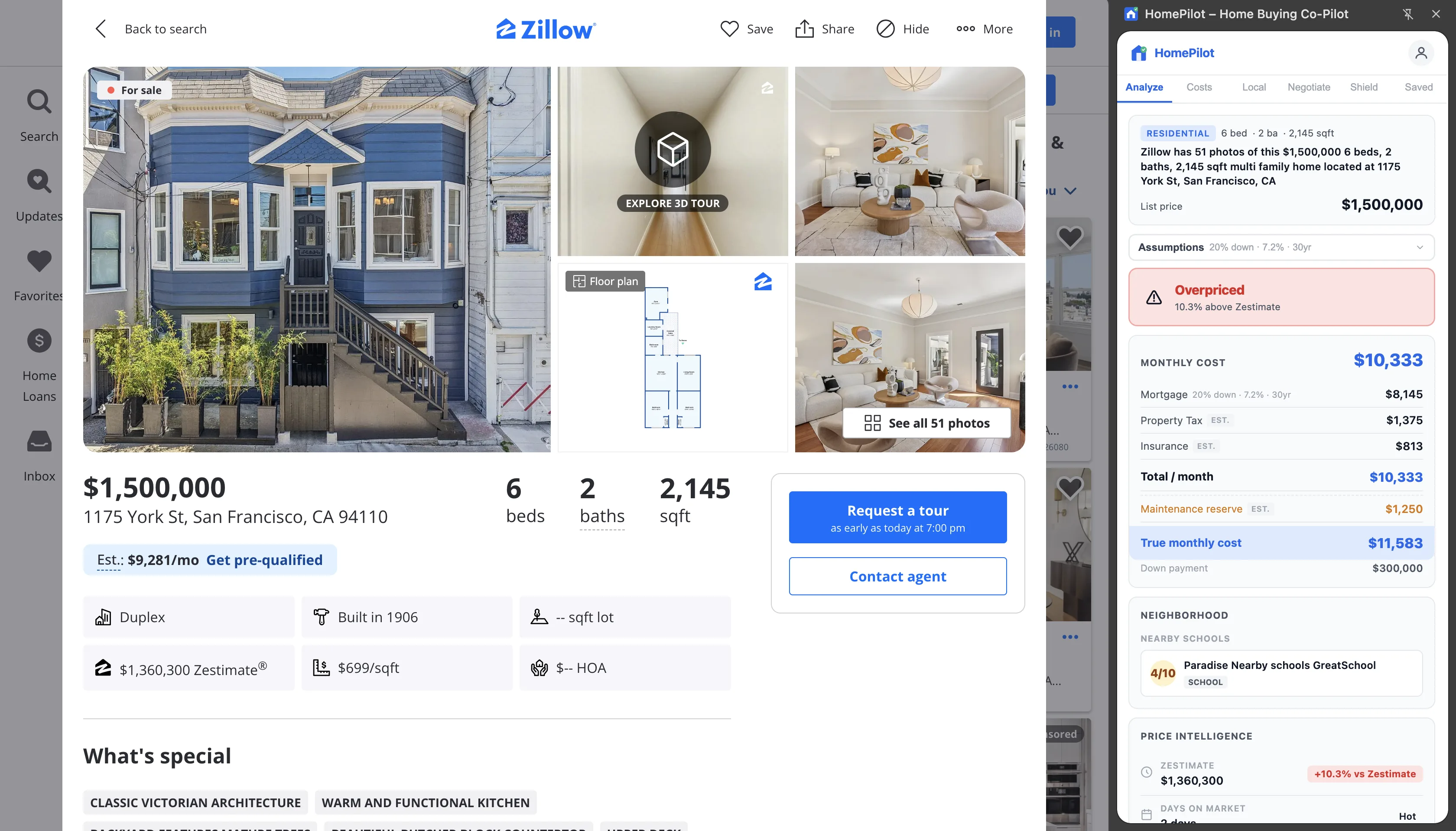
The number Zillow shows you vs. the number you'll actually pay
Open any Zillow listing and scroll to the mortgage calculator. By default, it displays a monthly estimate that covers principal and interest — the bank's cut. Zillow does offer a more detailed breakdown if you expand it, and it may include a rough estimate for taxes and insurance. But it requires you to enter those numbers manually, and it leaves out three major costs entirely: HOA fees, PMI (private mortgage insurance), and a maintenance reserve.
This matters because the gap between "mortgage payment" and "actual monthly housing cost" is often $400–$800 on a median-priced home — and on homes with substantial HOA fees or a low down payment, it can exceed $1,000.
For a buyer qualifying at the edge of their budget, that gap is the difference between a home they can afford and one that puts them underwater within a year.
What Zillow's calculator includes (and what it doesn't)
Zillow's mortgage calculator is designed to be approachable, not exhaustive. Its core output is the principal-and-interest (P&I) payment — calculated from list price, your down payment, and a default interest rate you can adjust. This is accurate for what it is: the mortgage payment itself.
Where it falls short is completeness:
- Property tax: Zillow may pre-fill an estimate, but it's not always sourced from the actual listing data for that property — and it's editable, which means buyers often leave it at a default that doesn't reflect the real tax burden.
- Homeowner's insurance: Shown as an estimate based on purchase price, not the actual quoted rate for that specific property type and location.
- HOA fees: Not included in the calculator. If a condo has a $600/month HOA fee, Zillow's payment estimate doesn't reflect it.
- PMI: If your down payment is below 20%, lenders require private mortgage insurance — typically 0.5%–1.5% of the loan amount annually. Zillow's default calculator doesn't calculate this automatically.
- Maintenance reserve: Not included. Industry standard is 1% of home value per year — on a $500,000 home, that's $417/month you should budget for repairs, appliances, and upkeep.
None of this is a flaw in Zillow as a platform. Zillow's job is to help you find homes. The calculator is a quick starting point, not a financial planning tool.
What HomePilot calculates instead
HomePilot is a Chrome extension that overlays a complete cost panel directly on Zillow (and Redfin, Realtor.com, and other major listing sites). When you open a listing, HomePilot reads the available data — list price, property tax, HOA fee — and calculates all six components of monthly housing cost:
- Principal + interest — based on list price, your down payment setting, and current rates
- Property tax — read from the listing, not a generic estimate you type in
- Homeowner's insurance — estimated based on home value and property type
- HOA fee — read directly from the listing when available
- PMI — automatically calculated if your down payment is below 20%, using a standard rate applied to the loan amount
- Maintenance reserve — 1% of purchase price annually, converted to a monthly figure
The total it shows you is what your monthly outflow actually looks like — not a floor that excludes the uncomfortable line items.
The full comparison
Here's how HomePilot and Zillow's mortgage calculator stack up across every dimension that determines whether a home fits your budget and whether the price is fair:
| Feature | Zillow calculator | HomePilot |
|---|---|---|
| What's included in monthly cost | P&I + estimated taxes + estimated insurance (manual entry) | All 6: P&I + tax + insurance + HOA + PMI + maintenance reserve |
| Property tax source | Manual entry or generic estimate | Read from the listing automatically |
| HOA included? | No — must add manually outside the calculator | Yes — read from the listing |
| PMI calculated? | No — not shown in default view | Yes — auto-calculated based on down payment % |
| Maintenance reserve? | No | Yes — 1% annual / 12 months |
| Price vs. Zestimate signal | Not shown as a comparison signal | Shows % above or below Zestimate as a negotiation signal |
| Deal score / negotiation signals | None | Synthesizes price gap, days on market, and price history into a deal score |
| Works where? | Zillow only | Zillow, Redfin, Realtor.com, and more |
Price vs. Zestimate — Zillow's own valuation, used against the listing
Zillow publishes a Zestimate — its algorithmic estimate of a home's market value — on virtually every listing. But Zillow doesn't prominently display how far the list price deviates from that estimate. If a home is listed at $620,000 and the Zestimate is $580,000, that 6.9% premium is buried or absent entirely from the listing view.
HomePilot surfaces this gap explicitly, showing the percentage difference between list price and Zestimate as a negotiation signal. A home listed significantly above its Zestimate is either overpriced or has unique features that justify the premium — either way, it's something you need to know before you make an offer.
Conversely, a home listed at or below its Zestimate may indicate motivated sellers or an underpriced opportunity.
Days on market and price history — what aging signals tell you
A home that's been sitting for 60+ days without a price reduction is a negotiating opportunity. A home that's had three price cuts in 45 days signals something different — either the market is soft in that area or the original pricing was off. Zillow shows days on market and price history, but in separate sections of the listing page, requiring you to scroll and mentally synthesize the information.
HomePilot pulls these signals into the same panel as the cost breakdown and Zestimate comparison, so you're seeing price position, time on market, and trend all at once — the same way a buyer's agent would look at a listing before advising you.
This synthesis is what HomePilot calls the deal score: a quick signal that something about a listing deserves a second look, or conversely, that it's priced fairly and moving fast.
The right way to think about both tools
Zillow's mortgage calculator isn't wrong — it's just incomplete. It was designed to give you a quick, frictionless number that gets you interested in a listing, not to give you the full picture of ownership cost. That's a reasonable product decision for a platform whose job is to show you homes.
HomePilot exists to close that gap. It's not a replacement for Zillow — you still use Zillow to browse, filter, and find listings. HomePilot is what you use to evaluate them once you find one worth looking at.
The workflow is straightforward: browse on Zillow as you normally would, open a listing that interests you, and let HomePilot's panel tell you the real monthly cost, where the price stands relative to the Zestimate, and whether the listing's time on market gives you any leverage. Then you make a decision with the full picture, not just the floor.
How to add HomePilot and see the difference on your next listing
HomePilot is a free Chrome extension. Setup takes under a minute:
- Install HomePilot from the Chrome Web Store — free, no account required
- Navigate to any listing on Zillow, Redfin, or Realtor.com
- HomePilot's panel appears automatically — complete monthly cost, Zestimate comparison, and deal score in one view
- Adjust your down payment percentage to see PMI drop off when you cross the 20% threshold
The first listing you check will show you exactly how wide the gap between Zillow's number and your real monthly cost actually is.
See your real monthly cost — not just the mortgage.
HomePilot adds all 6 cost components to every listing: taxes, HOA, PMI, maintenance reserve, and a deal score that tells you how hard to negotiate.
Add HomePilot to Chrome — Free →Free · No account required · Works on Zillow, Redfin & Realtor.com