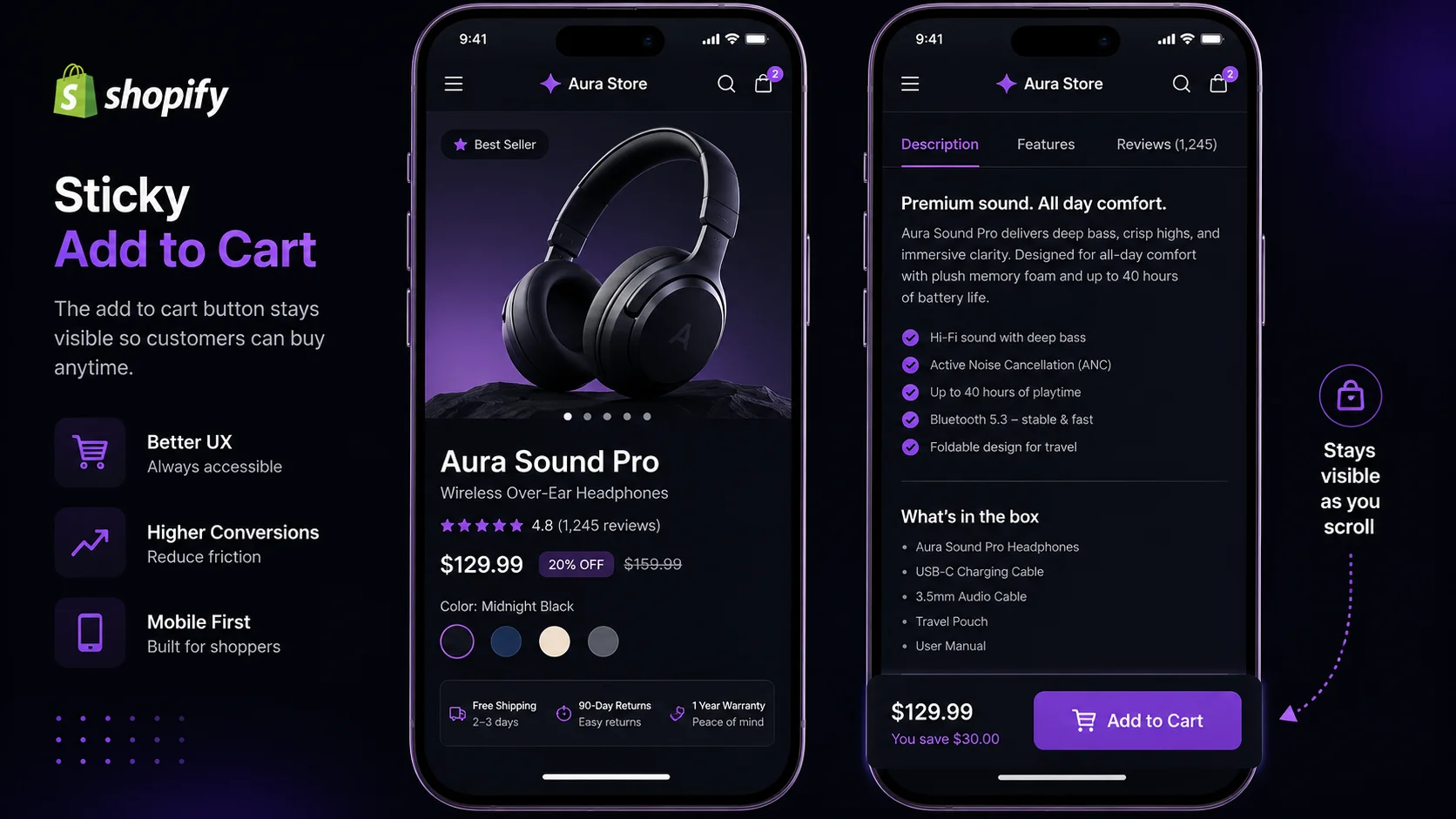
- A sticky add to cart bar keeps the buy button visible on mobile as shoppers scroll — fixing the single biggest mobile UX gap on most Shopify stores.
- Sticky ATC apps lift mobile conversions 10–15% on average; Shopify reports 73% of its traffic now comes from mobile devices.
- Top apps: Sticky Add To Cart Booster Pro (most reviews), Monster Cart Upsell (upsell features), Hextom (most customizable), Zoorix (bundle-friendly), EasyButtons (free tier).
- Sticky ATC handles button persistence only — pair it with social proof, countdown timers, exit intent, and a free shipping bar for maximum conversion.
- PopBoost adds those four complementary widgets ($19/month) and works alongside any sticky ATC app.
A Shopify Sticky Add to Cart Bar Is a Persistent Buy Button That Follows the Shopper
A sticky add to cart bar is a fixed-position element — typically at the bottom of the viewport — that displays your product's add to cart button, price, and often a product image thumbnail regardless of how far the visitor has scrolled. On a standard Shopify product page, the native add to cart button sits in the product form, which scrolls out of view the moment the shopper starts reading reviews or comparing variants. A sticky ATC bar eliminates that friction entirely.
For Shopify product page optimization, it's one of the easiest wins available: install an app, configure a bar, and the buy action stays accessible through the entire browsing session. No code required. No theme rebuild.
How Does a Sticky Add to Cart Bar Increase Shopify Conversions?
The mechanism is simple: every scroll-away from the native buy button is a potential lost sale. On mobile, product pages with multiple images, long descriptions, and a reviews section can push the ATC button 1,500–3,000 pixels below the fold. A shopper who finishes reading and decides to buy now faces a choice — scroll back up to find the button, or just leave. Many leave.
Mobile now accounts for 73% of all Shopify traffic according to Shopify's own platform data — but mobile conversion rates average around 1.2%, compared to 1.9% on desktop (Littledata, 2024). That gap is partly explained by mobile UX friction, and a disappearing buy button is one of the largest contributors.
A sticky add to cart bar directly addresses this by making the purchase action zero-scroll — the button is always there, wherever the shopper is on the page. That's why it consistently outperforms most other single-widget installations in terms of measured conversion lift. For more on the full picture, see our guide to Shopify conversion rate optimization.
Top 5 Shopify Sticky Add to Cart Apps in 2026
Shopify has no native sticky ATC feature — you need an app. Here are the five most used options, with honest differentiators for each.
1. Sticky Add To Cart Booster Pro
The most widely installed sticky ATC app on the Shopify App Store. Reliable, lightweight, and well-tested across themes. The free plan covers the core sticky bar; paid plans add an animated sticky cart button, quantity picker in the bar, and a "Buy Now" option. Best choice for stores that want a proven, no-fuss implementation.
2. Monster Cart Upsell + Free Gifts
Combines a sticky cart drawer with in-cart upsells, free gift tiers, and progress bars toward free shipping. If you want to increase average order value alongside the ATC lift, Monster Cart bundles both features. The sticky cart opens a slide-out cart panel rather than a bottom bar — better for stores with complex product lines and cross-sell opportunities.
3. Hextom: Sticky Add to Cart
The most customizable option in this list. Hextom lets you configure bar position, animation style, button color, product image display, variant selector in the bar, and separate mobile vs. desktop behavior. If your brand has strict design requirements or a theme that conflicts with other apps, Hextom's granular controls solve most compatibility issues.
4. Zoorix: Bundle Kit & Cross Sell
Zoorix leads with bundle building and cross-sell but includes a solid sticky ATC bar in its suite. If you're already running volume discounts or product bundles and want the sticky button alongside those features, Zoorix avoids adding a second app. Less ideal if you only want the sticky bar — the app is heavier than single-purpose options.
5. EasyButtons ‑ Sticky Add to Cart
A newer entrant with a cleaner UI and a free plan that covers most use cases. EasyButtons is particularly well-suited to new stores that want to test sticky ATC without committing to a paid plan. Setup takes under 5 minutes, and the bar renders cleanly across OS-2 Shopify themes without custom CSS.
How to Add a Sticky Add to Cart Bar to Shopify (4 Steps)
Install a sticky ATC app from the Shopify App Store
Choose one of the apps above based on your needs. Click "Add app," review permissions (most request read access to products and orders), and confirm. The app will prompt you to enable it in your theme — accept this to embed the bar without manual code edits.
Configure the widget: position, colors, and display rules
In the app dashboard, set bar position to "bottom" for mobile (the industry standard), match the button background color to your primary brand color, set the trigger to appear after 200–400px of scroll, and limit display to product pages only. Showing the bar on collection or homepage views adds clutter without conversion benefit.
Test on a real mobile device — not just DevTools
Open your product page on an actual iPhone or Android. Scroll past the images and description. The sticky bar should appear smoothly within the first few hundred pixels of scroll, stay pinned to the bottom throughout, and tap through to the cart or checkout correctly. Check that it does not overlap your site's live chat widget or cookie banner if those are present.
Pair with a conversion layer for maximum lift
A sticky ATC bar makes the buy button persistent — it does not create urgency, build trust, or recover abandoning visitors. After confirming the bar works correctly, install a complementary conversion app that handles the persuasion layer alongside the persistent button.
What to Pair with Sticky ATC for Maximum Conversion
Sticky add to cart solves one specific problem: the buy button disappearing as shoppers scroll. It does not address the other reasons visitors don't convert — doubt about the product, no reason to buy today, no recovery mechanism for exit-intent visitors, or uncertainty about shipping costs. That's where a complementary conversion layer matters.
Here's how the two layers work together:
PopBoost (conversion persuasion layer): Adds the four things sticky ATC doesn't cover —
- Social proof popup — shows recent purchases while the visitor reads, building trust before they decide to tap that sticky button
- Countdown timer — creates a real deadline for sale prices or limited offers, turning "I'll come back" into "I should buy now"
- Exit intent popup — fires a last offer when a visitor shows signs of leaving, recovering shoppers who scrolled past the sticky bar and still didn't convert
- Free shipping bar — shows progress toward the free shipping threshold, increasing average order value alongside the conversion rate lift (see our free shipping threshold strategy guide for the data on AOV impact)
Together, a sticky ATC app and PopBoost cover every major conversion drop-off point: button accessibility, trust, urgency, recovery, and shipping transparency. Neither replaces the other — they handle different parts of the funnel. This is also why addressing Shopify traffic but no sales requires a layered approach rather than a single-widget fix.
Add the conversion layer that works alongside any sticky ATC app
PopBoost's 7 widgets — social proof, countdown timer, exit intent, free shipping bar, product badges, announcement bar, and stock countdown — install in under 10 minutes and complement any sticky add to cart app you're already running.
Install PopBoost Free →Free plan available. $19/month for all 7 widgets.
Frequently Asked Questions
Does Shopify have a built-in sticky add to cart bar?
No. Shopify does not include a native sticky add to cart bar. The built-in add to cart button is static — it scrolls out of view on product pages with long descriptions or many images. To get a persistent sticky ATC bar, you need to install a third-party app from the Shopify App Store or add custom code to your theme. Every app on this list handles the install without touching your theme code.
What's the best free sticky add to cart app for Shopify?
Sticky Add To Cart Booster Pro and EasyButtons both offer free plans with core sticky ATC functionality. Sticky Add To Cart Booster Pro is the most widely used with over 3,000 reviews, while EasyButtons is newer but has a generous free tier. For stores on a tight budget, start with Sticky Add To Cart Booster Pro and upgrade once you've confirmed the conversion lift in your analytics.
Does sticky add to cart work on mobile?
Yes — and mobile is exactly where sticky ATC has the biggest impact. On mobile, product page descriptions and images push the add to cart button far below the fold. A sticky ATC bar that pins to the bottom of the screen keeps the purchase action permanently visible regardless of scroll position. Shopify data shows 73% of traffic comes from mobile, where the native ATC button is hardest to reach without scrolling all the way back up.
How do I test if my sticky add to cart bar is working?
Open your product page on a real mobile device and scroll down past the product images and description. The sticky bar should appear at the bottom of the screen within the first 200–400px of scroll, stay visible as you continue scrolling, and tap through correctly to the cart or checkout. In Google Analytics 4, track the add-to-cart event rate before and after installation — a working sticky ATC should lift mobile add-to-cart rate within the first 2 weeks of sufficient data.
What else should I add alongside a sticky add to cart bar?
A sticky ATC bar handles button persistence — it ensures the buy action stays visible. To maximize conversion further, pair it with: a social proof popup showing recent purchases to build trust while shoppers read the page, a countdown timer for time-limited offers to create urgency, an exit-intent popup to recover visitors who still leave despite seeing the sticky bar, and a free shipping progress bar to increase average order value. Apps like PopBoost add all four of these conversion layers alongside any sticky ATC app you choose.
