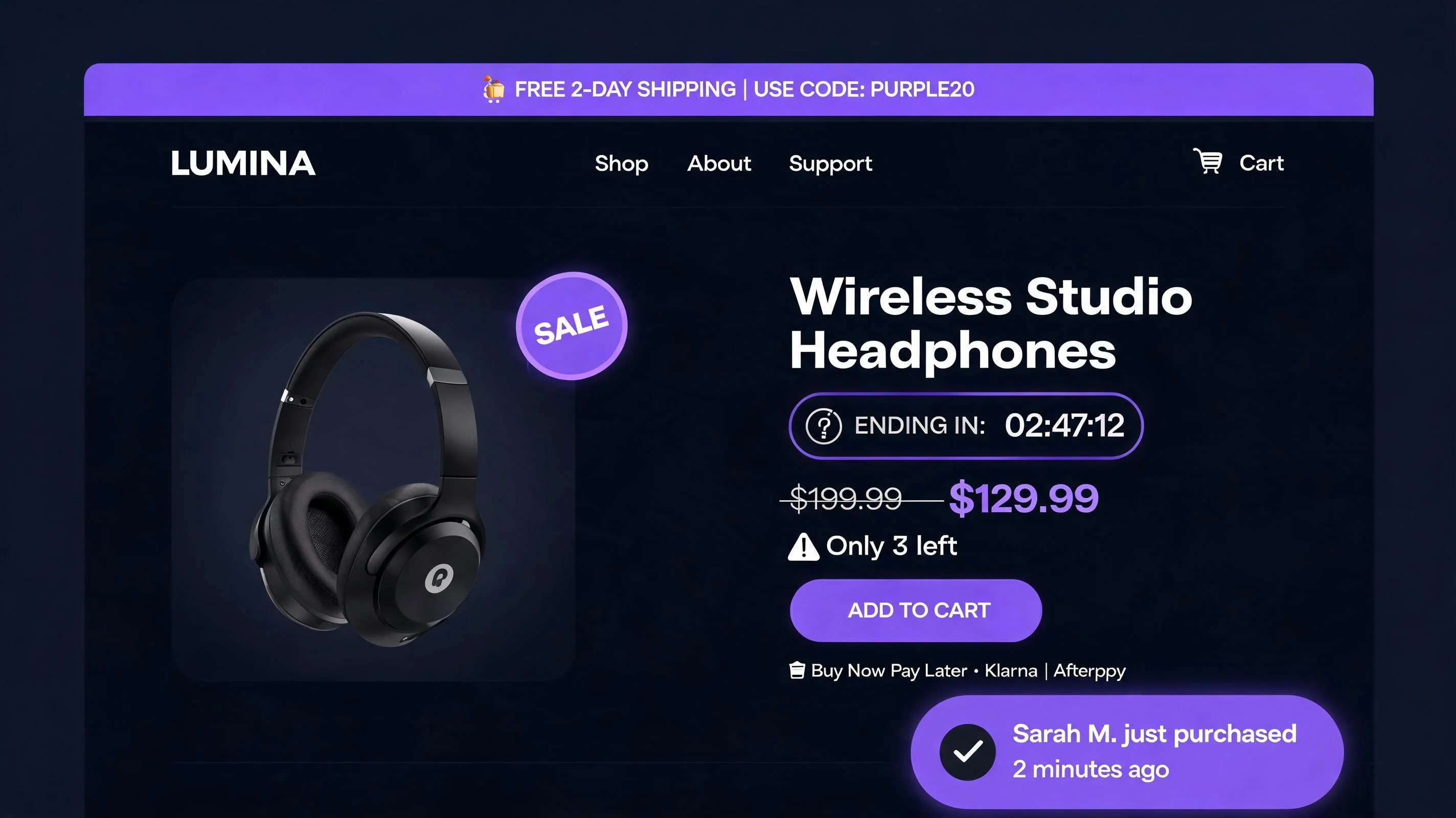
What is FOMO marketing and why does it work?
FOMO marketing is the deliberate use of psychological triggers — scarcity, urgency, social proof, and exclusivity — to motivate faster purchase decisions. The core mechanism is loss aversion: people are more motivated by the prospect of losing something than by the prospect of gaining something of equivalent value. Kahneman and Tversky's foundational work in behavioral economics showed that losses feel roughly twice as painful as equivalent gains feel pleasurable.
In ecommerce, this translates directly. "This item might not be here when you come back" is more motivating than "this is a great item." "14 people bought this today" is more convincing than "this is a popular item." "Your cart saves for 24 hours" is more urgent than "proceed when ready." Every FOMO tactic in this guide is an application of this core psychological principle — making the cost of inaction feel concrete and real.
The 2025 ecommerce data bears this out. A Shopify merchant analysis by Littledata found that stores actively using FOMO signals (urgency, scarcity, or social proof) had average conversion rates of 3.2%, compared to 1.8% for stores without them — a 78% relative difference. FOMO isn't the only conversion variable, but it's one of the most impactful levers available to any Shopify merchant.
| FOMO Tactic | Best For | Avg Conversion Lift |
|---|---|---|
| Countdown timer (sale end) | Flash sales, sitewide promotions | +8–18% |
| Social proof popup (recent purchase) | New visitors, homepage | +6–14% |
| Low-stock badge ("Only 3 left") | High-demand products | +10–22% |
| Free shipping progress bar | Cart page, product page | +15–30% AOV |
| Exit-intent discount popup | Cart abandoners | +5–12% recovery |
| Announcement bar (sitewide deal) | Sitewide promotions | +4–9% CTR |
| Real-time visitor count | High-traffic products | +3–8% |
Tactic 1: Social proof popups
A social proof popup is a toast notification that appears in a corner of the screen showing a recent purchase: "Emma from Seattle just bought the Midnight Blue Hoodie · 38 minutes ago." It fires automatically based on your real order history, cycling through recent purchases with a configurable delay between each notification.
Social proof popups address the new visitor's fundamental trust deficit. Someone who's never heard of your brand has no reason to believe your product descriptions. But seeing that Emma from Seattle bought this 38 minutes ago means the product is real, the store ships, and someone made the same decision just moments ago. That validation reduces perceived risk enough to move a hesitant visitor toward a purchase decision.
Key configuration points: set a session cap of 3–4 popups per visit to avoid annoyance, use real order data only (never fabricated), set a minimum time-on-page of 10–15 seconds before the first popup fires, and position it bottom-left or bottom-right with enough clearance for the Add to Cart button on mobile.
For a complete guide to social proof popups — including the five types of social proof, when to use each, and full setup steps — see the Shopify social proof guide.
Tactic 2: Countdown timers
A countdown timer shows how much time remains until a sale or offer expires: "Flash sale ends in 4h 22m 17s." The visual countdown activates urgency by making the deadline feel real, specific, and imminent. "Limited time offer" is easily ignored; "4h 22m" is harder to dismiss.
Countdown timers work through deadline pressure and loss aversion. When a visitor sees a timer counting down, the decision to delay ("I'll think about it and come back") becomes more costly — coming back in 6 hours means the deal is gone. The timer makes that cost explicit and immediate.
Two formats: flip timers (dramatic, attention-grabbing, suited for high-energy promotions) and bar timers (minimal, clean, suited for premium brands and longer-duration promotions). Deploy on product pages just above or below the Add to Cart button for maximum impact. Only use real deadlines — evergreen timers that reset per visitor are detectable, and when detected, they destroy trust.
Full guide: Shopify countdown timer setup and strategy.
Tactic 3: Stock countdown
A stock countdown shows how many units remain: "Only 4 left in stock." This is scarcity in its purest form — it implies others have been buying (social proof by inference), creates competition pressure (someone else might get the last one), and activates the fear of permanent unavailability.
Baymard research found that "only X left in stock" messaging is most effective when the count is between 1 and 10. Above 10, the urgency dissipates. Below 1, it's too late. The sweet spot is 3–8 units — enough to be achievable for the current visitor but clearly limited.
The stock countdown must use real inventory data. PopBoost's Stock Countdown widget is implemented in Liquid — it reads directly from Shopify's product inventory object, which means it reflects your actual inventory at the moment the page is rendered. No external API calls, no fabricated numbers. The widget automatically hides when inventory is above your configured threshold (e.g., above 10 units) and disappears when the product goes out of stock.
For accurate inventory management that powers honest stock countdowns, EZStock tracks inventory levels, reorder points, and purchase order status — so your stock countdown reflects reality rather than outdated data.
Tactic 4: Product badges
Product badges are overlay labels on product images: SALE, NEW, LOW STOCK, BESTSELLER. They're FOMO at the collection level — visible before the customer even clicks into a product page, directing attention and communicating value at a glance.
SALE badges activate bargain-seeking behavior and draw the eye in collection grids. LOW STOCK badges activate scarcity and competition. BESTSELLER badges provide social proof that others are choosing this product. NEW badges signal freshness for repeat visitors who want to know what's changed since their last visit.
The key constraint: each badge must be applied only when its condition is genuinely true. SALE on non-discounted products, LOW STOCK with 500 units in the warehouse, BESTSELLER badges unchanged for 9 months — these are trust-destroying shortcuts. Apply badges accurately, and they compound conversion lift across every collection page view.
Full setup guide: Shopify product badges — SALE, NEW, LOW STOCK.
Tactic 5: Announcement bar
An announcement bar is a sticky horizontal banner at the top of every page on your store. It persists as visitors navigate — which makes it uniquely powerful for sitewide communications: a sale that's running, a free shipping threshold, a product launch, a shipping cutoff deadline.
The announcement bar is the only FOMO widget with 100% visibility across your store's entire session. Every product page view, every collection browse, every cart visit — the announcement bar is always there. This makes it the right vehicle for your highest-priority conversion message at any given time.
Most merchants underuse the announcement bar by either leaving it blank or using it for generic branding ("Welcome to our store!"). The highest-value uses: displaying a sale deadline ("20% off everything · ends Sunday midnight"), showing the free shipping threshold ("Free shipping on orders over $55 · You're $[X] away"), or teasing a new product launch ("New collection drops this Thursday — join the waitlist"). One message per bar, rotated based on your current marketing priority.
Full guide: Shopify announcement bar — strategy and setup.
Tactic 6: Free shipping bar
The free shipping progress bar is a dynamic progress bar showing how close the customer's current cart is to qualifying for free shipping: "You're $11 away from free shipping!" As they add items, the bar fills toward the threshold, creating a goal that becomes more motivating as it becomes more achievable.
This tactic is unique among the seven because it's bidirectional: it's a FOMO signal (fear of paying for shipping) AND an AOV optimization tool (getting customers to add more to cart). The loss aversion mechanism is "I don't want to pay $8 for shipping if I'm only $11 away from avoiding it" — and the solution is adding one more item, which lifts your average order value.
Research consistently shows free shipping bars lift AOV by 15–30% when the threshold is set 15–25% above the current average order value. The bar should display on product pages (to show progress after each add-to-cart) and on the cart page (as a last-mile nudge before checkout).
Full setup guide with threshold calculation: free shipping bar for Shopify.
Tactic 7: Exit intent popup
An exit intent popup fires when a visitor signals they're about to leave: cursor moving toward the browser navigation on desktop, or rapid upward scroll on mobile. At this point, all other FOMO tactics have either worked (the visitor bought) or haven't (they're leaving). The exit intent popup is the last intervention before the visitor is lost.
Because it fires only at the exit signal, the exit intent popup can be bolder than any mid-session widget. A 15% discount offer that would feel premature mid-browse is well-timed at the moment of abandonment. The offer is tied to an implicit deadline: close this popup and the deal disappears. That urgency is real — the popup won't reappear until the next session at earliest.
Exit intent popups convert 2–5% of abandoning visitors. On a store with 10,000 monthly visitors, even a 2% exit capture rate represents 200 recovered purchase opportunities per month. At a typical conversion rate from those recovered sessions, that's 60–100 additional sales per month from one widget.
Full setup guide: Shopify exit intent popup — offers, timing, and setup.
Deploy all 7 FOMO tactics from one Shopify app
PopBoost includes all 7 widgets — social proof popup, countdown timer, stock countdown, product badges, announcement bar, free shipping bar, and exit intent popup — for $19/month. One app, one script, 7 conversion levers.
Install PopBoost free →14-day free trial · no credit card required · works with all Shopify themes
The FOMO stack: how to layer all 7 tactics
Running 7 independent apps for 7 FOMO widgets creates three problems: page speed degradation (each app loads its own scripts), inconsistent visual language (different designs from different developers), and management overhead (7 dashboards, 7 subscription renewals, 7 sets of settings to coordinate). PopBoost solves all three by delivering all 7 widgets as a single Shopify Theme App Extension — one script, one admin panel, consistent design across all widgets.
Here's how to layer the FOMO stack for maximum effect:
For a standard product catalog (always-on configuration)
Enable permanently: announcement bar (rotating between your free shipping threshold message and your current best promotion), free shipping bar (sitewide, always active), social proof popup (session cap of 3, 45-second intervals), product badges (SALE on discounted items, BESTSELLER on top 5 by monthly revenue, NEW on items added in last 21 days, LOW STOCK under 8 units).
Enable seasonally: countdown timer (only during active promotions with real end dates), stock countdown (when specific key items are genuinely running low), exit intent popup (always active — abandonment happens year-round).
During a promotion (sale or event-based)
Activate: announcement bar → "20% off ends Sunday midnight." Countdown timer → set to sale end date, placed on every product page. SALE badges → applied to all discounted products. Social proof popup → increase frequency slightly for high-traffic days. Free shipping bar → if sale includes a free shipping promotion, update the threshold. Exit intent popup → offer is specifically tied to the sale: "Before you go — grab your 20% off before midnight."
The compound effect: a visitor arrives during a weekend sale. They see the announcement bar with the sale deadline. They browse the collection and see SALE badges on discounted items. They click a product and see the countdown timer (sale ends in 11 hours). A social proof popup shows 23 purchases in the last hour. They add to cart — the free shipping bar shows they're $7 from free shipping. They leave without buying — the exit intent popup catches them with the sale reminder. They come back, add one more item to hit free shipping, and buy. That's 6 of the 7 widgets working in sequence on a single visit.
For a product drop or launch
Product drops — limited-quantity releases with a defined launch date — are the highest-FOMO format in ecommerce. For a launch, the waitlist IS the FOMO mechanism: a referral-powered queue where customers see live waitlist counts, countdown timers, and their position. EZDrop is built specifically for this use case — creating the waitlist, the referral mechanic, the countdown to launch, and the launch-day email notification to top-ranked waitlisters.
PopBoost and EZDrop work in sequence rather than in competition. EZDrop handles the pre-launch waitlist phase. Once the drop goes live and the product is available for general purchase, PopBoost's full widget stack activates for the general shopping experience — social proof showing real post-launch purchases, stock countdown showing remaining inventory, countdown timer if there's a sale window alongside the launch.
FOMO marketing and trust: how to stay on the right side of the line
FOMO marketing is legitimate when the signals are honest. It becomes manipulative — and in many jurisdictions, illegal — when the signals are fabricated. The line is simple:
Honest FOMO: Real countdown timers tied to actual sale end dates. Real inventory levels driving the stock countdown. Real purchase notifications from actual recent orders. Free shipping thresholds that genuinely unlock at checkout when the bar says so.
Manipulative FOMO: Evergreen timers that reset per visitor. "Only 2 left" when you have 400. Purchase notifications with fabricated names and locations. Free shipping bars that show a threshold different from what applies at checkout.
The practical test: could a determined visitor discover that your FOMO signal is false? If yes, don't do it. Shoppers who discover deception don't just abandon — they leave reviews, they post screenshots, they never return. Honest FOMO compounds trust; fake FOMO destroys it.
Measuring your FOMO stack performance
The composite metric is revenue per session (RPS): total revenue divided by total sessions. RPS captures the combined effect of conversion rate and AOV together. Run your full FOMO stack for 30 days, compare RPS to the prior 30-day period, and adjust for seasonality and traffic source changes.
Widget-level metrics:
- Social proof popup: sessions with popup exposure vs. conversion rate
- Countdown timer: conversion rate during active timer vs. baseline period
- Stock countdown: inventory turnover rate for items with countdown vs. without
- Product badges: collection page CTR on badged vs. unbadged products
- Announcement bar: click-through rate on the announcement bar CTA link
- Free shipping bar: AOV before and after enabling; % of orders above threshold
- Exit intent popup: conversion rate of sessions where popup was shown
For a comprehensive store audit before you configure any FOMO stack, RoastWeb provides an AI-powered analysis of your Shopify store's conversion funnel — surfacing the specific friction points and missed conversion opportunities that should inform which FOMO widgets to prioritize first.
Why running 7 separate apps for FOMO is a mistake
Many merchants who understand the value of FOMO marketing piece together their stack from 7 different apps — one for social proof, one for countdown timers, one for stock countdowns, and so on. The total cost is typically $56–$96/month (each individual app charges $8–$15). But cost is the smaller problem.
The bigger problem is performance. Each app installs its own JavaScript bundle on your storefront. Seven apps means seven scripts loading on every page, each making its own HTTP requests, each potentially blocking or delaying the rendering of your product page. Google's Core Web Vitals — which directly affect your search rankings — are degraded by each additional third-party script.
PopBoost delivers all 7 widgets as a single Shopify Theme App Extension. One script loads. Only the widgets you've enabled are activated. The performance footprint is dramatically smaller than 7 separate apps, and the design is consistent across all widgets because they share the same design system. The price is $19/month for all 7, compared to $56–$96/month for the equivalent in separate apps.
Frequently asked questions about FOMO marketing on Shopify
What is FOMO marketing?
FOMO marketing uses fear of missing out — scarcity, urgency, social proof, and exclusivity — to motivate faster purchase decisions. In Shopify ecommerce, FOMO tactics include countdown timers, social proof popups, stock scarcity signals, product badges, and exit intent popups. Each activates loss aversion: the fear that a desired product or deal will no longer be available.
Does FOMO marketing work for Shopify stores?
Yes. Merchant data from Littledata shows stores using FOMO signals average 3.2% conversion rates vs. 1.8% for stores without them — a 78% relative lift. The effect requires that the FOMO signals be honest (real deadlines, real inventory, real purchase data). Fake FOMO tactics backfire when discovered.
What's the difference between urgency and scarcity?
Urgency is time-based ("sale ends in 3 hours"). Scarcity is quantity-based ("only 4 left in stock"). Both activate loss aversion. Used together — a sale that ends tomorrow AND has limited inventory remaining — they create compounded motivation to act now.
How many FOMO widgets should I run?
3–5 active widgets simultaneously is the right range. On a sale product page: countdown timer + social proof popup + LOW STOCK badge + announcement bar message + free shipping bar is a well-balanced, non-aggressive stack. Beyond 5 simultaneous signals, the page begins to feel pushy rather than informative.
Is FOMO marketing ethical?
Yes, when signals are accurate. Real deadlines, real inventory, real purchase notifications are legitimate commercial signals. False urgency, fabricated social proof, and manufactured scarcity are deceptive and potentially illegal under consumer protection laws in the US, EU, and UK. Always build your FOMO stack on honest data.
For individual deep-dives on each tactic: social proof guide · countdown timer guide · exit intent guide · product badges guide · free shipping bar guide · announcement bar guide. For a broader conversion optimization framework, see the Shopify CRO checklist.
