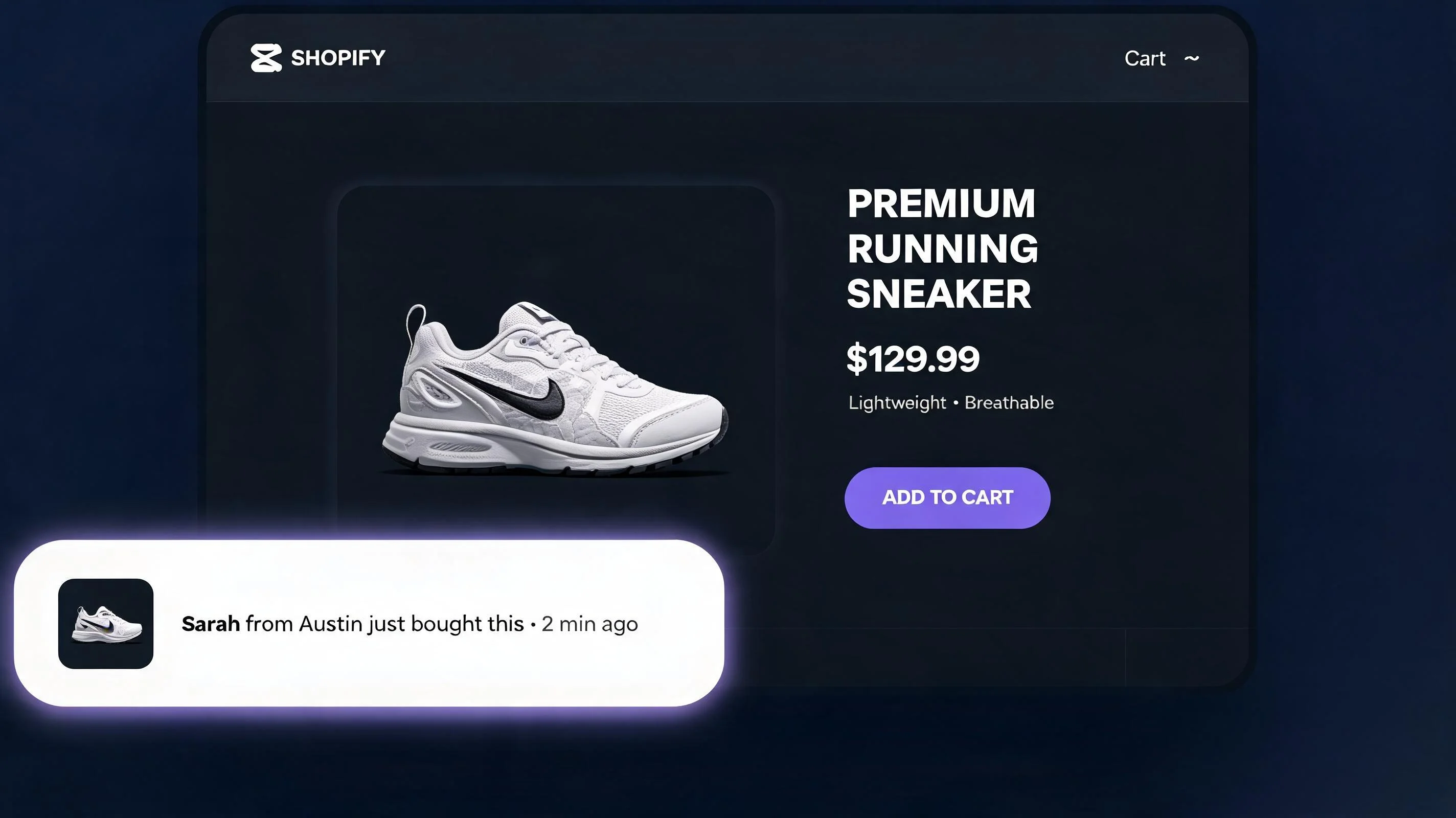
What is social proof in ecommerce?
Social proof is any signal that shows a potential buyer that other people have already purchased, reviewed, or approved a product. The concept comes from psychologist Robert Cialdini, who identified it in 1984 as one of the six principles of influence. In ecommerce, social proof takes many forms: customer reviews, star ratings, purchase notification popups, live visitor counts, user-generated content, and press mentions.
The core mechanism is simple: when people are uncertain about a decision, they look at what other people are doing and treat that as evidence of the correct choice. On a Shopify store, uncertainty is high — the visitor doesn't know you, can't examine the product physically, and has no prior relationship with your brand. Social proof reduces that uncertainty by providing external validation.
The research is clear. A 2025 CXL study found that product pages with social proof signals convert at 2.1× the rate of pages without them. Baymard Institute's research on checkout abandonment found that "lack of trust" is the third most common reason shoppers abandon their carts. Social proof directly addresses both.
The 5 types of social proof that work on Shopify
1. Recent purchase notifications (sales popups)
A recent purchase notification is a small toast popup — typically in the bottom-left or bottom-right corner of the screen — that shows a product being purchased in real time or recently. Example: "James from Chicago just bought the Matte Black Tumbler · 47 minutes ago." It appears, stays for 5–8 seconds, and disappears. The next one fires 30–60 seconds later.
This format works for three reasons: it creates social proof (others are buying), it creates urgency (people are buying right now), and it provides product discovery (showing items the visitor may not have found). Of all the social proof formats, this one has the fastest setup time and the most immediate lift — many merchants report seeing conversion rate improvements within the first 48 hours of enabling it.
The data that powers the popup is real order history pulled from your Shopify store. A well-built implementation — like the one in PopBoost — reads your recent orders via the Shopify API and cycles through them, showing 5–15 minute-old purchases during active sessions and recent-day purchases during quiet hours. Nothing is fabricated.
2. Star ratings and review counts
Star ratings are the most trusted form of social proof in ecommerce. A 2024 Trustpilot study found that 93% of consumers say reviews influence their purchasing decisions. More importantly, the volume of reviews matters nearly as much as the rating itself — a product with a 4.6 average from 340 reviews is perceived as more trustworthy than a product with a 5.0 average from 12 reviews.
If you use a review app (Judge.me, Loox, Okendo, Yotpo), your star ratings are already being displayed via that app's theme widget. The social proof work here is less about adding a widget and more about generating reviews systematically: post-purchase email sequences, SMS follow-ups, and review incentives for photo submissions. Review generation is the highest-ROI social proof work most Shopify stores are not doing consistently.
3. Live visitor counts
A live visitor count shows how many people are currently viewing a product: "🔥 14 people are looking at this right now." This format creates urgency through competition — if 14 people are looking, some of them will buy before you do. Combined with a stock countdown showing limited inventory, the effect is compounded.
Visitor count widgets work best on products where real demand is high enough to generate meaningful numbers. Showing "1 person is viewing this" is worse than showing nothing. Most implementations allow you to set minimum thresholds — only display the count if it's above, say, 5 visitors. If your store is new, delay this widget until your traffic volume justifies it.
4. Stock-based scarcity signals
"Only 3 left in stock" is one of the most powerful single-line copy additions you can make to a product page. It's social proof by implication — if inventory is low, others have been buying. Baymard found this signal is especially effective when the count is between 1 and 10. Numbers above 10 lose their urgency; below 1 (i.e., out of stock) is obviously too late.
The key is that this signal must be accurate. A false "only 2 left" when you have 500 in the warehouse destroys trust permanently when discovered. Use a Shopify app that reads your real inventory levels, or pair your PopBoost stock countdown widget with your actual Shopify inventory data. PopBoost's stock-countdown block is Liquid-only and reads directly from Shopify's product inventory — it shows real numbers, automatically hides when stock is above your set threshold, and disappears when the item goes out of stock.
5. Press and trust badges
Logos from publications that have covered your brand ("As seen in Forbes, TechCrunch, Vogue") function as third-party authority signals. Trust badges — SSL secure, free returns, money-back guarantee — address specific objections. These are static elements placed in your theme layout rather than popup widgets, but they belong in any discussion of social proof because they attack the same root problem: trust deficit on a first visit.
| Type | Format | Best Placement |
|---|---|---|
| Recent purchase notification | "Jane from Austin just bought X" popup | Homepage, product page |
| Review stars (aggregate) | Star rating + count | Product page, collection page |
| User-generated content (UGC) | Customer photos | Product page, homepage |
| Testimonial quotes | Text or video | Landing page, above fold |
| Trust badges (secure, guaranteed) | Icons + text | Checkout, product page |
| Sales count ("500+ sold") | Static or animated counter | Product page |
| Social media follower count | Number + platform icon | About page, footer |
| "As seen in" press logos | Media logos | Homepage, landing page |
Why social proof works: the psychology
Three psychological mechanisms explain why social proof converts:
Informational social influence — when uncertain, people assume others have more information. If 340 people gave this product 4.7 stars, they collectively know something about its quality that you don't yet know. Deferring to the crowd is a rational shortcut.
Loss aversion — seeing that others are buying creates a fear of missing out. The prospect of not getting the item — because someone else bought it first — is more motivating than the prospect of gaining it. "Only 3 left" and "17 people bought this in the last 24 hours" both activate this mechanism.
Risk reduction — buying from a store with no reviews or social signals feels risky. Every piece of social proof reduces perceived risk. A visitor who sees 200+ reviews, a recent purchase notification, and a stock countdown before they even scroll to the buy button has their risk perception substantially lowered.
How to set up a social proof popup in PopBoost
PopBoost includes a Social Proof Popup widget as one of its 7 native Shopify App Blocks. Here's how to install and configure it:
Install PopBoost from the Shopify App Store
Go to the PopBoost listing on the Shopify App Store and install. The app uses a Theme App Extension — it won't touch your theme files directly. You'll be redirected to the PopBoost admin inside Shopify after installation.
Enable the Social Proof Popup widget
In the PopBoost admin, click the Social Proof Popup card. Toggle it on. Configure: display delay (how many seconds after page load before first popup), minimum order age (don't show orders from more than N days ago), session cap (max popups per visit), and position (bottom-left or bottom-right).
Add the App Block in your Theme Editor
Go to Online Store → Themes → Customize. In the Theme Editor, click App Embeds in the left panel and enable PopBoost. The social proof popup will now appear on every page of your store during active sessions — no code required, no theme modification.
Match it to your store's brand palette
PopBoost's "Match store theme" feature reads your Shopify theme color palette and applies it to the popup automatically. You can also manually set background color, text color, and accent color if you want a specific look. The goal is that the popup feels like part of your store, not a third-party widget.
Verify with a private browse session
Open your store in a private/incognito browser window to see the popup as a new visitor would. Check timing, appearance, and that the product names and locations look right. The popup pulls from your last 30 days of orders by default.
Add a social proof popup to your Shopify store in 5 minutes
PopBoost includes the Social Proof Popup plus 6 other conversion widgets — $19/month flat, 14-day free trial, works with every Shopify theme.
Install PopBoost free →14-day free trial · no credit card required · works with all Shopify themes
Social proof + other conversion signals: how to stack them
Social proof performs best when it's one layer of a conversion stack — not the only thing you're doing. Here's how the widgets work together:
Social proof popup + stock countdown — the popup shows someone just bought; the stock countdown shows there are only 4 left. Together they deliver both social validation and scarcity in the first 90 seconds of a visit. This combination consistently outperforms either signal alone.
Social proof popup + countdown timer — the popup provides social validation; the timer creates a deadline. If your sale ends in 6 hours and 23 people bought in the last 24 hours, both signals reinforce the same message: act now, before time runs out and before stock disappears.
Social proof popup + exit intent popup — if a visitor is about to leave after seeing social proof but still not buying, the exit intent popup catches them with a discount offer. Having already seen that others are buying makes them more receptive to the offer — they're leaving despite interest, not leaving because they're uninterested. For more on pairing these widgets, see the Shopify exit intent popup guide.
If you're also running product drops or limited releases, pairing PopBoost's social proof signals with a EZDrop waitlist creates a particularly powerful launch stack — the social proof popup shows real buyers, and the drop mechanics create a queue that itself becomes a social proof signal (thousands of people waiting is the ultimate form of social proof).
Common social proof mistakes to avoid
Showing too many popups per session. Three popups in the first 60 seconds is spam. Cap sessions at 3–4 popups with at least 45-second intervals. Shoppers who feel pestered will close the popups and mentally categorize your store as low-quality.
Using fabricated data. Some older popup apps generated fake names and order data when a store had no recent orders. This is a trust-destroying practice. Only show real order data; if you're too new to have meaningful order history, wait to enable this widget or set it to pull from a 60-day window rather than a 7-day window.
Ignoring mobile behavior. Your popup position and size must be mobile-tested. A popup that covers the Add to Cart button on mobile is actively harming your conversion rate. Set mobile-specific positioning (always bottom-center or bottom-left, with enough clearance for sticky CTAs).
Showing popups for irrelevant products. A visitor on your running shoes category page should see popups for running shoes, not for your yoga mat. PopBoost's widget cycles through your recent orders without category filtering by default — if your catalog is very broad, configure which collections feed the popup data.
Forgetting the exit experience. Social proof doesn't stop at the popup. Make sure your product pages have review widgets, your checkout page has trust badges, and your post-purchase flow asks for reviews. Every touchpoint is an opportunity to build the social proof stack for the next visitor.
Measuring your social proof performance
Track these metrics in Shopify Analytics and Google Analytics to understand the impact of your social proof changes:
- Product page conversion rate — the primary metric. Segment by new visitors vs. returning visitors; social proof has the largest impact on first-time buyers.
- Popup engagement rate — what % of sessions see the popup click through to the linked product? If it's below 5%, your popup timing or product selection is off.
- Add-to-cart rate — how many visitors who saw a popup added a product to cart? Compare vs. sessions without popup exposure.
- Review volume over time — if you implement a post-purchase review ask, track new review submissions weekly. Consistent review generation compounds over months into a significant trust asset.
- Store conversion rate (overall) — run your full popup stack for 30 days, then compare to the prior 30-day period. Account for seasonality and traffic source changes.
Frequently asked questions about Shopify social proof
What is social proof in ecommerce?
Social proof in ecommerce is any signal showing that other people have purchased, reviewed, or validated a product. Examples: recent purchase toasts, star ratings, review counts, live visitor counts, and stock scarcity indicators. It works because people defer to the crowd when making uncertain decisions.
Do social proof popups work on Shopify?
Yes. Social proof popups reliably improve conversion rates on Shopify stores, especially for first-time visitors. CXL research puts the conversion lift at up to 2.1× on product pages. The effect is strongest on stores without strong brand recognition — where visitors have no prior relationship with you and need external validation to trust the purchase.
How do I add a social proof popup to Shopify?
Install a Shopify app that uses a Theme App Extension (not a script injection). PopBoost offers a Social Proof Popup widget as a native App Block. After installing, enable it in Online Store → Themes → Customize → App Embeds. Configure delay, session cap, and position. No coding required.
What should a social proof popup say?
A high-converting social proof popup should include: the buyer's first name and city (e.g., "Sarah from Austin"), the product name, and a recency signal ("2 hours ago"). Keep it short — one line of name/location, one line of product, one line of timestamp. Link the popup to the product page for click-through.
How many social proof popups per session is too many?
Cap at 3–4 popups per session with at least 45 seconds between each. The first popup gets the most attention; beyond 4, you're creating annoyance, not trust. Always allow visitors to dismiss the popup, and respect that dismissal for the rest of the session.
For more on how to use PopBoost's full widget set to build a complete conversion stack, see the FOMO marketing for Shopify guide and the Shopify CRO checklist. If you want an objective audit of how your current store is converting before adding any widgets, RoastWeb runs an AI-powered analysis of your store's conversion funnel and surfaces the highest-impact fixes.
