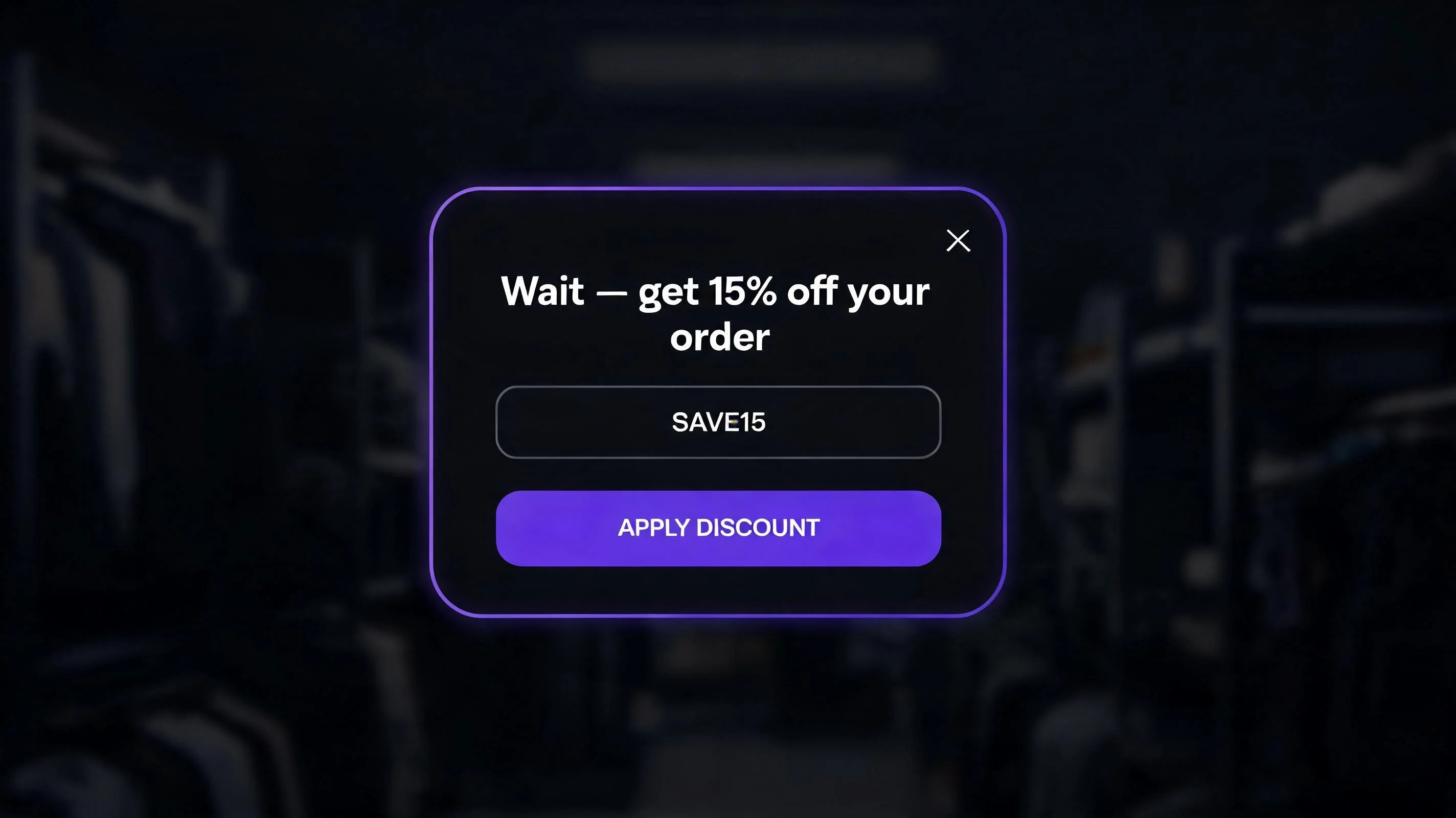
What is an exit intent popup?
An exit intent popup is a modal overlay that appears when a visitor is about to leave a webpage. The trigger is behavioral: on desktop, exit intent is detected when the cursor moves rapidly toward the top of the browser window — in the direction of the address bar, the back button, or the tab bar. This cursor movement is a reliable signal that the visitor is about to navigate away.
On mobile, cursor detection doesn't apply. Mobile exit intent is instead triggered by rapid upward scrolling — the behavioral pattern of a user who has decided they're done with the page and is scrolling back to the top to close the tab or navigate back. PopBoost's exit intent widget monitors scroll velocity to detect this pattern and fires within 100–200ms of the trigger.
When the popup fires, it presents a modal with an offer: a discount code, a free shipping unlock, a value-reinforcing message, or an email capture form with an incentive. The visitor can accept the offer, close the popup, or continue to leave. The goal is to convert the "soft abandonment" — the visitor who was interested but hadn't quite committed — into a buyer or at minimum a subscriber.
| Feature | PopBoost | Privy | Optimonk | Justuno |
|---|---|---|---|---|
| Price | Free + $19/mo | Free + $30/mo | Free + $39/mo | $29+/mo |
| Exit-intent trigger | ✓ Cursor-leave | ✓ | ✓ | ✓ |
| Discount code generation | ✓ Auto | ✓ | ✓ | ✓ |
| Match store theme palette | ✓ | ✗ | ✓ | ✓ |
| Mobile exit trigger | ✓ Scroll-up | ✓ | ✓ | ✓ |
| A/B testing | ✗ | ✗ | ✓ | ✓ |
| Klaviyo sync | ✗ | ✓ | ✓ | ✓ |
| Bundle with other widgets | ✓ (7 widgets) | ✓ (email + popup) | ✗ | ✗ |
| No code install | ✓ | ✓ | ✓ | ✓ |
Why exit intent popups work
The reason exit intent converts is context. A popup that fires 10 seconds after page load is interrupting a browsing session — the visitor hasn't had time to evaluate the product, they don't know if they want it yet, and the popup is pure friction. An exit intent popup fires only when the visitor has decided to leave — they've already evaluated, already browsed, and are making their final decision. The popup isn't interrupting a decision; it's participating in one that's already being made.
This timing advantage means the popup can be bolder than a mid-session popup. A 15% discount offer that would feel premature mid-browse feels like a fair rescue at the point of abandonment. The visitor thinks: "I was about to leave anyway — getting 15% off is a good reason to stay."
Loss aversion amplifies this: the discount is only available now, in this moment. Once they close the popup and leave, the offer goes away. That creates urgency without a fake countdown timer — the urgency is inherent in the situation.
What offer to show in your exit intent popup
The offer is the most important variable in exit intent popup performance. Here's how the main options rank:
Percentage discount (best for converting browsers)
A straightforward discount — "Take 10% off your first order" with a pre-filled code in the popup — is the highest-converting exit intent offer for first-time visitors. The offer is easy to understand, immediately applicable, and doesn't require clicking away. Best practice: auto-apply the discount code when the visitor clicks the CTA, rather than making them copy and paste it at checkout. Friction at code entry loses 15–25% of intent.
Set the discount at 10–15%. Below 10%, the offer doesn't feel meaningful. Above 20%, you're training customers to always abandon before buying to wait for the popup. 10–15% is the sweet spot: it moves the needle without conditioning bad behavior.
Free shipping unlock (best for cart abandoners)
If a visitor has items in their cart but hasn't checked out, a "free shipping on this order" offer addresses one of the top abandonment reasons (Baymard: 49% of cart abandoners cite unexpected shipping costs as the trigger). Show this offer when the cart is non-empty — some implementations segment by cart status, showing the discount offer to browsers and the free shipping offer to cart abandoners. PopBoost's exit intent popup can be configured with different messages based on session context.
Email capture with incentive (best for building your list)
If you have a strong email marketing program and value list subscribers highly, an email capture exit popup — "Get 10% off + early access to new products. Enter your email:" — serves dual purposes: it may convert to an immediate purchase via the follow-up discount code, and it captures the email for a longer nurture sequence if they don't buy today. This works especially well for stores with repeat-purchase products (consumables, skincare, supplements) where the lifetime value justifies a higher first-order discount.
Value proposition reminder (best for high-ticket items)
For high-ticket products ($200+), a discount isn't always the right lever — it can cheapen the brand perception. Instead, show a value reinforcement popup: "Still thinking about it? Free returns, 2-year warranty, ships in 24 hours." This addresses the real objection (risk) rather than trying to overcome price resistance with a discount. It doesn't reduce margin and doesn't condition discount expectations.
How to set up an exit intent popup in PopBoost
Install PopBoost and open the Exit Intent Popup widget
Install PopBoost from the Shopify App Store. In the PopBoost admin, click the Exit Intent Popup widget card. Toggle it on.
Configure your offer
Choose your offer type: discount code, custom message, or email capture. If using a discount code, either enter an existing Shopify discount code or let PopBoost create one automatically. Set the headline (5–8 words), body text (one line of reinforcement), CTA button text ("Get 10% off", "Unlock free shipping", "Claim offer"), and a close option ("No thanks, I'll pay full price" — making the dismiss feel like a loss reinforces the offer's value).
Set session and day caps
Configure how often the popup can fire: once per session (recommended), and not more than once every 14 days per visitor. The day cap prevents the popup from re-appearing on every visit, which would quickly become annoying and train visitors to dismiss it reflexively. PopBoost uses a cookie-based cap — set the duration in the settings panel.
Set a time-on-page minimum
Configure a minimum time before exit intent can fire: 10–15 seconds is standard. This prevents the popup from showing to visitors who bounced immediately (they're not interested — showing them a popup won't help) and focuses it on visitors who engaged with your content.
Enable in your theme and test
Enable PopBoost in Online Store → Themes → Customize → App Embeds. Test the popup by moving your cursor rapidly toward the top of the browser window in a private browsing session. Verify the popup appears, the offer text is correct, and the discount code applies at checkout. Test on mobile by scrolling down, then scrolling up rapidly.
Recover abandoning visitors with a Shopify exit intent popup
PopBoost's Exit Intent Popup is available on the free plan (one widget active at a time, with badge). Pro ($19/month) runs all 7 widgets simultaneously and removes the badge — 14-day free trial, no credit card required.
Install PopBoost free →Free plan available · 14-day Pro trial · no credit card required · works with all Shopify themes
Exit intent popup + email marketing: the complete recovery sequence
The exit intent popup is the first intervention in a recovery sequence, not the last. Here's a complete flow:
Layer 1: Exit intent popup. Shows at the moment of abandonment. 2–5% convert immediately. For those who don't convert but provide their email, move to Layer 2.
Layer 2: Cart abandonment email (1 hour after). Triggered automatically by Shopify's built-in cart recovery email or your email platform (Klaviyo, Omnisend). References the specific cart items left behind. Restates the discount offer from the popup.
Layer 3: Winback email (24 hours after). A second email for visitors who still haven't purchased. Shows social proof — recent reviews of the items in their cart. Adds urgency: "Your cart saves for 48 hours."
For merchants running product drops alongside their regular catalog, EZDrop handles its own waitlist-to-launch email sequence separately from your standard cart recovery flow. The exit intent popup and EZDrop's launch emails are complementary — one handles general store abandonment, the other handles drop-specific waitlist communication.
Exit intent popups and SEO: what you need to know
There's a common misconception that Google penalizes all popup overlays. The reality is more nuanced. Google's guidance specifically targets "intrusive interstitials" — popups that appear immediately on page load, especially on mobile, and that obstruct content before the user has engaged with it.
Exit intent popups are explicitly exempted from this guidance. Google's policy states that popups triggered by user interaction (including exit behavior) are not considered intrusive interstitials. PopBoost's exit intent popup fires only on the exit signal — not on page load — which means no SEO penalty risk.
Additionally, PopBoost's popups are built as Theme App Extensions. They don't inject scripts on page load or block the main thread during LCP measurement. The performance impact on Core Web Vitals is minimal — the script is deferred and only activates after the page is fully interactive.
Measuring exit intent popup performance
- Popup conversion rate — of visitors who see the exit popup, what % complete the offer CTA? A well-configured popup with a strong offer should convert 2–5%. Below 1% suggests the offer needs work; above 5% suggests you may be able to reduce the discount size.
- Recovery revenue — total revenue from sessions where the exit popup fired and the visitor subsequently purchased. Compare this to your PopBoost subscription cost to confirm positive ROI.
- Email capture rate — if using email capture, what % of exit popup viewers submit their email? 15–25% is typical for well-designed capture forms with strong incentives.
- Email-to-purchase rate — for captured emails, what % complete a purchase within 30 days? This extends the value of the exit popup beyond the immediate session.
For a comprehensive view of where your store is losing visitors — before, during, and after the exit intent trigger — RoastWeb performs an AI-powered audit of your store's full conversion funnel, identifying the friction points driving abandonment and ranking them by revenue impact.
Common exit intent popup mistakes to avoid
Firing too soon. A visitor who lands on your page and immediately moves their cursor (common behavior when navigating) shouldn't see an exit popup within the first 5 seconds. Set a minimum engagement time of 10–15 seconds. Most genuine exit behaviors happen after 30+ seconds on page.
A popup for every page. Exit intent on your homepage is lower-value than on product pages or the cart page. A visitor leaving the homepage has shown little intent; a visitor leaving a product page after 45 seconds of reading has shown meaningful interest. Consider restricting exit intent to product pages and the cart page only.
A generic offer. "10% off" is better than nothing. "10% off your first order — use WELCOME10" is better. "Before you go — here's 10% off the [product name] you were just looking at" is best. Context-awareness in the popup copy dramatically improves conversion.
No clear dismiss. The popup must have an obvious close button. If visitors feel trapped, they'll trust your store less, not more. A clean X in the corner, plus a "No thanks" text link, is the standard. The "No thanks" option can be written with mild loss-aversion framing ("No thanks, I'll pay full price") but shouldn't be manipulative or hidden.
Frequently asked questions about exit intent popups
What is an exit intent popup?
An exit intent popup is a modal that appears when a visitor is about to leave your site. On desktop, it fires when the cursor moves toward the browser navigation area. On mobile, it fires on rapid upward scroll. The goal is to present an offer that converts the leaving visitor into a buyer before they go.
Do exit intent popups work on Shopify?
Yes. Exit intent popups convert 2–5% of abandoning visitors when configured with a compelling offer (10–15% discount, free shipping unlock, or strong value message). On a store with significant traffic, this represents meaningful recovered revenue from visitors who would otherwise be lost.
What offer should I show in an exit intent popup?
For first-time visitors: a 10–15% discount code. For cart abandoners: a free shipping offer. For high-ticket items: a risk-reduction message (free returns, warranty, shipping speed). Email capture with an incentive works well for stores with strong retention email programs.
How do I add an exit intent popup to Shopify?
Install PopBoost. Enable the Exit Intent Popup widget in the PopBoost admin, configure your offer and session caps, and enable App Embeds in your Shopify theme. No code required. Works with all modern Shopify themes.
Can exit intent popups hurt SEO?
No. Google's intrusive interstitial guidelines specifically exempt exit-triggered popups. Exit intent popups fire on cursor leave or scroll-back behavior — not on page load — which is why they don't violate Google's policy or affect Core Web Vitals.
Exit intent works best as part of a complete conversion stack. See how it pairs with PopBoost's other widgets in the FOMO marketing for Shopify guide. For a full store conversion audit before configuring any widgets, RoastWeb can identify your highest-priority levers.
