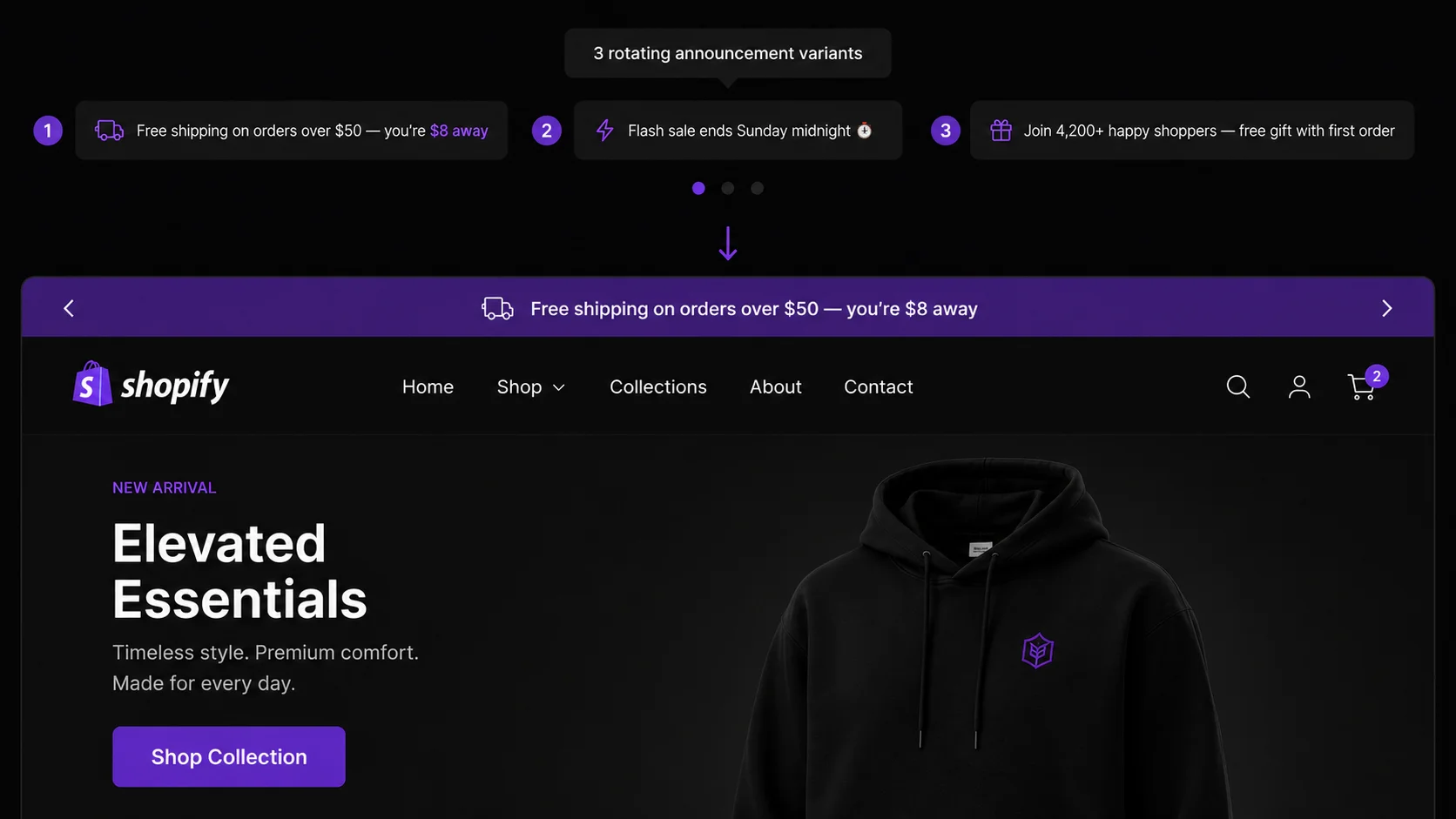
Your announcement bar is the highest-visibility real estate on your store — shown to every visitor on every page throughout every session. Weak copy wastes that exposure. Strong copy drives clicks to your sale, reduces shipping surprise at checkout, and lifts average order value before a customer even opens a product page.
Every template below follows a proven three-part formula: [offer] · [urgency or qualifier] · [CTA]. Character counts are noted so you know which ones work on mobile (under 45 characters) without truncation.
Category 1: Free Shipping Messages
Free shipping messages are the most universally applicable announcement bar content. They reduce checkout abandonment caused by shipping cost surprise and motivate higher order values throughout the session. Pair the announcement bar with PopBoost's free shipping bar for dynamic progress tracking. For threshold strategy, see the free shipping threshold strategy guide.
Free Shipping Messages (7 templates)
Free shipping on orders over $[X] — no code needed
Best for: always-on threshold offer. 46 chars at $50. Keep CTA link pointed at bestselling collection.
You're $[Y] away from free shipping · Add one more →
Best for: cart page or dynamic bar synced to cart total. Most motivating when $Y is under $15.
Free shipping today only · No minimum · Shop now →
Best for: one-day flash free shipping promos. 49 chars. Creates urgency without discounting product prices.
Order over $[X] and skip the $[Y] shipping fee →
Best for: stores with a prominent flat-rate shipping cost. Making the savings concrete ($8, $12) improves click rate.
Free express shipping on orders over $[X] · Ends Sunday →
Best for: weekend promotions upgrading standard to express. Adds deadline urgency on top of the shipping benefit.
Free worldwide shipping this week only →
Best for: stores with international customers who normally pay high shipping. 40 chars — safe for mobile.
Spend $[X] more · Unlock free shipping + a free gift →
Best for: adding a GWP (gift-with-purchase) incentive to the shipping offer. Two benefits in one line.
Category 2: Sale & Discount Messages
Sale messages must communicate three things: the discount amount, the scope (sitewide vs. specific category), and the deadline. Any two of the three make a workable message. All three make a compelling one. Never run a "sale" message without a real end date — permanence kills urgency.
Sale & Discount Messages (8 templates)
Sale ends tonight · 25% off sitewide · Shop now →
Best for: single-day or weekend sitewide sale. 49 chars. Tonight is more urgent than "Sunday" — use it on the final day.
20% off everything · Use code SUMMER20 · Ends Sunday →
Best for: code-based discounts. Showing the code in the bar eliminates the checkout hunt and reduces abandonment.
Up to 40% off selected styles · Limited time →
Best for: category or clearance sale where not every product is discounted. "Up to" sets accurate expectations.
Flash sale: 30% off for the next 4 hours only →
Best for: high-urgency short-duration sales. Pair with PopBoost countdown timer for maximum pressure.
Buy 2 get 1 free · All accessories · Shop the deal →
Best for: BOGO or multi-buy promotions. More compelling than a flat % when the category is clear.
Extra 15% off sale items · Code: EXTRA15 · Today only →
Best for: stacking a secondary discount on an existing sale. "Extra" signals there's already a deal — this makes it better.
Clearance: Up to 60% off · While stocks last →
Best for: end-of-season clearance. "While stocks last" implies scarcity without a specific countdown.
Members get 20% off · Not a member? Join free →
Best for: loyalty program acquisition. Drives account sign-ups by making the benefit visible to non-members.
Why deadlines work in announcement bars
Research on loss aversion consistently shows that time-limited offers outperform open-ended discounts. A bar that says "20% off — ends Sunday" drives more clicks than "20% off" with no end date, even when the same discount is available in both cases. The deadline activates the fear of missing out, not just the appeal of the discount.
Category 3: Urgency & Scarcity Messages
Urgency messages work best when they reflect real constraints — a genuine sale deadline, actual low stock, or a real shipping cutoff. Manufactured scarcity ("only 2 left!" when you have 200) is detectable and damages trust. Use these templates when the scarcity is real.
Urgency & Scarcity Messages (7 templates)
Only [N] left in stock · Order now before it's gone →
Best for: specific product or SKU with genuinely low stock. Link to that product page directly.
Sale ends in [4h 22m] · 30% off everything →
Best for: pairing with PopBoost countdown timer in the announcement bar. The live timer in brackets makes urgency visceral.
Last chance: sale ends at midnight tonight →
Best for: final-day messaging when a countdown timer isn't configured. 44 chars — safe for mobile.
Selling fast · [N] people viewing this right now →
Best for: high-traffic product launches or popular SKUs. Pairs well with PopBoost's live visitor count popup.
Order by 2PM today for next-day delivery →
Best for: shipping cutoff urgency. 40 chars. Only run when your fulfillment can reliably meet the promise.
Almost gone: [Product Name] is down to its last [N] units →
Best for: named bestsellers with genuine stock depletion. Specificity makes it credible.
Price goes back up in [2h 14m] · Lock in your discount →
Best for: price-increase announcements. More novel than "sale ends" — the frame is "lose the price" not "miss the sale".
Category 4: New Arrival & Launch Messages
Launch messages convert returning visitors into first-day buyers. Customers who visit your store after a new collection drops will see the announcement bar before they navigate to any specific section — making it your primary launch discovery channel.
New Arrival & Launch Messages (7 templates)
New: The [Collection Name] is here · Shop new arrivals →
Best for: planned collection drops. Link to the new arrivals collection page. Run for up to 2 weeks post-launch.
Just dropped: [Product Name] · Be the first to get it →
Best for: hero product launches. "Be the first" implies exclusivity even when the product is publicly available.
New collection drops [Day] · Join the waitlist now →
Best for: pre-launch announcement. Link to your EZDrop waitlist page. Run for the 1–2 weeks before launch.
Back in stock: [Product Name] · Get it before it sells out →
Best for: restocked bestsellers. "Before it sells out again" adds credibility — it sold out before, after all.
Restocked by popular demand · [Product Name] is back →
Best for: high-demand SKUs with a waitlist history. "By popular demand" signals social proof without a number.
New collab with [Partner Name] · Available now · Shop →
Best for: brand collaborations. The partner name adds novelty value and attracts their audience cross-shopping.
Limited edition [Product] · Once it's gone, it's gone →
Best for: genuinely limited-run products. "Once it's gone, it's gone" is more visceral than "limited edition" alone.
Category 5: Social Proof Messages
Social proof in the announcement bar works differently from product-level proof — it validates the store as a whole, not a specific SKU. Use milestones, press mentions, and aggregate review counts to build blanket trust before a visitor even reaches a product page.
Social Proof Messages (7 templates)
Trusted by 50,000+ customers · ⭐⭐⭐⭐⭐ 4.9 stars →
Best for: stores with a significant review base. Update the count periodically — stale numbers undermine trust.
Over 10,000 five-star reviews · See why customers love us →
Best for: directing to a reviews page or Trustpilot/Judge.me profile. Link destination matters here.
As seen in Forbes, Vogue, and TechCrunch · Shop now →
Best for: press-mentioned brands. Name the specific publications — generic "As seen in media" has no impact.
100,000 orders shipped · Join our happy customers →
Best for: milestone-based trust. Order count is more concrete than customer count (hard to verify).
"Exactly what I needed" — [Real customer first name] · Read reviews →
Best for: pulling a short, punchy review quote into the bar. The real name makes it feel authentic, not manufactured.
Winner: [Award Name] 2026 · See what sets us apart →
Best for: award-winning products or brands. Industry awards carry more weight than self-described superlatives.
Free returns on every order · No questions asked →
Best for: high-consideration purchases where return risk is a blocker. Removes the biggest hesitation before checkout.
Character counts matter more than you think
At 375px viewport width (iPhone SE/14 standard), an announcement bar at 14px font size can display roughly 38–45 characters per line before wrapping or truncating. Messages that wrap to two lines push navigation content below the fold on mobile. The under-45-character rule is not a preference — it is a mobile UX constraint.
Category 6: BFCM & Seasonal Messages
Seasonal messaging requires a calendar — know your start dates, peak dates, and end dates before writing copy. The biggest mistake in seasonal bars is running "Black Friday" messaging into December or keeping "Last chance for Christmas delivery" live after the cutoff has passed. See the full BFCM checklist for campaign sequencing.
BFCM & Seasonal Messages (7 templates)
Black Friday starts early · 40% off now · Don't wait →
Best for: early-access Black Friday teaser (1–2 weeks before Nov 29). "Don't wait" implies the deal may not last.
Black Friday · Up to 50% off · Ends midnight Sunday →
Best for: live Black Friday weekend. Specific deadline + specific discount = maximum urgency. 50 chars.
Cyber Monday: 35% off sitewide · Today only →
Best for: Cyber Monday (first Monday after Thanksgiving). 46 chars. Replace with Cyber Week if running multi-day.
Last day for Christmas delivery · Order by 2PM today →
Best for: pre-Christmas shipping cutoff (typically Dec 18–20 for standard, Dec 22 for express). Verify with your carrier.
Gift wrap available · Order by [Date] for guaranteed delivery →
Best for: gifting season (Nov–Dec). Gift wrap availability is a purchase motivator for holiday shoppers.
Valentine's Day sale · 20% off · Ends Feb 10 →
Best for: Valentine's shipping cutoff window. End the sale at least 3–4 days before Feb 14 for delivery buffer.
New Year, New You · 30% off [Category] · Shop the refresh →
Best for: January new-year motivation sales in fitness, wellness, home, or personal care categories.
Category 7: Loyalty & VIP Messages
Loyalty messages serve a dual purpose: they reward existing members while making the program visible (and aspirational) to non-members. Run loyalty messages between promotions — they give your announcement bar something meaningful to say when there's no active sale.
Loyalty & VIP Messages (7 templates)
Earn points on every order · Join our rewards program free →
Best for: rewards program acquisition. Link to your loyalty program sign-up page, not just the homepage.
VIP members get early access · Join free to unlock →
Best for: pre-launch periods when you want to grow your VIP list. The "early access" benefit is highly motivating.
Refer a friend · You both get $10 off your next order →
Best for: referral program promotion. Symmetric reward ("you both") is more compelling than a one-sided offer.
Email subscribers get 15% off their first order · Sign up →
Best for: email list growth. Showing the specific discount (not just "discount") increases sign-up conversion rate.
Double points this weekend · Members only · Shop now →
Best for: loyalty program engagement events. Creates urgency for members and aspiration for non-members.
Exclusive for subscribers: 20% off · Check your email →
Best for: driving email subscribers back to store after a campaign send. Reinforces the email they just received.
Your rewards points expire soon · Redeem before [Date] →
Best for: re-activating lapsed loyalty members. Points expiry is one of the most effective re-engagement triggers.
How to Rotate Messages in PopBoost's Announcement Bar
PopBoost's announcement bar widget is configured in your Shopify Theme Editor as a native App Block. To change the active message, go to Online Store → Themes → Customize → PopBoost Announcement Bar and update the message text and CTA link directly in the widget settings panel. Save and publish — the new message appears live on your store immediately.
The most effective rotation strategy is not automated — it is manual and calendar-driven. Keep a simple doc (or a shared Notion table with your team) mapping each promotion to its message, start date, end date, and CTA link destination. Update the bar when each promotion starts and ends. The goal is that your announcement bar always reflects exactly what's most important for a visitor to know right now.
If you choose to rotate automatically between two messages (PopBoost supports this), limit rotation to two messages maximum and set a 6–8 second display duration per message. Faster rotation means visitors never finish reading before the message changes. More than two messages means no single offer gets enough impression time to register.
Recommended rotation calendar — Tie each message to a specific window in your promotions calendar. Between sales, default to your free shipping threshold message. During a sale, switch to the sale message. During a product launch, switch to the launch message. The bar should never go more than 72 hours without someone reviewing whether it reflects the current marketing priority.
Message Length Rules: Desktop vs. Mobile
Desktop: keep messages under 60 characters including spaces. At 60 characters, your message fits on one line at standard 14px font size across 1280px desktops without word-wrapping.
Mobile: keep messages under 45 characters for safe single-line display at 375px viewport. Messages between 45 and 60 characters will wrap to two lines on mobile, pushing navigation down and reducing above-the-fold content. If your message lands between 45 and 60 characters, shorten the CTA from "Shop now →" to "→" or remove the middle-dot separator.
Test on mobile before publishing. Use Chrome DevTools device toolbar (iPhone SE is the conservative test case at 375px) or Shopify's Theme Editor mobile preview. What reads cleanly on desktop is frequently truncated or wrapped on mobile.
When NOT to Use the Announcement Bar
When you've run the same message for 30+ days. Return visitors stop reading content they've seen repeatedly. An evergreen free shipping bar that has been showing since your store launched is invisible to anyone who has visited more than twice. Update the copy, add a seasonal qualifier, or swap it for a different message type to reset attention.
When there's no CTA link. A bar without a clickable destination is informational wallpaper. Every message in this list becomes more effective when it links to a relevant destination — the sale collection, the new product page, the rewards sign-up, the waitlist. If you can't define where a click should go, reconsider whether the message deserves the announcement bar slot.
After a promotion has ended. A "Sale ends tonight!" message still live three days after the sale ended destroys credibility. Schedule calendar reminders for every promotion end date and update or remove the bar message promptly. A blank announcement bar is better than a liar bar.
When two competing offers are fighting for one slot. The announcement bar carries one message at a time. If you have a free shipping offer AND a 20% off sale running simultaneously, pick the one with higher perceived value and show that. Don't try to cram both into one message — compression makes both offers harder to read and reduces click rate on either.
Add a free announcement bar to your Shopify store
PopBoost's Announcement Bar is available on the free plan — no credit card required. Configure your message, CTA link, and color in minutes. Upgrade to Pro ($19/month) to run all 7 PopBoost widgets simultaneously.
Install PopBoost free →
Free announcement bar · no credit card required · works with all Shopify themes
Frequently Asked Questions
What should I put in my Shopify announcement bar?
Put your single most urgent promotional message — free shipping threshold, active sale deadline, shipping cutoff, or new product launch. Rotate based on your current marketing priority. Avoid generic welcome messages; they produce zero clicks and waste every impression. The announcement bar setup guide covers what works and what doesn't in detail.
How long should an announcement bar message be?
Under 60 characters for desktop, under 45 for mobile. Longer messages wrap to two lines on small screens, pushing navigation below the fold. Write the mobile version first, check it at 375px viewport, then confirm it works on desktop.
How often should I change my announcement bar message?
At minimum, every time a promotion starts or ends. Never leave the same evergreen message for more than 30 days — return visitors stop reading it. Treat message updates as a recurring task tied to your promotions calendar, not a one-time setup.
Can I run two messages at the same time?
PopBoost supports rotation between two messages. If you use this, set a 6–8 second display time per message and limit rotation to two messages maximum. More than two messages rotated quickly means visitors never fully read any single offer.
What is the best announcement bar message for a store with no current sale?
Default to your free shipping threshold message — "Free shipping on orders over $[X] · No code needed · Shop now →". It's always relevant, drives higher order values, and requires no promotion calendar management. Pair it with a free shipping bar for dynamic cart-level progress tracking.
These 50 templates give you a full year's worth of announcement bar copy. For the complete conversion infrastructure around each message type, see the announcement bar setup guide, the free shipping threshold strategy, and the BFCM checklist.