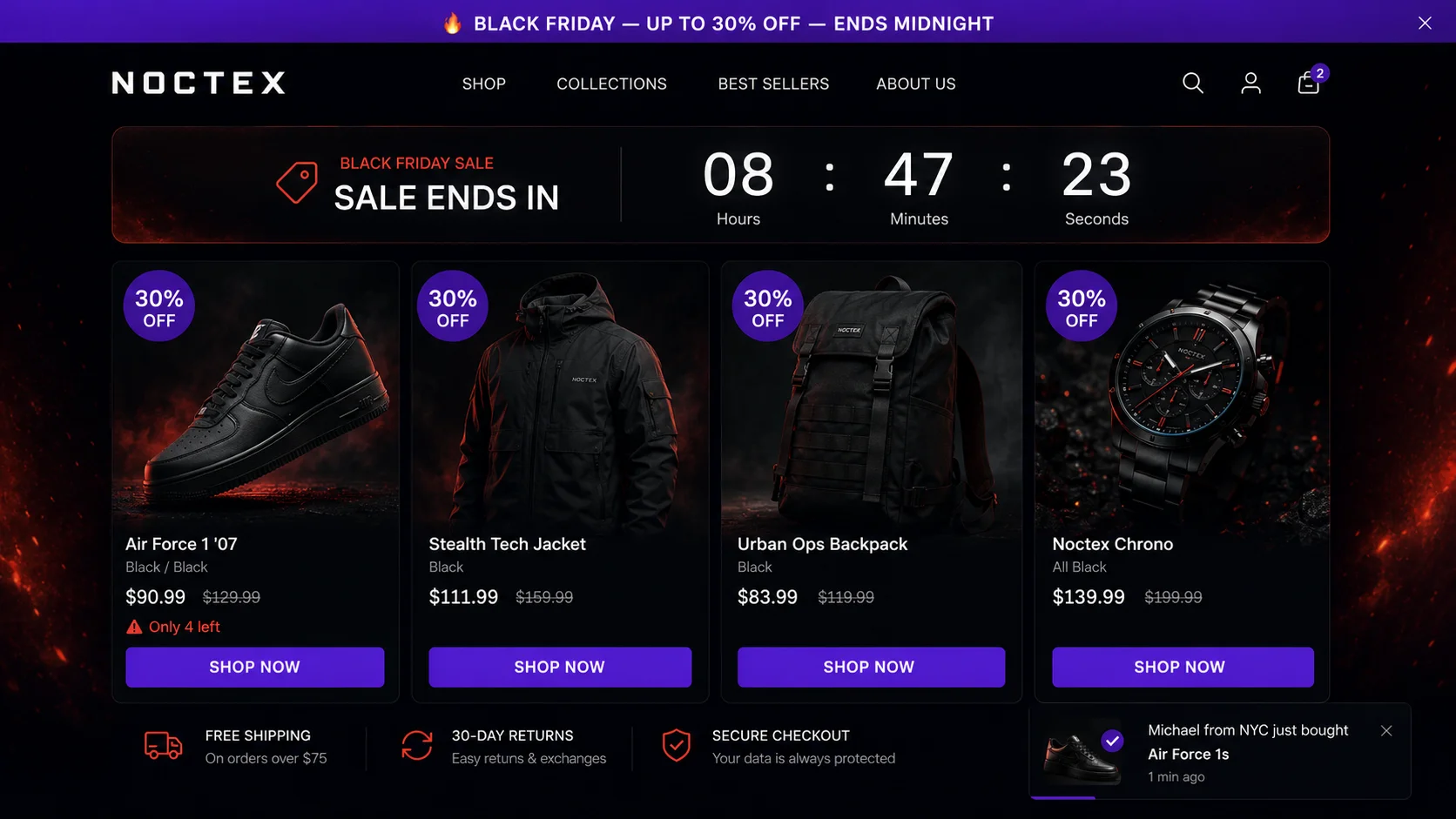
Why BFCM is make-or-break — and why preparation is everything
Shopify's 2025 BFCM report found that merchants made $11.5 billion in sales during the four-day BFCM weekend — up from $9.3 billion the prior year. The average Shopify merchant sees a 2–4× revenue spike during BFCM compared to a typical weekend. For stores with strong preparation, the spike is 5–8×.
The conversion rate gap between prepared and unprepared stores is dramatic. Average Shopify conversion rates during BFCM weekend run 2.5–3.5% — roughly double the year-round average of 1.3–1.4%. But stores that run urgency widgets, countdown timers, SALE badges, and exit intent popups during BFCM see conversion rates of 4–6%. The delta is entirely execution.
BFCM is also the best acquisition event of the year — shoppers are actively looking to buy, ad CPCs are high but intent is higher, and first-time buyers from BFCM have a longer customer lifetime than random-month acquirers. Getting BFCM right compounds: new customers from BFCM become repeat buyers, leave reviews, and refer others.
| Need | Recommended App | Why |
|---|---|---|
| Countdown timers + FOMO | PopBoost | 7 widgets in one app, no code |
| Bundle discounts | EZBundle | Fixed + mix-and-match, Shopify Functions-based |
| Product drops / flash sales | EZDrop | Waitlist + countdown, viral referral |
| Inventory / reorder alerts | EZStock | Real-time low-stock dashboard |
| Email marketing | Klaviyo | Segmentation + flows for BFCM sequences |
| Reviews | Loox or Judge.me | Photo reviews boost conversion on sale days |
| Upsell at checkout | Shopify native or ReConvert | Post-purchase upsell |
Phase 1: Pre-BFCM preparation (6–8 weeks before)
The preparation phase is where most of the BFCM conversion lift is actually earned. Launch day tactics only work if the foundation is right.
1. Build your early access email list
Email subscribers who receive early access to your BFCM sale convert at 2–3× the rate of cold traffic visitors who discover your sale through an ad or organic search. Start collecting early access signups 4–6 weeks before BFCM. A time-delay popup on your homepage — "Get early Black Friday access — be first to know when deals go live" — with no discount required, just an email, will build a warm list that converts heavily on launch day.
Set the popup to fire after 5 seconds with a session cap of once per 24 hours. The message is simple: exclusive access, not a discount. People sign up because they don't want to miss out, not because you've given them something. This list is your highest-intent BFCM audience.
2. Set up your countdown announcement bar
4–6 weeks before BFCM, update your announcement bar to a countdown: "Black Friday sale starts November 28 — deals up to 30% off." This creates anticipation and sets expectations for deal size. Update it weekly as you get closer: "9 days until Black Friday" → "3 days" → "Tomorrow" → "Black Friday is live now."
The announcement bar runs sitewide and is seen by every visitor without any interaction required. It's the lowest-friction, highest-reach signal you can deploy. In PopBoost, configure it under the Announcement Bar widget with your deal messaging and a countdown-style date reference.
3. Plan your discount structure in advance
Decide on your BFCM discount tiers before launch day. Common structures: (a) flat percentage sitewide (20–30% off everything), (b) tiered by category (electronics 30% off, accessories 20% off), (c) deepest discounts on hero products plus smaller discounts on everything else. Whatever structure you choose, commit to it — merchants who adjust discounts mid-BFCM based on performance anxiety often confuse customers and damage trust.
The 20–30% range is the BFCM sweet spot. Under 15% is perceived as weak. Over 40% signals desperation on non-clearance items. Free shipping as an add-on to a percentage discount consistently outperforms the equivalent dollar value in free shipping alone.
4. Stress-test your store speed and checkout
BFCM drives traffic spikes that may be 5–10× your normal load. Shopify handles infrastructure scaling automatically, but your theme, apps, and scripts determine performance at the store layer. In the weeks before BFCM: (a) run a Google PageSpeed Insights test on your homepage and top product pages, (b) check that your checkout flow has no broken apps or scripts using a real test transaction, (c) review your installed apps — disable or remove any app you're not actively using, since each one loads scripts that slow your store.
Get your BFCM conversion stack ready
PopBoost includes all 7 widgets needed for a full BFCM urgency stack — announcement bar, sale countdown timer, SALE product badges, social proof popup, stock countdown, free shipping bar, and exit intent popup. One $19/month install.
Install PopBoost free →14-day free trial · no credit card required · works with all Shopify themes
Phase 2: BFCM launch day (the full urgency stack)
On launch day, every widget in your conversion stack should be configured and tested. Here's each one and how to configure it specifically for BFCM.
5. Countdown timer: make the deadline visible everywhere
Black Friday has a hard deadline — midnight. Your countdown timer should show the exact time remaining until the sale ends. "Sale ends in 11h 47m 23s" on every product page is more powerful than any discount copy because it makes the time pressure concrete and real. Configure the countdown timer to count down to 11:59pm on Black Friday in your store's timezone.
The key rule: use a real deadline. Don't extend the sale beyond what the timer shows — doing so trains customers not to trust your urgency signals for future events. If you plan to extend the sale into the weekend, configure the timer to show the actual end time upfront: "Sale ends Sunday midnight" is fine. It's still a deadline. What damages trust is a timer that expires and then resets.
6. Product badges: SALE on everything discounted
SALE badges appear on product images in collection pages — before a visitor clicks into a product. This has two effects: it signals to browsing visitors that this product is on sale without requiring them to read any copy, and it creates visual urgency in the collection grid (a collection page where 80% of products have SALE badges feels like a real event, not a token markdown).
Configure PopBoost's Product Badge widget to show "SALE" or your specific discount percentage (e.g., "25% OFF") on all discounted products. If you have varying discount tiers, use the specific percentage badge — "20% OFF" and "30% OFF" in the same collection page communicates the depth of your sale more effectively than a uniform "SALE" label.
7. Social proof popup: lean on real purchase velocity
During BFCM, your store will (ideally) be processing orders at a higher rate than normal. Your social proof popup will naturally show more recent activity: "Sarah from Austin just bought the Merino Wool Scarf · 4 minutes ago" during a busy Black Friday session feels very different from the same popup showing a 47-minute-old order on a slow Tuesday. No configuration change is needed — the popup self-upgrades as your order velocity increases.
Do adjust the display window for BFCM: shorten the order recency window from 30 days to 7 days. This ensures the popup only shows BFCM-period orders, not pre-sale purchases, keeping the messaging aligned with the current event. You might also increase the session cap from 3 to 4 toasts per session during BFCM — the higher purchase velocity means each notification is more credible.
8. Stock countdown: surface real scarcity
If you have genuine inventory constraints on popular products, the stock countdown widget ("Only 6 left in stock") becomes significantly more powerful during BFCM when inventory actually does move faster than normal. For products that may sell out, lower the display threshold — show the countdown when stock drops below 20 units instead of your normal 10-unit threshold, to give the urgency signal more time to influence purchasing decisions before the product actually sells out.
For products with unlimited or high inventory, keep the widget off. Showing "Only 847 left in stock" destroys credibility. The stock countdown widget only earns its conversion lift when the number is genuinely low and real.
9. Free shipping bar: raise the threshold to lift AOV
BFCM is the ideal time to raise your free shipping threshold. If your standard free shipping threshold is $50, consider raising it to $75 during BFCM. Here's the logic: (1) average order values are higher during BFCM because shoppers are in buying mode, (2) the higher threshold nudges cart size up further, and (3) you're already running a discount — the free shipping bar gives shoppers a second reason to add one more item beyond the discount itself.
Update the free shipping bar message to reflect the BFCM context: "Add $12 more for free shipping + Black Friday discount applies at checkout." The combination of urgency (BFCM sale) and threshold progress (almost at free shipping) is a powerful add-to-cart driver.
10. Exit intent popup: BFCM-specific last-chance offer
Your standard exit intent popup offer should be updated for BFCM. Rather than a general "10% off your first order," use a BFCM-specific message: "Wait — Black Friday prices end at midnight. Complete your order now." If your sale is already 25% off sitewide, the exit intent popup doesn't need an additional discount — it just needs to remind the visitor that the sale is time-limited and they have items in their cart right now.
If your BFCM sale doesn't cover everything, or if a visitor is on a non-discounted product page, the exit intent can serve a different role: "This item isn't on sale, but here's 10% off if you order today." This catches visitors who were browsing non-sale inventory and gives them a reason to buy anyway.
11. Announcement bar: live BFCM messaging
Once BFCM launches, update your announcement bar from "coming soon" to the active sale message: "🔥 Black Friday is live — up to 30% off + free shipping over $75." Keep it prominent and updated. During the last 6–8 hours of the sale, update it to: "⏰ Final hours — Black Friday sale ends at midnight tonight." This final-hours messaging creates a wave of urgency for visitors who arrive late in the day.
Phase 3: Cyber Monday (the continuation)
12. Flip to Cyber Monday without stopping momentum
The transition from Black Friday to Cyber Monday is an opportunity that most stores waste. Rather than letting the momentum die overnight on Saturday, keep the sale rolling — but change the framing. Update your announcement bar at midnight on Friday: "Cyber Monday is live — deals continue through Monday midnight." Update the countdown timer to count down to Monday at 11:59pm.
Cyber Monday has historically been slightly stronger for Shopify stores than Black Friday itself (more desktop traffic, higher AOV, more intentional purchasing vs. impulse buying). Keeping your full urgency stack running through Cyber Monday — same product badges, same social proof popups, updated countdown timer — captures this second wave without any additional setup.
After Cyber Monday: reset all widgets to their standard configurations. Remove SALE badges from products that are back at full price. Update the announcement bar to your standard sitewide message. Don't leave a "Black Friday sale" banner running in December — it signals that the sale was fake urgency, which hurts trust for your next event.
BFCM benchmarks to track
Track these metrics before and during BFCM to understand what's working:
- Conversion rate — target 2.5–3.5% for an average store; 4%+ if your urgency stack is strong. Compare vs. your prior 30-day baseline, not vs. last BFCM (too much time has passed for a clean comparison).
- Average order value — BFCM shoppers typically spend 15–25% more than regular customers because they're in buying mode. If your AOV during BFCM is lower than normal, something is suppressing add-to-cart behavior — check your free shipping bar configuration.
- Exit intent conversion rate — what % of exit intent triggers resulted in a completed purchase. Target 4–7% during BFCM (higher than your standard 3–5% because visitor intent is higher).
- Social proof popup click-through rate — the % of popup impressions that result in a click to the featured product. If this drops during BFCM, it may be because your popup is showing pre-sale orders with lower prices while visitors are browsing BFCM sale prices.
- Email list growth rate — how many new subscribers you captured per day during the pre-BFCM period. This number compounds: every subscriber from this year's BFCM build becomes a higher-converting audience for next year.
Common BFCM mistakes that kill conversion
Fake countdown timers. A timer that expires and then resets to 24 hours is a trust-destroying pattern that sophisticated shoppers recognize immediately. BFCM shoppers are often experienced buyers who've seen this tactic. Use real deadlines — Black Friday ends at midnight; your timer should count down to midnight.
No urgency outside the discount. A 25% discount alone is not an urgency signal. Without a visible deadline (countdown timer), visible scarcity (stock countdown), or social proof (others are buying right now), visitors still have no reason to act immediately vs. "coming back later." The conversion lift from discounts alone is about 1.5–2×; the lift from discounts plus urgency stack is 3–5×.
Slow store during peak traffic. A 1-second delay in page load time reduces conversion rates by 7% (Akamai). During BFCM when paid traffic costs are at peak, a slow store is burning ad spend on visitors who leave before your page even loads. Do your speed audit in October, not the night before.
Ignoring mobile. 60–70% of BFCM traffic is mobile. If your popup covers the Add to Cart button on mobile, or your countdown timer doesn't render correctly on small screens, you're leaving a majority of your BFCM revenue on the table. Test every widget on a real device before launch day.
Running 5 separate apps for BFCM widgets. Many merchants install a countdown timer app, a SALE badge app, a social proof app, and an exit intent app separately for BFCM — four additional JavaScript bundles loading on every page during your highest-traffic weekend of the year. This is peak-traffic performance sabotage. A single Theme App Extension like PopBoost handles all seven widgets with one script.
Frequently asked questions about Black Friday on Shopify
When should I start preparing my Shopify store for Black Friday?
Start 6–8 weeks before Black Friday — mid-October for a late-November event. This window covers building your early access email list, setting up and testing all widgets, planning your discount structure, and running speed audits. Stores that complete their BFCM setup 4+ weeks in advance consistently outperform stores that configure everything 48 hours before launch.
What is the average conversion rate for Shopify stores on Black Friday?
Shopify's 2025 data shows average BFCM conversion rates of 2.5–3.5%, compared to the year-round baseline of 1.3–1.4%. Stores running a full urgency stack (countdown timer, SALE badges, social proof, stock scarcity, exit intent) achieve 4–6%. The lift is driven by the combination of high buyer intent (people are actively looking to spend) and well-configured urgency signals that close hesitating visitors.
Should I use a countdown timer for Black Friday on Shopify?
Yes — a countdown timer is one of the highest-ROI single changes you can make for BFCM. BFCM already has a hard deadline; the timer makes it visible and concrete. "Sale ends in 8h 14m" removes any ambiguity and converts visitors who might otherwise defer to "I'll come back tomorrow." The one rule: use a real deadline. Don't reset the timer when it expires — that destroys trust for all future urgency signals.
How do I add a SALE badge to my products for Black Friday on Shopify?
Using PopBoost's Product Badge widget: install PopBoost, navigate to Product Badge in the admin, select the SALE or percentage discount badge style, and configure which products or collections display it. The badge overlays on product images in collection pages and product pages — no code required. Activate 24–48 hours before launch so badges appear in organic search results before the sale goes live.
What discount percentage works best for Black Friday on Shopify?
20–30% is the BFCM sweet spot. Below 15% is perceived as weak. Above 40% can signal desperation on non-clearance items. "25% off + free shipping" consistently outperforms "30% off" even when the dollar value is equivalent, because shoppers perceive free shipping as disproportionately valuable. For your top-selling products, consider 30–35% — deeper discounts on hero products drive the most traffic and reviews.
For the complete countdown timer configuration guide, see Shopify countdown timer: how to create urgency that converts. For SALE and LOW STOCK badge setup, see the Shopify product badges guide. If you want a store audit showing exactly where your conversion funnel is leaking before BFCM, RoastWeb runs an AI-powered analysis in minutes and surfaces your highest-impact fixes.
