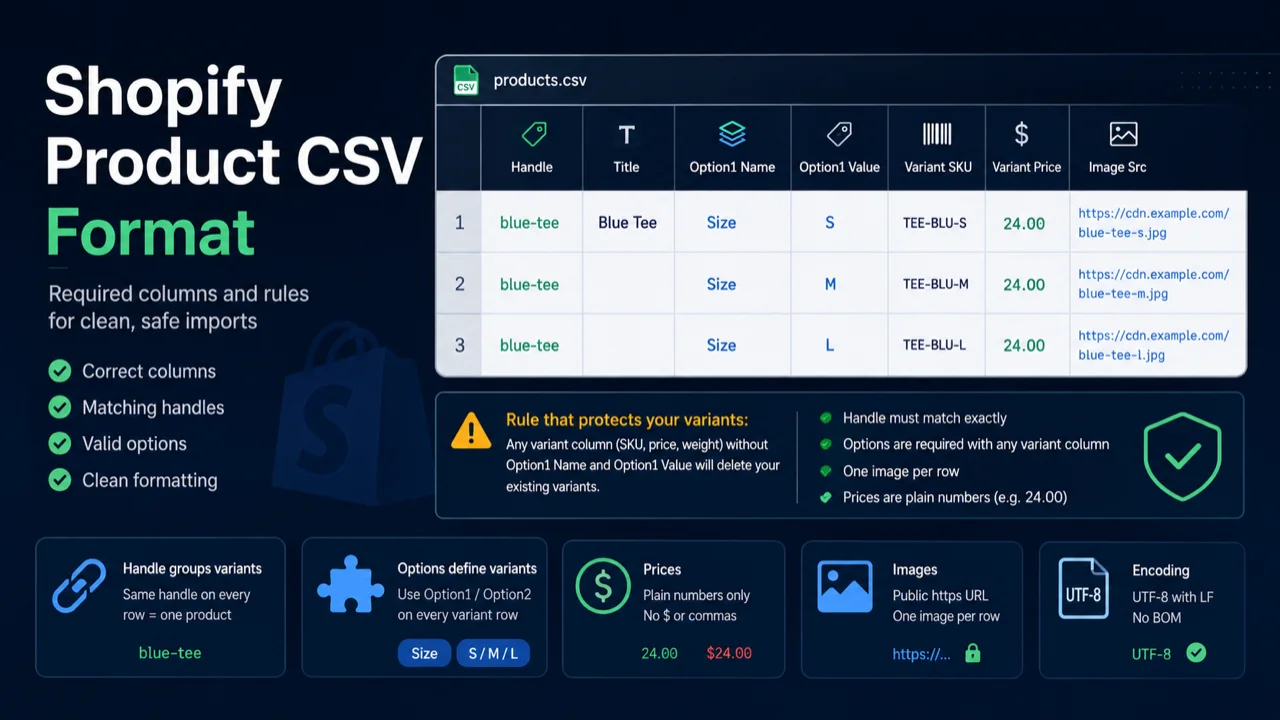
Short answer: a Shopify product CSV needs a Title to create a product and a Handle to add variants. If the file includes any variant column (SKU, price, weight), it must also include Option1 Name and Option1 Value on every row. Prices are plain numbers (9.99, no symbol), images are public https URLs, and the file is UTF-8 with LF line endings. The safest way to get all of this right is to export an existing product from Shopify and edit that.
The columns that matter
A Shopify export has dozens of columns, but only a few decide whether the import works. These are the ones to understand.
| Column | Required? | What it does |
|---|---|---|
Handle | For variants | The product's unique ID. Groups variant rows into one product. Must match exactly across a product's rows. |
Title | For new products | The product name. Only needs to appear on the first row of a product. |
Option1 Name / Option1 Value | With any variant column | Define the variants (e.g. Size / Small). Missing these while a SKU or Weight column is present deletes existing variants. |
Variant SKU | No | The variant's SKU. Safe to include only when the Option columns are present. |
Variant Price | No | Plain number, no currency symbol. |
Image Src | No | Public https URL, one image per row. Shopify downloads it during import. |
How Handle groups variants
Shopify uses the handle to know which rows belong to the same product. A product with three sizes is three rows, and all three carry the same handle. Only the first row repeats product-level fields (Title, Body, Vendor, Tags); the variant rows below it leave those blank and fill in the option and variant columns.
A handle is lowercase letters, numbers, and dashes, with no spaces. If a variant row has a blank handle or a slightly different one, Shopify treats it as a separate product, which splits your product apart. If you leave the handle empty on a new product, Shopify generates one from the Title (so "Blue Tee" becomes blue-tee).
Options: the part that protects your variants
Each variant is a combination of option values. A shirt in three sizes uses Option1 Name = Size with values S, M, L. A shirt in sizes and colors adds Option2 Name = Color. A single-variant product still needs options in the file: the convention is Option1 Name = Title and Option1 Value = Default Title.
Fill the option columns on every variant row, not just the first. This is the single most important habit for safe imports, because it's what keeps Shopify from collapsing your variants into one.
Formatting prices, images, and text
Prices
Plain number only. Write 24.00, not $24.00 or 1,299.00. A currency symbol or thousands separator makes the price import as 0.00 or fail. Leave the compare-at price blank rather than zero if there's no sale.
Images
Image Src must be a public https URL that Shopify can download without a login. Use one row per image when a product has several. Filenames can't end in _thumb, _small, or _medium, which Shopify rejects. Image Position controls the display order.
Encoding
Save as UTF-8 with LF line endings. A UTF-8 BOM can turn your first header into an unrecognized column, so Shopify misses the Handle column and treats every row as a new product. Opening and re-saving in Excel can also mangle long SKUs into scientific notation like 7.05E+11, which loses the real value.
Not sure your file follows these rules?
Our free Shopify Product CSV Checker reads your file in the browser and flags missing option columns, mismatched handles, bad prices, unreadable images, and encoding problems, ranked worst-first with fixes. Nothing is uploaded, no signup.
Check my CSV free →For the exact column definitions from the source, Shopify's CSV documentation lists every field. When you're ready to import for real, our guide on checking a CSV before import covers the pre-flight pass, and if a specific error is blocking you, see how to fix common Shopify CSV import errors. Migrating a full catalog from another system? The Stocky to Shopify migration guide puts all of this in order.
Frequently asked questions
What columns are required? Title to create a product, Handle to add variants, and Option1 Name plus Option1 Value whenever any variant column is present. The rest are optional.
How does Handle work? It's the product's unique ID and must match exactly across all of a product's variant rows so they group into one product.
How do I format prices? Plain numbers, no currency symbol or thousands separator. Use 9.99.
What encoding should I use? UTF-8 with LF line endings, and no BOM.