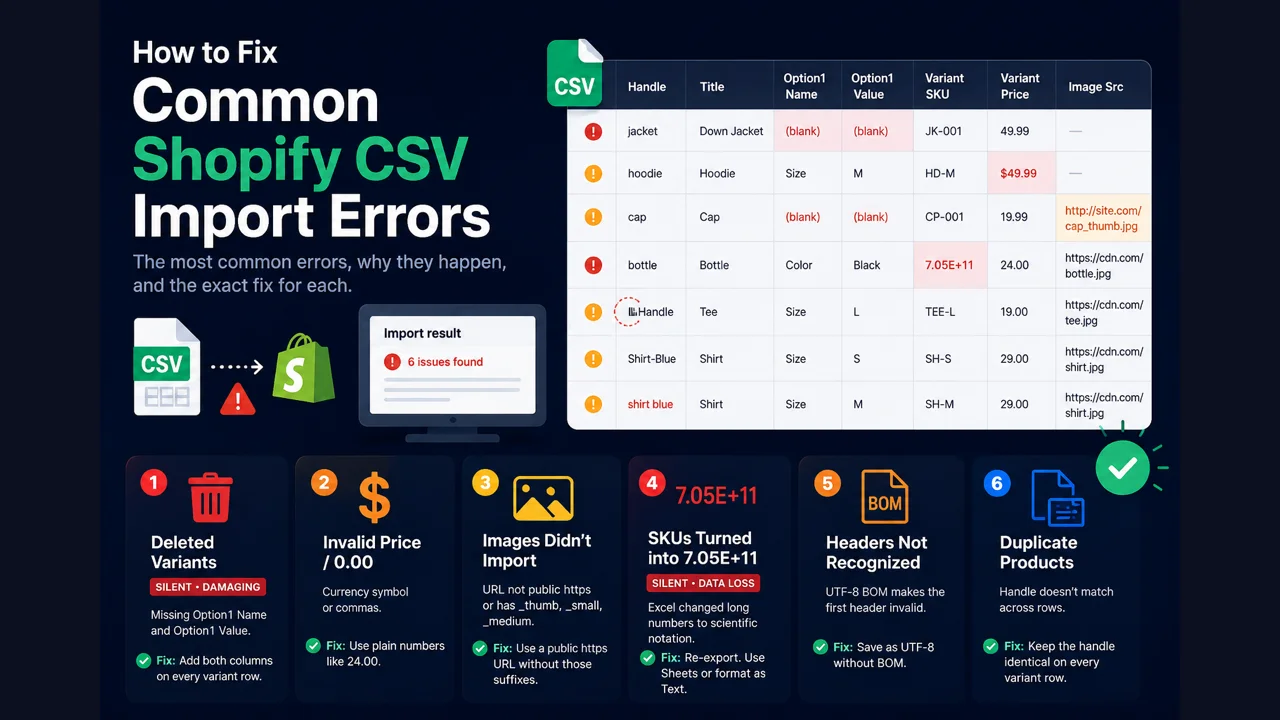
Short answer: the common Shopify CSV import errors are deleted variants (add Option1 Name and Value), invalid price (remove the currency symbol), images not importing (use a public https URL with no _thumb/_small/_medium), SKUs mangled into scientific notation (format the column as text), unrecognized headers (remove the UTF-8 BOM), and duplicate products (match the handle across rows). The most dangerous one shows no error at all.
The import deleted my variants
You updated a price or SKU by CSV and your variants disappeared, with no error shown. This happens when the file has a variant column (SKU or Weight) but not both Option1 Name and Option1 Value. Shopify rebuilds the product with one default variant and deletes the rest.
Fix: include Option1 Name and Option1 Value on every variant row, alongside whatever you're updating. Export the product first so those columns are already present. Full detail in why a CSV import deletes your variants.
Invalid price / price imported as 0.00
Shopify rejected a row for an invalid price, or the price came in as 0.00. The value has a currency symbol or a thousands separator.
Fix: write prices as plain numbers, 24.00 not $24.00 or 1,299. Strip symbols and commas from the Variant Price and Compare At Price columns. Leave compare-at blank when there's no sale, rather than entering 0.
Images didn't import
The products imported but with no images, and no error appeared. Shopify downloads each Image Src during import, so it needs a URL it can actually reach.
Fix: use a public https URL that doesn't require a login, one image per row. Remove any filename ending in _thumb, _small, or _medium, which Shopify blocks. If your images sit behind a login or on http, host them somewhere public first.
SKUs turned into 7.05E+11
Long numeric SKUs show as scientific notation like 7.05E+11. This is Excel converting the number and permanently losing the real digits, so the import writes the wrong SKU and breaks inventory and barcode matching.
Fix: the mangled value can't be recovered, so re-export the original. Open the file in Google Sheets instead of Excel, or format the SKU column as Text before opening it in Excel.
Shopify doesn't recognize my headers
Shopify says a required column is missing even though it's clearly in your file, or it treats every row as a new product. A UTF-8 byte-order mark (BOM) at the start of the file attaches invisible characters to the first header, so Handle becomes an unrecognized column.
Fix: save the file as UTF-8 without a BOM. Most editors have a "UTF-8" option separate from "UTF-8 with BOM"; pick the former. Google Sheets exports without a BOM by default.
The import created duplicate products
Instead of updating one product, the import split it into several. The handle didn't match across the product's rows, so Shopify treated each mismatched row as its own product.
Fix: make the handle identical on every variant row of a product, lowercase, no spaces. See the CSV format guide for the handle rules.
Catch these before you import
Our free Shopify Product CSV Checker reads your file in the browser and flags every error above, ranked worst-first, with the fix for each. It catches the silent ones (deleted variants, mangled SKUs) that Shopify won't warn you about. Nothing is uploaded, no signup.
Check my CSV free →For the official list of import behaviors, Shopify documents them in its common import issues help page. When your file is clean and you're ready, our guide on checking a CSV before import covers the full pre-flight. And once products are in, EZStock keeps inventory, reorder points, and purchase orders accurate on top of them.
Frequently asked questions
Why is my price invalid on import? It has a currency symbol or thousands separator. Use a plain number like 9.99.
Why didn't my images import? The URL isn't a public https link, or the filename ends in _thumb/_small/_medium, which Shopify blocks.
Why do my SKUs read 7.05E+11? Excel mangled them into scientific notation. Re-export and open in Google Sheets, or format the column as Text.
Why did the import make duplicates? The handle didn't match across a product's rows. Make it identical on every row.