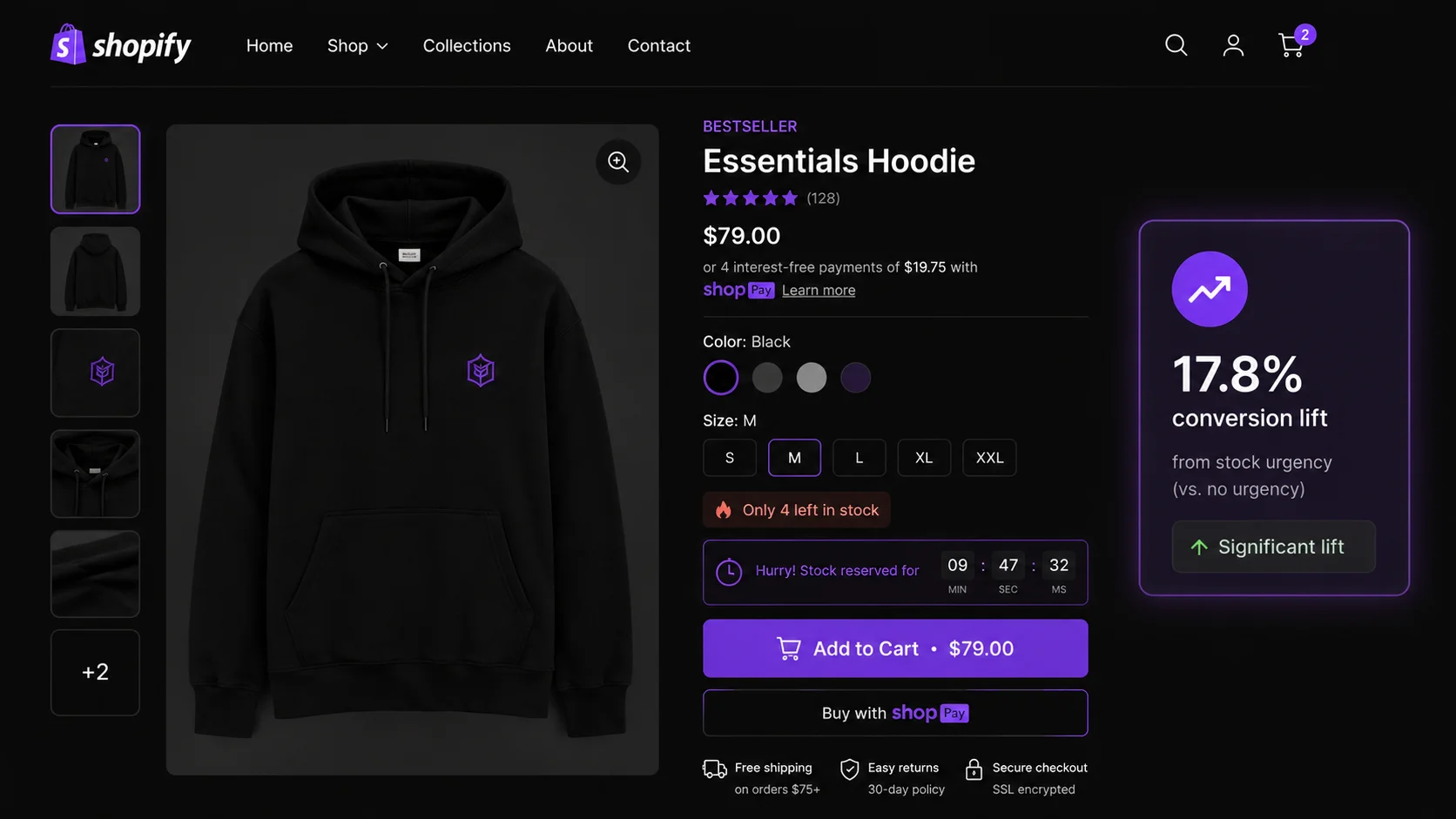
- A low stock counter reads real Shopify inventory and shows it below a threshold you configure (5–10 units recommended).
- Real inventory countdowns lifted conversion by up to 17.8% in high-traffic stores (CXL Institute).
- Percentage framing ("8% remaining") outperforms number framing for larger inventories; number framing wins under 10 units.
- Fake scarcity converts once but destroys repeat purchase rates — the FTC classifies it as a dark pattern.
- Combining stock countdown + countdown timer + social proof popup produces additive conversion gains.
What is a Shopify low stock counter — and what does it actually do?
A Shopify low stock counter is a product page widget that pulls your real inventory quantity from Shopify's inventory API and displays it when the count drops below a merchant-configured threshold. When a customer views a product with 6 units remaining and you've set a threshold of 10, they see "Only 6 left in stock." When stock is at 15 — above your threshold — the widget stays hidden.
This is different from a generic urgency banner. A low stock counter is dynamic: it fires on the right products at the right time, and the number it shows reflects your actual warehouse position. The widget typically lives below the variant selector and above the Add to Cart button — the highest-intent real estate on a product page.
Shopify does not include this widget natively. Out of the box, Shopify tracks inventory and prevents oversells, but it doesn't surface inventory counts to shoppers. A third-party app like PopBoost reads that inventory data and renders the stock countdown as a Theme App Extension block, requiring no code edits to your theme.
Why low stock badges convert — what the data says
The mechanism behind low stock conversion is loss aversion, not greed. Kahneman and Tversky's Prospect Theory (1979, still the most-cited behavioral economics paper) established that losses feel roughly twice as painful as equivalent gains feel pleasurable. "Only 3 left" activates the fear of missing out — of losing the option to buy — more than any positive framing of the same product ever could.
But the framing of the number matters as much as showing it at all. A 2023 study published in PMC examining scarcity messaging in high-volume ticket markets found that percentage framing ("8% of stock remaining") created stronger perceived scarcity than absolute number framing ("80 units left") even when both described identical inventory levels. The brain processes "8%" as nearly depleted because it anchors to 100% as the reference point. The absolute number "80" feels large in isolation.
The practical implication: for products with genuine low stock in the single digits, show the number ("Only 4 left"). For larger inventories where you want to signal relative depletion, show the percentage ("Only 12% of stock remaining"). PopBoost's stock countdown widget supports both framing modes.
When a shopper sees "Only 2 left," the amygdala registers a potential loss before the prefrontal cortex can evaluate it rationally. This pre-cognitive processing is why urgency signals shorten decision cycles — the brain starts the emotional response before any deliberate analysis occurs. For a deeper look at the behavioral science, see our urgency marketing psychology guide.
Honest vs fake low stock signals — where the ethics line is
The conversion data for low stock counters assumes the number is real. When it isn't, the math inverts.
The FTC's 2022 "Bringing Dark Patterns to Light" report identified fake scarcity as an explicitly deceptive practice — showing "Only 2 left" on a product with 400 units in stock is the type of manipulation the report flagged for potential enforcement action. Beyond legal exposure, the economic case against fake scarcity is equally clear: Growth Suite's research on repeat purchase behavior found that customers who buy under manufactured urgency have near-zero repeat purchase rates. They feel deceived when they realize the "limited stock" was always available, and they don't return.
The contrast with honest urgency is stark. A real "Only 5 left" that fires because you genuinely have 5 units left converts the customer and builds trust — they got something before it sold out. That experience creates a brand story they'll repeat to others and come back for.
The rule is simple: your low stock counter should only fire when your inventory number is real and your threshold is calibrated to your actual sales velocity. If you sell 1 unit per month, a threshold of 50 is not scarcity — it's deception. If you sell 20 units per day, a threshold of 30 represents 1.5 days of stock and is genuinely urgent. See the Shopify conversion rate optimization guide for how honest urgency fits into a full CRO strategy.
How to configure PopBoost's stock countdown widget in 5 steps
PopBoost's Stock Countdown widget reads your live Shopify inventory and renders a "Only X left" counter on product pages. Setup takes under 10 minutes.
Install PopBoost and go to Widgets → Stock Countdown
Install PopBoost from the Shopify App Store. In the PopBoost admin dashboard, click the Stock Countdown widget card and toggle it to active. The widget connects to your Shopify inventory data automatically — no manual configuration of product IDs or inventory feeds is required.
Set your display threshold (recommended: 5–10 units)
Enter the inventory quantity at which the counter becomes visible. For most stores, 5–10 units is the right range. Calibrate to your sales velocity: take your average daily units sold for the product and multiply by 2–3 days. That number is your threshold — it represents real urgency without being so close to zero that the badge looks like the product is about to be discontinued permanently.
Choose your framing: number or percentage
Select between two copy formats. "Only [n] left" is direct number framing — best for single-digit inventory where the absolute count creates impact. "Only [n] remaining — order soon" adds a soft urgency cue without alarm. For larger inventories (above 10 units), enable percentage framing if your store carries high-volume SKUs where "Only 8% of stock remaining" will read as more scarce than "Only 80 units left."
Set widget position: below variant selector, above Add to Cart
In the widget position settings, select the placement between the variant selector (size/color) and the Add to Cart button. This is the highest-intent location on the product page — the customer has already selected their variant and is about to act. Seeing the stock countdown at this exact moment creates maximum urgency at peak purchase intent. Avoid placing it in the product description or below the Add to Cart button, where it competes with less urgent content.
Enable auto-hide when inventory = 0
Toggle on the auto-hide setting so the widget disappears when inventory reaches zero. Without this, customers will see "Only 0 left" — a broken state that reads as an error rather than urgency and may prevent some customers from adding an out-of-stock product to their cart at all. When auto-hide is on, the widget simply disappears at zero and Shopify's own out-of-stock handling (greyed-out Add to Cart, sold-out badge) takes over cleanly.
Add a real low stock counter to your Shopify store
PopBoost's Stock Countdown widget reads your live inventory and shows "Only X left" exactly when it matters. Free plan available. Pro at $19/month unlocks all 7 widgets — 14-day free trial, no credit card required.
Install PopBoost free →Free plan available · 14-day Pro trial · no credit card required · works with all Shopify themes
Percentage vs number framing: when to use each
The 2023 PMC study on scarcity framing gives us a clear decision rule based on absolute inventory level:
| Inventory Level | Recommended Framing | Example Copy |
|---|---|---|
| 1–9 units | Number framing | Only 4 left in stock |
| 10–50 units | Either (test both) | Only 12 left / Only 18% remaining |
| 50+ units | Percentage framing | Only 8% of stock remaining |
The reason number framing wins at low counts: when someone sees "Only 4 left," four is a viscerally small number. The customer can picture 4 individual items. Percentage framing at low counts produces odd copy — "Only 0.4% remaining" is technically accurate but reads as an abstraction that fails to create emotional impact.
Conversely, when your stock position is "80 out of 1,000 units," the number 80 feels large. Saying "Only 8% remaining" anchors to the full 100% and makes depletion feel imminent. The percentage creates the right psychological reference frame when the absolute count alone wouldn't.
For a broader look at how scarcity badge design fits into product page merchandising, see the product badges guide.
How to combine a low stock counter with countdown timer and social proof for maximum effect
A low stock counter addresses one dimension of buying hesitation: "is there enough of this left for me?" A countdown timer addresses a different dimension: "how long do I have to decide?" Social proof popups address a third: "are other people buying this?" Each widget operates on a distinct psychological lever, and when they work together on the same product page, the conversion gains are additive rather than redundant.
Stock Countdown (below variant selector) — "Only 5 left in stock" — activates inventory scarcity and loss aversion.
Countdown Timer (above or below Add to Cart) — "Sale ends in 2:14:33" — activates time pressure tied to a real promotion end.
Social Proof Popup (bottom corner) — "Someone in Austin just bought this" — activates social validation and demand signals.
Together, these three signals confirm: the product is scarce, the price window is closing, and other people want it. Each removes a different objection without duplicating the others.
In PopBoost's Pro plan, all three widgets are active simultaneously and configured independently. You can show the stock countdown only on products below your inventory threshold, the countdown timer only during active sales, and the social proof popup sitewide or on specific collections. The widgets don't interfere with each other's placement or fire at the same time in a way that feels overwhelming — each occupies a distinct visual zone on the product page.
This combination is the full FOMO marketing stack applied to a single product page. Used on your highest-margin or highest-demand SKUs during peak traffic periods, it represents the most efficient conversion lever available without touching your pricing or offers.
Frequently asked questions about Shopify low stock counters
Does Shopify have a built-in low stock badge?
No. Shopify's native platform does not include a "Only X left" product page widget. Shopify tracks your inventory internally and can prevent oversells, but it doesn't surface inventory counts to shoppers. To show a low stock counter, you need a third-party app like PopBoost that reads your Shopify inventory data and renders it on the product page as a Theme App Extension block.
What threshold should I set for the low stock counter?
Set the threshold at 5–10 units for most stores. The right number depends on your sales velocity: take your average daily unit sales for the product and multiply by 2–3. If you sell 3 units per day, a threshold of 8 represents 2–3 days of stock — genuinely urgent. If you sell 1 unit per month, a threshold of 8 represents 8 months of stock and doesn't qualify as scarcity. Match your threshold to reality.
Does fake scarcity work on Shopify?
Fake scarcity generates a one-time conversion but destroys repeat purchase rates. Growth Suite research showed repeat purchases from customers acquired under manufactured urgency are 68% lower than those from standard acquisition. The FTC also identified false inventory claims as a dark pattern subject to enforcement. Honest low stock counters reading from real inventory convert without the legal exposure or trust damage.
How do I show "Only X left" on Shopify?
Install PopBoost, go to Widgets → Stock Countdown, set your display threshold, choose your copy framing, position the widget below the variant selector and above Add to Cart, and enable auto-hide at zero. The widget reads your live Shopify inventory and shows the counter automatically on any product that falls below your threshold. No theme code edits required.
What is the difference between a stock countdown and a product badge on Shopify?
A stock countdown is a text widget on the product page showing the specific remaining count — "Only 4 left in stock" — placed near the Add to Cart button to close decisions. A product badge is a visual overlay label (e.g., "LOW STOCK") on product images in collection pages, designed to direct attention during browsing. Both communicate scarcity but at different funnel stages. PopBoost includes both and they work best layered together: the badge captures attention on the collection page, the stock countdown closes the decision on the product page.
Low stock counters are the most conversion-efficient widget on a product page when the inventory data behind them is accurate. For honest urgency at scale, pair PopBoost's stock countdown with real inventory tracking — and see how the full signal stack performs across your store's highest-demand SKUs.
