Two Different "Large Catalog" Problems
When people say a large Shopify catalog is "slow," they usually mean one of two very different things, and it helps to separate them before you go looking for a fix.
Storefront speed is what your customers experience: collection pages with thousands of products, heavy filtering, large images. That is a theme and page-rendering problem. It is real, but it is solved in your theme, with better collection filtering, image handling, and rendering, not by an inventory app.
Backend catalog operations is what you experience inside Shopify admin: an inventory app trying to read every product, variant, and sales figure so it can forecast demand, flag low stock, and build purchase orders. That is the problem this article is about. It lives entirely in the admin side, behind the scenes, and has nothing to do with what your customers load.
Why Inventory Apps Slow Down at Scale
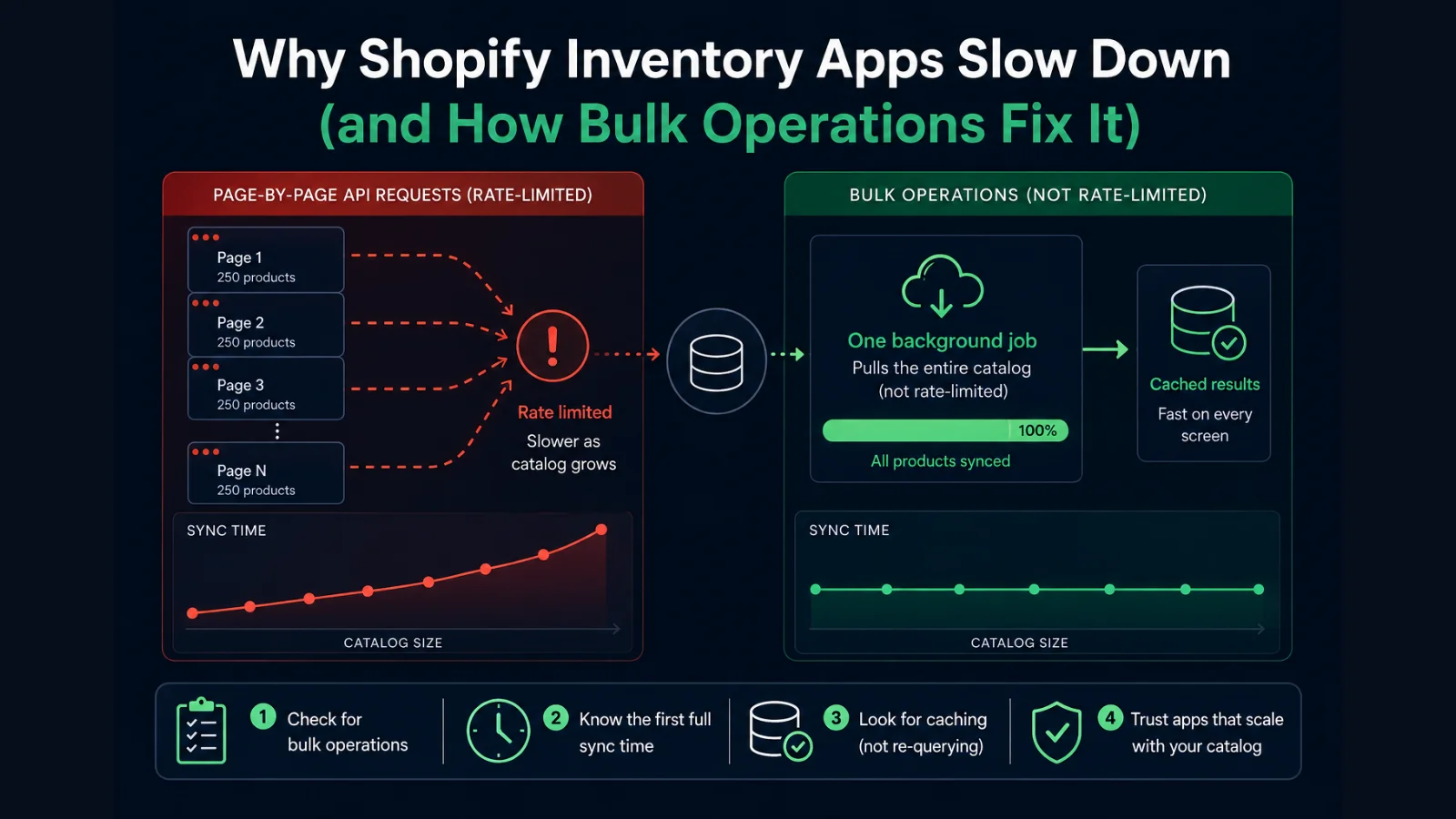
In one line: A Shopify inventory app slows down on a large catalog when it reads products page-by-page through the rate-limited Admin API. An app that reads the catalog with a single bulk operation is not throttled by catalog size, because a bulk operation runs as one background job outside the rate limit.
Every inventory app has to read your catalog out of Shopify to do anything useful. The difference between a fast app and a slow one is how it reads.
Shopify's Admin API is rate-limited. Each store gets a budget of request "points," and once an app spends them, Shopify makes it wait before it can ask for more. This budget is generous for small requests and quickly becomes the bottleneck for large ones.
The common approach is to page through the catalog: ask for 50 or 250 products, then the next batch, then the next, until the whole catalog is read. On 300 products that is a few quick calls. On 10,000 products it is hundreds of calls, and somewhere in the middle the app runs out of its request budget and starts waiting between pages. That is when the first sync goes from seconds to many minutes, and why a store that felt fine at 500 SKUs feels broken at 10,000.
It gets worse if the app re-reads the whole catalog every time you open a screen, or queries the live API on every page view instead of storing what it already fetched. Now the throttling is not a one-time setup cost. It is on every interaction.
The Faster Way: Bulk Operations
Shopify has a purpose-built answer for reading large amounts of data: bulk operations. Instead of paging through the catalog request by request, an app submits one query ("give me every product, variant, and inventory level") and Shopify runs it as a single background job. When it finishes, the app downloads the whole result as one file.
Two things make this fundamentally different from pagination:
- Bulk operations are not counted against the standard rate limit. The whole catalog comes back in one job, so there is no death-by-a-thousand-throttled-calls. A 10,000-product catalog uses the same mechanism as a 300-product one. It just takes a little longer to finish.
- Downloading the finished result has no rate-limit cost either. The app pulls one file, not thousands of paginated responses.
The practical effect is that sync time scales gently with catalog size instead of hitting a wall. A large catalog's first scan takes a few minutes to complete in the background rather than seconds, but it completes, and it does not degrade the way pagination does as you add more products.
What to Check Before Trusting an App With a Big Catalog
You do not need to read an app's source code to tell whether it will hold up. Four questions get you most of the way, and you can answer them from the app's docs, a quick trial on your real store, or by asking their support.
Does it use bulk operations, or paginate the API?
This is the core fork. Bulk operations scale; pagination throttles. Good apps will happily tell you they use bulk operations, because it is a selling point on large stores.
How long is the first full sync on a catalog your size?
A few minutes in the background is normal and fine. Hours, repeated timeouts, or a spinner that never resolves is the warning sign. Test on your actual store, not a demo store with 20 products.
Does it update incrementally, or re-scan everything?
After the first sync, a well-built app listens for Shopify's inventory webhooks and patches just the item that changed. An app that re-scans your entire catalog to notice one stock change will feel slow forever.
Does it cache, or read live on every screen?
Reading from a stored copy keeps everyday screens instant regardless of catalog size. Hitting the live API on every page view puts you back inside the rate limit every time you click.
An app that paginates, re-scans, and reads live will slow down as your catalog grows. An app that uses bulk operations, incremental webhooks, and a cache will not. The catalog size is the same either way. The architecture is what decides whether it works.
How EZStock Is Built for This
EZStock was built around the four points above, because a large catalog is exactly where an inventory app either earns its place or gets uninstalled.
Bulk operations for the catalog and sales history
Both the full catalog scan and the sales-velocity scan run as Shopify bulk operations, one background job each, outside the rate limit. The mechanism is the same at 500 SKUs or several thousand, so it does not throttle as your catalog grows.
Results are cached
Once a scan finishes, EZStock stores the catalog, velocity, and inventory data in its own database and reads from there. Your day-to-day screens (the low-stock dashboard, the product list, purchase orders) read the cache, not the live API, so they stay fast at any catalog size.
Inventory updates incrementally
After the first sync, EZStock listens for Shopify's inventory-level webhook and patches just the variant that changed. It does not re-scan your whole catalog to notice a single stock movement.
On a large catalog, the first full scan takes a few minutes to complete in the background. EZStock shows a "preparing" state while it runs and lets you keep working with what you already track, then fills in the rest when the scan lands. That first-sync time is the honest trade-off for reading a big catalog properly, and it happens once, not on every screen.
This matters most for merchants coming off Stocky. Stocky handled purchase orders, supplier records, and demand forecasting for a lot of large-catalog stores, and its shutdown left those merchants looking for a tool that can read the same catalog without choking. EZStock was built as a Stocky alternative for exactly that workflow: it covers purchase orders, supplier lead times and costs, reorder points, and forecasting, and the bulk-operation architecture above is what lets it do that on a catalog with thousands of variants rather than only a small store.
Where EZStock fits, honestly: it is built for small-to-large Shopify stores, from a few dozen products up through catalogs with many thousands of variants. The very largest Shopify Plus catalogs, the ones with hundreds of thousands of variants and their own operations teams, are not the target today. If that is you, a dedicated enterprise inventory platform is the right call. If you are a growing store whose catalog outgrew the simple apps, that is exactly who EZStock is for.
Try EZStock on your catalog
Built to read large Shopify catalogs with bulk operations, so it does not throttle as you grow. Free to install, 14-day trial on paid plans, no credit card required.
Install EZStock Free →Frequently Asked Questions
Why does my Shopify inventory app get slow on a large catalog?
Most inventory apps read your products one page at a time through Shopify's Admin API, which is rate-limited. On a catalog of thousands of products that means hundreds of API calls, and once the app hits the rate limit Shopify makes it wait between requests. The first full sync crawls, and any screen that reads live from the API feels sluggish. Apps built on Shopify's bulk operations avoid this because a bulk operation runs as one background job that is not rate-limited.
Does EZStock work with 10,000 products?
Yes. EZStock reads your catalog and sales history using Shopify bulk operations, which run as a single background job outside the API rate limit, so the approach does not slow down as the catalog grows. On a large catalog the first full scan takes a few minutes to complete in the background, then results are cached and everyday screens stay fast. EZStock is built for small-to-large Shopify stores; the very largest Plus catalogs with hundreds of thousands of variants are not the target today.
What is a Shopify bulk operation?
A bulk operation is a Shopify feature that lets an app request a large amount of data, like every product and variant in a store, as a single asynchronous job. Shopify runs the query in the background and returns the result as a downloadable file. Unlike normal paginated API calls, bulk operations are not counted against the standard rate limit, so they handle very large catalogs without throttling. Downloading the finished result also has no rate-limit cost.
Is EZStock a good Stocky alternative for a large catalog?
Yes. EZStock covers the core Stocky workflow (purchase orders, supplier records with lead times and costs, reorder points, and demand forecasting) and reads your catalog with Shopify bulk operations, so it handles the large catalogs many Stocky users ran without slowing down. There is no data import from Stocky; you add suppliers and link products with cost prices and reorder points, and the app pulls live product, inventory, and sales data from Shopify. See the full Stocky alternatives comparison for feature and pricing details.
What should I check before trusting an inventory app with a big catalog?
Four things: whether it reads your catalog with bulk operations or paginates the API, how long the first full sync takes, whether it updates inventory incrementally through webhooks or re-scans the whole catalog each time, and whether it caches results or queries the live API on every screen. An app that paginates, re-scans, and reads live will slow down as your catalog grows. An app that uses bulk operations, incremental webhooks, and a cache will not.
For the full comparison of Stocky replacements, see the 2026 Stocky alternatives guide. For the calculation behind reorder timing, see Shopify demand forecasting. Read the canonical version of this article on the EZStock blog.