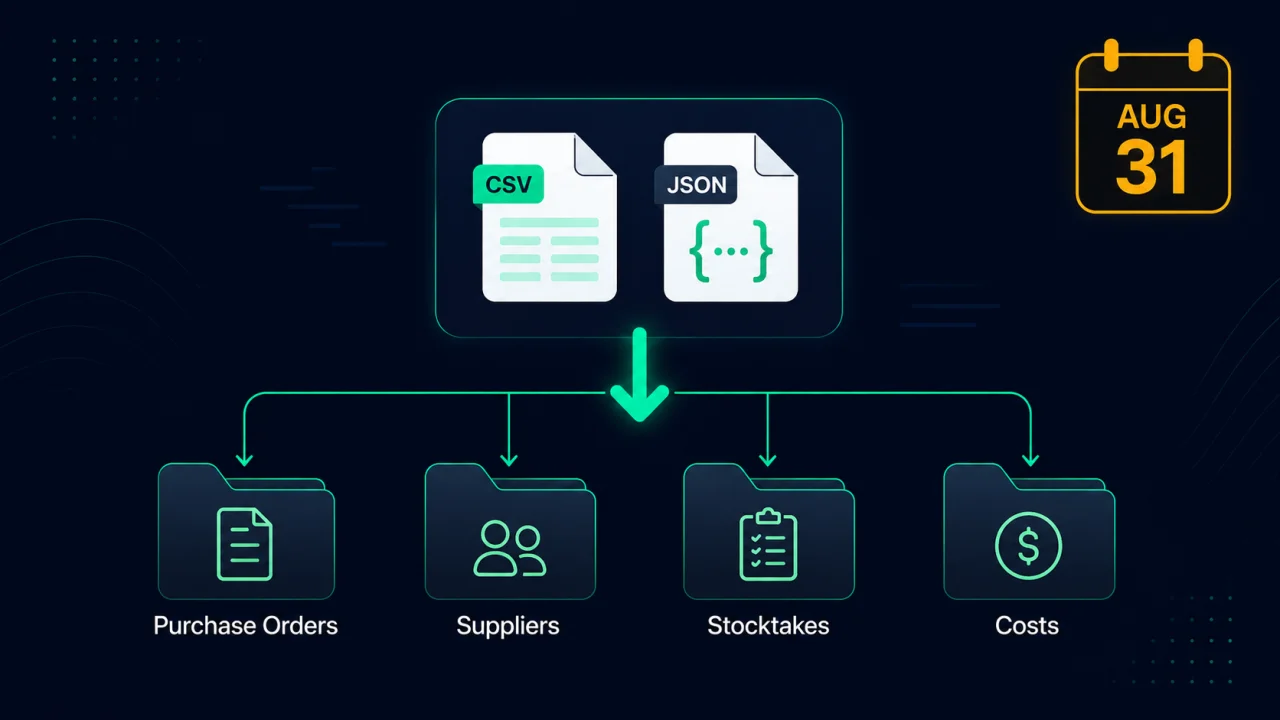
The short answer: while Stocky is read-only (until about November 29, 2026), export three things from its reports: your purchase orders (completed ones as CSV, plus any open orders), your stocktake history, and your cost data. Stocky can't export suppliers, and its API stopped on August 31, so the API JSON is only an option if you saved it before then. Then convert them into an import-ready format, because Shopify's own CSV import only creates a new draft PO and drops the status, received quantities, supplier links, and costs.
Key takeaways
- Stocky shut down on August 31, 2026 and stays read-only until about November 29, 2026. After that, the data is gone.
- Export purchase orders, stocktakes, and costs, not just products. Stocky can't export suppliers.
- The Stocky API stopped on August 31. If you saved its JSON before then, use it: it carries per-line supplier costs and receipt dates the CSV leaves out.
- Shopify's native PO import can't restore history — it makes a draft and drops status, received quantities, and suppliers.
- Supplier notes and reorder-point settings aren't in any export, so copy those by hand.
Why can't I just leave my data in Stocky?
Because read-only access ends at least 90 days after August 31, 2026, so about November 29, and the export button goes away with it. Stocky's purchase-order history, supplier records, landed costs, and stocktakes live inside Stocky. They are not stored as Shopify records, so uninstalling Stocky (or read-only access ending) takes them with it. Anything you haven't pulled out by then can't be recovered afterward. The safe move is to export everything now, while you still can, and keep the files somewhere you control.
What exactly should I export from Stocky?
Most people export their product list and stop there. That's the one file Shopify handles fine on its own, and it's the least valuable to save. The data worth rescuing is the operational history: which purchase orders you placed, what you actually paid, what arrived and when, and who your suppliers are. Here's the full checklist, in order.
1 Export your purchase orders
In Stocky's reports, export your completed purchase orders, plus any open orders you still expect. There were two paths, and only one is left:
- CSV export: available from Stocky's reports while it is read-only. It covers most fields but leaves a couple out.
- Stocky API JSON (the
purchase_ordersendpoint): the more complete source, but the API stopped working on August 31, 2026. It's the only place that carries the per-line supplier cost actually paid (supplier_cost_price) and the real per-line receipt date (received_at), which you need for an accurate cost trail and true supplier lead times.
If you saved the API JSON before August 31, use it. If not, the CSV works for most stores. Either way, export the CSV reports before read-only access ends.
If you saved the purchase-order JSON
Stocky's API stopped working on August 31, 2026, so the JSON can't be pulled anymore. If you or a developer saved purchase_orders.json before then (one file, or several if a big catalog was paged with since_id), open the free Stocky Export Converter and drop each file in. It reads supplier_cost_price, received_at, and the inventory_item_id match key, so the full cost-and-receipt trail comes through. EZStock's Move from Stocky page reads the JSON too. If you didn't save it, the CSV reports cover what a typical store needs.
2 Rebuild your suppliers from your purchase orders
Stocky can't export its supplier list; Shopify's own Stocky page says so. Each purchase order carries its supplier's name, though, and EZStock's Move from Stocky page creates your suppliers from your PO files, with lead times worked out from the order and received dates. If you keep your own supplier spreadsheet with emails and phone numbers, the converter can clean it into an import-ready file.
Free-text supplier notes are not in Stocky's CSV or its API either. If you keep notes per vendor (payment terms, minimums, the rep's name), copy those into a spreadsheet by hand while you can still open Stocky. No tool can extract them for you.
3 Export your stocktake history
Export your stocktake history for your records. Your current on-hand quantities already live in Shopify, because Stocky wrote every count and receipt there, so there is nothing to re-import. Don't upload an old stocktake through Shopify's Inventory import: it would set each SKU back to the count from that day and undo every sale since.
4 Export your SKU cost list
Export your historical cost data (SKU to unit cost). Your cost basis drives every margin report you'll ever run, and it's tedious to rebuild from invoices. Save it now as a clean SKU-to-cost file so you can re-apply cost-per-item in Shopify or your new inventory app.
5 Convert the files into an import-ready format
A raw Stocky export isn't something Shopify can ingest as history. Run each file through the free Stocky Export Converter. It detects the type, consolidates Stocky's one-PO-at-a-time exports into a single file, and gives you both a Shopify-native CSV and an EZStock-ready file that preserves PO status, received quantities, costs, dates, and supplier. It runs entirely in your browser; nothing is uploaded.
7.5E+11, Excel converted it to scientific notation and the real value is gone for good, and no tool can recover it. Open Stocky exports in Google Sheets, or format the SKU column as text before opening in Excel. The converter lists any mangled rows so you can catch them instead of importing bad data.
What does Shopify's native import actually keep?
This is the part that surprises people. You'd assume Shopify's own purchase-order CSV upload restores your Stocky POs. It doesn't. It only adds product line items to a new draft purchase order and drops everything that made the record useful. Here's the gap:
| Field | Shopify native PO import | After converting first |
|---|---|---|
| Product line items | Kept | Kept |
| PO status (sent / received) | Dropped (starts as draft) | Preserved |
| Received quantities | Dropped | Preserved |
| Supplier link | Dropped | Preserved |
| Cost paid per line | Dropped | Preserved (from a saved API JSON) |
So exporting is only half the job. Exporting keeps the raw data; converting keeps the history, which is the whole reason you'd want it.
Convert your Stocky export free, before read-only access ends
Drop your Stocky purchase orders, suppliers, stocktakes, or cost lists into the free converter and get clean, import-ready files: a Shopify CSV and an EZStock-ready file that keeps your full PO history. Runs in your browser, no signup, nothing uploaded.
Open the free Stocky converter →Once your files are converted, the next question is where the history actually lands. Shopify's built-in inventory has its own purchase orders and suppliers now, but it can't import a past purchase order with its status and received quantities. EZStock is a Shopify inventory and purchase-order app built to be the Stocky replacement, and it imports your Stocky PO history (status, received quantities, costs, and suppliers) in one upload. If you want the full migration path start to finish, read the Stocky to Shopify migration guide, or compare your options in the guide to the best Stocky alternative apps.
Frequently asked questions
When exactly did Stocky shut down? August 31, 2026. The app and its API stopped working that day. Shopify keeps Stocky read-only for at least 90 days after, so the CSV reports can be exported until about November 29, 2026.
Can I export everything at once? No. Stocky exports each data type separately (purchase orders, stocktakes, costs), so run through the checklist above and pull each one. Then you can convert them together.
Should I use the CSV or the API JSON? The API stopped working on August 31, 2026, so the CSV is the only export left. If you saved the API JSON before then, use it: it's the only source with per-line supplier costs and real receipt dates. The CSV is fine for most stores; it just leaves those two fields out.
Can I still export the JSON? No. Stocky's API stopped working on August 31, 2026, along with the app. A purchase_orders.json file saved before then still works in the converter and in EZStock.
What can't be recovered no matter what? Supplier free-text notes and par / reorder-point settings aren't in Stocky's CSV or its API, so no converter can extract them. Copy those by hand while you can still open Stocky. Suppliers can't be exported either, but their names come through on your purchase orders. Everything else in the CSV reports (purchase orders, stocktakes, costs) comes through.