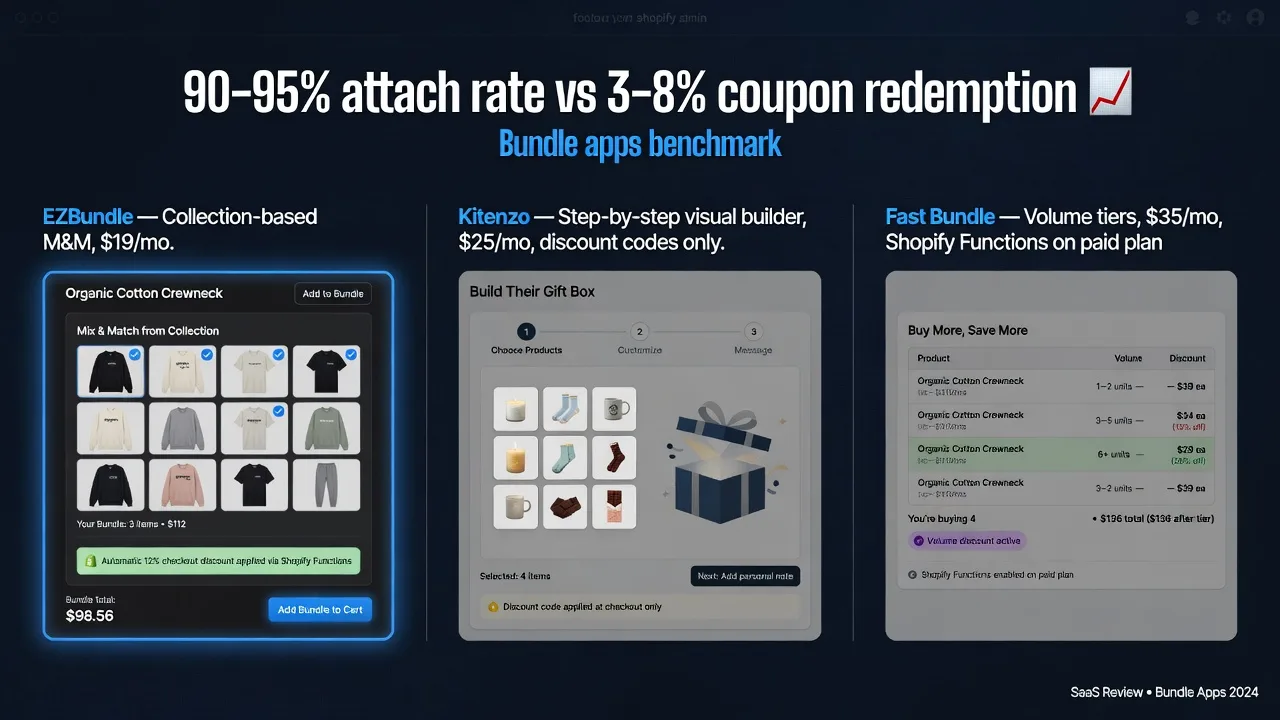
Quick Overview
EZBundle — collection-based mix-and-match bundles: customers pick any N products from a tagged collection and the discount applies automatically at checkout via Shopify Functions. Theme App Extension architecture (zero PageSpeed impact). Lowest price. Best for merchants who want fast setup and high-converting automatic discounts without a customized bundle builder UI.
Kitenzo — visual step-by-step bundle builder ("build your own box"): customers progress through configured steps, each selecting from a specific product group. Stronger for gift box brands and subscription-style builds where the selection process is part of the experience. Higher price, discount code-based. Best for merchants where the bundle-building UI is itself a product differentiator.
Fast Bundle — newer all-in-one app: fixed bundles, M&M, volume discounts, frequently bought together. Shopify Functions on higher plan. Comparable to EZBundle in feature set at a similar price, but with less history and fewer reviews. Best for merchants who want one app to handle all bundle types including volume discounts.
Full Feature Comparison Table
| Feature | EZBundle | Kitenzo | Fast Bundle |
|---|---|---|---|
| Mix-and-match bundles | Yes — collection-based | Yes — step-by-step builder | Yes — collection-based |
| Fixed bundles | Yes | Yes | Yes |
| Volume discounts | No | No | Yes |
| Step-by-step visual builder | No — grid widget | Yes — guided steps | No — grid widget |
| Checkout discount method | Shopify Functions — automatic | Discount code | Shopify Functions (higher plan) |
| App architecture | Theme App Extension | Custom storefront builder | Mixed |
| PageSpeed impact | Zero | Moderate — builder scripts load | Minor overhead |
| Bundle analytics | Yes — attach rate, revenue | Basic | Yes |
| Gift bundles | No | Yes | No |
| Price/month | Free → $19 | $25–$49 | $19–$49 |
How Each App Handles Mix-and-Match Bundles
EZBundle: Collection-Based M&M
EZBundle's mix-and-match works by linking a bundle to a Shopify product collection. You define: the collection (which products can be bundled), the minimum quantity (e.g., "pick any 3"), and the discount percentage. The widget appears on any product page you've configured and shows the eligible products from the collection. Customers pick their combination and add it to cart — the discount appears in the cart automatically.
This is the simplest M&M mechanic. It requires no custom pages, no redirects, no checkout extensions beyond Shopify Functions. Setup time: 10–15 minutes per bundle.
Kitenzo: Step-by-Step Visual Builder
Kitenzo takes a different approach: a guided multi-step bundle builder where each "step" is a group of products the customer must choose from. You configure Step 1 (e.g., "Choose your base: pick 1 of 5 pillows"), Step 2 ("Choose an accessory: pick 1 of 4 pillowcases"), and so on. The customer progresses through each step before completing the bundle.
This is more powerful for gift boxes and curated subscription-style bundles where the selection process is part of the brand experience — "build your own skincare routine," "create your bedtime kit." It's more complex to set up (30–60 minutes per bundle) and runs on a custom page within your store, which adds some loading overhead.
Fast Bundle: Collection-Based M&M with Volume Options
Fast Bundle's M&M mechanics are similar to EZBundle's collection-based approach. The additional differentiator is volume discount support — "buy 3 get 10% off, buy 5 get 15% off" — which EZBundle doesn't support natively. If tiered volume pricing is your primary need, Fast Bundle is worth considering. For standard M&M with a flat discount, EZBundle and Fast Bundle are comparable, with EZBundle having more reviews and a longer track record.
The Discount Mechanics Difference — Why This Matters
This is the most important functional difference in the comparison:
EZBundle applies the bundle discount via Shopify Functions — server-side logic that runs natively inside Shopify's checkout. When the qualifying products are in the cart, the discount appears automatically. No coupon code, no button, no trigger required from the customer. Measured attach rate with automatic Shopify Functions discounts: 90–95%+.
Kitenzo uses Shopify's discount code system. After the customer completes the bundle builder flow, a discount code is generated or applied. The friction of this step — even when it's mostly automated — reduces attach rate compared to fully automatic discounts. Real-world impact: 10–20% fewer bundles completed vs. automatic discount apps.
Fast Bundle offers Shopify Functions on its higher-tier plan ($35–49/month). On the entry plan, it also uses discount codes. If you choose Fast Bundle, use the higher plan specifically for the automatic discount behavior.
Speed and App Architecture
EZBundle is built on Theme App Extension architecture. The bundle widget loads asynchronously — it never blocks your page render. Adding EZBundle to a product page has zero measured impact on LCP or PageSpeed scores. See the full speed test data.
Kitenzo runs its bundle builder on custom pages with dedicated JavaScript and CSS loading. The builder scripts add meaningful overhead — typically 150–300ms — because the step-by-step UI requires additional assets that your standard product page doesn't load. For merchants using Kitenzo, this is the expected tradeoff for the richer UI; it's not a flaw, it's an architectural consequence of the feature.
Fast Bundle uses mixed architecture — the product page widget is mostly TAE-based, but some features run as storefront scripts. Impact is minor on most stores, similar to Bundler in the previous comparison.
Pricing Comparison
| App | Free tier | Entry paid | Full feature access |
|---|---|---|---|
| EZBundle | Yes — 1 bundle | $19/mo — all features | $19/mo |
| Kitenzo | Free trial only | $25/mo | $49/mo (advanced steps) |
| Fast Bundle | Yes — limited bundles | $19/mo (discount codes) | $35–$49/mo (Shopify Functions) |
Which App to Choose
You want mix-and-match bundles with automatic Shopify Functions checkout discounts, zero PageSpeed impact, and the simplest setup at the lowest price. The collection-based M&M widget covers 90% of bundle use cases for standard Shopify stores. Best for: apparel, beauty, supplements, home goods, and any merchant where customers pick from a collection and a discount applies automatically. Setup is 10–15 minutes.
The bundle-building process itself is part of your product experience — gift boxes where customers step through curated selections, subscription box configurators, "build your routine" flows. Kitenzo's step-by-step visual builder is genuinely better for this use case than EZBundle's grid widget. Accept the higher price and discount code tradeoff if the guided experience is central to your brand. Best for: gift box brands, curated set merchants, D2C brands where customization is a selling point.
You need volume discounts (tiered pricing: buy 3 get 10%, buy 5 get 15%) in addition to M&M bundles, and you're willing to pay for the higher plan to get Shopify Functions automatic discounts. Fast Bundle is the only app in this comparison that covers both M&M and volume discounts natively. Use EZBundle if volume discounts aren't needed — it's cheaper and has more reviews.
EZBundle is free to install — set up your first M&M bundle today
Collection-based mix-and-match, automatic Shopify Functions checkout discount, zero PageSpeed impact. Full feature set at $19/month.
Install EZBundle Free on Shopify →