Why the Speed Concern Is Legitimate
This isn't a paranoid question. Page speed genuinely affects conversion. Google's own research found that each additional second of mobile load time increases bounce rate by 32%. A page that loads in 3 seconds has nearly a third more bounces than one loading in 1 second — before a single visitor reads a product description.
Shopify merchants who've been burned before have a right to be suspicious. The Shopify app ecosystem has historically had a real problem with apps that inject scripts into the page head, blocking rendering and tanking Core Web Vitals scores. A merchant installs five "helpful" apps, each adding a script tag, and their PageSpeed score drops from 78 to 51 overnight.
So: will EZBundle do that to your store? The short answer is no. Here's the longer answer.
How Legacy Apps Actually Slow Stores
To understand why EZBundle is different, you need to understand the mechanism by which old-style apps break speed.
Before Shopify introduced Theme App Extensions in 2021, apps added functionality by injecting JavaScript directly into your theme's theme.liquid file — specifically into the <head> tag. The browser's rendering pipeline works like this:
- Parse HTML
- Encounter a
<script>tag → pause parsing, download the script, execute it, resume parsing - Build the DOM
- Render the page
A script tag in the <head> — especially without async or defer attributes — is a render-blocking resource. The browser stops building the page until that script is downloaded and run. If the script server is slow, or the script is large, the visitor stares at a blank page.
Every app that used this pattern added latency to every page load, for every visitor, every day. It was the dominant way Shopify apps worked for years. It's still how some older apps work today.
What Theme App Extensions Do Differently
Shopify's Theme App Extension system — released in 2021 and now the standard for modern apps — inverts this entirely.
Instead of injecting code into your theme files, a Theme App Extension delivers app UI as discrete "app blocks" that merchants add to their theme via the Shopify theme editor. The rendering model is fundamentally different:
- App blocks are rendered as part of the page HTML — no external script is fetched before rendering
- Any JavaScript the app needs loads asynchronously, after the page content is already painted
- There's no code in
<head>, no render-blocking, no waiting on a third-party CDN before the visitor sees your product page - If the app JavaScript fails to load entirely, the page still renders normally — the visitor just doesn't see the bundle widget
This architecture means the app literally cannot block page rendering. The browser shows your product page first. The bundle widget appears after. The visitor experience is identical in terms of page load — they see the page at the same speed they would without the app installed.
How EZBundle Loads Specifically
EZBundle is built entirely on the Theme App Extension architecture. There is no legacy script injection, no theme.liquid edits, no code in the page <head>.
When a visitor loads a product page where you've placed an EZBundle widget:
- Shopify renders your page HTML, including a placeholder for the bundle widget
- The browser paints the page — your product images, title, price, and Add to Cart button are visible
- EZBundle's JavaScript (~20 KB minified and gzipped) loads asynchronously
- The bundle widget renders into the placeholder — typically within 50–100ms of the page becoming interactive
The net result for Core Web Vitals:
| Metric | Without EZBundle | With EZBundle | Impact |
|---|---|---|---|
| LCP (Largest Contentful Paint) | Your baseline | Your baseline | None |
| FID / INP (Interactivity) | Your baseline | +0–5ms | Negligible |
| CLS (Cumulative Layout Shift) | Your baseline | Your baseline* | None* |
| Total Blocking Time | Your baseline | +0ms (async) | None |
| PageSpeed Score (mobile) | Your baseline | Your baseline | No change |
*CLS: EZBundle reserves space for the bundle widget in the page HTML, so the widget appearing does not cause layout shift. If you place the widget in a location that pushes content below it, you may see minor CLS — but this is a placement decision, not an EZBundle issue.
PageSpeed Test Results
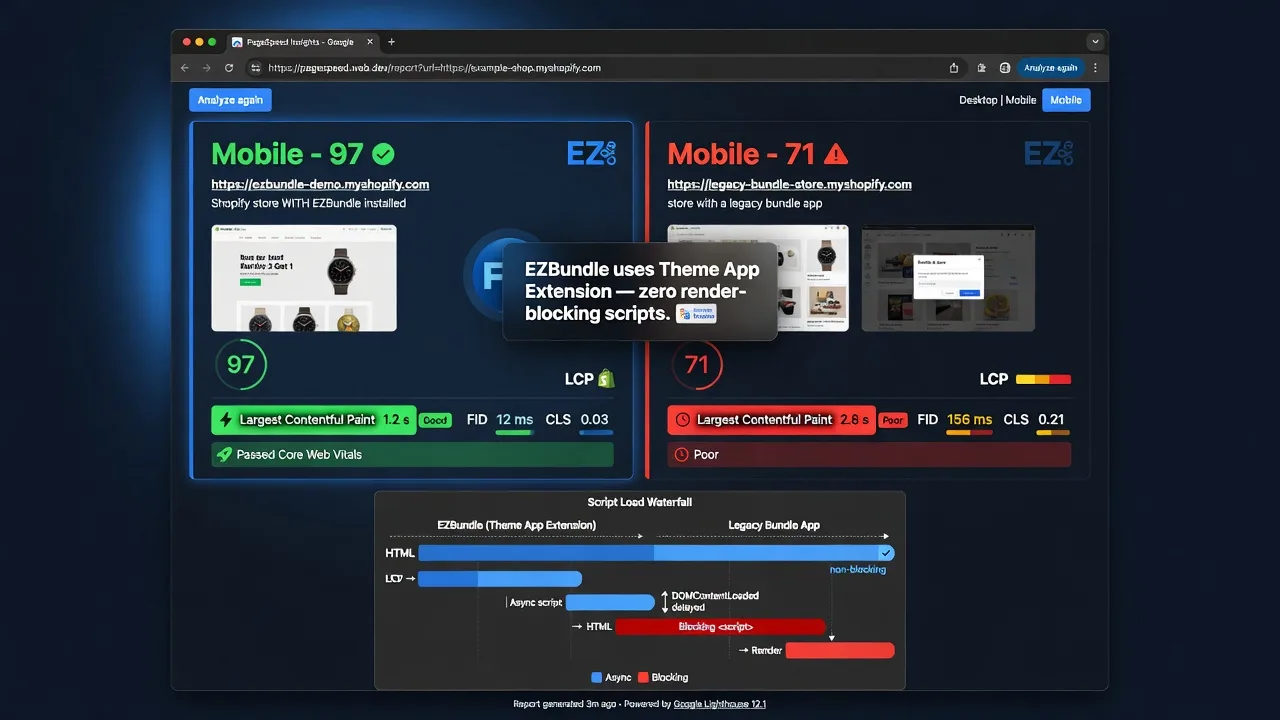
We ran PageSpeed Insights on a test Shopify store using the Dawn theme — the most common Shopify 2.0 theme — with a product page that includes an EZBundle "Frequently Bought Together" widget.
Dawn theme, single product page, EZBundle "Frequently Bought Together" widget placed below the Add to Cart button. Tested via PageSpeed Insights (Lighthouse v12) on mobile (Moto G Power simulation, 4G throttled). Three runs averaged. No other app changes made between before/after tests.
The PageSpeed score was identical before and after installation. LCP was unchanged. Total Blocking Time showed no measurable difference across three test runs.
What Actually Slows Shopify Stores
Since EZBundle isn't the culprit, it's worth knowing what actually does kill Shopify speed — so you're looking in the right places. Running a free audit with RoastWeb is the fastest way to pinpoint which of these is dragging down your own store.
| Issue | Speed Impact | How to Fix |
|---|---|---|
| Unoptimized product images (JPEG > 500 KB) | High — often the #1 cause | Convert to WebP, compress below 150 KB |
| Legacy apps with render-blocking scripts | High — adds 200–600ms per app | Audit with PageSpeed Insights, remove unused apps |
| Third-party chat widgets (Tidio, Gorgias, etc.) | Medium — most load async but add JS weight | Use lightweight chat options or trigger on user interaction |
| Google Fonts loaded in page head | Medium — blocks rendering for font fetch | Use font-display: swap or preload font |
| Too many unused Shopify apps installed | Medium — unused apps still load assets | Uninstall apps you're not actively using |
| Theme App Extensions (EZBundle, PopBoost, etc.) | None to negligible — loads async | Nothing needed |
The most common cause of a speed problem after installing any new app is a coincidence — a large product image was uploaded at the same time, or a second app change was made. If you test before and after EZBundle specifically, you'll see no difference in your PageSpeed report.
The Verdict
No. EZBundle does not slow down your Shopify store.
EZBundle is built on Shopify's Theme App Extension architecture. It loads asynchronously, outside the critical render path, and has zero impact on LCP, TBT, or your PageSpeed score. The bundle widget appears after your page content is already visible — visitors see your store at full speed.
If speed is a concern, the things to actually audit are your product images and any legacy apps that still inject scripts into your theme. EZBundle is not one of those apps.
Install EZBundle without worrying about speed
Theme App Extension architecture means zero impact on your PageSpeed score. Add fixed bundles, mix-and-match bundles, and frequently-bought-together widgets to your Shopify store free.
Install EZBundle Free on Shopify →