The problem with coupon codes
Bundle discounts are one of the most effective ways to increase average order value on Shopify. The idea is simple: buy two or more products together and get a percentage off. But the traditional way to implement this, coupon codes, creates a surprisingly large amount of friction.
Consider what a customer has to do: remember to look for a code, search your site or Google for it, copy it, paste it at checkout, hope it applies correctly, and understand why it didn't work if it doesn't. Each of those steps is a place where the purchase can fall apart.
Research consistently shows that cart abandonment spikes when customers hit unexpected steps at checkout. A coupon code field that doesn't work, or worse, a discount that customers didn't know existed until after they paid, damages trust and kills repeat business.
| Method | Requires Coupon Code | Applies Automatically | Best For |
|---|---|---|---|
| Shopify automatic discount | ✗ | ✓ | Simple % off entire order |
| Shopify Function (Quizzo) | ✗ | ✓ | Tag-based bundle discount at checkout |
| Discount code | ✓ | ✗ | Promotional campaigns; trackable |
| Draft order workaround | ✓ (manual) | ✗ | Wholesale / B2B only |
| Buy X Get Y (native) | ✗ | ✓ | Simple BOGO or add-on offers |
| Third-party bundle app (EZBundle) | ✗ | ✓ | Complex fixed + M&M bundles with widget |
How Shopify Functions change everything
Shopify Functions are small pieces of business logic that run inside Shopify's own infrastructure, directly in the checkout pipeline. Unlike apps that rely on scripts injected into the storefront or webhooks that fire after the fact, Functions execute natively, at exactly the moment Shopify is calculating the cart total.
This means a Function can inspect the cart: what's in it, how many qualifying items, what tags those products have. Then it applies a discount without any involvement from the customer. No code. No button. No friction.
How Quizzo uses Shopify Functions
Quizzo turns a gamified quiz into a curated bundle: shoppers answer questions, earn coins, spin the wheel, and win a reward. When you activate the bundle discount in Quizzo, the app creates an automatic app discount on your store powered by a Shopify Function. Here's exactly what happens on every cart:
Cart inspection
The Function reads every line item in the cart and checks whether each product carries one of your quiz-* category tags. Those tags map to whatever categories your catalog uses, apparel, skincare, supplements, gear, home goods, or anything else. It counts how many qualifying products are present.
Threshold check
The Function reads your configured minimum (set in the app's Settings page, default: 2 products). If the qualifying count meets or exceeds that threshold, the discount is eligible to fire.
Discount application
The reward the shopper won on the spin wheel is applied to all qualifying line items, clamped to your merchant maximum (for example 15%) so a lucky spin never oversells. The customer sees the reduced price in the checkout summary, no action required on their end.
Merchant configuration
You control two variables from the Quizzo admin:
- Discount percentage, how much off (1–50%). This is your maximum reward: the spin-wheel outcome is clamped to it and applied to all qualifying items simultaneously.
- Minimum qualifying products, how many tagged products must be in the cart (2–5). Lower this to 2 for maximum activation, raise it to 3 or 4 if you want to incentivize larger bundles.
Changes take effect immediately, you don't need to reinstall or recreate the discount. The Function reads its configuration from a Shopify metafield that the app updates whenever you save new settings.
What the customer sees
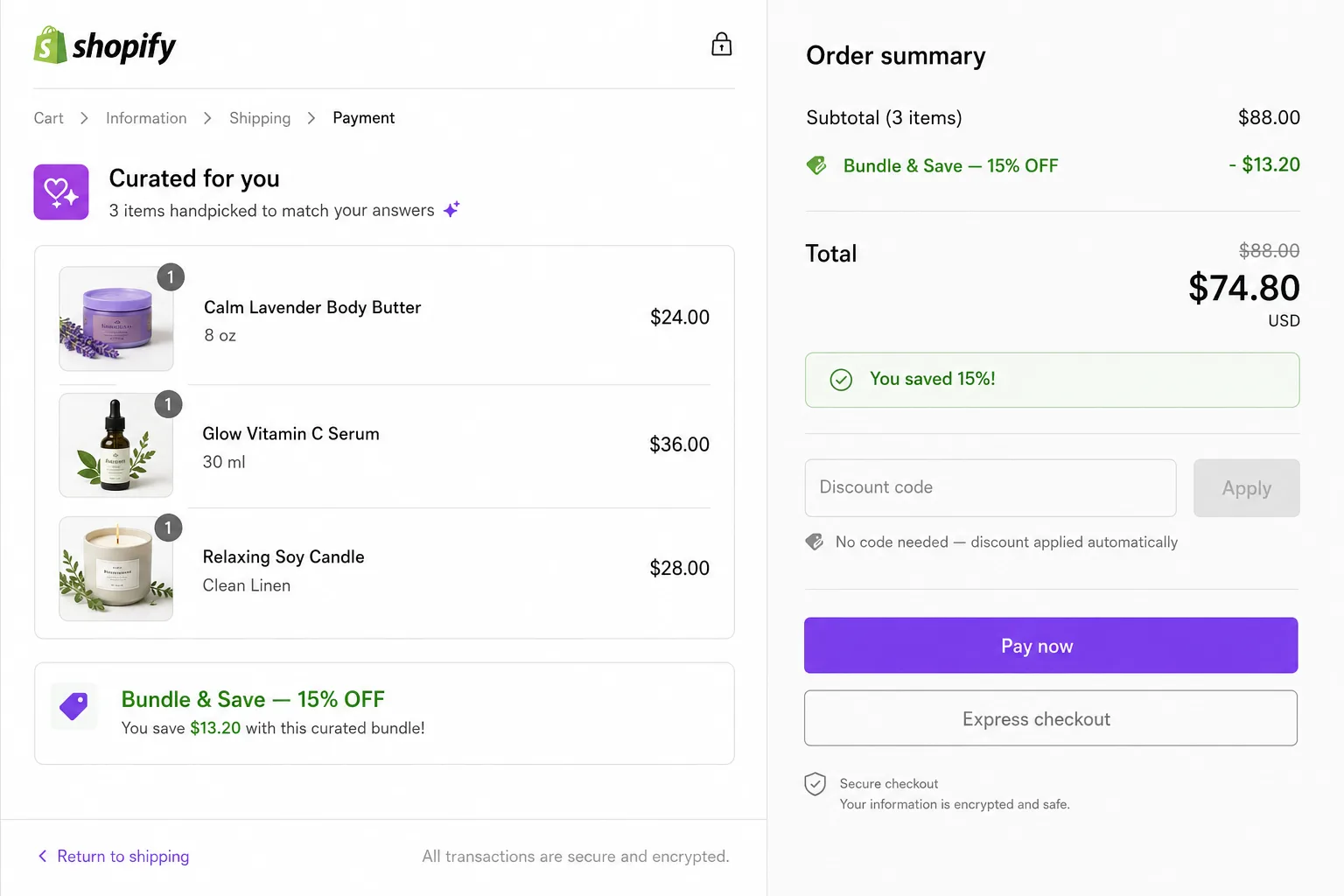
On the storefront, the quiz and spin wheel show the reward the shopper won (e.g. "You won 15% off your curated bundle") so customers know a discount is waiting. But they never have to type anything to claim it.
In the Shopify checkout, the discount line appears automatically under the cart summary. It reads as an automatic discount, customers see the savings clearly, but there's no coupon field involved.
Why not use Shopify's built-in bundle discounts?
Shopify's native discount rules are powerful but blunt. They apply to specific product collections or variants, not to dynamically tagged product sets. They also don't natively understand the concept of "2 or more items from this semantic category", you'd have to maintain a collection manually and update it every time your product lineup changes.
The tag-based approach Quizzo uses means the discount rules follow your product catalog automatically. Tag a new product with quiz-category-1 and it's immediately eligible for the bundle discount, no collection updates, no discount rule edits. Because Quizzo can auto-generate the quiz from your catalog, tagging scales with any category you sell.
Activating and deactivating
From the Settings page in the app, click Activate bundle discount to create the Shopify automatic discount. The status badge turns green. To pause it (for a sale, a seasonal change, or testing), click Deactivate discount: it deletes the Shopify discount object while keeping your settings saved. Reactivate any time with one click.