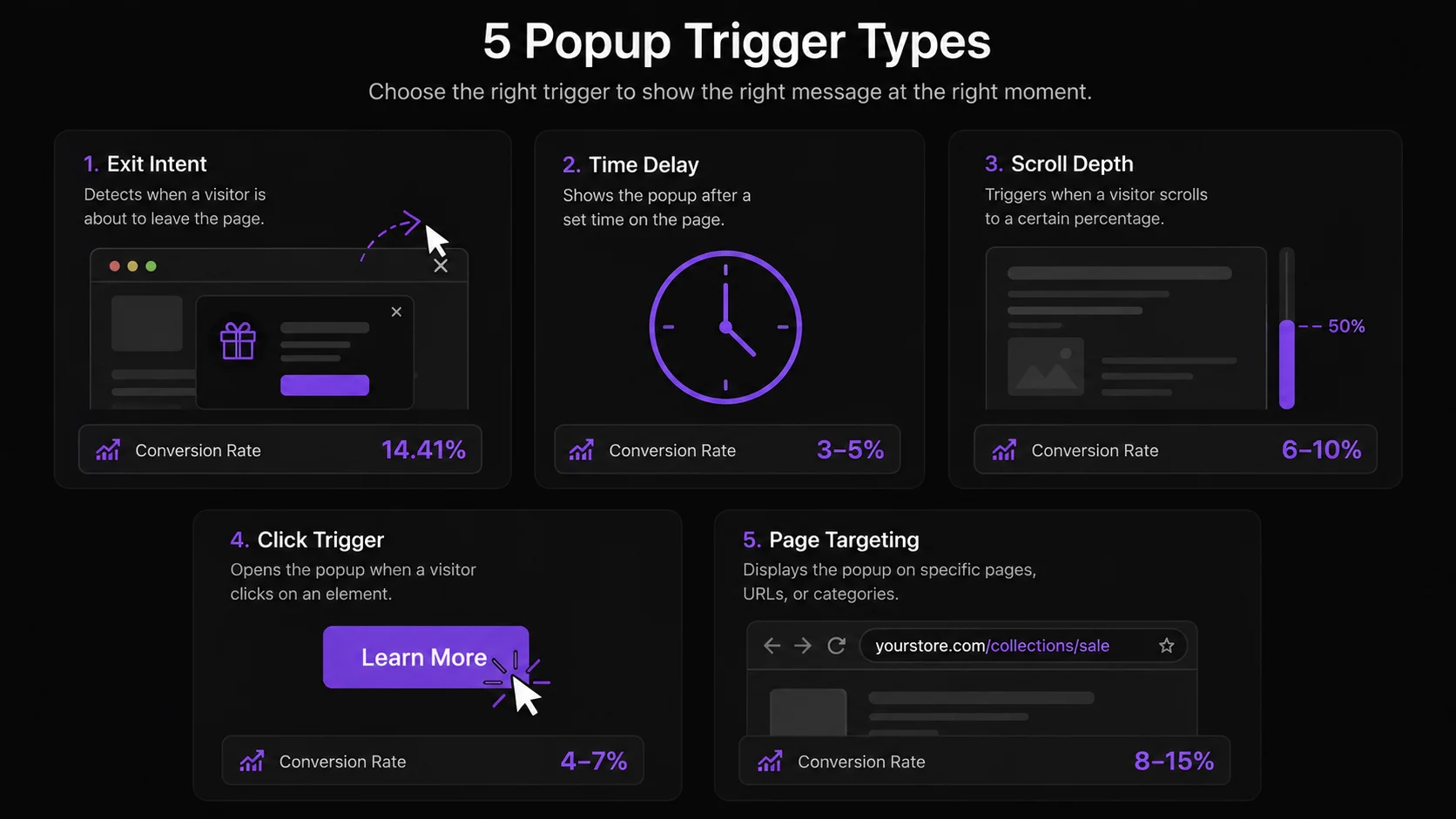
The 5 Shopify popup trigger types, ranked by conversion
Every popup on your Shopify store is controlled by a trigger — the behavioral event that decides when and whether the popup fires. Getting the trigger right is more important than the popup design or copy, because a well-written offer shown at the wrong moment converts at a fraction of the rate of a basic offer shown at exactly the right moment.
Here is each trigger type in detail, with conversion data and the specific use cases where it outperforms the alternatives.
Trigger 1: Exit Intent
Exit intent is the highest-converting trigger for discount popups. Average conversion rate: 14.41% on triggering sessions, per Wisepops industry benchmark data. The reason is context: exit intent fires at exactly the moment a visitor is making a leave decision. The popup does not interrupt a browsing session — it participates in a decision that is already in progress. A 10–15% discount offer that would feel premature mid-browse feels like a fair last-minute rescue at the moment of departure.
Best for: Any Shopify store offering a discount or free shipping. Exit intent is the default choice for discount capture on product pages, collection pages, and the cart page.
PopBoost setting: Exit Intent Popup widget with configurable sensitivity. On desktop, sensitivity controls how far toward the top of the viewport the cursor must travel before the trigger fires. On mobile, scroll velocity threshold is adjustable. Set a minimum time-on-page of 10–15 seconds to exclude immediate bouncers — they are not interested and showing them a popup is wasted friction.
For a deep dive into the exit intent trigger specifically, see the exit intent popup guide.
Trigger 2: Time Delay
Time delay is the most common trigger for newsletter signup popups. The optimal delay is 30–60 seconds per OptinMonster data — long enough for the visitor to have engaged with page content, short enough to catch visitors before they leave. Under 10 seconds, the popup interrupts before the visitor has seen anything worth staying for, which consistently increases bounce rate. Over 90 seconds, the trigger misses a large share of visitors who leave in the first minute. For the full breakdown of the right delay by page type, see the best timing for a Shopify popup.
Best for: Blog content and high-content pages where visitors spend longer reading before making any decisions. Time delay is appropriate for newsletter signups because content readers are more receptive to subscription offers than product browsers.
What not to do: Do not set a time delay under 15 seconds on product pages. At that point, the visitor hasn't had time to evaluate the product — the popup fires on strangers, not prospects, and the conversion rate reflects it.
PopBoost setting: Configurable delay in seconds per widget. Set the delay independently for each page type — longer delays for blog and informational pages, shorter for high-exit-rate product pages where you need to catch visitors while they're still engaged.
Trigger 3: Scroll Depth
Scroll depth is a behavioral engagement signal: a visitor who has scrolled to 75% of a product page has read most of the description, looked at multiple images, and is actively evaluating the product. This is fundamentally different from a visitor who has been on the page for 30 seconds without scrolling — time on page without scroll can mean passive tab-switching, not active reading. For engaged visitors on product pages and long-form content, scroll depth converts better than time delay because it fires on demonstrated engagement, not passive presence.
Best for: Product pages with long descriptions or multiple sections, and blog posts where the popup content relates to what the visitor just read. A 75% scroll trigger on a "best running shoes" blog post fires after the visitor has read your full recommendation — exactly when they are most receptive to an offer on running gear.
PopBoost setting: Set the scroll percentage threshold in the widget settings. 50% catches more visitors at the cost of lower intent; 75% catches fewer visitors but at much higher intent. Start at 75% for product pages.
Trigger 4: Click Trigger
Click triggers carry the highest intent signal of any trigger type. A visitor who clicks a "Get free sample" button or a "View size guide" link has explicitly expressed an interest in that specific action — they are not being interrupted mid-browse. The popup fires in response to a deliberate action, which means it does not interrupt the browsing flow at all. Conversion rates per triggering event are high precisely because the visitor self-selected into the interaction.
Best for: Free sample request flows, size guide overlays, "Compare options" overlays, and any action where the visitor needs more information before committing. Click triggers work well on product pages where visitors have secondary questions they want answered without leaving the page.
What not to do: Do not use click triggers for discount capture — there is no natural click event that maps to "visitor considering leaving." Use exit intent for that goal instead.
PopBoost setting: Assign the trigger to a CSS selector or specific element ID. The popup fires immediately on click, with no delay required — the click itself is the intent signal.
Trigger 5: Page-Specific Targeting
Page-specific targeting is not a standalone trigger — it is a filter applied on top of another trigger. You configure exit intent to fire only on the cart page, or a scroll trigger to fire only on product pages. The power is in precision: a cart page exit popup reaches a visitor who has added items and is abandoning — the highest-value abandonment scenario in ecommerce. Cart page exit popups are among the highest-converting popup placements because the visitor has already expressed purchase intent through the act of adding to cart.
Best for: Cart page (exit intent to prevent checkout abandonment), product pages (scroll depth for newsletter capture), and landing pages built for specific campaigns where a general sitewide popup would be off-message.
PopBoost setting: Page targeting is configured in the widget display rules. Add URL conditions to restrict the popup to specific page types — for example, URLs containing "/cart" for cart-only targeting, or specific product handle URLs for single-product campaigns.
Trigger combination strategy: exit intent + scroll depth
The highest-performing popup configuration for most Shopify stores is a two-trigger stack: exit intent as primary, scroll depth as secondary. The logic:
- Exit intent catches visitors who are actively leaving. This is your highest-value audience — they evaluated the product and almost bought. Show them a discount or free shipping offer.
- Scroll depth catches engaged mid-page readers who have not yet triggered exit intent. A visitor who has scrolled 75% of a product page is engaged but not yet leaving — a newsletter signup offer or a "Save this product" prompt converts well here without the aggressive discount required at exit.
Session caps are critical in this setup. Configure PopBoost to fire a maximum of one modal popup per session. If scroll depth fires first and the visitor dismisses it, exit intent should still be available when they start to leave — but the two triggers should not stack in rapid succession. PopBoost handles per-session caps automatically; verify your cap is set to 1 modal per session in the widget settings.
What NOT to do: the three trigger mistakes that kill conversion
Mistake 1: Fire on page load. A page-load popup fires before the visitor has seen a single word of your content. The visitor landed 0.5 seconds ago and has no context for why they should hand over their email or claim a discount. Page-load popups consistently produce the lowest conversion rates and the highest bounce rates of all trigger types. Google also flags them under the intrusive interstitials policy on mobile. Never use page load as a trigger.
Mistake 2: Stack multiple triggers in the same session. Showing a visitor a time-delay popup after 30 seconds, then an exit intent popup when they try to leave, then a scroll trigger when they scroll down on the next page — this is aggressive and drives visitors away rather than toward conversion. Pick one popup event per session. The session cap in PopBoost exists for exactly this reason.
Mistake 3: Show the same popup more than once per session. If a visitor dismisses your exit intent popup, they made a decision. Showing the same popup again on the next page they visit in the same session signals that your store does not respect their choice and trains them to dismiss without reading. Set session caps to 1 and day caps to at least 7 days per repeat visitor.
Trigger performance comparison table
| Trigger | Best For | Avg Conversion | Interruption Level |
|---|---|---|---|
| Exit Intent | Discount capture | 14.41% | Low (user already leaving) |
| Click Trigger | High-intent actions | High | None |
| Scroll Depth | Engaged readers | Medium | Medium |
| Time Delay | Newsletter signups | 3–5% | Medium-High |
| Page Load | — | Lowest | Very High (avoid) |
How to configure popup triggers in PopBoost
Choose your primary trigger goal
Start by identifying what you want the popup to accomplish: discount capture (use exit intent), newsletter signup (use time delay or scroll depth), or on-demand information (use click trigger). The goal determines the trigger — not the other way around.
Enable the widget in PopBoost and select trigger type
In the PopBoost admin, open the relevant widget. Each widget has a Trigger section with options for exit intent, time delay (with second input), and scroll depth (with percentage selector). Click triggers are configured by entering a CSS selector for the element that should fire the popup.
Add page targeting rules
Under Display Rules, add URL conditions to restrict the popup to the relevant pages. For cart exit popups: URL contains "/cart". For product-only scroll triggers: URL contains "/products/". For sitewide triggers, leave page rules empty.
Set session and day caps
Set the modal popup cap to 1 per session. Set the repeat cap to once every 7–14 days per unique visitor. This prevents the popup from firing repeatedly on return visits, which tanks brand trust faster than the popup can recover it.
Test in private browsing
Private browsing clears session cookies, which lets you see the popup fresh on each visit. Test each trigger: for exit intent, move the cursor rapidly toward the top of the browser. For scroll depth, scroll down to the configured percentage. Confirm the popup fires at the right moment and that the offer, code, and CTA all work correctly at checkout.
All 5 trigger types, one app
PopBoost supports exit intent, time delay, scroll depth, click trigger, and page-specific targeting across all 7 conversion widgets. Free plan includes one active widget. Pro ($19/month) runs all 7 simultaneously — 14-day free trial, no credit card required.
Install PopBoost free →Free plan available · 14-day Pro trial · no credit card required · works with all Shopify themes
Frequently asked questions about Shopify popup triggers
What are the types of Shopify popup triggers?
The 5 main Shopify popup trigger types are exit intent (cursor moves toward browser close), time delay (fires after X seconds), scroll depth (fires at 50% or 75% page scroll), click trigger (fires when a visitor clicks a specific element), and page-specific targeting (restricts popup to certain pages). Each performs differently based on the goal and page context.
Which Shopify popup trigger converts best?
Exit intent converts highest for discount capture at 14.41% per Wisepops benchmark data. Click triggers produce the highest per-event intent but fire far less frequently. For newsletter signups, time delay at 30–60 seconds converts at 3–5%. Scroll depth outperforms time delay for engaged product page visitors. Page load converts lowest and should be avoided.
What is the best time delay for a Shopify popup?
30–60 seconds is the optimal time delay, per OptinMonster data. Under 10 seconds fires before the visitor has engaged with any content. Over 90 seconds misses most visitors who leave in the first minute. For product pages, 15–30 seconds is appropriate since product evaluation happens faster than content reading.
What is scroll depth targeting in Shopify popups?
Scroll depth popup targeting fires when a visitor scrolls to a configured percentage of the page — typically 50% or 75%. It is a behavioral engagement signal: a visitor at 75% scroll has read most of the page and is actively evaluating the content. This makes scroll depth a stronger trigger than time delay for product pages and long-form blog content where reading behavior is the primary engagement signal.
Should I use multiple popup triggers on the same Shopify store?
You can use multiple trigger types across different widgets, but never stack them in a way that fires two modal popups in the same visitor session. Configure session caps to 1 modal per session. A valid setup: exit intent on product pages for discount capture, plus scroll depth on blog pages for newsletter signup — with session caps ensuring only one fires per visit.
For a broader look at all popup types and timing best practices, see the full popup guide. For email capture popup setup specifically, see the email popup best practices guide. And for a broader Shopify conversion rate optimization strategy that puts popup triggers in context with your full funnel, start there.
