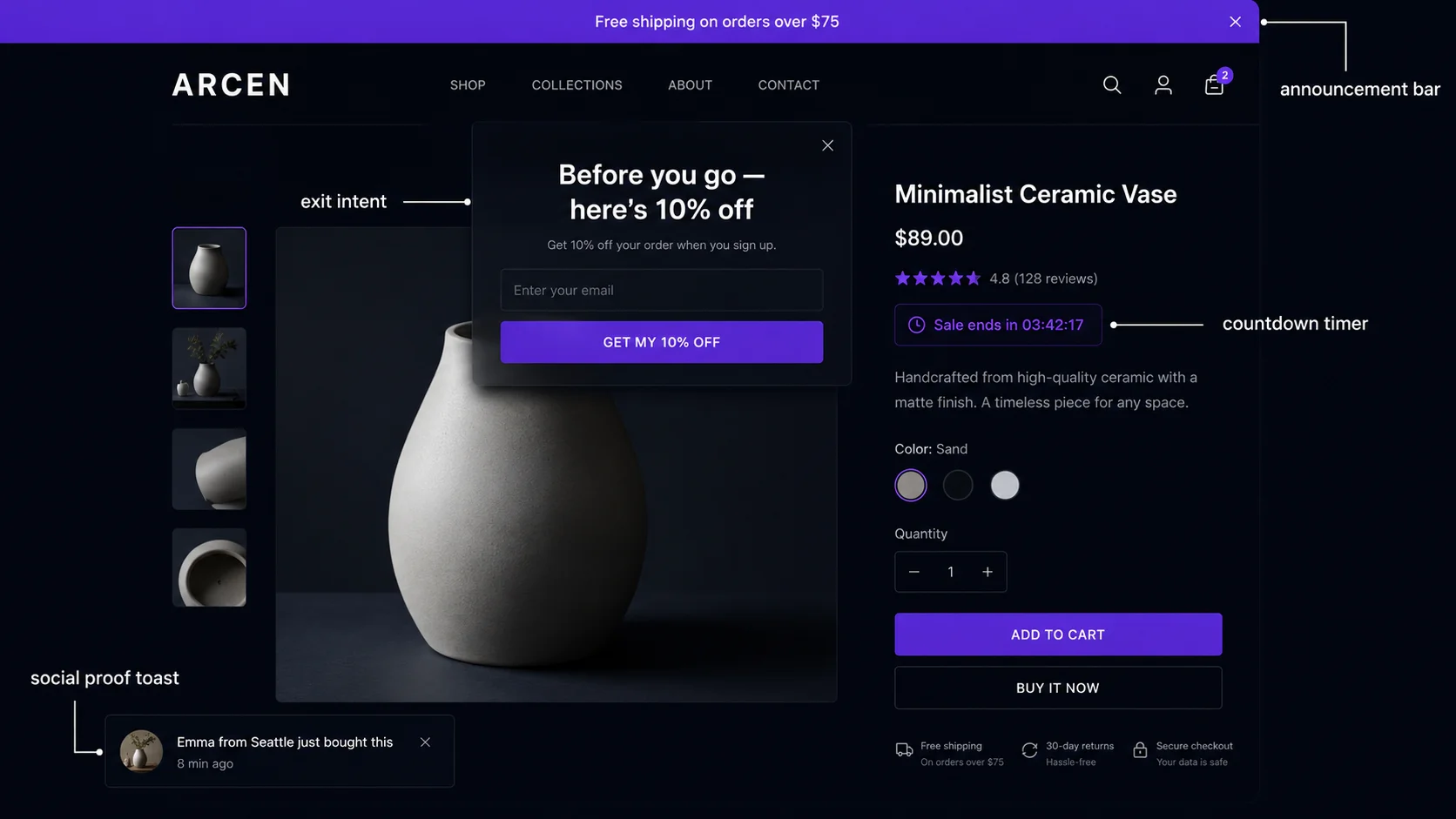
The 6 popup types on Shopify and what each one does
Not all Shopify popups are the same. The category "popup" covers at least six distinct formats with different triggers, positions, and conversion goals. Treating them as interchangeable leads to the most common mistake: deploying the wrong popup type for the goal you're trying to achieve.
1. Time-delay popup (modal)
Fires after the visitor has been on the page for a set number of seconds. The classic email capture popup — "Get 10% off your first order" — is almost always time-delay triggered. Best suited for: email list building, new visitor discount offers, newsletter signups. The delay gives visitors a chance to see your store before being interrupted — how long to wait depends on the page type.
2. Exit intent popup (modal)
Fires when a visitor moves their cursor toward the top of the browser window — toward the address bar, back button, or tabs — which is a strong behavioral signal of imminent departure. Best suited for: cart abandonment recovery, last-chance discount offers, retaining visitors who are about to bounce from a product page. Does not fire on mobile (cursor detection is desktop-only); on mobile, scroll-depth triggers or time-delay triggers are used as substitutes.
3. Scroll-depth popup
Fires when a visitor has scrolled past a defined percentage of the page — typically 50–75%. This signals engagement: the visitor has read enough to be genuinely interested. Best suited for: content pages and blog posts (capturing email after a reader has consumed your content), lead magnets on landing pages, "ready to buy?" prompts after detailed product descriptions.
4. Social proof toast notification
A small, non-blocking notification in the corner of the screen — typically bottom-left or bottom-right — that appears automatically and disappears after 5–8 seconds. "James from Portland just bought the Matte Black Tumbler · 2 hours ago." Not a modal; the visitor doesn't need to dismiss it. Best suited for: continuous trust building throughout a session, product popularity signals, real-time purchase activity. Fires passively without interrupting browsing.
5. Stock countdown / urgency widget
An inline widget on the product page showing remaining inventory: "Only 4 left in stock." Or a countdown timer showing a sale end date. These are not modals — they're embedded in the page layout and visible without any trigger. Best suited for: high-demand products with genuine inventory constraints, flash sales with a real end date, products with limited seasonal availability.
6. Click-trigger popup
Fires when a visitor clicks a specific button or link — "View offer," "Get coupon," "See deal." Unlike the other types, the visitor explicitly requests this popup. Best suited for: multi-step discount reveals, gamified spin-to-win offers, terms/eligibility details on promotional pages. The explicit opt-in nature means these popups convert at very high rates — anyone who clicks the trigger is already interested.
Matching popup type to conversion goal
The most important popup strategy decision is not design or copy — it's choosing the right popup type for the goal you're trying to achieve:
| Goal | Best popup type | Why |
|---|---|---|
| Email list capture | Time-delay modal (5–8s) | Fires after value is shown; visitor has context for the offer |
| Cart abandonment recovery | Exit intent modal | Fires at the exact moment of departure; catches high-intent visitors |
| Trust building | Social proof toast | Non-blocking; accumulates social validation throughout the session |
| Urgency / scarcity | Inline stock countdown or timer | Always visible on product page; doesn't interrupt browsing |
| Sitewide announcement | Announcement bar (sticky) | Persistent and non-intrusive; communicates sale/shipping threshold sitewide |
| Content engagement capture | Scroll-depth modal (50–75%) | Fires only for engaged readers; captures warm leads |
Timing and trigger best practices
Timing is the single most common misconfiguration in Shopify popups. The default settings in many popup apps are optimized for the app's conversion metric (email captures), not for the visitor experience or your store's conversion rate.
Time-delay: don't go below 4 seconds
A popup that fires 0–2 seconds after page load catches visitors before they've seen any content. This is optimized for sheer volume of impressions, not quality. Visitors who close an immediate popup are more likely to leave the site entirely — the popup becomes a negative first impression. Tests across multiple ecommerce platforms consistently show that a 5–8 second delay produces higher email capture rates than a 1–2 second delay, because the visitors who see it have already engaged with your store and are more receptive to an offer.
For product pages specifically, 10–15 seconds is better — give the visitor time to read the product description and assess whether they want the item before presenting an offer.
Exit intent: configure sensitivity correctly
Exit intent detection monitors cursor velocity and direction. Most implementations allow you to configure sensitivity — how aggressively the popup fires. High sensitivity means it fires for any upward cursor movement; low sensitivity requires a more deliberate exit motion. Start with medium sensitivity. Very high sensitivity creates false triggers (popup fires on visitors just scrolling up to re-read something), which trains visitors to close the popup reflexively rather than engaging with the offer.
Also configure a scroll depth minimum for exit intent — only fire the popup if the visitor has scrolled at least 20% of the page. This prevents the exit intent from firing on visitors who bounced immediately without reading anything, who are the least likely to convert regardless of offer.
Session caps are mandatory
Without session caps, the same visitor can be shown the same popup on every page they visit. This is a conversion-killing pattern. Configure:
- Modal popups: maximum 1 per session per popup type. If the visitor dismisses your exit intent offer once, don't show it again in the same session.
- Social proof toasts: maximum 3–4 per session with at least 45-second intervals between each.
- Cross-session frequency: most popup apps support a "don't show again for X days" setting tied to a browser cookie. Set this to at least 24 hours for modal popups.
7 popup types. One $19/month app.
PopBoost includes every popup type covered in this guide — announcement bar, social proof toast, stock countdown, countdown timer, product badge, free shipping bar, and exit intent popup. All as native Shopify App Blocks.
Install PopBoost free →14-day free trial · no credit card required · works with all Shopify themes
Mobile popup rules
Mobile accounts for 60–70% of Shopify traffic but converts at roughly half the rate of desktop. A significant portion of this gap is caused by poorly configured popups on mobile. Google's intrusive interstitial penalty (introduced in 2017) penalizes pages where a popup covers the main content immediately on page load on mobile — this can directly hurt your search rankings.
What Google penalizes
Google's mobile interstitial penalty applies to popups that: (1) fire immediately on page load and cover the main content, or (2) require the user to dismiss them before accessing content, where the dismissal target (the X button) is small or hard to tap. A popup that fires after 5+ seconds, or fires only on exit intent, does not typically trigger this penalty. When in doubt, follow Google's guidelines: popups that use a "reasonable amount of screen space" and are easily dismissible are acceptable.
Mobile-specific configuration rules
- Use bottom-anchored modals on mobile, not full-screen overlays. A modal that slides up from the bottom and covers 40–50% of the screen is both mobile-friendly and Google-compliant. Full-screen popups on mobile feel like a takeover and have higher dismissal rates.
- Make the dismiss button large enough to tap. Minimum 44×44 pixels for the close button. Small dismiss targets cause accidental engagement — visitors accidentally click "accept" instead of "close" because they couldn't aim accurately on a small screen. This inflates your email list with low-quality addresses.
- Exit intent doesn't work on mobile. Cursor detection doesn't apply to touch devices. Use a time-delay trigger (10–15 seconds) or scroll-depth trigger (75%) as the mobile equivalent for "visitor who is about to leave."
- Test on an actual device, not just browser DevTools. DevTools mobile simulation doesn't accurately represent tap target sizes, real scroll behavior, or the visual weight of a popup on a physical screen. Test on at least one iOS and one Android device before going live.
Building the popup stack: how many to run simultaneously
The question "how many popups should I run?" is really two questions: how many types, and how many instances of each type per session.
A well-configured three-layer stack looks like this:
- Passive layer (always on): social proof toasts running throughout the session, announcement bar showing a sitewide message, free shipping bar showing progress toward threshold. These don't require dismissal and create no friction.
- Urgency layer (product pages): stock countdown widget inline on the product page, or a countdown timer if a sale is active. Visible without any trigger, embedded in the page layout.
- Active layer (one per session, at the right moment): either a time-delay email capture popup on the homepage, or an exit intent popup on the cart page. Not both on the same page. Pick the active popup type based on the goal for that specific page.
The most common mistake is running two modal popups on the same page — for example, a time-delay popup that fires at 5 seconds AND an exit intent popup. If the visitor dismisses the first, the second fires moments later. This is double friction and causes a measurable drop in session length and conversion rate. Choose one active popup per page type.
PopBoost's 7 widgets mapped to popup types
PopBoost covers all six popup categories with its seven native Shopify App Block widgets:
- Announcement Bar → persistent sitewide message, no trigger required
- Free Shipping Bar → passive progress bar, no trigger required
- Social Proof Popup → time-delay toast notification (passive, auto-fires after 5s)
- Stock Countdown → inline urgency widget on product pages (always visible)
- Countdown Timer → inline sale deadline timer (always visible)
- Product Badge → overlay badge on product images (SALE, NEW, LOW STOCK, BESTSELLER)
- Exit Intent Popup → exit-trigger modal for cart/product page recovery
All seven load as a single Theme App Extension script — one JavaScript bundle for the entire widget set, individual widgets enabled or disabled from the PopBoost admin. Compared to running seven separate apps, this eliminates six redundant script loads per page, which is directly measurable in Core Web Vitals (LCP and TBT in particular).
A/B testing framework for Shopify popups
Most popup A/B tests produce noisy, inconclusive results because they test the wrong variables on too small a sample. Here's a framework that produces reliable, actionable insights:
Step 1: Pick one variable
The variables worth testing, in order of expected impact:
- Offer type — percentage discount vs. free shipping vs. no discount (urgency framing only)
- Headline — the primary message in the popup
- Trigger timing — 5 seconds vs. 10 seconds vs. exit intent
- Position — bottom-right vs. bottom-left vs. center modal
- Design — color, image presence, button text
Step 2: Run for minimum 14 days and 500 trigger sessions
Anything shorter produces a result that's likely to be noise. For stores with less than 500 sessions per variant per 14 days, extend the test period rather than drawing conclusions from small sample sizes. A 2% difference in conversion rate that's based on 50 sessions in each variant is meaningless. That same 2% difference based on 1,000 sessions per variant is actionable.
Step 3: Track the right metric
Track conversion rate to purchase, not just email capture rate or popup engagement rate. An email capture popup that captures 500 emails but none of those subscribers ever buys has zero revenue impact. If your email platform allows it, segment captured subscribers by which popup variant they came from and track purchase rate over the next 30 days. This is the true measure of popup performance.
Step 4: Implement, don't iterate forever
A/B testing is valuable, but shipping one winning variant is more valuable than running perpetual inconclusive tests. If you have a clear winner after one clean test, implement it, document what you learned, and move on to a different conversion lever. The marginal gain from optimizing a popup from 4.2% to 4.8% conversion is smaller than the gain from fixing a trust deficit on your product page or reducing checkout friction.
Frequently asked questions about Shopify popups
What types of popups work best on Shopify?
Exit intent popups convert at 3–9% of triggering sessions and are the highest single-session ROI popup type. Social proof toasts produce the most sustained lift because they run passively throughout every session without creating friction. For new stores, a time-delayed email capture popup (5–8 seconds) builds an owned audience that can be retargeted indefinitely — higher long-term ROI than any individual session recovery tactic.
How many popups should a Shopify store run at once?
Run 2–3 types maximum, with clear rules about which fires on which pages and strict session caps. The safe baseline: social proof toasts sitewide (passive), one inline urgency widget on product pages, and one modal popup per page type (exit intent on cart, time-delay on homepage). Never fire two modals on the same page in the same session.
Do Shopify popups hurt SEO or page speed?
Poorly implemented popups can hurt both. Google's intrusive interstitial penalty targets mobile popups that immediately cover content. Script-injected popups from multiple third-party apps can add significant JavaScript blocking time. Theme App Extension popups (the PopBoost approach) avoid both issues — they load in Shopify's optimized pipeline and can be delayed past the initial page render.
What is the best time delay for a Shopify popup?
5–8 seconds for homepage email capture, 10–15 seconds for product pages. Exit intent trigger (cursor movement) outperforms any fixed time delay on cart pages. The principle: delay long enough that the visitor has seen your store's value before being interrupted with an offer.
How do I A/B test a Shopify popup?
Test one variable at a time, run for at least 14 days with 500+ trigger sessions per variant, and measure revenue impact — not just email capture rate. Test offer type first (it has the highest impact variance), then headline, then trigger timing. Implement the winner and move to a different conversion lever rather than running perpetual popup tests.
For a deeper dive into exit intent popup configuration and offer strategy, see the Shopify exit intent popup guide. For the psychology behind urgency and FOMO and how to stack the full widget set, see FOMO marketing for Shopify: 7 proven tactics. If you want to understand which conversion levers have the most impact on your specific store before building a popup strategy, RoastWeb runs an AI-powered store audit that surfaces your highest-impact fixes.
