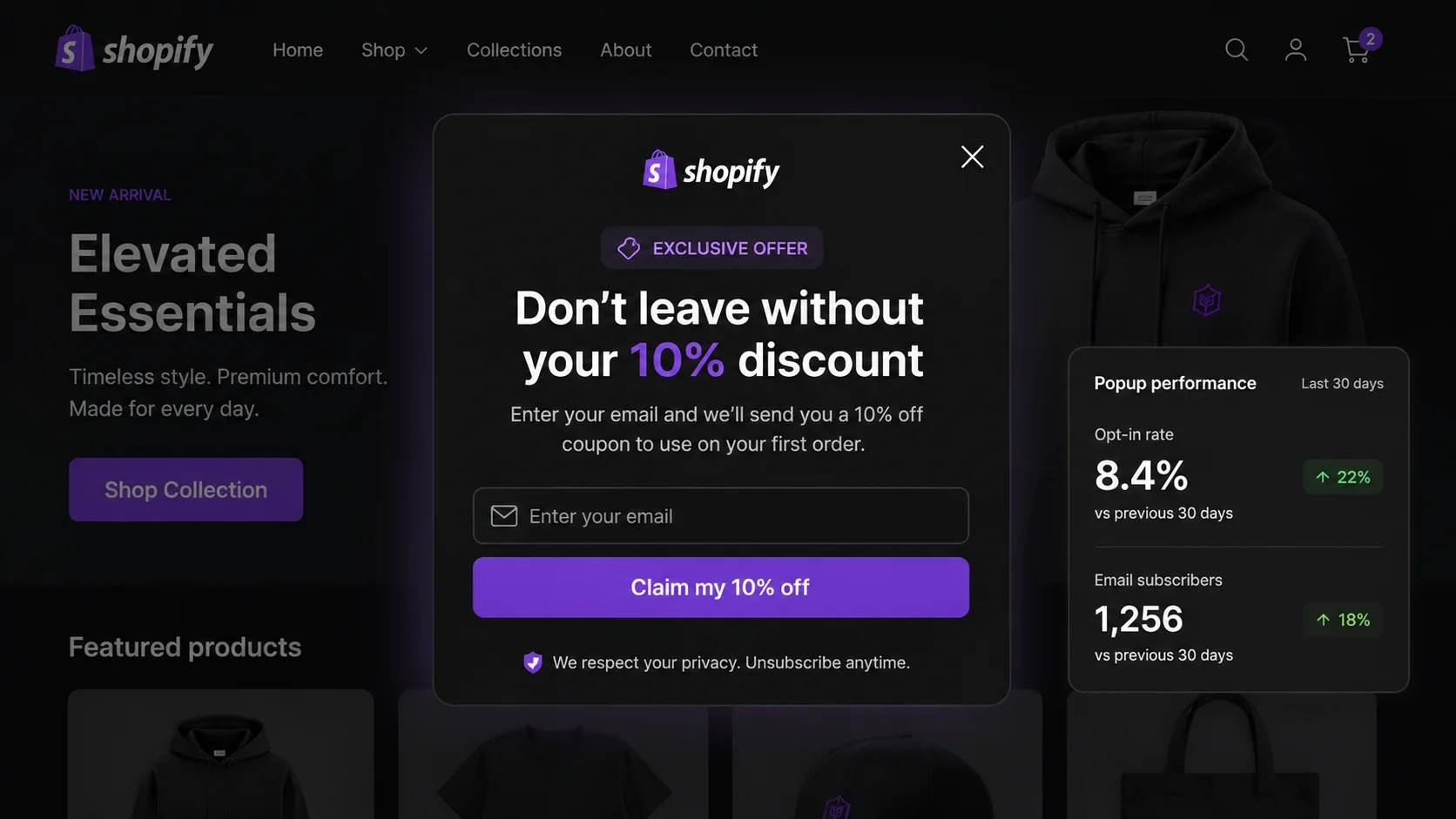
- Generic Shopify email popups average a 3–5% opt-in rate; optimized ones reach 8–12% (Wisepops, Sumo).
- Exit-intent timing outperforms immediate page-load popups — immediate popups reduce average session length.
- A specific discount ("10% off your first order") outconverts a vague promise ("exclusive deals") every time.
- Two-step opt-in flows (click to reveal the form) convert higher due to the micro-commitment effect.
- Loss-framed CTAs ("Claim my 10% off") outperform passive verbs ("Subscribe") in every A/B test.
- Mobile popups require a full-screen layout with large tap targets — scaled-down desktop popups underperform.
What Makes a Shopify Email Popup High-Converting?
Most Shopify stores deploy their email popup with default settings: show immediately, offer "exclusive deals," and use a "Subscribe" button. That combination produces the 3–5% industry baseline. Stores that consistently hit 8–12% have changed at least four of the seven variables below. The good news is that each change is a configuration decision, not a redesign.
The gap between 4% and 10% is meaningful at scale. A store with 10,000 monthly visitors and a 4% opt-in rate captures 400 email subscribers per month. The same traffic with a 10% rate captures 1,000. At even a $20 average revenue per email subscriber over the first 90 days, that is a $12,000 monthly difference from the same ad spend and the same audience.
The 7 Tactics: Step-by-Step to a Higher Opt-In Rate
Each tactic below maps to one of the seven HowTo steps. They can be implemented independently, but the highest gains come from combining all seven. Start with Tactics 1 and 2 if you are only changing one thing today — timing and offer specificity have the highest individual impact.
Trigger on Exit Intent, Not on Page Load
Immediate page-load popups interrupt visitors before they have seen any content. Industry data shows they reduce average session length because a meaningful percentage of visitors close the tab rather than dismiss the popup. Exit-intent fires when the visitor's cursor moves toward the browser close zone — after they have already browsed, which means they have some product interest before the popup appears. That context lift alone can move opt-in rate by 2–3 percentage points.
Exit-intent also avoids the Google intrusive interstitial penalty, which applies to popups that fire immediately on mobile and obscure content. Timing your popup to exit signals keeps you on the right side of Core Web Vitals scoring. For a deeper technical breakdown of exit-intent implementation and browser signal handling, see the exit intent popup guide.
Offer a Specific Discount, Not a Vague "Deals" Promise
Vague offers ("Join our list for exclusive deals and updates") ask visitors to trade their email address for an unknown future value. Specific offers ("Get 10% off your first order — code sent instantly") make the value concrete and immediate. The visitor knows exactly what they get before they type their email. That certainty removes the single largest source of friction in email opt-in forms.
Free shipping offers work especially well for stores where the standard shipping cost is visible on product pages. If your customers can see a $7.99 shipping fee, "Free shipping on your first order" has a tangible, immediate dollar value that converts well even without a percentage discount. Test both and let the data decide, but do not run a vague offer against either — it will lose every time.
Use a Two-Step Opt-In (Click First, Form Second)
Instead of showing an email input field immediately, show a button first: "Claim my 10% off." After the visitor clicks, reveal the email field. This is the two-step opt-in. Sumo's data consistently shows two-step opt-ins convert higher than one-step forms because the initial button click creates a micro-commitment. Once someone has clicked "Claim my 10% off," typing their email feels consistent with that action. The psychological term is commitment and consistency — people follow through on decisions they have already made.
The two-step approach also lets you write more compelling initial copy without the visual friction of an email field. A button with bold copy and a single clear action gets more initial engagement than a form asking for information before establishing the value.
Write Loss-Framed CTA Copy ("Claim My 10% Off," Not "Subscribe")
CTA button copy is the single most-tested element in email marketing, and the finding is consistent: action verbs that frame the offer as something to claim outperform passive subscription verbs. "Subscribe" tells the visitor what they are doing. "Claim my 10% off" tells the visitor what they are getting — and implies it could disappear if they do not act. That loss-framing activates the same prospect theory mechanism behind urgency marketing: the possibility of not getting something you could have had registers as a loss, not merely a missed gain.
First-person phrasing ("my" instead of "your") also consistently tests better. "Get my discount" outperforms "Get your discount" because the first person makes the offer feel already possessed and therefore more worth protecting. For a full breakdown of loss framing and how it applies across Shopify conversion points, see the guide to Shopify conversion rate optimization.
Add Social Proof Inside the Popup ("Join 4,200 Shoppers Who Save With Us")
A subscriber count or short testimonial inside the popup body reduces the perceived risk of submitting an email address. Visitors seeing "Join 4,200 shoppers who save with us" are making a decision that 4,200 other people have already made — a powerful uncertainty reducer for first-time visitors who have no prior relationship with your brand. Social proof works through herd behavior: when we are uncertain, we take cues from what others have done.
Keep the social proof stat honest. If you have fewer than 500 subscribers, frame it differently: use a product review count ("Loved by 380 customers"), a recent sale stat ("127 orders this week"), or a press mention. Fabricated subscriber counts are immediately detectable and destroy the credibility the social proof was supposed to build.
Use a Time Delay + Scroll Trigger Combo (30 Seconds OR 50% Scroll)
Firing the popup after 30 seconds OR 50% scroll depth — whichever comes first — targets the two behavioral signals that predict engagement: time on page and content consumption. A visitor who has spent 30 seconds on your site or scrolled halfway down a product page has demonstrated interest. Showing the popup at that moment filters out immediate bouncers (who would not convert anyway) while catching genuinely interested visitors before they leave.
The OR logic is important. A visitor who reads quickly may hit 50% scroll in 15 seconds. A visitor who opens a tab and returns 45 seconds later may still be near the top of the page. Either trigger catches them at the right moment. Using only one trigger misses the other population.
Design a Mobile-Specific Popup (Full-Screen, One Field, Large Tap Targets)
Over 60% of Shopify traffic is mobile. A desktop popup scaled down to a 375px viewport produces small tap targets, cramped text, and a close button that requires a precise fingertip tap. Full-screen mobile popups that occupy the entire viewport with a single email field and large, thumb-friendly buttons consistently outperform responsive desktop popups on mobile. The design principle is not scaling down — it is designing up from the smallest screen first.
Minimum tap target size is 44px per Apple's Human Interface Guidelines and Google's Material Design spec. Your email input, your CTA button, and your close/dismiss option all need to meet this minimum. If a visitor cannot easily close your popup without effort, they close the tab instead.
All 7 tactics. One Shopify app.
PopBoost's email popup widget supports exit-intent triggering, two-step opt-in flows, scroll and time-delay combos, and separate mobile layouts — all configurable without code. Part of the full 7-widget PopBoost conversion suite at $19/month.
Install PopBoost free →14-day free trial · no credit card required · works with all Shopify themes
What Opt-In Rate Benchmarks Should You Aim For?
Use these benchmarks to diagnose where your popup sits and which levers to pull next.
2–4% — Baseline performance. You are capturing subscribers but leaving the majority on the table. Test a specific discount offer and switch to exit-intent triggering.
4–7% — Above average. You have the fundamentals right. Test two-step opt-in vs. one-step, and test loss-framed CTA copy against your current button.
7–12% — High-performing. You are in the top tier. Optimize for quality: test free shipping vs. percentage off, and add social proof to see if the rate climbs further.
Above 12% — Exceptional. Check that your list is not inflated by bots or incentive-seekers who never open emails. Monitor open rates alongside opt-in rate.
How PopBoost's Email Popup Widget Implements These Best Practices
PopBoost's email popup is one of seven widgets in the PopBoost conversion suite. It natively supports all seven tactics above: exit-intent triggering, time-delay and scroll-depth combo logic, two-step opt-in flow, configurable CTA button copy, social proof subscriber count display, and separate mobile layout configuration. Everything is set in the dashboard — no Liquid code edits required.
The popup integrates directly with Klaviyo, Mailchimp, and Shopify Email. When a visitor subscribes, they are added to your chosen list immediately, and a welcome email (with the discount code if you configured one) fires within seconds. For advanced follow-up sequences once subscribers are on your list, see the guide to Klaviyo FOMO email sequences.
A/B testing is built in: you can run two popup variants simultaneously — different offers, different CTA copy, different trigger timing — and PopBoost reports the opt-in rate for each. This is the fastest way to move from the 3–5% baseline to the 8–12% optimized range without guessing which variable is doing the work.
Frequently Asked Questions About Shopify Email Popup Best Practices
What is a good opt-in rate for a Shopify email popup?
A generic popup averages 3–5%, according to Wisepops and Sumo benchmarks. A well-optimized popup using exit-intent timing, a specific discount, two-step opt-in, and loss-framed CTA copy can reach 8–12%. If your rate is below 3%, switch to exit-intent triggering as the first fix.
Should I show a Shopify email popup immediately when a visitor arrives?
No. Immediate page-load popups reduce average session length because visitors close the tab rather than engaging. Exit-intent or time-delayed triggers (30 seconds minimum) produce higher opt-in rates and better subscriber quality. For the full technical setup, see the exit intent popup guide.
What discount converts best in a Shopify email popup?
A specific percentage off ("10% off your first order") or a concrete free shipping offer converts significantly better than vague value promises ("exclusive deals"). Specificity removes uncertainty about what the visitor receives. Test both formats — the winning offer varies by product category and average order value.
How do I avoid annoying visitors with a Shopify email popup?
Four rules: (1) trigger on exit intent or after 30 seconds, not on page load; (2) show the popup once per session; (3) suppress for returning subscribers using cookie-based targeting; (4) make the close button clearly visible and large enough to tap on mobile. Popups that respect context and make dismissal easy generate better conversions and fewer negative signals.
Does popup placement matter on a Shopify store?
Center-screen modals outperform corner slide-ins for opt-in rate. On mobile, a full-screen popup outperforms a center-screen modal scaled from desktop. Configure a separate mobile layout rather than relying on a responsive desktop popup. For a complete popup format comparison, read the full popup guide.
For related reading: the full popup guide covering all popup types and placement strategy, the exit intent popup guide for trigger configuration details, Klaviyo FOMO email sequences for what to do after someone subscribes, and a broader look at Shopify conversion rate optimization for every touchpoint beyond the popup.
