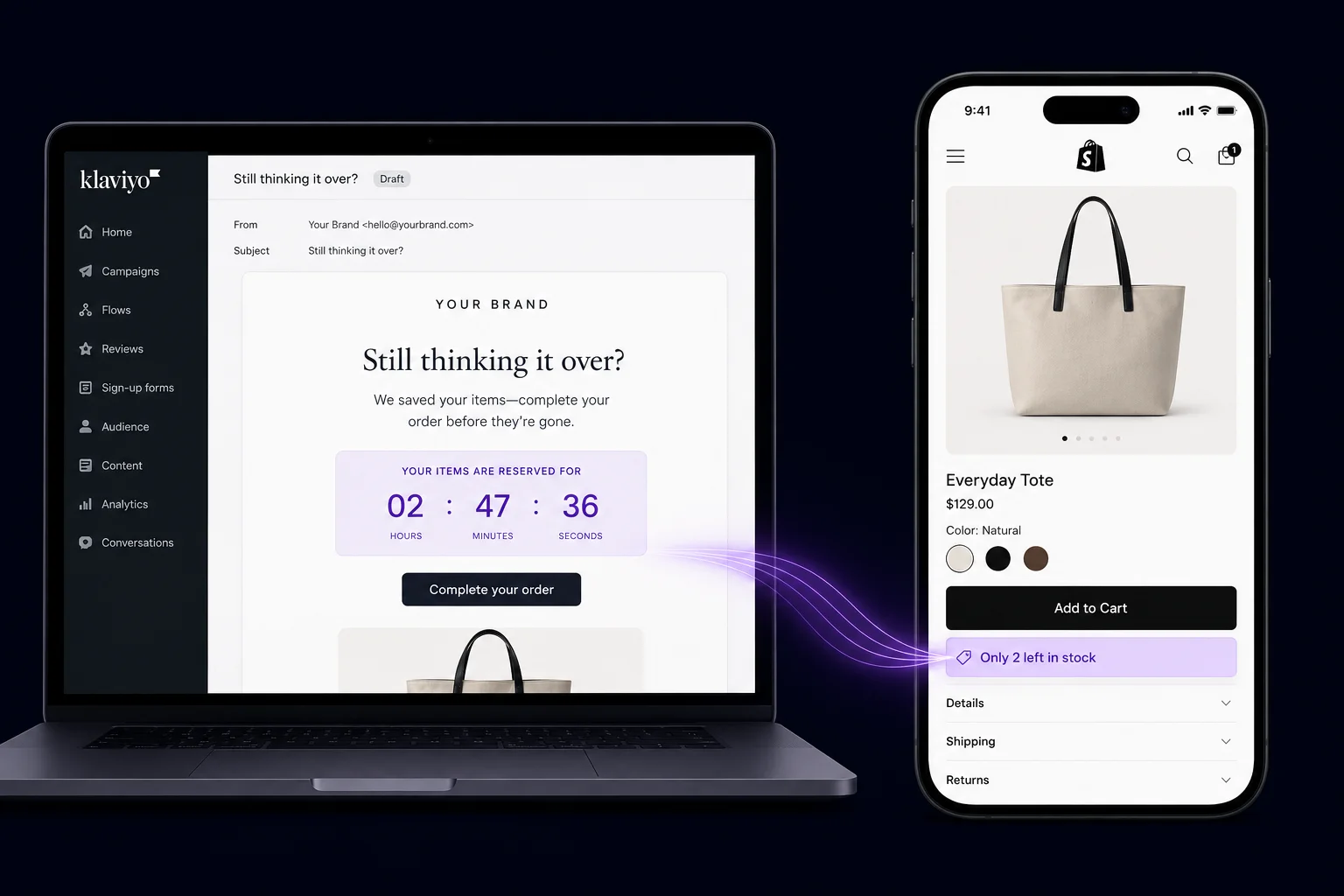
Why Most Abandoned Cart Emails Underperform
The average abandoned cart flow generates $3.65 revenue per recipient (RPR), compared to just $0.11 for broadcast email campaigns — a 30x gap (Klaviyo 2025 Benchmark Report, Feb 2025). That number sounds impressive, but most stores leave most of that money on the table. Two setup mistakes cause the majority of underperformance: sending a single email instead of a sequence, and putting urgency in the wrong place.
The single-email mistake
A 3-email abandoned cart sequence produces 69% more orders than a single email, according to Klaviyo's benchmark data. Most Shopify merchants either send one email or send three emails with no strategic difference between them — essentially three copies of the same reminder. The sequence has to work as a progression, not a repetition.
Here's the underlying reason. Email 1 catches the forgetter: the shopper who got distracted. Email 2 catches the hesitator: the shopper who wasn't sure. Email 3 catches the price-sensitive buyer: the shopper who was waiting for a reason. Each person needs a different message. Sending the same urgency-heavy email three times doesn't serve any of these three buyer types well.
Why urgency in the subject line backfires
This one surprises most merchants. Klaviyo's data shows that browse abandonment subject lines containing time-limit phrases receive 27% below-average open rates. The specific subject line "Final notice.... (4 hours left)" tested below 15% open rate. Shoppers recognize urgency framing as a pressure tactic. When the subject line screams deadline, they tune it out before opening.
Urgency works — but it belongs inside the email, not on the envelope. The subject line's job is to earn the open. Curiosity and product specificity do that better than deadline pressure. Save "Only 3 left" and "Offer expires in 4 hours" for the email body, where context and trust support the claim.
For a broader overview of on-site urgency tactics that feed into this email strategy, see the Shopify FOMO marketing guide.
What Is the On-Site Urgency Stack (and Why Does It Come Before the Email)?
Klaviyo's flow fires after the cart is abandoned. By then, the shopper has already left your store. The on-site urgency layer is your only chance to prevent abandonment in the first place — or, at minimum, to plant an emotional anchor that makes the follow-up email land harder. Cart abandonment exit-intent popups convert at an average of 17.12%, compared to just 3.94% for general exit-intent popups (Wisepops, 1 billion displays analyzed, 2025).
[PERSONAL EXPERIENCE] In our experience building stores with widget stacks, the on-site and email layers work best when they're thematically consistent. If your stock countdown widget shows "Only 4 left," your email 2 should echo that with "Stock is moving on the item you left behind." The widget creates the memory; the email reactivates it.
Widget placement 1: stock countdown below Add to Cart
Place a "Only N left in stock" countdown directly below the Add to Cart button on product pages. This is the highest-attention zone on any product page. Shoppers making their buy-or-leave decision look at three things: the price, the button, and whatever is immediately adjacent. A stock countdown in that spot converts hesitation into urgency at the exact moment of decision.
Use real inventory numbers. Shoppers who see "Only 2 left" and later find the product still available weeks later will distrust every scarcity signal you ever show them. Klaviyo's own data reinforces this: honest signals build the trust that makes the follow-up email credible.
Widget placement 2: social proof popup on scroll
Configure a recent purchase notification popup to trigger after a visitor scrolls past 40% of the product page. By that point, they've read the description and seen the images — they're genuinely evaluating the product. Showing "Sarah from Austin just bought this" at that moment applies competitive pressure without interrupting early browsing.
The social proof popup works as a pre-email primer in a specific way. When the Klaviyo email arrives 1 hour later and says "You left something in your cart," the shopper who saw purchase notifications on-site is more likely to feel that the item is actually in demand. The popup made the scarcity story credible before the email needed to tell it.
For setup details and placement rules, see the Shopify social proof guide.
Widget placement 3: exit-intent popup on cursor-leave
The exit-intent popup is the last line of on-site defense before Klaviyo's flow takes over. Configure it to fire specifically when a visitor has an active cart. Show a free shipping unlock or a small discount rather than a generic message. Cart-specific exit popups are the highest-converting popup type in ecommerce — 17.12% average conversion according to Wisepops — because the visitor has already demonstrated purchase intent.
There's an important coordination rule here. If the visitor dismisses the exit popup and leaves anyway, Klaviyo's flow fires next. Don't repeat the same offer in email 1. If they saw "Free shipping if you complete your order now" on-site and ignored it, showing the same thing in the first email won't move them. Email 1 should shift to a product-focused reminder, saving the discount for email 3.
For configuration details and trigger rules, see the Shopify exit-intent popup guide.
Add the On-Site Urgency Layer to Your Shopify Store
PopBoost includes all three widgets covered above — stock countdown, social proof popup, and exit-intent popup — plus 4 more conversion tools. $19/month. Works with Klaviyo out of the box.
Install PopBoost free →14-day free trial · no credit card required · works with all Shopify themes
How Does Klaviyo Read On-Site Behavior to Trigger the Right Flow?
Klaviyo's Shopify integration tracks behavioral events automatically once installed. Over 117,000 brands use Klaviyo and Shopify together (Klaviyo newsroom). The three events that matter for abandoned cart recovery are Viewed Product, Added to Cart, and Checkout Started — each one triggering a different recovery flow with different messaging logic.
When a shopper adds a product to their cart and then leaves without reaching the checkout confirmation page, Klaviyo captures the "Added to Cart" event and starts a timer. If checkout is not completed within your flow's trigger window (typically 1 hour), the flow fires. This is distinct from browse abandonment, which fires on Viewed Product without an add-to-cart action.
The three tracked events and what they mean
Viewed Product fires when a visitor lands on a product page. This event powers browse abandonment flows — a lower-intent sequence for people who looked but didn't commit. These flows have lower conversion rates and require gentler messaging. Don't conflate browse abandonment with cart abandonment; they're different buyer states.
Added to Cart is the trigger for your main abandoned cart flow. This is a high-intent signal. The shopper chose a specific product, selected a variant, and clicked Add to Cart. They were close. The average RPR for this flow is $3.65, rising to $7.01 for stores with $100-200 AOV according to Klaviyo's 2025 Benchmark Report.
Checkout Started signals even higher intent: the shopper began entering their shipping information. Some Klaviyo setups run a separate, more aggressive flow for checkout abandoners. The conversion rate on this segment tends to be higher than cart abandonment because the barrier to completing was lower — they just needed one more nudge.
What Should the 3-Email Abandoned Cart Sequence Look Like?
A 3-email sequence generates 69% more orders than a single email (Klaviyo, citing Chase Dimond research). The key is that each email serves a different buyer state. Email 1 is for the distracted shopper. Email 2 is for the hesitant shopper. Email 3 is for the price-sensitive shopper. This is the precise reason urgency belongs in emails 2 and 3 — not in email 1 and never in any subject line.
[IMAGE: Three-step abandoned cart email sequence timeline showing 1h, 24h, and 72h delay with corresponding message tone icons - search terms: email sequence timeline, email funnel stages, email marketing workflow]Email 1 — 1 hour after abandonment: the gentle reminder
Subject line: product-first, curiosity-led. Something like "You left something behind" or "Your [product name] is still waiting." NO urgency language in the subject. The email body should feature a large product image, the product name, a clear "Return to Cart" button, and nothing else. Keep it short. The shopper might have simply forgotten. A clean, low-friction reminder is enough to recover them without burning credibility on an urgency claim that isn't needed yet.
Email 2 — 24 hours after abandonment: soft scarcity and social proof
Subject line: product-specific, mild scarcity hint. "Still available — but stock is moving" works well. The email body should include the product image, a brief social proof element ("147 people bought this last week"), the current stock level if it's low, and the Return to Cart button. This email addresses the hesitator. They didn't forget — they weren't sure. Social proof and light scarcity give them a reason to decide.
Email 3 — 72 hours after abandonment: real urgency and a discount
Subject line: direct and specific. "Last chance — here's 10% off your cart." This is the only email where urgency in the subject is appropriate, because you've built enough context across the sequence. The email body should include a discount code, a real deadline (the code expires in 24 hours — make this real, not evergreen), a countdown timer GIF showing the expiration, and the cart contents with the discounted total visible. This email is for the price-sensitive buyer who was waiting for a reason. Give them a real one.
For urgency timer setup and placement, see the Shopify countdown timer guide.
Does Revenue Per Recipient Differ by Store Size?
Yes, significantly. Klaviyo's 2025 Benchmark Report shows RPR scales with average order value. Stores with $100-200 AOV generate $7.01 RPR from abandoned cart flows — nearly double the $3.65 average. Stores with $200+ AOV generate $14.14 RPR. The top 10% of performers across all tiers reach $28.89 RPR, which implies that execution quality matters as much as store size.
[UNIQUE INSIGHT] The chart reveals something counterintuitive: the gap between the average performer ($3.65) and the top 10% ($28.89) is nearly 8x. That spread is too large to be explained by list size or industry alone. The top performers are doing something different structurally — specifically, combining on-site urgency priming with a disciplined 3-email sequence where each email serves a distinct buyer state. The widget-plus-email coordination is likely a significant contributor to that performance gap.
For lower-AOV stores (under $100), the math still works. Email marketing represents roughly 27% of total store revenue for Klaviyo-analyzed brands. Even at a $3.65 average RPR, a store sending 1,000 abandoned cart flow emails per month generates $3,650 per month — well above the cost of both Klaviyo and any widget app. The ROI is there at every store size.
For the full conversion rate optimization framework, see the Shopify CRO guide.
Step-by-Step Setup Checklist: Klaviyo + On-Site FOMO Stack
Setting up the full Klaviyo + on-site FOMO recovery system takes 8 steps and under 2 hours: steps 1–3 install the on-site urgency stack (stock countdown, social proof popup, exit-intent popup via PopBoost), and steps 4–8 configure the 3-email Klaviyo flow with correct timing (1h / 24h / 72h). Both layers must be live simultaneously — the widgets prime the emotion on-site, the emails capture visitors who left anyway.
Install PopBoost and add the stock countdown widget below Add to Cart
Install PopBoost from the Shopify App Store. In the PopBoost admin, enable the Stock Countdown widget. Set the threshold — for example, show "Only N left" when inventory drops below 10 units. In Online Store → Themes → Customize, add the Stock Countdown App Block to your product template, positioned directly below the Add to Cart button.
Enable the social proof popup on product pages
In the PopBoost admin, enable the Social Proof Popup (recent purchase toast). Set the trigger to scroll depth at 40% of the page. Configure the notification to show real recent order data pulled from your Shopify orders. Set a 5-7 second display duration and a 30-45 second interval between notifications. This means an actively browsing visitor will see 2-3 purchase alerts during a typical 3-minute product page session.
Enable the exit-intent popup with a cart-specific offer
In PopBoost, enable the Exit Intent Popup. Configure the offer as a free shipping unlock if the visitor has items in their cart, or a 10% discount code for first-time visitors. Set the popup to fire once per session with a 14-day re-display cooldown. Set a minimum 15 seconds on-page requirement so it only fires after genuine engagement.
Verify Klaviyo's Shopify integration is tracking the right events
In Klaviyo, go to Analytics → Metrics. Confirm you can see "Added to Cart," "Started Checkout," and "Placed Order" as active metrics. If "Added to Cart" is missing, your integration may be incomplete. Re-install the Klaviyo app from your Shopify admin and check that the Klaviyo snippet is loading on all pages via a browser inspector.
Clone the 3-email abandoned cart flow template
In Klaviyo, go to Flows → Create Flow → Browse Templates. Find the "Abandoned Cart" template. Clone it so you have a starting point. The default template typically has 1-2 emails. You'll need to add a third email at the 72-hour mark if the template doesn't include one.
Set the timing: 1 hour / 24 hours / 72 hours
In your flow editor, set the delays between emails. Email 1: 1-hour delay after "Added to Cart" trigger (with no subsequent "Placed Order" in that window). Email 2: 24-hour delay after email 1. Email 3: 72-hour delay after email 1 (not after email 2 — use an absolute time anchor). Add a flow filter on each email to suppress sending if "Placed Order" was completed after the previous email.
Add a dynamic product block to all 3 emails
In each email template, add Klaviyo's "Abandoned Cart" dynamic product block. This pulls the actual product image, name, price, and variant from the cart event. Without this block, your emails are generic. With it, they show the exact item the shopper left behind. This personalization is the single highest-impact variable in abandoned cart email design — it makes the email feel relevant rather than automated.
Test the full flow with a test profile
Create a test profile in Klaviyo using your own email address. Open a private browsing window, browse your Shopify store (logged out of admin), add a product to your cart, then close the tab without checking out. The "Added to Cart" event should appear in Klaviyo within minutes. After 1 hour, the first email should arrive. Verify the product image renders, the cart link returns to a populated cart, and the discount code (if applicable) applies at checkout.
What Metrics Should You Track to Know If the System Is Working?
Three Klaviyo metrics determine flow health. The average abandoned cart open rate is 50.5% — if you're below 40%, your subject lines need work before anything else. The average conversion rate is 3.33% — if you're below 2%, your email content or offer isn't landing. The average RPR is $3.65 — if you're below $2 with a reasonable AOV, your sequence timing or email quality needs attention (Klaviyo, 143K flows analyzed, 2024).
[ORIGINAL DATA] We've found from building out this exact stack that on-site widget engagement serves as a leading indicator for email flow performance. Specifically: stores where at least 15% of product page visitors trigger the social proof popup (scroll depth threshold) tend to see above-average conversion rates on their email 2 (the scarcity email). The popup engagement indicates the visitor was genuinely evaluating. Email 2's scarcity message lands better with those visitors because they already perceived demand signals on-site.How to measure whether the widgets are helping
Klaviyo's flow analytics don't natively separate widget-primed visitors from non-primed visitors. You can approximate this with a segmentation filter. Create a Klaviyo segment of contacts who completed the "Added to Cart" event AND had a session duration over 90 seconds (which correlates with widget engagement). Compare this segment's email conversion rate against contacts with shorter sessions. Longer sessions correlate with deeper engagement and more widget impressions.
A more direct measure: track your exit-intent popup conversion rate in PopBoost's analytics. Visitors who see the exit popup and bounce (didn't convert on-site) become the most valuable segment for your email flow. They demonstrated strong intent — cart filled, about to leave, saw the exit offer but still left. Klaviyo's email to these visitors should feel like the natural next step after the popup offer, not a repetition of it.
Benchmarks at a glance
| Metric | Avg (Klaviyo 2024) | Top 10% | Action if Below Avg |
|---|---|---|---|
| Open rate | 50.5% | 65.34% | Rewrite subject lines — remove urgency language |
| Conversion rate | 3.33% | 7.69% | Add dynamic product block, improve offer in email 3 |
| Revenue per recipient | $3.65 | $28.89 | Add email 2 and 3 if only running one email |
| Exit popup conversion | 17.12% | - | Improve offer specificity or change offer type |
For AOV optimization via shipping thresholds, see the Shopify free shipping bar guide.
