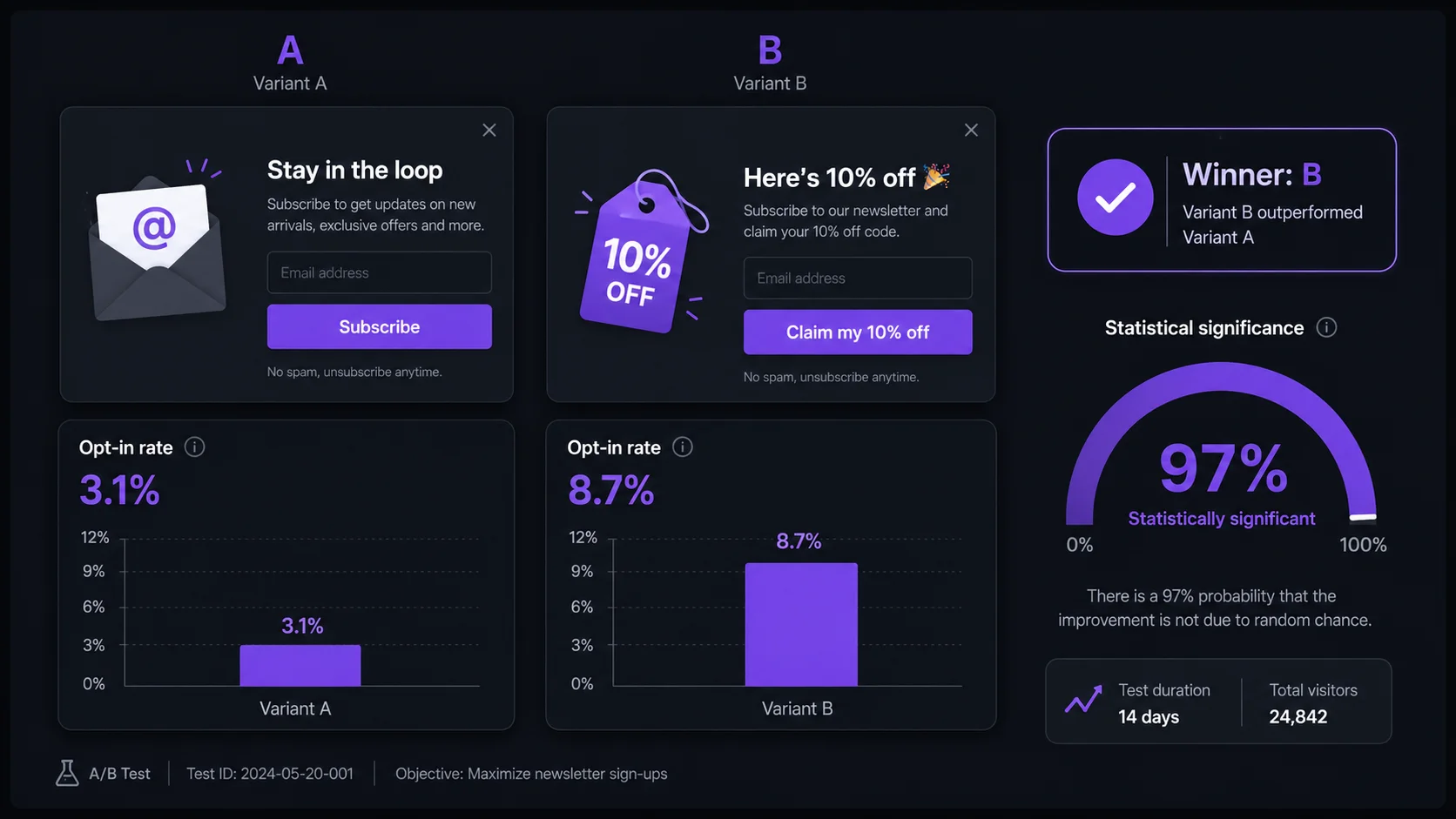
- Test one variable at a time — changing headline and offer simultaneously makes results uninterpretable.
- Headline first: it's the fastest path to a 20–40% opt-in lift with no design changes required.
- Run tests for 2 weeks minimum or 500 visitors per variant — stop earlier and your data is unreliable.
- Your success metric is opt-in rate, not clicks or impressions.
- Exit intent outperforms timed triggers by 2–3x opt-in rate — test trigger type last, after copy and offer.
What to A/B Test in a Shopify Popup — and in What Order
Most Shopify store owners who try popup A/B testing either test too many things at once or test the wrong things first. The correct approach is sequential: pick the highest-impact variable, test it in isolation, implement the winner, then move down the list. This structure is what separates a 10% opt-in rate improvement from a 100%+ one.
Here's the priority sequence, ordered by speed of measurable results and magnitude of typical lift:
The reason headlines come first isn't just because they have high impact — it's because copy changes require zero design work, zero dev time, and zero risk. You write two different headlines, run both for two weeks, and one outperforms the other by a measurable margin. That's a clean, fast win that sets a stronger baseline for every subsequent test.
How to Run a Valid Popup A/B Test on Shopify
A valid A/B test has three non-negotiable properties: one variable changed, a pre-defined success metric, and sufficient sample size before stopping. Violate any of these and your results are unreliable — you'll implement the "winner" and see no real change in performance.
Choose one variable to test — only one
Select exactly one element to change between variant A and variant B. If you change both the headline and the offer type simultaneously, you cannot attribute any difference in opt-in rate to either change. The most common mistake is launching a "new popup" that changes five things at once and declaring the better-performing version the winner. That's not a test — it's a redesign with no actionable insight.
Create Control (A) and Treatment (B) — change only the one variable
Your Control is your current popup exactly as it runs. Your Treatment changes only the variable you're testing. If testing headline, every other element — offer value, CTA text, image, trigger timing, form fields, colors — must be pixel-identical between variants. This isolation is the mechanism that makes results interpretable. If you're testing offer type (% discount vs free shipping), the headline and CTA must be the same across both variants.
Define your success metric before starting
Decide on your metric before you launch — not after you see partial results. For popup A/B testing, the correct primary metric is opt-in rate: the percentage of visitors who see the popup and submit their email. Not clicks, not impressions, not revenue (revenue introduces too many downstream variables). Set your significance threshold at 95% minimum. A 95% threshold means there's only a 5% chance the observed difference is random noise.
Run for minimum 2 weeks or 500 visitors per variant
Run until you hit 95% statistical significance or a minimum of 500 visitors per variant — whichever takes longer. If your store gets 300 visitors per month, a single popup variable test requires 3–4 weeks of data. Do not stop early when one variant is ahead. Early leaders normalize regularly as sample size grows — the variant that's "winning" at day 3 with 40 impressions may be tied at day 14 with 600. Also segment by device: mobile and desktop can produce different winners for the same variable.
Implement the winner, then test the next variable
Once you reach statistical significance, make the winning variant your new Control and move to the next variable in the priority sequence. Each test builds on the last. Three completed tests — headline, offer, CTA — can compound to 80–120% total lift above your original opt-in rate, because each winning variant becomes the new baseline that the subsequent test improves further.
Run popup tests without a dedicated A/B tool
PopBoost's popup widgets are free to configure and update — swap your headline, change your offer, adjust your trigger. If you're testing manually with weekly alternation, PopBoost makes it easy to update variants in under 2 minutes.
Install PopBoost Free →Free plan includes all 7 widgets. No credit card required.
Sample Tests with Expected Lift Ranges
These are directional benchmarks from aggregate popup test data — your store will vary based on audience, niche, and baseline opt-in rate. Use them to set expectations before you start, not to skip running your own tests.
| Variable | Variant A (Control) | Variant B (Treatment) | Typical Lift |
|---|---|---|---|
| Headline copy | Subscribe to our newsletter | Get 10% off your first order | 30–50% higher opt-in for B |
| CTA button | Subscribe | Claim my 10% off | 40–60% higher opt-in for B |
| Offer type (AOV >$50) | 10% off first order | Free shipping on first order | Free shipping wins for most stores |
| Trigger timing | 30-second timed trigger | Exit intent | 2–3x higher opt-in rate for exit intent |
| Form fields | Email only | Email + first name | 10–20% lower opt-in for B (name field) |
The CTA button copy finding is worth pausing on. "Subscribe" tells visitors what they're doing for you. "Claim my 10% off" tells visitors what they're getting for themselves. Loss-framing — framing the action as claiming something the visitor will miss if they don't act — consistently outperforms neutral or effort-framing. This is one of the easiest wins in Shopify conversion rate optimization and requires only a few seconds to implement.
How to Read Results Without False Positives
False positives are the biggest risk in popup A/B testing. They happen when you stop a test early based on a promising-looking result that turns out to be random noise. Here's how to avoid the most common mistakes:
Don't stop when one variant looks good. Looking at results after 3 days with 80 impressions per variant is essentially useless. The variance at that sample size is enormous. A 60/40 split at 80 impressions is meaningless; it needs to hold at 500+ impressions per variant before you can trust it.
Require 95% statistical significance. Use a free significance calculator (AB Testguide, VWO's significance tool, or any A/B test calculator) and input your impressions and conversions for both variants. Only declare a winner when the calculator returns 95%+. At 90% significance, you're accepting a 10% false positive rate — meaning one in ten tests where you think B won, A would have performed the same or better.
Segment by device before implementing. A headline that wins on desktop may underperform on mobile. If your traffic is 60%+ mobile (which most Shopify stores are), check whether the winning variant holds across both device types before treating it as a universal winner. Mobile visitors often respond differently to the same copy — shorter headlines tend to perform better on mobile where the popup viewport is smaller.
A/B Testing Without a Dedicated Popup Tool
If your popup app doesn't support native A/B testing, you can still run directionally useful tests using a weekly alternation method. This approach is less statistically rigorous but gives you actionable signals on low-traffic stores where a full significance test would take months.
The method: week 1, run variant A. Week 2, run variant B. Week 3, return to variant A. Week 4, back to variant B. Track opt-in rate manually in a spreadsheet for each week, noting any external factors (promotions, traffic spikes, seasonal effects) that could explain differences. After 4 weeks, average variant A weeks vs variant B weeks. A consistent pattern across two cycles of each variant is a reasonable signal — not statistically validated, but directionally reliable enough to make a decision.
For deeper guidance on the full popup strategy behind these tests, the popup guide covers popup type selection, stacking order, and the timing logic that determines which popup fires in which context. For more on email popup best practices — including timing, copy templates, and opt-in incentive structures — see the dedicated guide. And for a breakdown of how trigger types compare across different visitor segments, see popup trigger types.
Popup A/B testing is one of the highest-ROI activities in the Shopify conversion rate optimization toolkit precisely because the barrier is low — you're testing copy changes and trigger settings, not rebuilding your store. A single winning headline test can permanently lift opt-in rate by 30%. Run four sequential tests well, and the compounded result often exceeds what most stores see from a full redesign. See how these principles play out in a real store in our conversion rate case study.
Start testing your Shopify popup today
PopBoost's email popup widget is free to install and takes under 5 minutes to configure. Change your headline, swap your CTA, adjust your trigger — then measure opt-in rate. No developer needed.
Install PopBoost Free on Shopify →7 conversion widgets · Free plan available · Works with all Shopify themes
Frequently Asked Questions
How do I A/B test a Shopify popup?
Change exactly one variable at a time — start with the headline, which delivers the biggest lift fastest (typically 20–40% difference between variants). Create two versions of your popup where only the headline differs, run both for at least 2 weeks or 500 visitors per variant, then measure opt-in rate. Once you have a statistically significant winner, implement it and move to the next variable in sequence: offer type, CTA copy, trigger timing, then form fields.
What should I A/B test on a Shopify popup first?
Test the headline first. Headline changes are the highest-impact, fastest-result variable in popup A/B testing — a single word change can produce a 20–40% difference in opt-in rate within 2 weeks. After the headline, test offer type (percentage discount vs free shipping vs free gift), then CTA button copy, then trigger timing, and finally form fields. Working in this order gives you the biggest lifts early and builds a stronger baseline for each subsequent test.
How long should I run a Shopify popup A/B test?
Run your test for a minimum of 2 weeks or until each variant has reached 500 visitors — whichever comes later. Most popup platforms require 95% statistical significance before declaring a winner. Stopping early when one variant looks better is the most common mistake: early leads frequently disappear as sample size grows. If your store gets fewer than 1,000 monthly visitors, extend the test to 3–4 weeks minimum.
Does popup headline copy really affect opt-in rate that much?
Yes. In popup A/B testing, the headline is typically the single highest-leverage element. The difference between a generic headline like "Subscribe to our newsletter" and a specific value-framed one like "Get 10% off your first order" commonly produces 30–50% higher opt-in rates. Loss-framed CTAs ("Claim my 10%") outperform generic ones ("Get discount") by 40–60% in controlled tests. Copy changes cost nothing to implement and produce measurable results faster than any design change.
Is exit intent or a timed trigger better for Shopify popups?
Exit intent typically outperforms timed triggers by 2–3x opt-in rate because it fires only for visitors who are actively leaving — the highest-intent-to-abandon segment. A timed trigger at 30 or 60 seconds fires for every visitor regardless of behavior, which means a higher proportion of low-intent impressions. For a first popup, use exit intent on desktop (cursor-leave) and scroll-back detection on mobile. Add a timed trigger as a secondary variant only after you have exit intent data to compare against.

PopBoost ‑ FOMO & Popups
7 Shopify conversion widgets. One $19/month app.