The average job seeker spends 11 hours applying per job offer received. Most of that time goes to two tasks: writing cover letters (15–30 minutes each) and filling out repetitive application forms (5–15 minutes each). Chrome extensions that automate both tasks don't just save time — they allow you to apply to 3–5× more positions in the same hours, which directly improves your odds of getting a callback.
This guide covers the best job search Chrome extensions in 2026, what each one actually does, and how to combine them into a workflow that turns a full-day job search into a focused 2-hour session.
Why Chrome Extensions Make Job Searching Faster
Job searching is almost entirely browser-based. You're on LinkedIn, Indeed, Greenhouse, Lever, and Workday — all in Chrome. Extensions live in that same environment, which means they can read job descriptions, auto-fill forms, generate content, and track applications without you switching between apps.
The three areas where extensions save the most time:
| Task | Manual Time | With Extension | Time Saved |
|---|---|---|---|
| Writing a tailored cover letter | 15–30 min | 1–3 min (edit AI draft) | 12–27 min per application |
| Filling application forms | 5–15 min | 1–3 min (auto-fill + review) | 4–12 min per application |
| Logging applications to a tracker | 3–5 min | Automatic | 3–5 min per application |
At 10 applications per day, these savings compound to 3–4+ hours daily. For a serious job search running 3–4 weeks, that's 60–80 hours recovered — time that can go toward networking, interview prep, or simply not burning out.
JobPilot — AI Cover Letters and Auto-Fill
JobPilot is the most impactful job search extension for most people because it attacks the highest-time-cost task: writing cover letters.
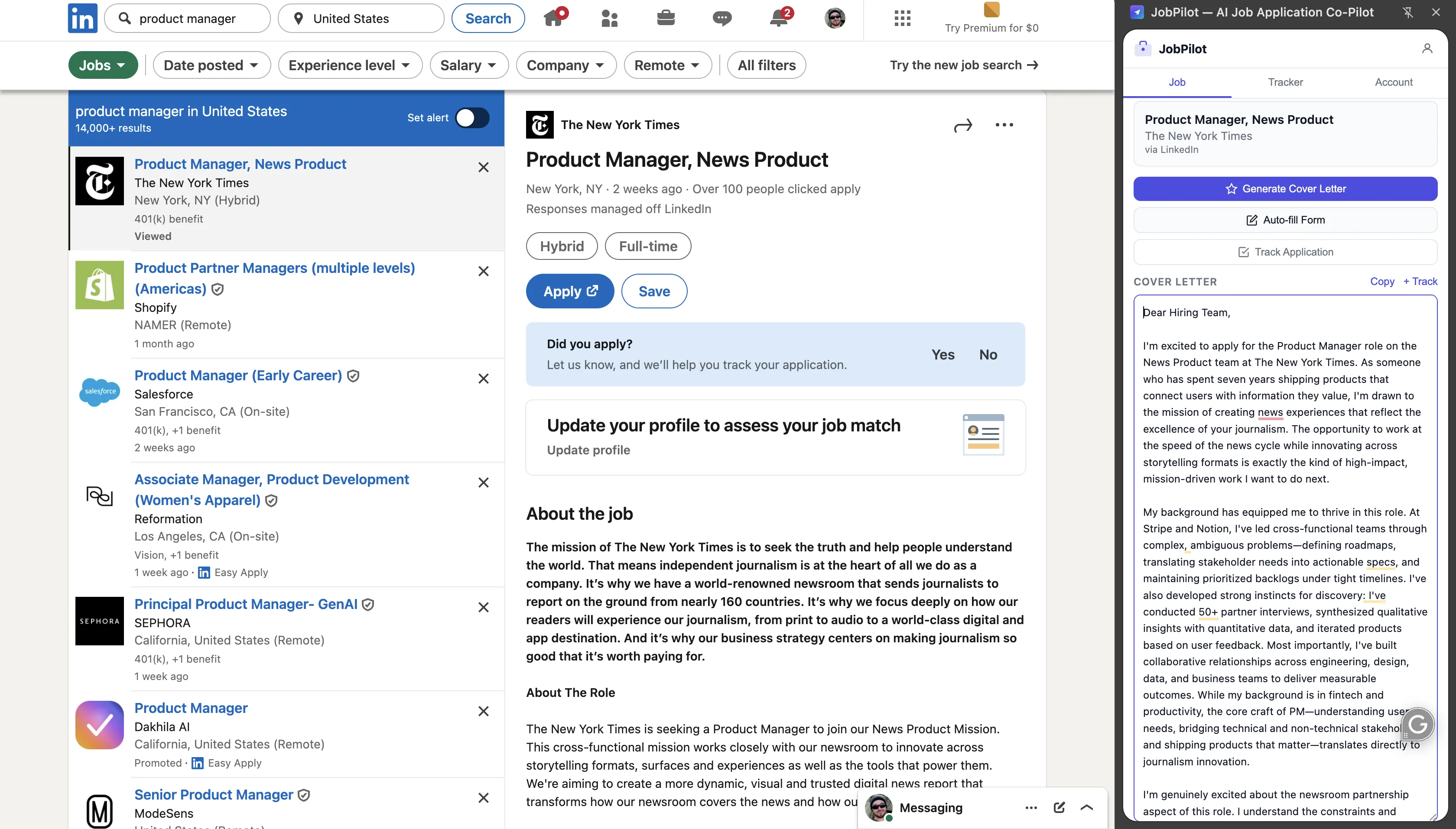
How it works: You paste your resume once into JobPilot (stored locally, never sent to a server). When you open a job listing on any supported platform, JobPilot reads the job description and generates a cover letter tailored to that specific role — using the requirements, keywords, and company context from the listing alongside your stored experience.
Supported platforms: LinkedIn, Indeed, ZipRecruiter, Glassdoor, Lever, Greenhouse, Workday, Ashby, Wellfound, Monster, Handshake.
What makes it different from ChatGPT: You don't have to copy-paste the job description, prompt it, copy-paste your resume, write instructions, and then format the output. JobPilot does all of that automatically in the context of the page you're already on. The result is a tailored draft in under 60 seconds.
Setup: paste your resume once
Open the JobPilot extension icon and paste your resume in plain text. JobPilot stores it locally in Chrome storage — it doesn't leave your browser. You only do this once; the extension remembers it across all sessions and all job sites.
On each job listing: generate in one click
Open any job listing. Click the JobPilot icon. The extension reads the job description from the page and generates a tailored cover letter in the side panel. The output is ready to copy in under 60 seconds.
Edit for 2–3 minutes
Review the output. Add one specific personal detail (why you're interested in this company, a relevant project from your background, a connection to their product). Delete any generic phrases. The result is a cover letter that reads as genuinely tailored — because the base is accurate, not a template.
Auto-fill: JobPilot also auto-fills standard application form fields — name, email, phone, LinkedIn URL, work authorization, graduation year — reducing the repetitive data entry that eats time on ATS-heavy forms (Greenhouse, Workday, Ashby).
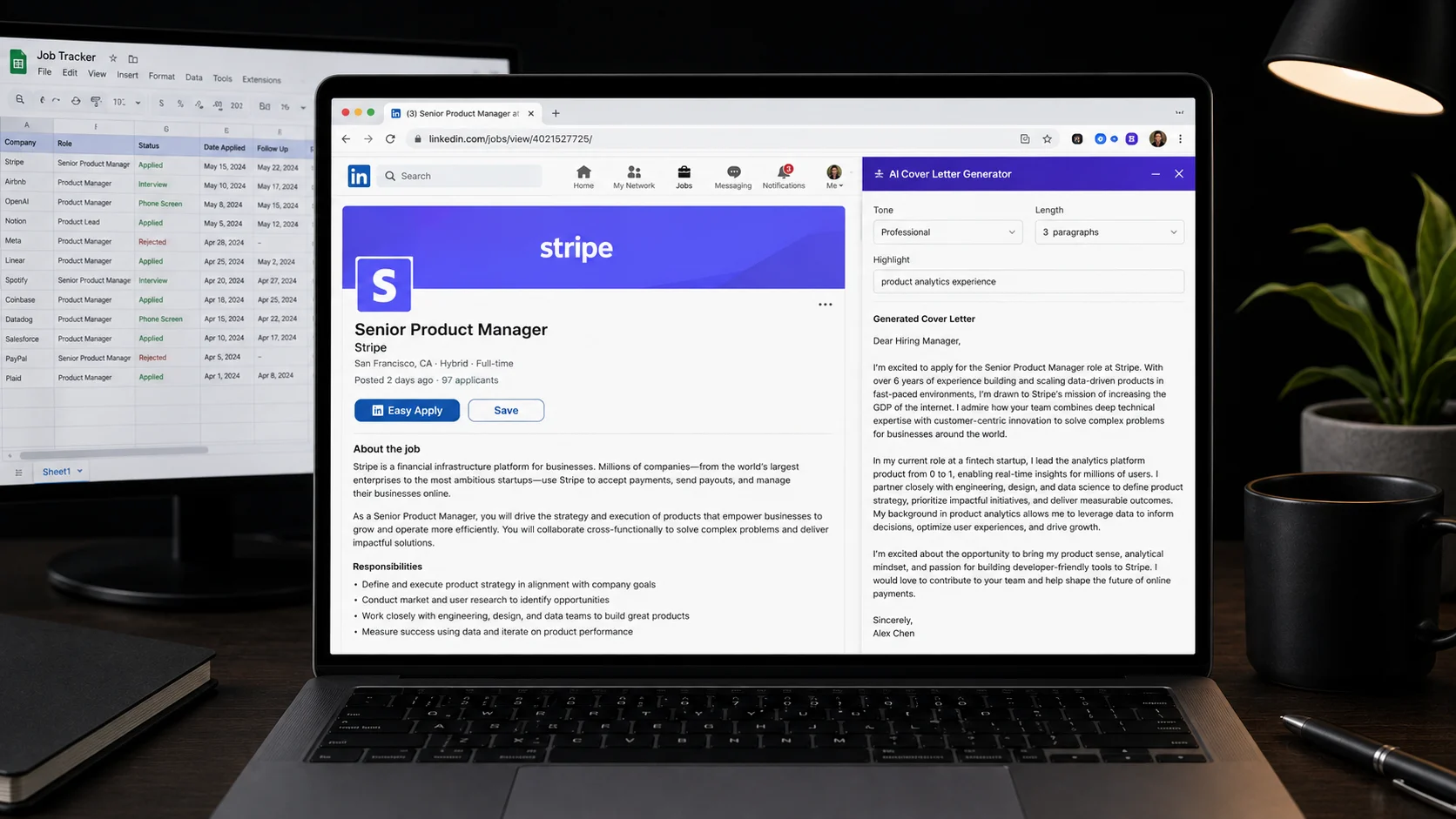
Application tracking: JobPilot logs each job you interact with, storing the company name, role, and date so you can review your pipeline without maintaining a separate spreadsheet.
Pricing: Free (3 cover letters/day), Basic $9.99/month (20/day), Pro $19.99/month (100/day). For most job seekers, the free tier is sufficient to start. Heavy applicants (10+ applications/day) benefit from Pro.
The AI quality question: JobPilot is trained to write in a direct, professional, human tone — no "I am thrilled and excited to apply" or "proven track record of success." The output reads as human because it avoids the five phrases that immediately signal AI to experienced recruiters. That said, always review and edit before submitting.
Application Tracking Extensions
Tracking your applications manually in a spreadsheet is fine for 10–20 applications. Past that, it becomes a job in itself. These extensions automate the tracking layer:
Huntr
Huntr is a Kanban-style job tracker that works as a Chrome extension. When you open a job listing, a Huntr icon appears — click it to add the job to your board with one click, auto-populating the company, role title, and URL. The board gives you columns for Wishlist, Applied, Phone Screen, Interview, Offer, and Rejected. Free for up to 40 jobs; $9/month for unlimited.
Teal Job Tracker
Similar to Huntr with a more visual resume builder integration. Teal's extension saves job listings directly from LinkedIn or Indeed and syncs them to your Teal dashboard. Free tier is fairly generous (unlimited job saving, basic tracker).
Both integrate with LinkedIn, Indeed, and most ATS-based application pages. If you're using JobPilot's built-in tracker, you may not need a separate extension for basic tracking — JobPilot covers the essentials. Huntr and Teal add more structure if you want detailed pipeline management.
Salary Transparency Extensions
Knowing the salary range before applying changes your strategy — both which jobs to apply to and how to negotiate when an offer comes. These extensions surface salary data inline while you browse:
Glassdoor Salary Extension
The official Glassdoor extension shows salary ranges for jobs on LinkedIn, Indeed, and other boards — pulled from Glassdoor's database of company-reported and user-submitted salaries. When a salary range isn't listed in the job posting, Glassdoor's estimate fills the gap based on role, company, and location.
Levels.fyi Extension (for tech roles)
For software engineering, product, and data science roles, levels.fyi has far more granular compensation data than Glassdoor — broken down by level (L3, L4, L5) and total comp including equity and bonus. The extension surfaces this data on LinkedIn job pages without leaving the listing.
LinkedIn Optimization Extensions
LinkedIn is the primary job search platform for most professionals. These extensions improve the LinkedIn experience specifically:
LinkedIn Job Search Filters (native enhancement)
LinkedIn's built-in Easy Apply filter is useful but imprecise. The unofficial "LinkedIn Job Search Super Filters" extension adds additional filter options including posting date granularity (past 24 hours, exact date ranges), company size filters, and remote-only or hybrid-only views — making it significantly faster to find fresh, relevant listings.
Dux-Soup (LinkedIn outreach, with caution)
Dux-Soup automates LinkedIn profile visits and connection requests for networking. Use with extreme caution — LinkedIn's terms prohibit automation and accounts can be restricted. Useful for targeted outreach campaigns but should be rate-limited (no more than 20–30 connection requests/day) to avoid triggering restrictions.
The Complete Job Search Extension Stack
You don't need every extension listed here. The most effective combination depends on your situation:
| Your Situation | Recommended Stack |
|---|---|
| Active job seeker, 10+ applications/day | JobPilot Pro + Huntr + Glassdoor Salary |
| Casual job search, 2–5 applications/week | JobPilot Free + Glassdoor Salary |
| Tech/engineering roles | JobPilot + Levels.fyi Extension |
| Early in search, exploring options | JobPilot Free + Teal Job Tracker |
| Targeting specific companies | JobPilot + Huntr (with company research notes) |
The one constant across every scenario is a cover letter tool. Cover letters are required for most roles that matter, and writing them manually for every application is the fastest path to search fatigue. JobPilot's free tier (3/day) handles a light search; Pro handles an aggressive one.
The Fastest Application Workflow for 2026
With the right extension stack, a high-volume job search looks like this:
Morning: source 20–30 relevant listings (15 minutes)
Set up saved searches on LinkedIn and Indeed for your target roles and locations. Every morning, open new results from the past 24 hours. Glassdoor or Levels.fyi extension shows salary ranges inline — filter out roles below your minimum without opening each one fully.
Per application: read, generate, edit, submit (5–8 minutes)
Open the listing, read the requirements (2 minutes). Click JobPilot to generate the cover letter (30 seconds). Edit — add one specific detail, cut any generic phrases (2–3 minutes). Auto-fill the application form (1 minute). Submit. JobPilot logs it automatically.
Weekly: review your Huntr pipeline (15 minutes)
Move applications through stages in Huntr. Identify which roles are past the 10-day mark with no response — either follow up or deprioritize. Spot patterns in which job types or companies aren't responding, and adjust your targeting accordingly.
Before interviews: revisit your cover letter in JobPilot
JobPilot's application log shows the exact cover letter you submitted for each role. Review it before the interview so your opening conversation is consistent with what the recruiter read.
At 8 minutes per application with this workflow, you can complete 10 quality applications in 80 minutes — leaving the rest of your day for networking, interview prep, and the callbacks that start coming in by week two. For more on volume job searching, see how to apply to 100 jobs a week without burning out.