Most Shopify merchants do a full inventory review once a year — usually in January after the holiday rush. By the time they've cleaned things up, it's March. Then suddenly it's October and they're placing BFCM orders with stale data from a different version of their business.
A mid-year audit in June fixes that. You're past spring, you have six months of 2026 data, summer clearance is still viable, and you have a full quarter before BFCM purchase orders need to go out. It's the best possible window.
Here's how to do it — and what to do with what you find.
Why June Is the Right Time
Timing an inventory audit is about having both good data and enough runway to act on it. June gives you both.
- You have 6 months of 2026 data. That's a meaningful sample — enough to see which products are actually growing, which are flattening, and which are dead.
- Summer clearance still works. Dead stock moves in summer sales. By September, buyers are in a different mindset and discounting becomes less effective.
- You have time before Q4 orders. International purchase orders for BFCM need to go out in July. If you audit in June, you can clean up your supplier list and reorder points before those orders are placed — not after.
- Cash flow reset. Money tied up in dead stock is money you can't use for Q4 inventory. Clear it now and reinvest in your best sellers.
The cost of skipping it: A study by IHL Group found that inventory distortion — overstocks and out-of-stocks combined — costs retailers $1.77 trillion globally per year. For Shopify merchants, the practical version of that is cash locked in unsellable stock while your top products run dry.
Step 1: Pull a Complete Stock Count
Start with the basics: does Shopify's inventory record match reality?
Shopify's inventory count can drift from your physical count due to returns that weren't restocked correctly, damaged items that weren't written off, fulfillment errors, and manual adjustments that were entered wrong. Before you do any analysis, make sure the numbers are accurate.
How to reconcile:
Export your Shopify inventory
Go to Products → Inventory → Export. Download the full inventory report with current stock levels per variant per location.
Do a physical count (or spot check)
For a full audit, count everything. For a faster approach, spot-check your top 20% of products by value — the ones where an error actually matters. Count everything that has more than $500 of stock value sitting on the shelf.
Compare and reconcile variances
Any product where the physical count differs from Shopify by more than 5% needs investigation. Don't just correct the number — find out why it's wrong. A pattern of inventory shrinkage in a product category is a problem you need to solve, not just adjust.
Update Shopify
Correct any variances in Shopify's inventory. Use the bulk inventory update via CSV import if you have many corrections. EZStock reflects Shopify's inventory in real time, so once Shopify is correct, your EZStock data is correct too.
This step is boring. Do it anyway. Every analysis you run after this point depends on the numbers being right.
Step 2: Classify Your Inventory (ABC Method)
ABC inventory classification is a simple way to prioritize where your attention and capital go. It divides your products into three tiers based on revenue contribution.
ABC Definition: A classification method that ranks products by their revenue contribution to identify which items deserve the most operational focus and cash investment.
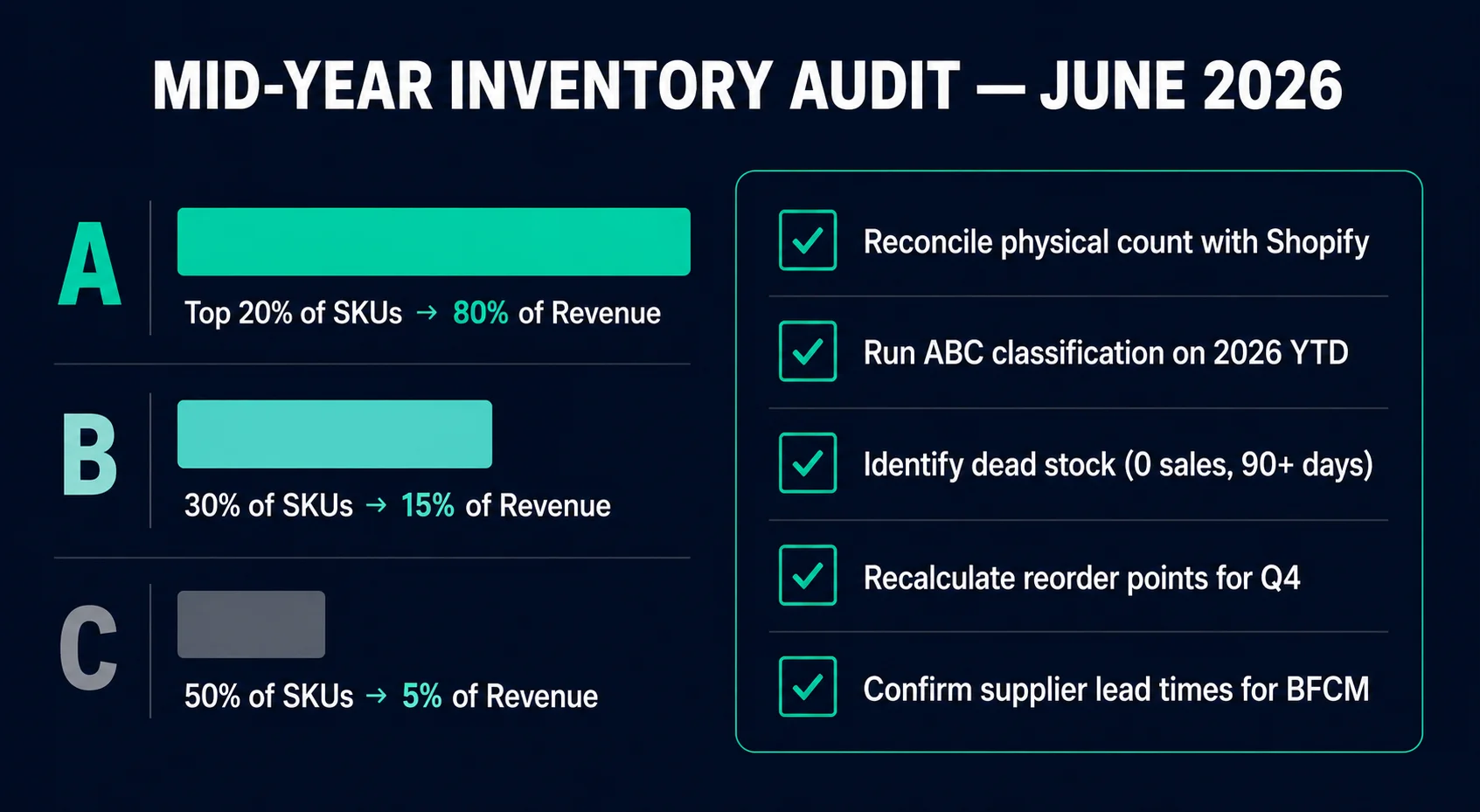
A items: Your top performers
Typically 10–20% of your SKUs driving 70–80% of revenue. These get tight reorder points, accurate safety stock buffers, and are the priority for BFCM ordering. Never let A items go out of stock.
B items: Your steady middle
Usually 30% of SKUs, 15–20% of revenue. These sell consistently but aren't stars. Manage them with standard reorder points. They don't need the same scrutiny as A items.
C items: Low velocity, low priority
Often 50–60% of SKUs but only 5–10% of revenue. These deserve minimal capital investment. If a C item becomes dead stock, clear it fast. Don't tie up cash on products that barely move.
To run this classification, pull your revenue per SKU for January through May 2026. Rank them from highest to lowest. The top 20% by revenue are your A items. The next 30% are B. The rest are C.
Do this annually at minimum. Products can shift categories. A C item might have become a B item after a successful promotion. An A item might be declining and heading toward dead stock without you noticing.
Once you have your A/B/C list, two things become immediately clear: which products deserve your Q4 purchasing focus, and which products are problems you need to resolve right now.
| Class | % of Revenue | % of SKUs | Action |
|---|---|---|---|
| A (top performers) | 70–80% | 10–20% | Prioritize stock; tightest reorder points; never stock out |
| B (mid performers) | 15–25% | 30–40% | Standard reorder cadence; review quarterly |
| C (slow movers) | 5–10% | 40–60% | Reduce safety stock; review for discontinuation |
| Dead stock | ~0% | Varies | Liquidate, bundle, or write off; free up capital |
Step 3: Identify and Move Dead Stock Before Summer Ends
Dead stock is inventory that hasn't sold in 60 to 90 days and shows no sign of moving. It's cash sitting in a warehouse. Every day it stays there, it's costing you storage, opportunity cost, and sometimes physical degradation.
How to identify it:
- Pull all products with zero units sold in the last 90 days
- Filter to those with more than 30 days of supply on hand (based on their last known velocity)
- Cross-reference with purchase dates — anything that's been sitting since before January 2026 is a serious problem
Once you have the dead stock list, you have four options. Use them in order before moving to the next:
Bundle with a fast mover
Pair the dead stock item with an A or B item as a value bundle. Price the bundle at a slight discount versus buying both separately. The fast mover carries the sale. The dead stock moves. This works especially well as a summer promotion.
Run a targeted discount email
Segment customers who viewed the dead stock product but didn't buy. Send them a 20–30% discount with a hard expiry (7–10 days). Scarcity and exclusivity drive action better than a blanket sale.
List on secondary channels
Amazon, eBay, Facebook Marketplace, or a wholesale channel. Accept a lower margin to recover the cash. Something is better than nothing, and warehouse space has real value heading into Q4.
Write it down and donate or liquidate
If the product genuinely cannot be moved at any price, liquidate or donate it. Take the tax deduction. Clear the warehouse space. And update your buying process to prevent ordering it again.
Do this before September: Summer clearance has a natural deadline. Shoppers in summer mode respond to clearance sales. Shoppers in October are thinking about Q4 gifting, not clearance. Move dead stock while the consumer psychology is working in your favor.
Step 4: Recalculate Reorder Points for Q4
Your current reorder points are based on old data. If your store grew 25% this year, your daily sales velocity is higher than it was when you last set your reorder points. Same lead times, higher demand — your existing reorder points will trigger too late.
For every A item and high-priority B item, recalculate the reorder point using current 30-day sales data:
Safety Stock = Avg Daily Sales × Lead Time × 0.2
Example — updated for current velocity:
Was selling 8/day. Now selling 12/day. Lead time 21 days.
Old ROP: (8 × 21) + 33 = 201 units
Updated ROP: (12 × 21) + 50 = 302 units
That's a 50% increase in the reorder point driven entirely by sales growth. Without updating it, you'd be placing orders 101 units later than you should — potentially running out during a peak demand window.
After you've recalculated for normal velocity, set a calendar reminder for early October to update to peak-season reorder points for BFCM. Those calculations use your BFCM multiplier on top of the base velocity.
In EZStock, you update reorder points in the product settings for each supplier-linked product. The dashboard immediately reflects the new thresholds and will flag products as soon as they drop below the updated level.
EZStock makes reorder point management easy — set it, update it seasonally, and let the app tell you when to order.
Purchase orders, sales velocity tracking, and automatic inventory updates — all inside Shopify. Starter from $19/month · 14-day trial · no credit card required.
Install EZStock Free on Shopify →Step 5: Update Your Supplier List Before BFCM Orders Go Out
June is also the time to audit your suppliers — not just your inventory. Before you place BFCM orders in July, you want to know:
- Which suppliers performed well in 2026. On-time delivery, accurate quantities, responsive communication. These are your Q4 priority suppliers.
- Which suppliers caused problems. Late deliveries, quality issues, communication gaps. These need either a serious conversation or a replacement.
- Whether lead times have changed. Shipping lanes shift. Manufacturer capacity changes. A supplier that took 30 days in 2025 might be running 45 days in 2026. Update your formula inputs before they affect your Q4 orders.
- Whether you need a backup supplier. For every A item, you should have at least one alternative supplier identified — not necessarily used, but ready. If your primary supplier can't fill your BFCM order, you have somewhere to go.
Send a brief email to each primary supplier in June. Confirm their Q4 lead times. Ask about capacity for your expected BFCM volumes. Lock in pricing if you can. This two-hour task in June saves enormous stress in October.
The Mid-Year Audit Checklist
Run through this in order. Check everything off before July 1.
Reconcile physical count with Shopify
Spot-check top 20% by value. Correct all variances in Shopify. Investigate patterns.
Run ABC classification on 2026 YTD revenue
Tag A, B, and C items. Note any products that shifted categories compared to last year.
Identify dead stock (0 sales, 90+ days, stock on hand)
Create a clearance plan. Bundle, discount, secondary channel, or liquidate — in that order.
Recalculate reorder points for A and B items
Use your current sales velocity. Update in EZStock. Set a calendar reminder to switch to peak-season ROPs in October.
Audit suppliers — performance, lead times, Q4 capacity
Confirm lead times. Flag problem suppliers. Identify backups for A items.
Calculate BFCM order quantities for A items
Use updated velocity × BFCM multiplier × 30 days + safety stock. These numbers feed your July purchase orders.
That's it. Two to three hours of focused work in June sets up the entire back half of your year. The merchants who win Q4 didn't get lucky — they did this in June.
