Why most merchants never calculate this
The spreadsheet inventory system costs nothing to run — no subscription, no contract. So most merchants never question it. The cost is invisible because it shows up as time, not as a line on a credit card statement. It shows up as revenue you didn't earn rather than money you spent. It shows up as inventory discrepancies that take an hour to diagnose rather than an obvious error report.
This is the classic trap of low-visibility operational costs. Because they don't arrive as invoices, they don't get scrutinized the way software subscriptions do. A $49/month tool gets evaluated for ROI every renewal. A process that costs 8 hours a week in staff time — which at even a modest $25/hour rate is $5,200 a month — never gets the same analysis.
The goal of this article is to make those costs visible by putting actual numbers on each category. You'll be able to apply these formulas to your specific situation and arrive at a real dollar figure for what your current system is costing you.
| Cost Category | Manual/Spreadsheet | EZStock (Growth Plan) |
|---|---|---|
| Software cost | $0 | $49/month ($588/year) |
| Staff time (10h/week @ $20/hr) | $10,400/year | ~$2,080/year (80% reduction) |
| Stockout cost (lost sales, 2x per year) | $1,500–$8,000 | $200–$800 (early alerts) |
| Overstock carrying cost (20% of excess) | $800–$3,000 | $200–$600 (demand forecasting) |
| Data entry errors (returns, refunds) | $500–$2,000 | ~$50–$200 |
| Total estimated annual cost | $13,200–$23,400 | $3,120–$4,300 |
| Net annual savings | - | $10,000–$19,000 |
Cost category 1: Staff time
Time is the most straightforward cost to calculate. The question is: how many hours per week does your team spend on inventory management tasks that a proper system would automate or eliminate?
The recurring time sinks
Map out every inventory-related task that happens on a recurring basis and estimate the weekly time for each:
- Checking current stock levels — opening Shopify, navigating to products, manually checking quantities across variants and locations. For a 200-SKU store, a thorough check takes 30–60 minutes.
- Deciding what to order — comparing current stock against estimated demand, usually in a spreadsheet. Identifying which variants are running low requires cross-referencing stock levels with recent sales, often across multiple tabs. For 200 SKUs, 60–90 minutes.
- Creating purchase orders — writing or copying a PO document, gathering supplier contact details, formatting line items, calculating totals, sending by email. Per PO: 20–45 minutes depending on line item count.
- Updating inventory on receipt — counting received items, opening each Shopify product, finding the correct variant, entering a new quantity, saving. Per shipment of 20 variants: 30–60 minutes of manual adjustment work.
- Reconciling discrepancies — when inventory counts don't match what Shopify shows, investigating why. This is the hardest to estimate but typically takes 1–3 hours per incident, and happens several times per month in stores without a receiving workflow.
Calculating the weekly time cost
For a mid-size Shopify store (200 SKUs, 5 active suppliers, 3–4 POs per month), a realistic weekly tally:
| Task | Weekly hours |
|---|---|
| Checking stock levels across catalog | 1.5 hrs |
| Identifying reorder needs (manual analysis) | 1.5 hrs |
| Creating and sending purchase orders | 1.0 hrs |
| Receiving stock and updating Shopify | 1.5 hrs |
| Reconciling discrepancies and errors | 1.0 hrs |
| Total | 6.5 hrs/week |
At $25/hour (a conservative rate for operations or admin staff), 6.5 hours/week = $8,450/year in staff time on manual inventory tasks. At $35/hour for a more senior operations person, that's $11,830/year.
If it's the owner doing this work, the opportunity cost is even higher — those hours could be spent on product development, marketing, or customer relationships.
Cost category 2: Stockout revenue losses
This is the largest and most underestimated cost category. When a product is out of stock, you don't just lose that sale — you lose the customer. Research across e-commerce consistently shows that 30–40% of shoppers who encounter an out-of-stock product buy from a competitor rather than waiting. They don't come back.
Calculating your stockout rate
Pull this from Shopify Analytics or a quick manual check:
- How many times per month does a variant hit zero inventory?
- How many days on average does each stockout last?
- What's the average daily revenue for a typical variant when it's in stock?
The stockout revenue formula
Monthly stockout cost = (number of stockouts × avg days per stockout × avg daily variant revenue) + (lost customers × avg order value)
For a store with 10 stockouts per month, each lasting 5 days, at $80 average daily revenue per variant, the direct lost revenue is $4,000/month before accounting for any customer loss. Add a 30% customer loss rate on each stockout and the real figure is significantly higher.
Stockouts are the most preventable cost in this list. They happen almost exclusively because there was no system to signal "order now" before stock hit zero. Reorder points and demand forecasting — the two core features of any proper inventory system — exist specifically to eliminate this cost.
Cost category 3: Receiving errors
When inventory arrives and you update Shopify manually — navigating to each product, finding the correct variant, typing a new quantity — errors happen. The most common ones:
- Wrong variant updated — updating Size M when the received stock was Size L. The error only surfaces when a customer orders the wrong variant and you can't fulfill it.
- Wrong quantity entered — typos on quantity fields (120 entered as 12, or 80 entered as 800).
- Partial shipments not tracked — supplier sends 40 of a 50-unit order; merchant updates inventory for 50. The 10 missing units are never followed up on because there's no record they're outstanding.
- Overwriting with stale data — if you set a variant to an absolute quantity (say, 100) at the same moment a customer order is being fulfilled (reducing stock by 1), you've just overwritten the correct post-sale inventory with the pre-sale count.
What errors actually cost
Each receiving error generates downstream work: investigating the discrepancy, making a correction, potentially issuing a refund or expediting a reorder. A conservative estimate is 45–90 minutes of investigation and correction time per error. At 3 errors per month (a low estimate for manual processes), that's 2.25–4.5 hours/month, or $675–$1,350/year at $25/hour.
More importantly, some errors don't get caught until a customer order fails — at which point there's also a customer service cost, a refund, and a potential review impact. The downstream cost of undetected receiving errors is difficult to quantify but real.
Cost category 4: Supplier relationship inefficiency
Without a supplier database, every purchase order requires you to look up the supplier's email, recall their lead time, remember their preferred format for orders, and check what currency you pay them in. This sounds trivial until you're doing it for the fifth time this month with four different suppliers.
Beyond the time cost, the lack of documented supplier data creates operational fragility. If the person who manages purchasing leaves or is unavailable, the knowledge of supplier relationships — lead times, payment terms, contact names, minimum order requirements — walks out the door with them. There's no record to hand off.
Documented supplier records are operational infrastructure. They're not glamorous, but they're the difference between a purchasing process that's resilient and one that depends entirely on one person's memory.
Building the full cost picture
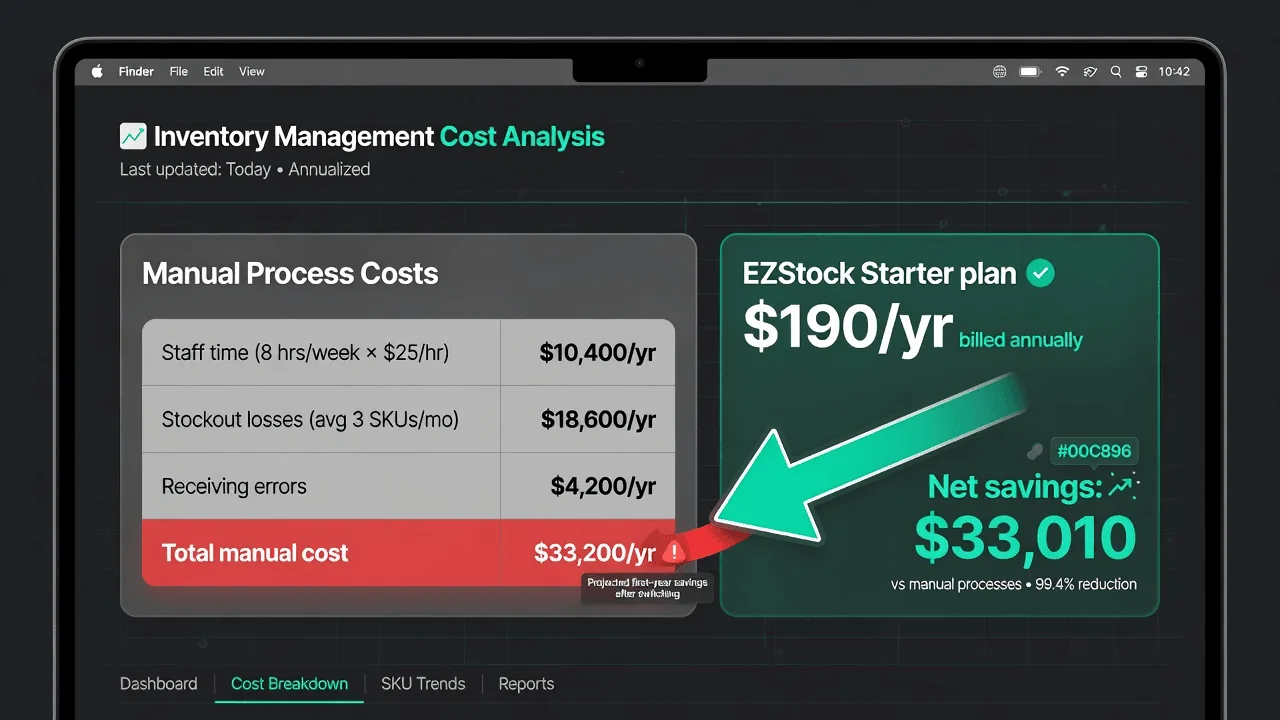
Adding up the four cost categories for a typical mid-size Shopify store:
Annual cost of manual inventory management — example store
The stockout revenue loss dominates the total — and that's the most conservative estimate, using only 10 stockouts per month and not accounting for lost customers or ranking degradation. For stores with seasonal products, more SKUs, or longer supplier lead times, the stockout cost is typically 2–3× higher.
The ROI calculation for switching
A proper inventory management system for Shopify costs $19–$99/month depending on scale. Against the cost picture above, the math is straightforward:
ROI of switching — same example store
Even using the most conservative assumptions — only 50% stockout reduction, only partial time recovery — the ROI on a $49/month inventory system is overwhelming. The tool pays for itself in the first week if it prevents even a single multi-day stockout.
What a proper system actually automates
The cost reduction comes from automating or eliminating each of the manual tasks in the first category. Specifically, what a system like EZstock removes from your weekly workflow:
- Stock level checking → replaced by a demand dashboard that surfaces urgency automatically. You check one screen instead of navigating 200 product pages.
- Reorder decision-making → replaced by reorder points calculated from sales velocity. The system tells you what to order; you review and confirm.
- PO creation → supplier records pre-fill contact details, variant costs, and preferred format. PO generation is minutes, not 45 minutes.
- Inventory updates on receipt → receiving workflow writes to the Shopify API automatically. No manual variant-by-variant adjustment.
- Reconciliation → partial receipt tracking means there's always a record of what was ordered versus what arrived. Discrepancies surface immediately rather than weeks later.
Applying this to your store
The numbers above are illustrative. Your actual cost will depend on your SKU count, stockout frequency, staff cost, and supplier count. To calculate your specific number:
Calculate weekly time spent on inventory tasks
Track for one week. Every time you or a team member touches anything inventory-related — checking stock, creating a PO, updating quantities, chasing a supplier — log the time. The real number is almost always higher than the estimate.
Count stockouts in the last 90 days
Pull a Shopify report showing variants that hit zero inventory. Count how many times and how many days each lasted. Multiply by the variant's average daily revenue. This is your minimum stockout cost — it doesn't include lost customers.
Count inventory discrepancies last quarter
How many times did your Shopify inventory not match physical reality? Each one required investigation time. Estimate conservatively and multiply by your hourly staff rate.
Compare against the cost of a system
EZstock starts at $19/month ($228/year) for the Starter plan and $49/month ($588/year) for Growth. Put your calculated annual cost on one side and the tool cost on the other. The payback period is almost always measured in weeks, not years.
If you've done this calculation and the numbers are what you expected, the next step is setting up the system. For a full walkthrough of the EZstock supplier and purchase order workflow, see Shopify Supplier Strategy: How to Negotiate Lead Times, MOQs, and Payment Terms. For the metrics side — how to know whether your inventory system is actually performing — see Shopify Inventory KPIs: The 6 Metrics Every Product Business Should Track.
Stop paying the manual tax
EZstock automates the tasks in this article — demand dashboard, PO creation, automatic inventory updates on receipt. Free plan available, 14-day trial on paid plans.
Install EZstock free →Starter from $19/month · no credit card required · works with any Shopify plan
