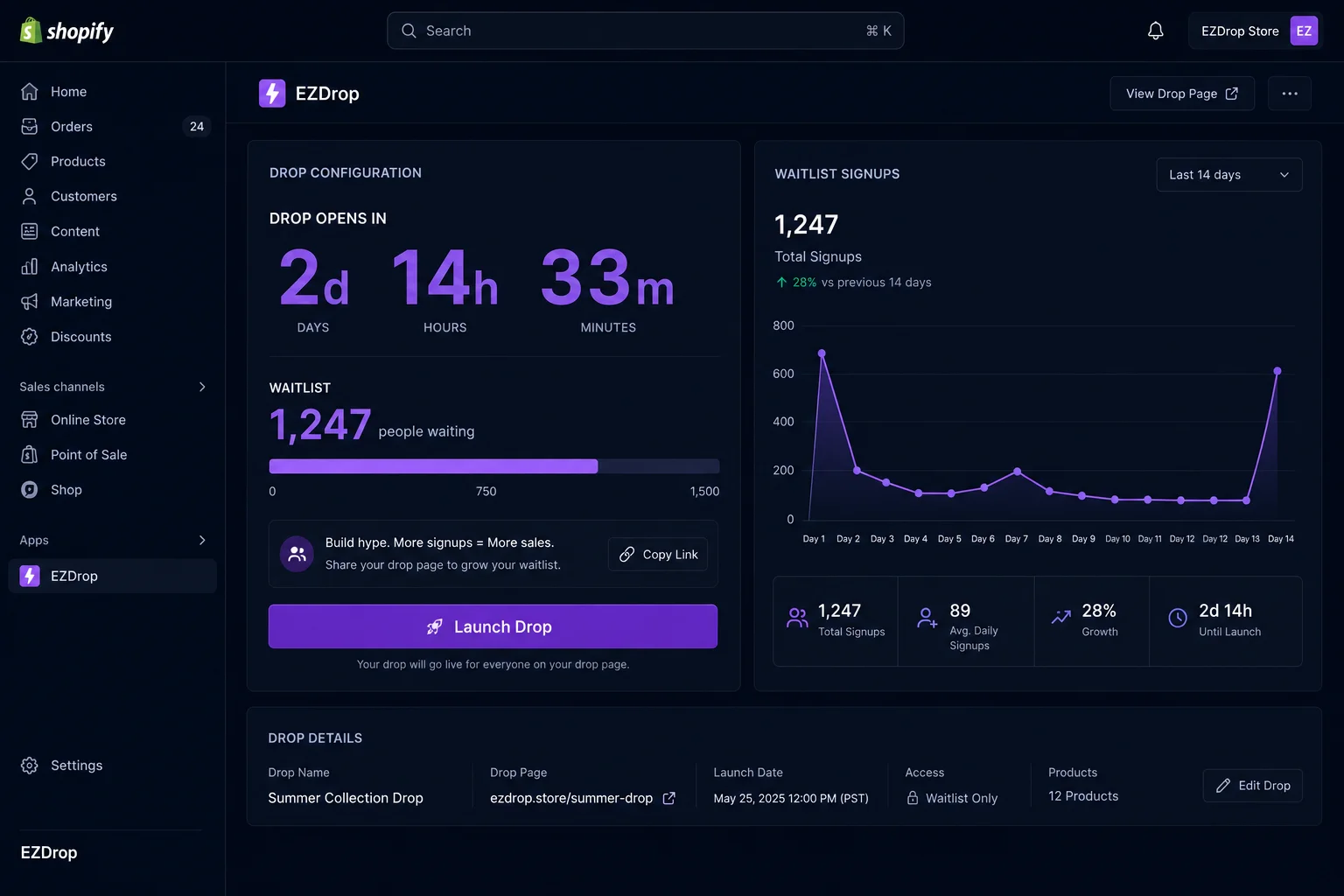
What is a product drop on Shopify?
A product drop on Shopify is a time-limited, quantity-limited release where a product becomes purchasable at a specific announced moment — after a pre-launch waitlist period. Unlike a standard product listing (available to anyone, at any time, until stock runs out), a drop gates access. Customers join a waitlist in advance, the countdown runs publicly, and at launch only a fixed number of top-ranked queue members receive purchase access.
The three defining characteristics of a drop are: a finite slot count (genuine scarcity), a public launch moment (a specific time that creates shared anticipation), and a ranked access mechanism (queue position determines who gets to buy). Remove any one of these and you have a sale, not a drop.
Drops originated in sneaker culture — Nike SNKRS, Supreme, OFF-WHITE — but have spread to every category where real demand exceeds supply: beauty restocks, craft food products, limited streetwear, seasonal collectibles, software early access, and handmade goods. The mechanics transfer across categories because the psychology is universal.
Why product drops work — the psychology of scarcity, FOMO, and loss aversion
Product drops outperform standard launches because they exploit three well-documented psychological mechanisms simultaneously — not one at a time, but all at once, reinforcing each other.
Scarcity creates perceived value
Scarcity is not just a pricing signal — it is a quality signal. When something is limited, buyers infer that it must be worth having. This is the commodity theory of psychological reactance: people want things more when availability is restricted. A product you can buy at any time, in unlimited quantity, triggers no urgency. A product with 200 slots and a launch countdown triggers immediate action.
The key word is genuine scarcity. Artificial countdown timers on products with unlimited stock have been shown to erode trust when discovered. For a drop to work, the slot count must be real. Customers are sophisticated — they test whether the "sold out" message actually sticks.
FOMO drives immediate action
Fear of missing out is effective precisely because it is time-bound. A standard product listing allows indefinite deferral — "I'll buy it next week." A drop with a public countdown eliminates that option. The decision must be made now, or the window closes. This is why drops consistently produce higher conversion rates than standard listings: they remove the single biggest enemy of conversion, which is deferral.
FOMO also compounds via social signals. When your drop page shows "1,847 people in the queue," each new visitor receives an implicit endorsement: 1,847 people considered this worth signing up for. Social proof and urgency reinforce each other.
Loss aversion makes referrals self-reinforcing
The most powerful mechanic in a well-run drop is the referral queue model — where sharing a referral link moves you up the queue. Loss aversion explains why this works so much better than a discount referral program: watching other people jump ahead of you in the queue feels like a loss, not just a missed gain. Losses motivate action more strongly than equivalent gains. If your queue position is 340 and you know each referral moves you up 50 spots, you don't need an email reminder to share — the competitive pressure is structural.
This is the mechanic Robinhood used in 2013 to grow to 1 million signups before their app launched. It has been replicated by Morning Brew, Superhuman, and dozens of DTC brands since. The scarcity marketing framework only reaches its full potential when the referral incentive is built into access control, not layered on top as a discount.
How to set up a product drop on Shopify — step by step
Setting up a product drop on Shopify takes under two hours with the right tool. Here is the complete seven-step process.
Choose your product and set your slot count
Select the specific product (or variant) to drop. The slot count is your most important decision: too many slots and scarcity is unconvincing; too few and you leave revenue on the table and disappoint your waitlist. A good starting point is 10–30% of your estimated demand. If you have 2,000 people on an email list and historically 15% buy a new product, your realistic demand is ~300 units — a slot count of 50–100 creates genuine scarcity without being exclusionary.
Set the slot count before you promote. Changing it mid-waitlist damages trust.
Build your waitlist page (EZDrop widget or landing page)
Install EZDrop from the Shopify App Store. You have two embed options: (a) embed the waitlist widget directly on your product page using the EZDrop theme extension, or (b) create a standalone pre-launch landing page that links to the product. The standalone landing page is better for driving paid traffic and email teaser links because it focuses entirely on the drop — no competing navigation, no add-to-cart confusion. Use the embedded widget for organic product page visitors who discover the product outside the drop cycle.
The waitlist page must display: the slot count, the release date/time, a live countdown timer, and a signup form. The live queue count (number of people already signed up) should be visible once you have 50+ entries — before that, hide it to avoid looking sparse.
Set up the referral queue so customers earn higher position
This is the step most Shopify merchants skip — and it is the step that determines whether your drop grows linearly or exponentially. Enable the referral queue in EZDrop. Every signup automatically receives a unique referral link. Each successful referral (a friend who signs up using your link) adds 50 points to your queue score. Queue positions are ranked by score, so referrers move ahead of non-referrers.
The scoring formula: score = max(0, 1000 − minutesSinceSignup × 0.1) + referralCount × 50. Early signers start with a higher base score; referrals add flat point bonuses. Someone who signs up 3 days after launch and refers 10 friends can overtake someone who signed up on day one but shared nothing. This keeps the queue competitive throughout the waitlist period, not just in the first hour.
Make the referral link prominently visible on the post-signup confirmation page — this is the highest-motivation moment in the customer journey and the most likely point of immediate sharing. See the full referral queue model breakdown for the complete psychology and scoring details.
Promote the drop (email teaser, social countdown, 2 weeks out)
A drop without promotion is just a hidden page. The promotion cadence that consistently produces the strongest waitlist growth runs over 14 days:
- Day −14: Email your list with the teaser announcement. Subject line should communicate scarcity ("Only 100 slots") and the exact release date. Include the waitlist signup link. This is your biggest day for signups.
- Day −7: Social post with the countdown timer screenshot or embed. Stories perform better than feed posts for urgency-driven content. Show the current queue count to reinforce social proof.
- Day −3: Email reminder to anyone who opened the first email but didn't sign up. Subject: "3 days left to get in the queue for [Product Name]." Include the current position count.
- Day −1: Final reminder to your full list. "Tomorrow at [time]. Only [N] slots left." This is your second-largest signup day — a significant portion of your audience defers until the last moment.
For tactics beyond email and social, see the dedicated guide to building hype for your Shopify product launch.
Schedule the drop countdown and auto-open
Set the exact launch date and time in EZDrop. The countdown widget on your waitlist page updates in real time and is visible to every visitor. At the scheduled moment, the drop opens automatically — no manual trigger required. This is important: manual launches introduce human error (forgetting to click "launch," launching 20 minutes late, launching while asleep in a different time zone). Scheduled auto-open eliminates these failure modes.
Set the launch time for a moment of high audience activity. For most DTC brands, Tuesday or Wednesday at 10am in your primary customer time zone produces the highest conversion rates on launch day. Avoid Friday afternoons and Monday mornings.
Launch and send winner emails
At launch, EZDrop recalculates all queue positions based on final scores, selects the top-N winners (where N is your slot count), and sends personalized purchase access emails to each winner automatically. Each email contains a unique access link tied to that customer's email address.
The launch email is the highest-value email in your entire drop sequence — it goes to people who wanted your product badly enough to join a waitlist and wait. Open rates for EZDrop launch emails consistently exceed 70%. Write the launch email with that in mind: it is not a marketing email, it is access confirmation. Keep it short, clear, and direct. "You're in. Your slot expires in 48 hours." Then a single CTA button.
Post-drop analysis
Review four metrics after every drop: (1) Referral rate — percentage of signups that came through a referral link. Target: above 30%. Strong drops hit 40–60%. (2) Winner conversion rate — percentage of access-link recipients who completed a purchase. Target: above 60%. (3) Top referrer list — the 10–20% of referrers who drove 60–80% of referred signups. These are your brand advocates; identify them for next drop's early access. (4) Waitlist-to-winner ratio — how many people wanted in versus how many got in. A ratio above 5:1 validates that your slot count was genuinely scarce. Ratios below 2:1 suggest you should lower your slot count next time.
Use this data to seed the announcement list for your next drop — everyone who joined the waitlist but didn't win is a warm lead. Email them first when the next drop opens.
How to create hype for a Shopify product drop (pre-launch tactics)
Hype is earned before the waitlist opens, not after. The mechanics of the referral queue amplify existing excitement — they cannot manufacture excitement for a product nobody wants. Building genuine pre-launch hype requires separate, deliberate effort.
Tease the product before revealing it
The most effective pre-launch teasers show the product without full detail. A close-up crop, a silhouette, a texture shot, a single ingredient — enough to provoke curiosity, not enough to satisfy it. Run 3–5 tease posts over the 2 weeks before the drop, each revealing slightly more. By the time the waitlist opens, your audience already has an emotional relationship with the product.
Use a "notify me" capture before the drop goes live
EZDrop includes a "notify me when this drops" mode for products that don't yet have an active waitlist. A visitor who clicks it and enters their email is saved as a ProductInterest record. When you create the drop, EZDrop notifies them automatically. This pre-captures buyer intent at the exact moment it exists — when they're on your product page — weeks before your drop is configured. The notify-me list becomes your highest-converting first-wave of waitlist signups.
Seed social proof early
Share early signup numbers on social and in your emails. "1,200 people already in the queue, 200 slots available" is more motivating to a new visitor than any ad copy. Show the count growing. If you have early customer testimonials or user-generated content from a prior drop, include them in the pre-launch content sequence.
Partner with micro-influencers in your niche
Micro-influencers (5,000–50,000 followers) in your product category consistently outperform macro-influencers for drop-style launches because their audiences are more engaged and trust their recommendations more specifically. Give them early access to the waitlist (not a free product — a priority position in the queue) so their content about the drop is authentic and timely.
For a deep-dive on pre-launch hype tactics specifically for creating a viral waitlist for Shopify, including influencer brief templates and social countdown strategies, see the dedicated guide.
Product drop checklist: what to verify before going live
Before you set your drop status to live, verify every item on this checklist. Skipping any one of these is the most common cause of drop underperformance.
| Category | Item | Why It Matters |
|---|---|---|
| Setup | Slot count is set and matches what you've promoted | Changing mid-waitlist destroys trust |
| Setup | Launch date and time confirmed in EZDrop scheduler | Auto-open requires this to be set correctly |
| Referral | Referral queue is enabled | Without it, growth is linear, not viral |
| Referral | Post-signup page shows referral link and position | Highest-motivation sharing moment — must be visible |
| Confirmation email sends with referral link | Many signups share from email, not from the page | |
| Launch email template is written and tested | 70%+ open rate — needs to be short and clear | |
| Page | Countdown timer is visible and updates live | Creates urgency for every new visitor |
| Page | Waitlist page loads in under 2 seconds | Slow pages kill drop conversions, especially on mobile |
| Page | Mobile layout tested — form and timer both visible | 60–75% of social-driven traffic is mobile |
| Product | Product is hidden from standard store until drop launches | Early buyers bypass the waitlist if product is live |
| Product | Stock quantity matches slot count (not more) | Overselling a "limited" drop erodes future credibility |
| Promotion | Email teaser scheduled for Day −14 | First promotion email drives the majority of Day 1 signups |
| Promotion | Day −1 reminder email drafted | Last-minute signups are a significant signup segment |
Best Shopify apps for product drops in 2026
Four apps dominate the Shopify product drop market in 2026. They serve different use cases and price points — choosing the wrong one is a common and costly mistake.
EZDrop — best for viral referral drops
EZDrop is purpose-built for the referral queue mechanic. Every signup gets a unique referral link, every referral adds queue position points, and the final ranked list automatically triggers winner emails at launch. Free plan includes 1 active drop and 500 entries — enough to validate the mechanic before committing to a paid plan. Growth plan ($19/month) adds unlimited drops, up to 2,500 entries per drop, and Klaviyo integration. Pro plan ($49/month) adds unlimited entries, priority support, and custom domain embedding.
EZDrop is the right choice if your primary goal is viral growth through referrals. If you have an existing email list and want to maximize the compounding effect of your audience sharing the drop with their networks, no other Shopify app matches its referral queue implementation. It is not the best choice for brands running simultaneous global drops that need geographic access controls or fraud prevention — for that, see EQL below.
If you're evaluating EZDrop against other options, see the Wait.li alternative comparison and the EQL alternative breakdown for side-by-side feature comparisons.
EQL (Equal) — best for high-volume luxury drops
EQL is designed for brands running large-scale simultaneous global drops where fraud prevention and fair access are paramount. It uses a randomized ballot system — every eligible entrant has an equal chance of winning access, regardless of when they entered. This is ideal for luxury sneakers, high-end streetwear, and collectibles where the brand identity depends on perceived fairness rather than first-mover advantage. EQL includes geographic access controls, bot detection, and purchase verification. Pricing is enterprise (contact sales). It is significantly more expensive than EZDrop and provides no referral-based viral growth mechanic — for most Shopify merchants it is overkill. It is the right choice for brands running drops at the scale of hundreds of thousands of entries simultaneously.
Droppable — best for native theme integration
Droppable integrates directly into Shopify's native theme system without a separate widget or app embed. This makes it easier to match your brand styling and reduces page load overhead from a third-party widget. It supports countdown timers, waitlists, and scheduled product reveals. It does not include a referral queue mechanic — growth is first-come-first-served. Good choice for brands whose primary drop goal is a clean, on-brand user experience rather than viral growth. Mid-range pricing at around $29/month.
Wait.li — best for simple email waitlists
Wait.li is the simplest option: it captures emails for a product waitlist and notifies them when the product is available. There is no countdown timer, no referral queue, no ranked access mechanism. It is not really a "drop" tool in the sense described in this guide — it is an email capture tool with a waitlist interface. Use it if you want to gauge demand before committing to a full drop structure and don't need the viral mechanics. Free tier available. See the Wait.li alternative comparison for a feature-by-feature breakdown.
| Feature | EZDrop | EQL | Droppable | Wait.li |
|---|---|---|---|---|
| Referral queue | ✓ | — | — | — |
| Countdown timer | ✓ | ✓ | ✓ | — |
| Auto launch email | ✓ | ✓ | ✓ | partial |
| Slot-based access | ✓ | ✓ | ✓ | — |
| Free plan | ✓ (1 drop, 500 entries) | — | — | ✓ |
| Fraud prevention | basic | ✓ advanced | basic | — |
| Klaviyo integration | ✓ (Growth+) | ✓ | ✓ | partial |
| Starting price | Free / $19mo | Enterprise | ~$29/mo | Free / paid |
| Best for | Viral referral drops | High-volume luxury | Brand integration | Simple waitlists |
For a full breakdown of selling limited edition products on Shopify, including photography, packaging, and post-drop marketing, see the dedicated guide.
Product drop mistakes Shopify merchants make
These are the mistakes that consistently undermine drop performance. Each one is avoidable.
Mistake 1: Setting the slot count too high
If you have 500 waitlist signups and 400 slots, there is no scarcity. Winners don't feel like they won anything. The social proof value of "limited edition" collapses. A drop with a 80% win rate converts worse than a drop with a 20% win rate, even though the first drop had four times as many winners. The experience of exclusivity matters as much as the access itself. Start conservative — you can always do another drop to serve the people who missed out.
Mistake 2: Skipping the referral queue
First-come-first-served waitlists grow linearly. Referral queues grow exponentially. A waitlist that opens with 200 signups and adds 10 per day for 14 days ends at 340. The same waitlist with a referral queue that produces a 30% referral rate and 1.5 referrals per referrer ends at 340 × 1.3 × 1.3 × ... (compounding) — potentially 1,000+ entries. The referral mechanic is not a nice-to-have feature; it is the primary growth driver. Dropping it in favor of a simpler implementation is the highest-cost mistake on this list.
The complete breakdown of how the referral queue model works — including the scoring algorithm and psychology — is in the dedicated guide.
Mistake 3: Announcing the drop with less than 7 days notice
Drops announced 1–3 days in advance have insufficient time for referral sharing to compound. The viral loop requires multiple cycles: Person A signs up → shares link → Person B signs up → shares link → Person C signs up. Each cycle takes 12–48 hours. A 14-day waitlist gets 7–14 cycles. A 3-day waitlist gets 1–2. Announce early, even if it feels uncomfortable to announce something that's 2 weeks away.
Mistake 4: Not emailing the waitlist losers after the drop
Everyone who joined the waitlist and didn't win is a warm lead who has already demonstrated product desire. Not emailing them after the drop is leaving qualified demand unaddressed. Send a post-drop email within 24 hours of launch: "You didn't get access this time, but here's what's coming next..." If you have a second batch planned, offer them priority notification. If not, offer them a consolation discount. The post-drop email sequence consistently has a higher ROI than any pre-launch email.
Mistake 5: Treating every product as drop-worthy
Drops work for products where genuine desire exceeds supply. They do not work for products where you're using artificial scarcity to try to manufacture interest. Customers can tell the difference. A drop on a product with unlimited inventory that you're artificially limiting will be found out — and the reputational damage to future drops is significant. Reserve the drop format for products that are genuinely special: limited production runs, seasonal items, collab products, restocks of sold-out hits.
Mistake 6: No post-drop analysis
A drop that generates no data is a missed learning opportunity. The referral rate, top-referrer list, conversion rate, and waitlist-to-winner ratio from each drop directly inform the next one. Merchants who iterate on these metrics across 3–5 drops consistently see referral rates climb from 10–15% to 35–50% as they optimize their promotion cadence, referral link placement, and slot count decisions. Treat every drop as a data point, not a one-time event.
Frequently asked questions about Shopify product drops
What is a product drop on Shopify?
A product drop on Shopify is a time-limited, quantity-limited release where a product becomes purchasable at a specific announced moment, after a pre-launch waitlist period. Unlike a standard listing available to anyone at any time, a drop gates access: customers join a queue, a countdown runs publicly, and at launch only a fixed number of top-ranked queue members receive purchase links. The three defining characteristics are a finite slot count, a public launch moment, and a ranked access mechanism.
How do I set up a product drop on Shopify?
To set up a product drop on Shopify: install EZDrop from the Shopify App Store, create a drop linked to your product (set the slot count, release date, drop title), add a waitlist widget to your product page or build a standalone landing page, enable the referral queue so customers earn higher queue positions by referring friends, promote the drop via email and social 14 days before launch, and let EZDrop auto-open the drop and send winner emails at the scheduled launch time.
How long should a Shopify product drop waitlist run?
A product drop waitlist should run for 10–21 days. Shorter than 10 days gives insufficient time for referral sharing to compound. Longer than 21 days causes interest to fade — customers who signed up 4 weeks ago are significantly less likely to convert on launch day than customers who signed up 5 days ago. For high-demand restocks with a large existing audience, 7–10 days is enough. For brand-new products building awareness, 14–21 days is the sweet spot.
What makes a Shopify product drop go viral?
A Shopify product drop goes viral when three conditions align: genuine product desirability (scarcity mechanics can't manufacture desire for a commodity, only amplify existing demand), a referral queue that gives every signup a personal incentive to share (not a generic discount but queue position — zero-sum and immediately motivating), and a visible waitlist count that provides social proof to each new visitor. The referral queue is the mechanism most commonly underutilized — standard first-come-first-served waitlists have no built-in sharing incentive, so growth is linear. Referral queues create compounding growth because every new signup has an incentive to bring in more signups.
Which Shopify app is best for product drops?
EZDrop is the best Shopify app for product drops if your priority is a built-in referral queue (the mechanic that drives viral growth). It includes a referral waitlist queue, countdown timers, storefront widget, and launch email automation on the free plan. EQL is best for high-volume luxury brands running simultaneous global drops that need fraud prevention and geographic access controls. Droppable suits merchants who want native Shopify theme integration without a separate widget. Wait.li is the simplest option for basic email waitlists without queue mechanics.
Run your first Shopify product drop with EZDrop
EZDrop includes the referral queue, countdown timer, storefront widget, and winner email automation — everything in this guide — on the free plan. Install in minutes from the Shopify App Store.
Install EZDrop free →Free plan · 1 drop · 500 entries · referral queue · no credit card required
Or learn more at ezdrop.app — the Shopify waitlist app