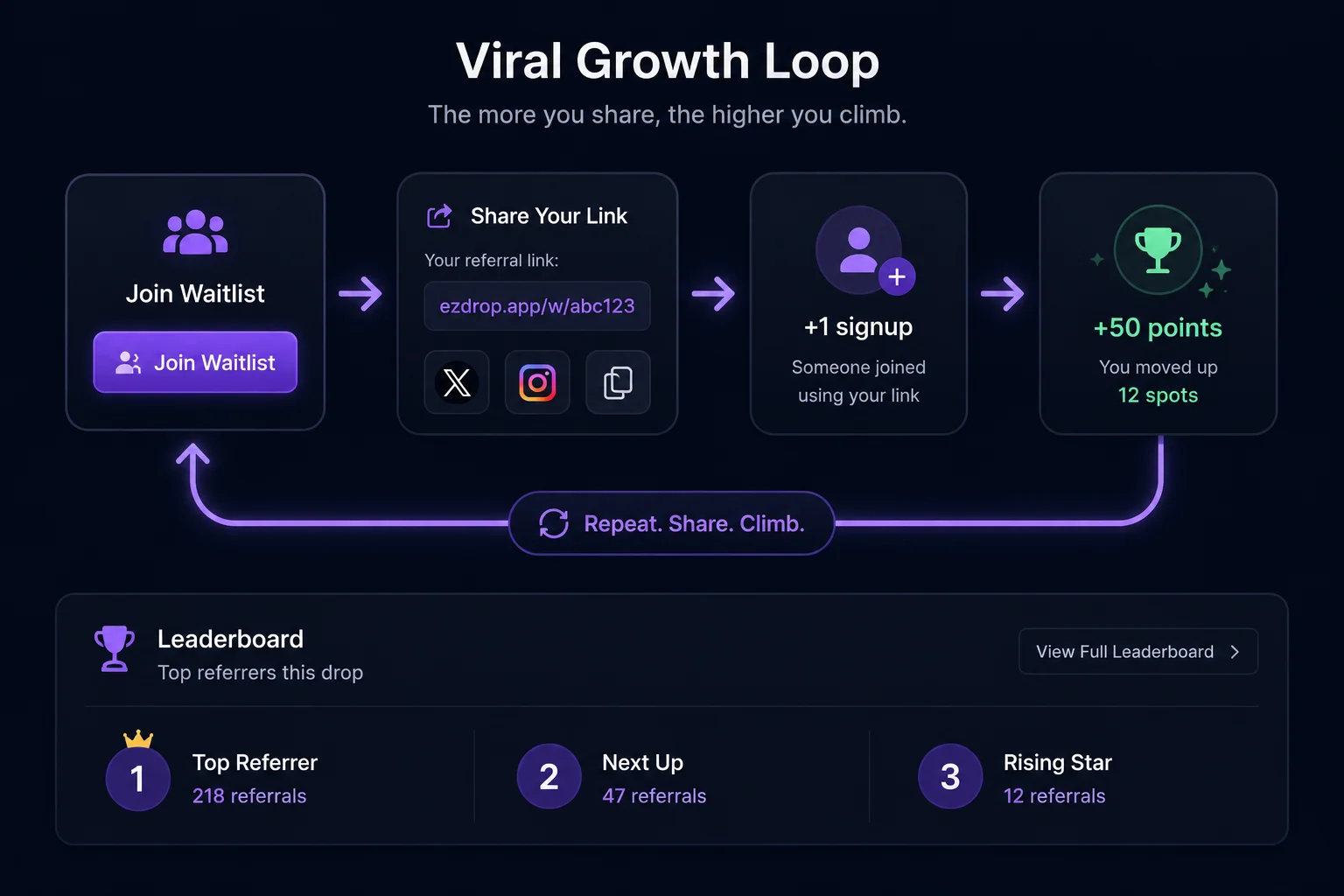
What makes a waitlist "viral"?
A waitlist becomes viral when signing up creates an automatic incentive to share. A standard waitlist is first-come-first-served: you sign up, you wait, there's nothing you can do to improve your position. A viral waitlist adds one mechanic that changes everything — your position is not fixed; it improves every time you refer a friend who joins.
That single change converts each customer from a passive waiter into an active recruiter. They're not sharing because they love your brand. They're sharing because their queue position depends on it. Self-interest and your customer acquisition goals point in the same direction, which is why viral waitlists consistently outperform conventional pre-launch landing pages by 3–5x on signup volume.
The term "viral" here has a precise meaning: the product spreads through the actions of its own users, not through paid distribution. Each person who joins has an incentive to bring in at least one more person, which means your list can grow faster than your spending. If you want to understand the historical model behind this mechanic, see our breakdown of the Robinhood referral waitlist model.
How a viral Shopify waitlist works — the referral mechanics
The referral queue works through a transparent scoring formula. Every person who signs up gets a score, and queue position is determined by that score. The score has two components: an early-signup bonus that decays over time, and a referral bonus that grows with each successful referral.
The formula used by EZDrop:
score = max(0, 1000 - minutesSinceOpen × 0.1) + referralCount × 50Breaking this down: a person who signs up at the moment the waitlist opens earns a base score of 1,000. Someone who signs up 10 days (14,400 minutes) later earns a base of max(0, 1000 − 1440) = 0 — but they can fully recover through referrals. Each referral adds 50 points. Positions are then calculated using RANK() OVER by score descending, so tied scores share a position.
| Referrals Made | Points Added | Equivalent Position Jump (1,000-person list) |
|---|---|---|
| 0 referrals | +0 pts | Stays at base position |
| 1 referral | +50 pts | Jumps ahead of ~50 non-referrers |
| 3 referrals | +150 pts | Can move from position 500 to top 100 |
| 5 referrals | +250 pts | Near-guaranteed top 50 on most lists |
| 10 referrals | +500 pts | Top 10 on lists up to 10,000 entries |
The transparency of the formula is not incidental — it's what makes the mechanic work. When customers can see exactly what moves them up, they trust the system and invest in it. Opaque scoring creates suspicion; transparent scoring creates motivation.
How to set up a viral waitlist on Shopify with EZDrop
You can build a viral waitlist on Shopify in under 20 minutes using EZDrop. Here is the exact process.
Install EZDrop from the Shopify App Store
Go to apps.shopify.com/ezdrop and install the app. The free plan includes 1 active drop, 500 waitlist entries, and the full referral queue with unique referral links — no credit card required. Growth ($19/mo) and Pro ($49/mo) plans remove caps for larger launches.
Create your drop and set a winner slot count
In your Shopify admin, open EZDrop and click "New Drop." Fill in the drop title, link it to your product, set the number of winner slots (e.g. 100 for a limited release of 100 units), and add a release date. Each slot corresponds to exactly one customer who will receive launch-day access. Setting scarcity here is important — a slot count equal to your actual inventory makes the queue meaningful.
Go live and copy your waitlist URL
Set the drop status to "Live." EZDrop generates a public waitlist URL immediately. This is the link you will share in emails, on social media, and with influencers to begin collecting signups. The storefront widget also activates on your linked product page, so visitors who find the product organically see the waitlist badge in context.
Verify the post-signup referral experience
After each signup, EZDrop automatically shows the customer their current queue position, the live waitlist count, and their unique referral link with a pre-written share CTA. Sign up yourself using a test email and confirm this page appears correctly — it is the single most important screen in your funnel. This is where the viral loop starts. If it's broken or confusing, sharing rates drop immediately.
Launch and let EZDrop email the winners
When your release date arrives, set the drop status to "Launched" in EZDrop. The system recalculates all scores using final referral counts, ranks every entry with RANK() OVER by score descending, selects the top-N winners, and sends personalized launch emails with access links automatically. You do not need to export a CSV or manually email anyone — the launch flow is handled end-to-end.
How to promote your Shopify waitlist to get the first 100 signups
The referral loop only ignites once you have an initial audience to seed it. Here is how to reach your first 100 signups through channels you already own.
Email your existing customer list
Your existing customers are your highest-converting audience for a waitlist. They've bought from you before; they're pre-sold on your brand. A simple email — "We're dropping [product name] in limited quantity. Get early access here" — with a clear link to the waitlist page will convert at 5–15% depending on your list's engagement. Send it the day your drop goes live, not a week before. Immediacy matters because the early-signup bonus is highest on day one.
Social media teaser with a countdown
Post a teaser on Instagram, TikTok, or X showing the product (or a hint of it) alongside a countdown to the release date and a link to the waitlist. The countdown creates urgency. The scarcity framing ("only 100 units") creates desire. Run this as an organic post first — if engagement is strong, boost it with a small paid budget. Even $50–100 in paid amplification on a high-intent social post can add 200–500 signups.
Influencer seeding before public launch
Reach out to 3–5 micro-influencers in your niche 24–48 hours before the public launch and give them early referral links. Their audience registers as referrals under the influencer's account, which gives the influencer an incentive to share authentically (their position improves with every follower who joins). Micro-influencers with 5,000–50,000 engaged followers in a niche consistently outperform mega-influencers for waitlist conversions.
SMS capture at existing checkout
If you have an SMS list or can add an SMS capture field to your checkout flow, send a text to your existing SMS subscribers with the waitlist link. SMS open rates are 90%+ — even a small list of 500 subscribers will outperform a cold email blast of 5,000. Keep the message under 160 characters: "We're dropping [product] in limited qty. Get early access: [url]"
Viral waitlist best practices: what to do after someone signs up
The moment after signup is the highest-leverage moment in your entire waitlist funnel. The customer is maximally engaged — they just made a micro-commitment — and the value of moving up is most salient. Wasting this moment with a generic "thanks for signing up" page is the most common mistake merchants make.
Show the share prompt immediately on the post-signup page
The post-signup page should display: current position (#247 of 1,089 people), the referral link prominently, and a one-click share button for at least Instagram, X, and WhatsApp. EZDrop does this automatically. What you control is the copy on that page — make the position feel meaningful ("You're in the top 23%") and the referral value concrete ("Refer 3 friends → move to top 50").
Send a reminder email at 48 hours
Most sharing happens within 48 hours of signup or not at all. A reminder email at the 48-hour mark — showing the customer their current position, how many referrals they have, and how many more they need to reach a milestone position — re-activates the sharing impulse without feeling spammy. Subject lines like "You're #312 — refer 2 more to reach the top 100" have consistently high open and click rates because they are personally relevant.
Display a live social proof counter
Show the total waitlist count prominently on the waitlist landing page and update it in real time. A counter that reads "4,112 people are waiting" does two things simultaneously: it validates demand (this product is worth wanting) and creates urgency (the queue is long, sign up now). This is a compounding signal — the larger the count, the more it attracts additional signups, which grows the count further.
How many referrals does the average waitlist member make?
The average waitlist member on a referral-powered queue refers 2–3 friends. This figure comes from behavioral data on waitlist campaigns modeled after the Robinhood referral waitlist model, which generated over 1 million signups with a reported average of approximately 2 referrals per user.
The distribution is highly unequal. The majority of signups (roughly 70–80%) share zero or one time. A top 10–15% of members — typically those with existing social audiences or strong community ties — drive the majority of total referred signups, each contributing 5 or more. This top-heavy distribution is why the referral mechanic produces outsized results even when average participation is modest: a handful of high-referrers can each bring in 20–50 signups.
The overall viral coefficient (K-factor) for a well-run Shopify waitlist typically falls between 0.3 and 0.7. A K-factor below 1.0 means growth is amplified but not exponential — for every 100 direct signups you seed, you pick up an additional 30–70 referred signups. That translates to a 30–70% reduction in effective customer acquisition cost for your launch.
To push the average higher, focus on two things: (1) make the post-signup referral prompt impossible to miss and easy to act on, and (2) visually reinforce position movement when referrals come in. If people see their position jump in real time after a referral, they share again. If they have to guess whether it worked, they stop.
Frequently asked questions
What is a viral waitlist for Shopify?
A viral waitlist for Shopify is a pre-launch signup list where every customer receives a unique referral link. When their friends sign up using that link, the referrer moves up in the queue. Because queue position determines who gets first access to the product, each customer is personally motivated to share — turning your list into a self-propagating acquisition channel that grows without paid spend.
How is queue position calculated in a Shopify viral waitlist?
In EZDrop, queue position is calculated with the formula: score = max(0, 1000 − minutesSinceOpen × 0.1) + referralCount × 50. Early signups earn a higher base score (up to 1,000 points). Each successful referral adds 50 points. Positions are ranked using RANK() OVER by score descending. The top N scorers receive launch emails when the drop goes live.
How do I get the first 100 signups for my Shopify waitlist?
The fastest path to your first 100 waitlist signups is: (1) email your existing customer list with an exclusive early-access message, (2) post a social media teaser with a countdown to the drop date, (3) seed 3–5 micro-influencers in your niche with early referral links before public launch, and (4) send an SMS to your existing opt-in list. Your first 50–100 signups from owned channels are the seed that triggers the referral loop for the rest.
How many referrals does the average waitlist member make?
On referral waitlists modeled after the Robinhood approach, the average member refers 2–3 friends. Most signups share once or not at all; a top 10–15% of members drive the majority of referred signups. The overall viral coefficient for a well-run Shopify waitlist typically falls between 0.3 and 0.7, meaning 30–70% of all signups arrive through referral links rather than direct traffic.
Ready to build your viral waitlist?
EZDrop has a free plan — 1 active drop, 500 entries, full referral queue with unique referral links and automatic winner emails included. No credit card required.
Install EZDrop free →Free plan · full referral queue · no credit card required
Or learn more at ezdrop.app — the Shopify waitlist app