Why most pre-launch email captures fail
The typical Shopify pre-launch sequence looks like this: add a popup to your store that says "join the waitlist for early access," collect emails, and send a "we're live" blast on launch day. The open rate is decent. The click rate is not. Most of the people who signed up have forgotten why they were interested three weeks ago, and the sense of urgency that made them sign up has evaporated.
Three things go wrong with this approach:
- No growth mechanism. The only way to add people to the list is to drive them there yourself — ads, posts, email blasts. The list is entirely dependent on your marketing efforts and doesn't grow on its own.
- No urgency maintenance. Once someone signs up, there's nothing pulling them back until launch day. The anticipation you worked to build fades over days and weeks.
- No differentiation between signups. The person who signed up the day you announced gets the same launch email as the person who signed up the day before launch. There's no reward for early commitment or for spreading the word.
A viral waitlist solves all three. The referral mechanic is the growth engine. Queue position is the ongoing engagement hook. And launch emails that go out in waves to top-ranked waitlisters create a natural scarcity event that makes the opening minutes of a drop feel urgent and exclusive.
| Metric | Standard Signup Form | Viral Waitlist (EZDrop) |
|---|---|---|
| Average signups per campaign | 50–200 | 200–1,200+ |
| Referral-driven signups | 0% | 30–60% of total |
| Time to 500 signups | Weeks–months | 3–10 days (with promotion) |
| Email list quality | Cold contacts | Warm, product-interested |
| Social sharing rate | < 1% | 8–25% |
| Launch-day conversion rate | 1–3% (cold list) | 15–35% (warm waitlist) |
| Cost per signup | $0.50–$5.00 (paid) | $0.05–$0.50 (organic referrals) |
| Setup time | 10 min | 30 min (EZDrop app block + form) |
The referral queue mechanic: how it works
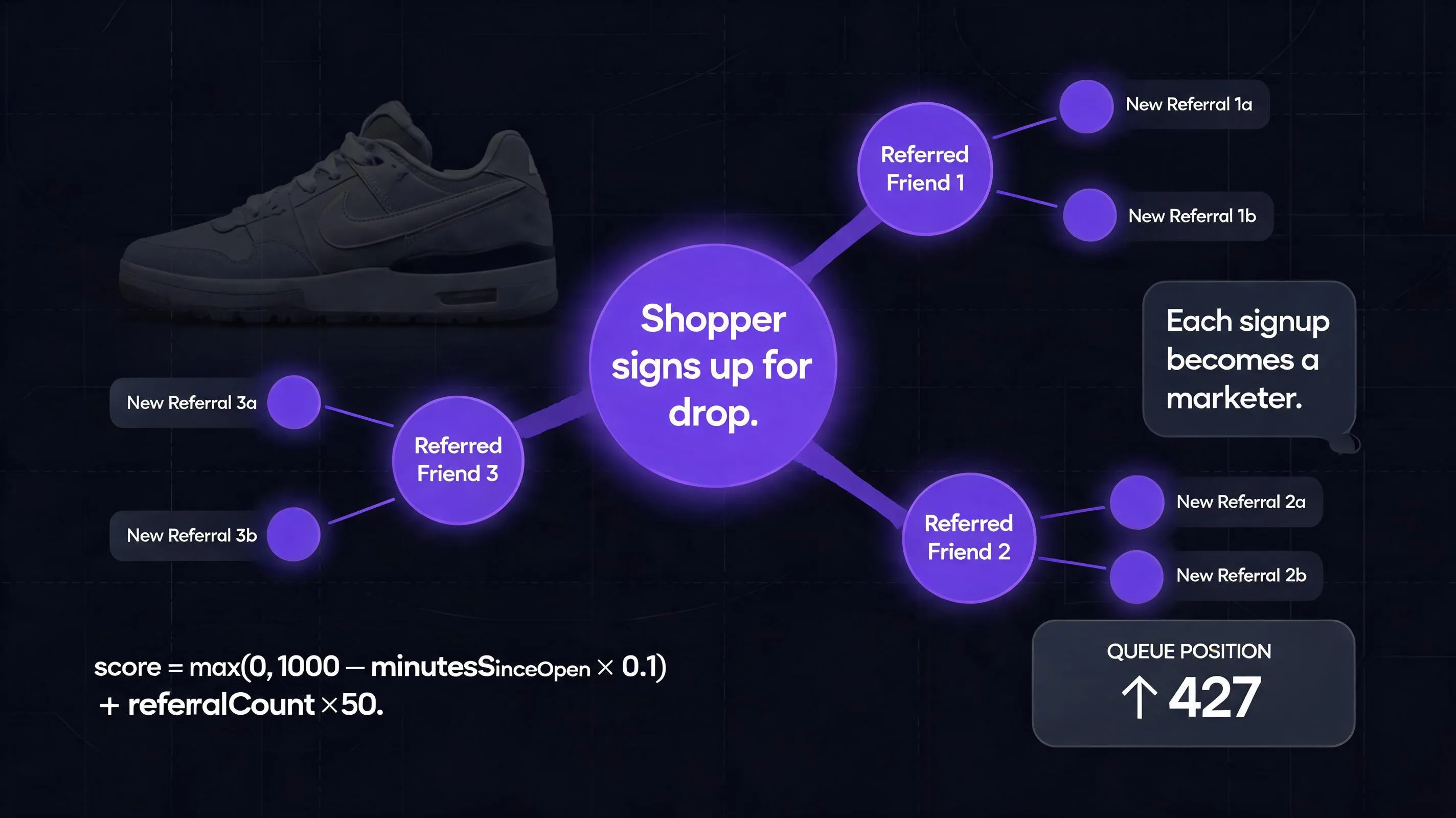
The core insight comes from Robinhood's 2013 pre-launch campaign, where the app grew from zero to 1 million waitlist signups in 24 hours — not through advertising, but by showing each person their position in the queue and how many referrals they needed to move up. The mechanic is simple: every signup gets a unique referral link. When someone new signs up through that link, the referrer's position improves.
The genius is in the incentive alignment. The referrer benefits directly and immediately from every successful referral — it's not altruistic sharing, it's self-interested sharing. And the referred person joins because they don't want to start at the bottom of the queue.
Referral bonus — each confirmed referral adds a fixed score boost
Position — ranked by score descending; top N positions get launch-day access
In EZDrop's implementation, the scoring formula is: score = max(0, 1000 − minutesSinceOpen × 0.1) + referralCount × 50. A person who signs up in the first hour starts with a score near 1,000. Each referral adds 50 points. Someone who signs up a week late but refers 20 people can score 1,000 — same as the earliest supporter. This keeps the competition open throughout the waitlist period and gives late joiners a reason to participate aggressively.
The three phases of a high-converting waitlist
Launch the waitlist
Open signups 2–4 weeks before the product drop. First movers get the highest base scores — reward early commitment.
Fuel the referral loop
Each signup shares their link to improve their position. You do nothing — the queue mechanic does the marketing for you.
Execute the drop
At launch, top-N winners get a launch email with a direct buy link. They purchase through your normal checkout. Lower-ranked signups see their position and have a reason to keep sharing.
Building the waitlist: what you need before launch
A viral waitlist is a system with three components: a public signup page, a referral tracking mechanism, and a launch delivery workflow. Setting each one up correctly before you announce anything is the difference between a smooth drop and a chaotic one.
Component 1: The public waitlist page
Every signup gets a unique URL they share with friends: yourstore.com/drop/[token]. This page shows three things that matter psychologically: how many total people are on the list, the visitor's current position (if they've signed up), and how many positions they gain per referral. The first number creates social proof. The second creates personal stakes. The third creates action.
The page doesn't need to be elaborate. It needs a clear product image, a deadline, a signup form, and — after signup — a visible position number and share button. Everything else is decoration. The EZDrop waitlist page delivers all of this automatically with your store's branding, no custom development needed.
Component 2: The referral tracking mechanism
Each participant's referral link contains a unique code tied to their signup record. When a new visitor arrives via that link and completes signup, the system: (1) creates a new waitlist entry for the new person, (2) credits a referral to the link's owner, (3) recalculates the queue position for both, and (4) shows the referrer their updated position the next time they open their link.
The position update is the reward that triggers the next share. Showing it clearly — "You moved from position #47 to position #31 because 3 people used your link" — is what turns a one-time share into an ongoing effort. Obscuring or delaying this feedback kills the loop.
Component 3: The launch delivery workflow
When the drop goes live, positions are finalized and emails go out to the top-N winners. N is your slot count — the number of products you have available (or the number of buyers you want to allow through in the first wave). These top-ranked winners receive a direct link to buy the product before it goes public. For them, winning the waitlist is a tangible, exclusive reward — not just earlier access to something anyone can buy.
For winners below the cutoff, the email acknowledges their position and tells them what happens next (if you're releasing additional stock, if there's a second drop, if they get a consolation offer). Handling the "you didn't make the cut" moment well is as important as handling the winner experience — the people who don't win this time are your warmest audience for the next one.
Ready to run this on your next launch?
EZDrop handles the entire waitlist system — public signup page, referral tracking, queue scoring, and launch-day emails. Install on Shopify and your first drop is live in under 30 minutes.
Install EZDrop free →Free plan available · Growth $19/month · Pro $49/month · 7-day free trial
Or learn more at ezdrop.app — the Shopify waitlist app
Step-by-step: setting up your viral waitlist on Shopify
Install EZDrop and create your first drop
Install EZDrop from the Shopify App Store. In the EZDrop admin, click New Drop and fill in: drop title, short description, product (link to the Shopify product this drop is for), total slots (how many winners will get launch access), and the release date. Set status to Live to open signups. EZDrop generates a unique public waitlist URL immediately — this is the link you'll share everywhere.
Enable the storefront badge on your product page
Go to Online Store → Themes → Customize. Under App Embeds, enable the EZDrop badge. Navigate to the product page for the drop product and add the EZDrop app block. The block shows a live FOMO widget with the waitlist entry count and countdown to release — visitors see real momentum building as signups accumulate, which pushes fence-sitters to join before they lose their position advantage.
Announce the waitlist — not the product
The announcement copy matters. Don't lead with product features. Lead with the queue mechanic: "We're releasing [X] units on [date]. Spots are limited. Sign up now to lock your place — and share your referral link to move up." Early signups get the highest base scores, so every hour of delay is a real cost to them. This framing motivates immediate action better than "be the first to know."
Post the waitlist URL to every channel simultaneously: email list, Instagram stories, TikTok, your most engaged Discord or community group. The first 24 hours generate the most organic position competition — people who signed up early watch their position fall as new signups arrive, which triggers them to share proactively to defend their rank.
Send one mid-waitlist update to reactivate the loop
About halfway through your waitlist period, send an email to the full list with everyone's current position and how many referrals they'd need to reach the top. This serves two purposes: it re-engages people who signed up but forgot about it, and it shows the competitive landscape, which motivates those near the cutoff to push harder. The email subject line that works best: "Your position is #[X] — here's how to move up before [launch date]."
Execute launch day
When your release date arrives, EZDrop finalizes positions, selects the top-N winners, and sends launch emails automatically. The winner email contains a direct link to the Shopify product page. Winners check out through your normal Shopify checkout — no special flow, no custom code. EZDrop handles the pre-launch mechanics; Shopify handles the purchase. Set the product to available at the same moment the winner emails go out, or a few minutes before, so the links work when winners click them.
What to do with the rest of your list after launch
The people who didn't win are your most valuable post-launch audience. They expressed interest, spent time on your product page, and may have shared your product with their own network. Don't treat them as a dead lead.
- If you have remaining inventory after fulfilling the top-N winners, open it to the next tier of waitlisters before making it publicly available. Frame it as a second chance for near-winners — this rewards near-miss engagement and prevents the frustration of "I was on the list and still couldn't get one."
- If you're planning a second drop, tell them their position on this waitlist carries over — they start the next one with points already banked. This dramatically increases sign-up rates for future drops because previous participants have an existing stake.
- If you have related products they might buy instead, the post-drop email is the right moment. They're in a purchasing mindset and were already interested in your brand. A segmented offer for a complementary product typically converts at 15–25% for this warm audience.
The waitlist doesn't end on launch day. It becomes the seed audience for everything that comes next.
Common mistakes that kill waitlist growth
Setting the slot count too high
If your drop has 1,000 slots and 1,200 signups, the last 200 people get meaningful launch access anyway — there's no real scarcity. The competition for position only motivates sharing when the cutoff is real and visible. Set your slot count at 60–70% of your expected interest level, not 100%. You can always open additional inventory after the initial drop.
Hiding the queue position after signup
The position number is the entire incentive to share. If participants don't see their position prominently every time they visit their waitlist link, the motivation to share disappears. The page should show position in large numbers, not buried in a settings section. The copy around it should make the stake explicit: "You're #234 of 400 slots available."
Waiting too long to announce
A 1-week waitlist rarely reaches viral momentum. The referral loop needs time to compound — most viral growth happens in week 2 and 3, when people who were referred start referring their own networks. Launch your waitlist 3–4 weeks before the drop date to give the compounding enough time to work.
Making the product too niche for word-of-mouth
Referral mechanics work best for products people are proud to be seen wanting. Fashion, limited collectibles, beauty, wellness, tech accessories — all have strong social sharing behavior. If your product is something people don't discuss publicly (certain health products, B2B tools), adjust your expectations and lean harder on direct community channels (Discord, private groups) rather than general social sharing.
Combining waitlist mechanics with on-site urgency
The waitlist creates anticipation before the drop. What happens on launch day when winners land on your product page also matters — a page with zero urgency signals can dampen the excitement of being a winner. Adding a countdown timer showing when the exclusive access window closes (paired with a PopBoost countdown widget on the product page) reinforces the "act now" moment for winners who click through from their launch email.
Similarly, once the drop goes public — if you're opening remaining inventory after the initial winner wave — a social proof popup showing recent purchases from the winner wave creates authentic momentum for the public phase of the launch. Real purchase notifications from the first-wave buyers are the most powerful social proof you can show at that moment.
Frequently asked questions
What is a viral waitlist?
A viral waitlist is an email capture mechanism that incentivizes signups to recruit new ones. Queue position is tied to referral activity — sharing your link with people who then sign up moves you higher in the queue. This creates self-reinforcing growth without requiring paid advertising from the merchant.
How is a viral waitlist different from a regular email signup?
A regular signup offers "early access" as a vague promise with no competitive dynamic. A viral waitlist assigns a specific position number and provides a direct personal benefit — improved queue position — for every referral. The incentive is self-interested, not altruistic, which is why viral waitlists generate 3x–10x more contacts than standard forms.
How many signups can a viral waitlist generate?
Results vary by audience size and product category. For a merchant with a warm social following (5,000–20,000 followers) and a compelling product, 200 organic signups growing to 1,000–3,000 through referral activity is a realistic range over a 3-week waitlist period. Brands like Robinhood and Superhuman have used this mechanic to generate millions of waitlist signups, though their audiences and PR budgets were considerably larger.
What is the best app for a Shopify waitlist?
EZDrop is a native Shopify waitlist app that handles the full referral queue mechanic — signup page, referral tracking, position scoring, and launch-day email delivery. It integrates with Shopify via a Theme App Extension for the on-page badge and connects to your existing Shopify product catalog and checkout.
Does a product waitlist hurt sales of current inventory?
No. A waitlist is for a product that isn't yet available — either a new launch or a scheduled restock. It doesn't affect in-stock products. It actually helps by giving you demand data before you commit to production quantity: if your waitlist reaches 500 before manufacturing, you produce 500 units instead of guessing.
For the full mechanics of a product drop — what happens on launch day, how slot counts and timing decisions affect sell-through — see How to Run a Product Drop on Shopify: The Complete Playbook. For the research behind why referral queues work psychologically, the Robinhood Waitlist Model guide explains the behavioral economics in detail. And if you're comparing waitlist apps before committing, Shopify Waitlist Apps: How to Pick One covers what features matter for each use case.
Build your launch list before you need it
EZDrop handles the public waitlist page, referral tracking, position scoring, and launch-day emails. Set up your first drop in 30 minutes — no code required, works with any Shopify theme.
Install EZDrop free →Free plan available · Growth $19/month · Pro $49/month · 7-day free trial
Or learn more at ezdrop.app — the Shopify waitlist app