Most guides on increasing Airbnb revenue focus on property improvements — adding a hot tub, upgrading furniture, staging for photos. These can work, but they require capital and take months to pay off. The nine strategies below require no capital investment. They're pure pricing and operational decisions that any host can implement this week.
Combined, these strategies typically increase annual revenue by 20–40% for hosts who currently use passive or default pricing. Here's each one in detail.
Strategy 1: Price to the Live Market Median, Not Your Intuition
The problem: Most hosts price based on feel, not data
Hosts typically set their nightly rate based on one of three broken methods: picking a round number that seems fair, matching a competitor they found manually, or accepting whatever Airbnb's Smart Pricing suggests. All three approaches fail for the same reason — they don't reflect what the full market is actually charging right now.
Smart Pricing in particular is a systematic underpricing tool. Airbnb's algorithm optimizes for booking volume (which benefits Airbnb's fee income), not for your revenue. Multiple studies of Airbnb host earnings have found that manually-managed pricing beats Smart Pricing by 15–25% annually on a revenue-per-available-night basis.
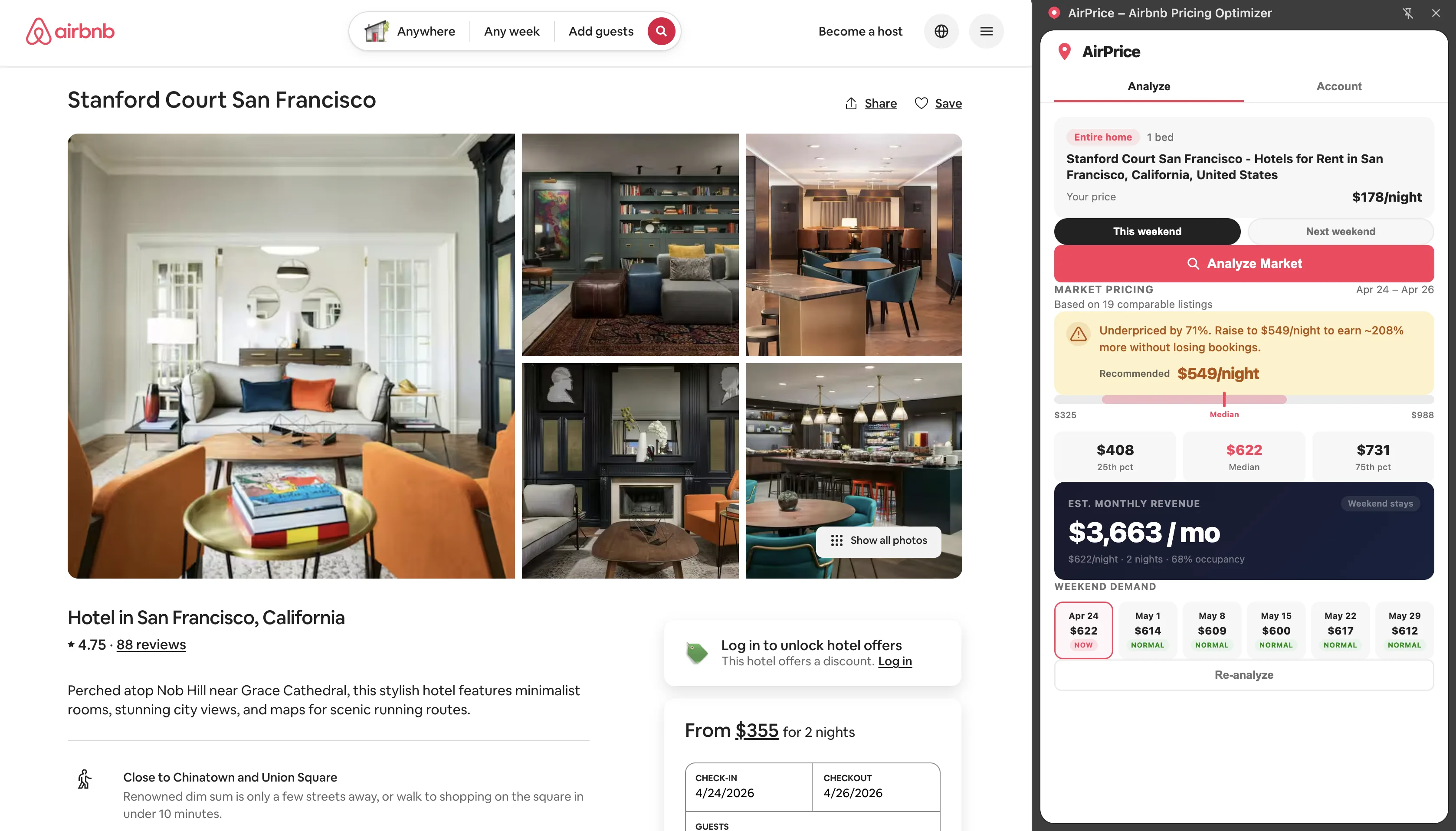
2. AirPrice auto-analyzes and shows P25 / Median / P75 / Sweet Spot
3. Your target: within 5–10% of the sweet spot (P45 of local comps)
4. The sweet spot = price that maximizes rate × occupancy product
If you're above P75 and occupancy is below 65%: lower your rate.
If your occupancy is above 80%: you're underpriced — raise it.
The AirPrice analysis pulls real listing prices from Airbnb's search results for your city and bedroom count — not historical estimates, not survey data. It's the live market, sampled in real time. This is the only reliable foundation for a pricing decision.
Strategy 2: Split Weekday and Weekend Rates
The problem: Most markets charge 20–40% more on weekends, but hosts charge the same flat rate
Airbnb demand is inherently not uniform across the week. In most markets, Friday–Sunday sees dramatically higher demand than Monday–Thursday. Weekend travelers are less price-sensitive. Weekday travelers (business travelers, remote workers, shoulder-season explorers) are more price-sensitive and will choose a cheaper option if yours isn't competitive.
AirPrice v1.3.0 shows you the exact weekday vs. weekend split in your local market — the median Monday–Wednesday price vs. the median Friday–Sunday price. Here's what the split looks like in representative markets:
| Market | Weekday Median | Weekend Median | Premium |
|---|---|---|---|
| NYC (2BR) | $195 | $280 | +44% |
| Nashville (2BR) | $155 | $225 | +45% |
| Denver (1BR) | $120 | $165 | +38% |
| Miami Beach (2BR) | $220 | $295 | +34% |
| Suburban Atlanta (3BR) | $130 | $175 | +35% |
Setting a single flat rate means you're either overpriced on weekdays (reducing weekday occupancy) or underpriced on weekends (leaving money on the table). The solution is a two-tier pricing rule in Airbnb's calendar settings: a weekday rate at approximately the weekday market median, and a weekend rate at the weekend market median. AirPrice tells you both numbers.
To implement: use Airbnb's calendar pricing tool to set custom weekend rates. Under Pricing → Weekend pricing, set a weekend premium that matches the split AirPrice shows for your market. Update this each month as the split fluctuates seasonally.
Strategy 3: Use the Revenue Calculator Before Every Rate Change
The problem: Hosts change rates without modeling the revenue impact first
A rate change that looks good in isolation can reduce total monthly revenue if the occupancy impact is larger than the rate gain. And a rate reduction that looks like it will hurt revenue can actually increase it if it recovers significantly more occupancy nights. The only way to know is to model it.
AirPrice v1.3.0's revenue calculator lets you model any scenario before committing. The sliders update monthly revenue in real time:
- Nightly rate slider — adjust your rate and see projected monthly income
- Nights per month slider — model different availability scenarios
- Occupancy rate slider — set your occupancy estimate to see the rate × occupancy math
- Cleaning fee slider — see how your cleaning fee affects total monthly income
+ (Cleaning Fee × Bookings Per Month)
Example: ($160 × 30 × 72%) × 1 + ($65 × 7 bookings)
= $3,456 + $455
= $3,911/month
Before raising your rate by $20: open the calculator, slide the rate up, slide occupancy down by 5–10 points to model the booking impact, and see whether monthly income increases or decreases. This 30-second check prevents the most common revenue mistake hosts make — raising rates without accounting for the occupancy penalty.
Strategy 4: Optimize Cleaning Fees for Short-Stay Conversion
The problem: High cleaning fees are a silent booking killer for short trips
Airbnb displays total trip cost in search results. Guests searching for a 2-night weekend trip see the effective rate including cleaning fee — not the nightly rate alone. A listing with a $150 nightly rate and a $120 cleaning fee charges a $210 effective nightly rate for a 2-night stay. A competitor listing at $165/night with a $40 cleaning fee charges only $185 effective — and wins the booking despite the higher advertised rate.
| Scenario | Nightly Rate | Cleaning Fee | 2-Night Total | Effective Rate |
|---|---|---|---|---|
| High cleaning fee | $150 | $120 | $420 | $210/night |
| Balanced pricing | $165 | $40 | $370 | $185/night |
| Optimal for short stays | $180 | $25 | $385 | $192/night |
The practical fix: calculate your actual cleaning cost. Set your fee at actual cost or slightly below. Absorb the difference in a modestly higher nightly rate. Your total revenue per booking stays the same, but your total trip cost drops — and you'll convert more short-stay browsers into bookers.
For listings that are in a high-turnover market (lots of 1–2 night stays), this adjustment alone can recover several percentage points of occupancy. Model it in the AirPrice revenue calculator: lower the cleaning fee by $30–40, raise the nightly rate by $8–12, and compare the monthly revenue projection at your current occupancy vs. a modest occupancy improvement.
Strategy 5: Capture Event Surge Pricing Automatically
The problem: Hosts miss event demand because they don't know the event is happening
Local events create demand spikes that can push market medians 40–80% above normal weekend rates. A listing two blocks from a major festival that normally earns $250 for a Friday–Sunday weekend can earn $500–$600 during the event — but only if the host has set event-appropriate rates before the demand window closes.
Most hosts miss event demand for one of two reasons: they don't know about the event, or they know but haven't updated their rates. By the time they notice their calendar is booked for that weekend, it's already at their standard rate — they can't reprice a confirmed booking.
To capture event surges:
- Build a local events calendar. Search your city + "events 2026" and note dates for festivals, conferences, sports events, graduation weekends, and other major draws. Add them to a simple spreadsheet with the event dates.
- Check AirPrice's demand calendar 8 weeks before each event. As the event approaches, the market median will climb. Verify your rates are at or above the rising market median.
- Pre-set event rates in your calendar. Don't wait for the surge — set higher rates for known event windows 2–3 months in advance. This captures advance bookers who plan ahead.
- Set a 3-night minimum for event weekends. Events drive demand for the full weekend. A 3-night minimum prevents guests from booking just Friday night and blocking the rest of the event window.
Tip: When AirPrice shows a "Hot" tag on an upcoming weekend, it means the market median is already running above the trailing average — a likely signal that a local event is driving demand. Open the analysis and check the comp prices to confirm. If comps are pricing 30–50% above their recent average, you're looking at an event surge.
Strategy 6: Last-Minute Discount Windows
The problem: Empty nights within 5 days almost never fill at standard rates
The probability of an empty night booking at your standard rate drops dramatically within 5 days of the stay date. Travelers booking that close to a trip have specific needs and are often willing to trade rate for availability — but only if your listing is competitively priced against their alternative (staying home or finding a cheaper option).
Last-minute discounting is not about slashing rates. It's about recognizing that $100 in last-minute revenue beats $0 in empty revenue, and calibrating the discount to the minimum needed to remain competitive with alternatives.
Airbnb's native last-minute discount feature lets you set an automatic percentage off for bookings made within 1, 3, 7, or 14 days of the stay. Configuration:
- Peak season: 5–10% discount for stays within 7 days. Peak demand is high enough that you rarely need to discount, but this provides a small incentive for last-minute planners.
- Shoulder season: 15–20% discount within 5 days. This brings your effective rate to slightly below the market median, making you the competitive option for last-minute travelers.
- Off-peak: 20–25% discount within 7 days. Off-peak nights have low natural demand — you need to be meaningfully below the market to drive last-minute bookings.
Strategy 7: Length-of-Stay Discount Architecture
The problem: Most hosts use generic weekly/monthly discounts without thinking about the revenue math
Airbnb's default weekly and monthly discount settings are blunt instruments. The right discount depends on your cleaning costs, your market's demand pattern, and the season. An off-peak monthly discount that's too small doesn't attract long-stay guests. One that's too large unnecessarily cuts into revenue from guests who would have booked anyway.
Cleaning fee: $70
Cleaning cost (actual): $60
3 nights: $480 + $70 fee = $550 gross, $490 net (5 bookings/month = 15 nights)
7 nights (-10%): $1,008 + $70 = $1,078 gross, $1,018 net (2 bookings/month)
28 nights (-30%): $3,136 + $70 = $3,206 gross, $3,146 net (1 booking/month)
Monthly guest = 1 cleaning, 1 check-in, stable income, zero gaps.
Optimal discount architecture by season:
| Stay Length | Peak Season | Shoulder Season | Off-Peak Season |
|---|---|---|---|
| 7 nights (weekly) | 5–8% discount | 10–12% discount | 15–18% discount |
| 28 nights (monthly) | 15–20% discount | 25–30% discount | 35–40% discount |
During peak season, guests are booking regardless — weekly discounts don't need to be aggressive because demand pulls them in without incentive. In off-peak months, a 35–40% monthly discount sounds like a lot, but a single 28-night booking at that discount level will often out-earn an entire month of unsuccessful attempts at higher short-stay rates.
Strategy 8: Review Velocity and Rating Protection
The problem: Most hosts treat reviews passively, but reviews directly drive search ranking and booking conversion
Airbnb's search algorithm is explicit about weighting reviews heavily — both the star rating and the recency of reviews matter. A listing that earned 4.9 stars 18 months ago but has had few recent reviews will rank below a listing with a 4.8 rating from consistent recent reviewers. Freshness counts.
Review strategy has two components: generating reviews and protecting your rating.
Generating reviews:
- Send a post-checkout message thanking the guest and mentioning that reviews help other travelers find the listing. This subtle prompt increases review rates by 15–25%.
- Leave your guest a 5-star review promptly after checkout. Airbnb shows guests their review only after both parties have reviewed, which creates reciprocal motivation.
- For new listings, price slightly below market for the first 5–10 bookings to drive occupancy and reviews quickly. The New Listing Boost gives you elevated placement for the first 3 months — don't waste it on an empty calendar.
Protecting your rating:
- Review your most recent guest feedback. Which categories score below 4.9? (Cleanliness, accuracy, communication, location, check-in, value.) Each below-5 review in a category is specific signal about something to fix.
- A listing consistently rated below 4.7 will lose significant search visibility over 90 days. This is a revenue issue, not a vanity issue.
- If you get a negative review for something within your control (cleanliness, inaccurate description), fix the root cause immediately. One bad review doesn't tank you; a pattern does.
Strategy 9: Monthly Rate Review with Live Comp Data
The problem: Markets move, but most hosts set rates quarterly or annually
Your competitors adjust their rates constantly. New listings enter your market. Events drive temporary demand spikes. Seasons transition. A rate that was perfectly calibrated in March is almost certainly wrong in June — and the host who doesn't update is either leaving money on the table or pricing themselves out of bookings.
The monthly rate review is the highest-leverage 10-minute habit in Airbnb hosting. Here's the exact routine:
Week 1 of every month: Run an AirPrice analysis
Open your listing on Airbnb with AirPrice active. The auto-analyze feature runs immediately if you're on Pro, or click "Analyze Market." Note the P50, sweet spot, and your current price. Has the market moved since last month? Are you still in the sweet spot range, or have comps shifted your relative position?
Check the trend indicator
AirPrice's trend badge shows whether this weekend's median is up or down vs. last weekend. A consistent upward trend over 3–4 weeks means demand is building — this is the signal to raise rates proactively before your calendar fills at the current (lower) rate.
Review the 6-weekend demand calendar
For any upcoming "Hot" weekend where you're still open, verify your rates are at or above the sweet spot. For "Soft" weekends, decide whether to run a modest discount or hold and accept lower occupancy. Use the revenue calculator to model both scenarios before deciding.
Model any planned rate changes in the revenue calculator
Before implementing a rate adjustment, plug the new rate into the AirPrice revenue calculator with a realistic occupancy estimate. If the projected monthly income increases, make the change. If it decreases, reconsider. This 2-minute step prevents the common mistake of raising rates without accounting for the occupancy impact.
Hosting on Airbnb is fundamentally an information advantage game. The hosts who know what the market is charging — right now, for this weekend, for their specific property type — consistently outperform those who guess. AirPrice exists to give you that information advantage in 30 seconds on any listing page.
For deeper coverage of the revenue formula behind these strategies, see the complete revenue optimization guide. For seasonal context on when each strategy matters most, see the month-by-month seasonal pricing guide.