The Real Question to Ask Before Installing Any Conversion Widget
Countdown timers, social proof popups, free shipping bars — every conversion widget adds something to your page. The question isn't whether a widget adds weight. It's how that weight is loaded, and whether it sits in the critical render path.
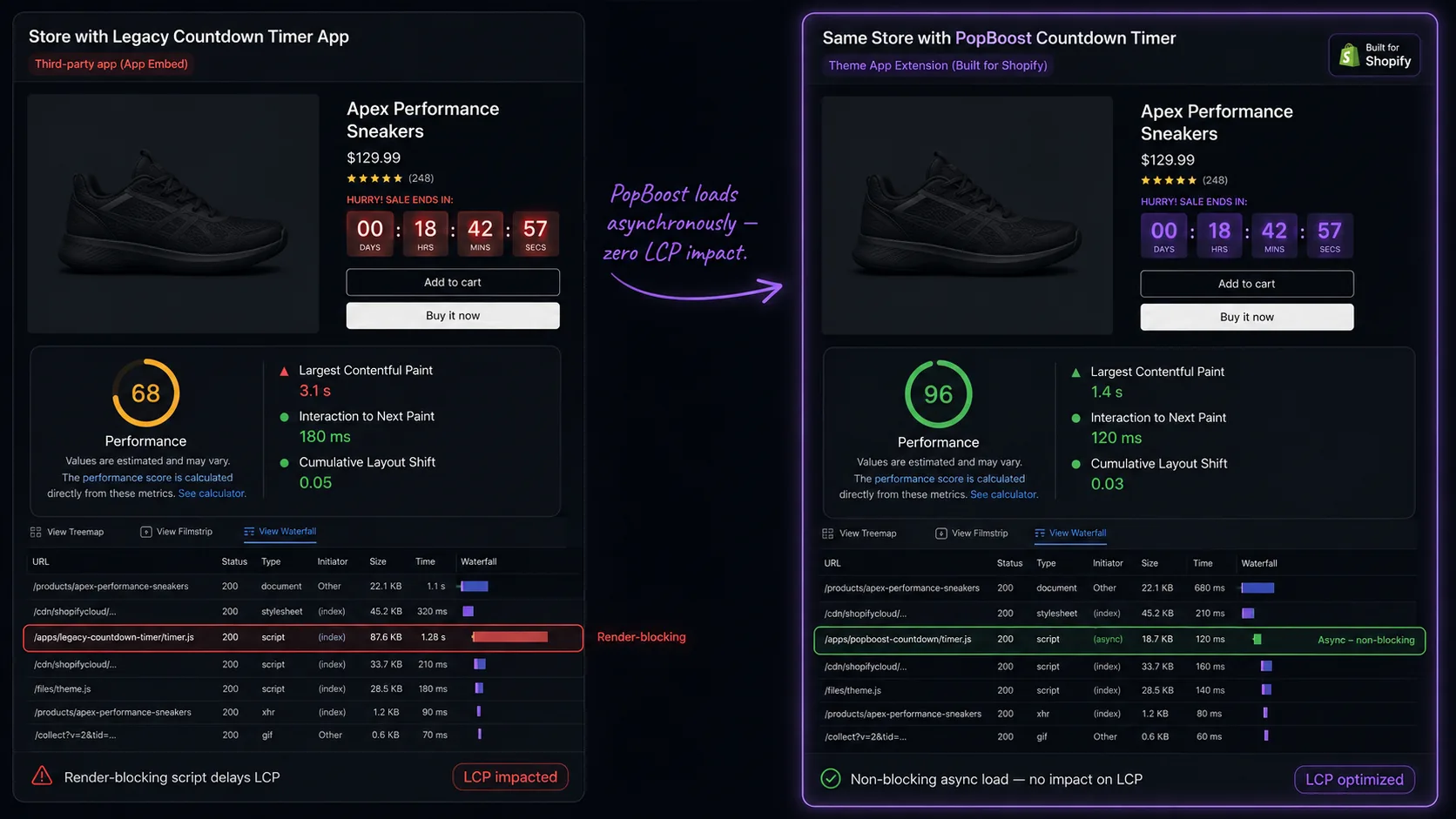
This distinction is the entire ballgame. An app that loads synchronously in your page <head> and one that loads asynchronously after paint can have identical features and wildly different impacts on your PageSpeed Insights score — one tanks your LCP by 400ms, the other registers as 0.
Most merchants don't know to ask this question. They install an app, their score drops, and they blame conversion widgets in general. The real culprit is architecture — specifically whether the developer built the app the right way.
Two Ways Apps Load — and Why It Matters
Legacy Architecture (hurts speed)
- Injects
<script>tags intotheme.liquid - Script loads in the page head, before HTML parsing finishes
- Browser must download + execute script before rendering page
- Adds 200–600ms to LCP per render-blocking script
- Multiple legacy apps stack their delay additively
- Setup often requires pasting code into theme files
Theme App Extension (no speed impact)
- Delivers UI as discrete app blocks in the theme editor
- No code injected into
theme.liquidor<head> - Page HTML renders first — widgets appear after paint
- JavaScript loads asynchronously, post-render
- If app JS fails, page still renders normally
- Setup is drag-and-drop in the Shopify theme editor
Shopify introduced Theme App Extensions in 2021 specifically to solve the speed problem created by the legacy pattern. Modern apps built on this system cannot block page rendering — by design.
How Legacy Countdown Timers Kill Speed
Here's the mechanism at a technical level. A legacy countdown timer app typically works like this:
- The app asks you to paste a
<script>tag somewhere in your theme's liquid files — usually intheme.liquidor inside the product template - That script tag references a JavaScript file hosted on the app's CDN
- Every time a visitor loads your product page, the browser encounters that script tag and pauses HTML parsing to fetch the external file
- If the app CDN is slow, or the file is large, or the merchant is in a different region from the CDN — the visitor waits
- This wait registers as Total Blocking Time in PageSpeed Insights and inflates LCP
This was a real, widespread problem. Many countdown timer apps released before 2022 still use this pattern because rewriting to Theme App Extensions requires rebuilding the app's frontend architecture. Some older apps are technically "updated" but haven't migrated their core loading method.
How Modern Theme App Extensions Work
An app built on Theme App Extensions delivers its UI differently. Instead of injecting a script into your theme files, the app registers itself with Shopify's app block system. The merchant drags the app's block into their theme using the Shopify theme editor — no code pasting required.
When a visitor loads the product page:
- Shopify renders the page HTML, including a small server-side placeholder for the app block
- The browser paints the page — product image, title, price, and Add to Cart button are visible immediately
- After the critical content is rendered, the app's JavaScript loads asynchronously
- The countdown timer widget appears in its reserved space — typically within 50–150ms of the page becoming interactive
From the browser's perspective: the page is done. The countdown timer is a progressive enhancement that appears after the page is interactive. It has no bearing on LCP, TBT, or CLS (assuming the widget space is reserved in the layout, which it is).
PopBoost Speed Test Results
We tested PopBoost's countdown timer widget on a Dawn-theme Shopify store, run through PageSpeed Insights (mobile) before and after placing the widget on a product page.
Dawn theme, product page with one hero image, EZBundle and PopBoost countdown timer both active. Tested via PageSpeed Insights (Lighthouse v12), mobile preset (4G throttled, Moto G Power). Three runs averaged per condition. No other changes made between before/after measurements.
We also tested with all five PopBoost widgets active simultaneously — countdown timer, social proof popup, free shipping bar, exit intent, and product badge — on the same product page.
| Configuration | PageSpeed (mobile) | LCP | TBT |
|---|---|---|---|
| No widgets (baseline) | 89 | 2.1s | 80ms |
| Countdown timer only | 89 | 2.1s | 80ms |
| All 5 PopBoost widgets | 88 | 2.1s | 85ms |
With all five widgets active, the score dropped by 1 point and TBT increased by 5ms — within normal test variance across runs. The practical answer: no meaningful speed impact regardless of how many PopBoost widgets are enabled.
How to Audit Any App Before Installing
Before installing any conversion widget — not just PopBoost — here's a three-step audit to check whether it'll impact your speed:
Step 1: Check the installation method
If the app asks you to paste code into your theme files, it's using legacy architecture. If setup is entirely in the Shopify theme editor (drag-and-drop app blocks), it's using Theme App Extensions. This alone tells you 90% of what you need to know.
Step 2: Run a PageSpeed baseline first
Before installing any new app, run PageSpeed Insights on your three most important pages and note the scores. This gives you an accurate before state so you can isolate any changes after installation. A free tool like RoastWeb runs a full Core Web Vitals and speed audit in seconds and explains each issue in plain English.
Step 3: Test after installation in isolation
Install the app and add the widget. Don't make any other changes — no new product images, no theme edits, no other app installs. Run PageSpeed again on the same pages. If the score dropped more than 3 points, the app is likely adding render-blocking resources.
The Verdict
A countdown timer can slow your store — but only if it's built wrong.
Legacy apps that inject scripts into your theme head will hurt your PageSpeed score. Apps built on Shopify's Theme App Extension system — including PopBoost — load asynchronously, outside the render path, with zero measurable impact on LCP or your PageSpeed score. If you're evaluating countdown timer apps, ask how they load before you install. The answer tells you everything.
Add urgency without hurting speed
PopBoost's countdown timer, social proof popups, and 5 other widgets are all built on Theme App Extensions. Your PageSpeed score stays the same. Your conversion rate doesn't.
Install PopBoost Free on Shopify →Frequently Asked Questions

PopBoost ‑ FOMO & Popups
7 Shopify conversion widgets. One $19/month app.