Inventory management isn't a once-a-year task. Demand shifts every few months. The merchants who stay ahead of those shifts — ordering at the right time, clearing slow stock at the right time, adjusting reorder points before velocity changes — consistently outperform the ones reacting to whatever's happening right now.
This guide walks you through the full 2026 seasonal arc from where you are right now (June) through the holiday rush and into the January reset. Each section tells you what to focus on, what to order, what to clear, and what numbers to watch.
The Seasonal Inventory Calendar for 2026
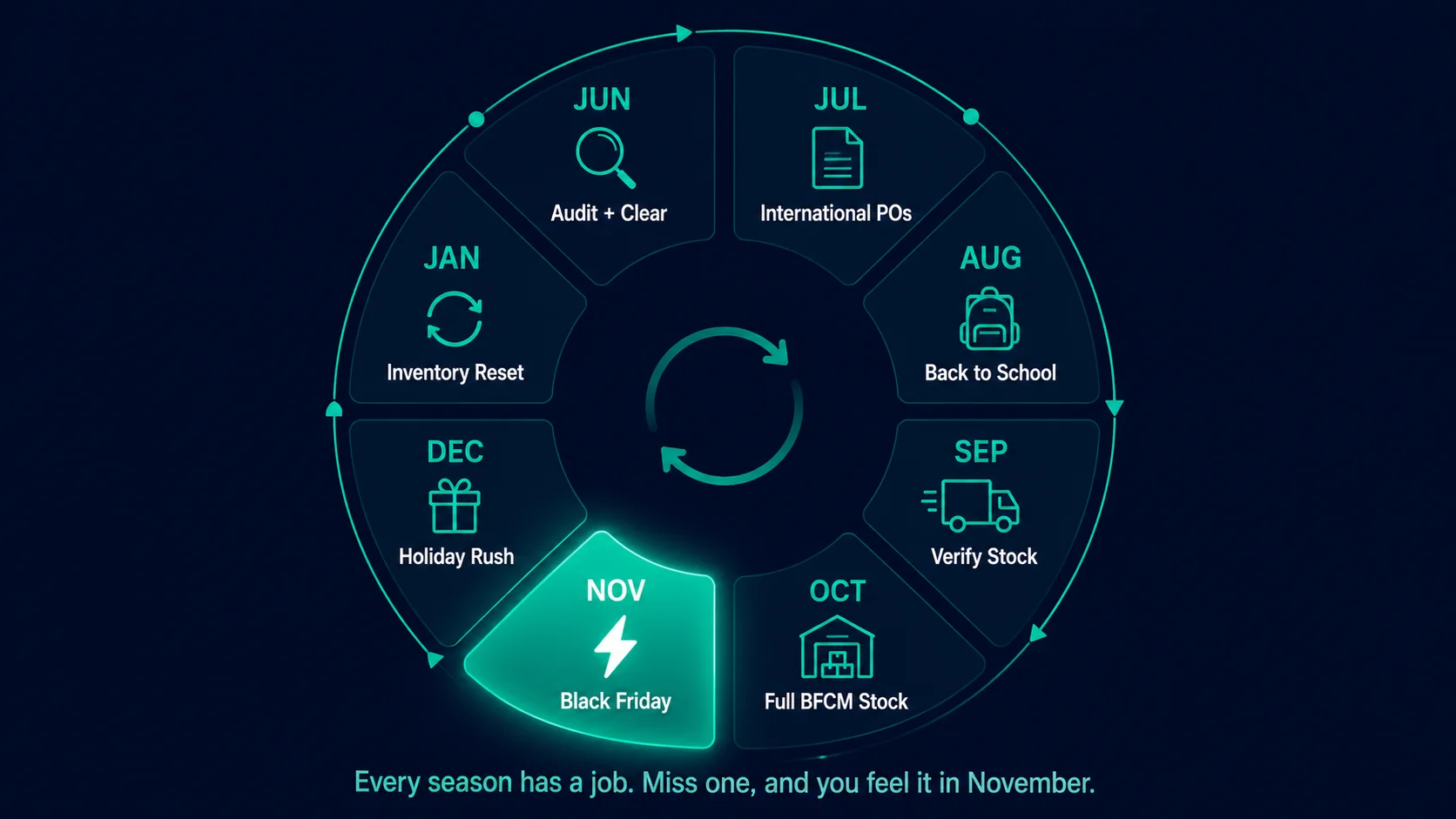
Before diving into each season, here's the full picture. Every action below flows from knowing where you are in this cycle:
Mid-year audit + summer clearance launch
Reconcile inventory. Run ABC classification. Start moving dead stock through summer clearance bundles and promotions. Calculate BFCM order quantities.
International BFCM orders go out
POs for overseas suppliers must leave by July 15. Confirm supplier capacity. Lock in Q4 pricing. Continue summer promotions on clearance items.
Back-to-school + domestic BFCM orders
Capitalize on back-to-school demand for relevant categories. Domestic BFCM orders go out by August 15. Summer clearance deadline — last chance to move slow stock before Q4 mindset kicks in.
Verify incoming stock + update reorder points
Chase late international shipments. Place any top-up domestic orders. Update reorder points to transition-season velocity.
All BFCM stock on hand + switch to peak ROPs
Full BFCM inventory should be at your location by October 15. Switch all A and B items to peak-season reorder points. Watch velocity pick up as early shoppers start browsing.
Black Friday — execute
Monitor stock levels daily. Place emergency top-up orders on fast movers if needed. Have a stockout contingency ready for every A item.
Holiday gifting season
Ship cutoff dates matter — communicate them clearly. Start planning January clearance for holiday-specific items. Monitor velocity as it approaches the shipping deadline cliff.
Post-holiday reset
Clear holiday-specific inventory fast. Reconcile counts. Pause purchasing on slow movers until February data is available. Set conservative reorder points for the slow season.
| Month | Focus | Key Action |
|---|---|---|
| June | Mid-year audit | Run ABC analysis; identify dead stock; clear with bundles |
| July | BFCM prep start | Place international orders; lock in supplier lead times |
| August | BFCM order window | Place domestic top-up orders; confirm safety stock levels |
| September | Pre-peak buffer | Verify all BFCM stock arrived; test receiving workflow |
| October | Last-chance restock | Emergency domestic order window; set up low-stock alerts |
| November | Peak season | Monitor daily; trigger replenishment on fast movers immediately |
| December | Post-peak clear | Flash sales on leftover stock; negotiate returns with suppliers |
| January | Reset | Full audit; update velocity data; revise reorder points for new year |
June–July: Summer Clearance and Cash Flow Reset
Summer is a dual-purpose window. You're clearing slow stock from the first half of the year, and you're building the purchasing capital you need for Q4 orders.
The goal isn't maximum revenue. It's cash flow and warehouse space.
What to clear
Any product that falls into one of these categories:
- Zero sales in the last 60 to 90 days with stock on hand
- C-classification products with more than 60 days of supply
- Products with declining velocity over the last 3 months
- Seasonal products from spring that won't be relevant again until 2027
How to run a summer clearance that actually works
Blanket "SUMMER SALE" banners with 10% off don't move dead stock. Here's what does:
Tiered discounting by age
30–59 days unsold: 15% off. 60–89 days unsold: 25% off. 90+ days: 35–40% off or bundle with a fast mover. The older the stock, the steeper the discount. Don't leave slow movers sitting at 10% off for two months hoping someone takes them.
Value bundles with A items
Pair dead stock with a fast mover at a price 15–20% below buying both separately. The A item drives the purchase. The dead stock ships with it. This works especially well for complementary products — a slow-selling case bundled with a bestselling product it's designed for.
Targeted email to past viewers
Segment customers who viewed the product but didn't buy. A 20% exclusive discount with a 7-day expiry to this segment outperforms a store-wide sale announcement every time. The customer already showed interest — you just need to convert them.
Summer clearance deadline: August 31. After that, shoppers are mentally in fall mode and clearance psychology shifts. Anything still unsold by September needs a different strategy — secondary channel, liquidator, or write-down.
Cash flow from clearance → Q4 orders
The cash you recover from summer clearance goes directly into BFCM purchase orders. This is the cycle: move slow stock at a discount, reinvest in fast stock that will sell at full price during the biggest shopping window of the year. The math on a 25% clearance discount paying for a full-price Q4 bestseller is almost always favorable.
August: Back-to-School Prep
Back-to-school is a $37 billion annual retail event in the US alone, concentrated in July and August. Not every Shopify store benefits — but if your products are relevant to students, parents, or teachers, this is your Q3 peak.
Relevant categories: stationery, tech accessories, bags and backpacks, organizational products, clothing basics, home office and dorm supplies, educational materials.
What to do in August
- Identify back-to-school velocity. Look at your August 2025 sales data. Did any products spike? Apply a seasonal multiplier to those products for August 2026 stock planning.
- Don't over-order. Back-to-school has a hard end date. The demand window is short. Order enough to cover the spike plus 20% safety — not three months of Q4 inventory.
- Domestic orders only at this point. International orders for back-to-school need to have gone out in June. August is for domestic top-ups and positioning, not primary ordering.
- Domestic BFCM orders go out this month. August 15 is the deadline for domestic suppliers if you want stock on hand by October 15. Don't let the back-to-school push distract you from getting BFCM orders placed.
September–October: Q4 Stock Build-Up
This is the most important two-month window of your year. Everything you planned in June, ordered in July and August, is arriving now or should be in transit.
September tasks
Chase late international shipments
Any international orders that haven't shipped by September 1 need urgent follow-up. If a supplier is going to miss your October 15 target, you need to know now — not in October — so you have time to source domestically at a premium if necessary.
Place domestic top-up orders
If you underestimated quantities on any A item, domestic suppliers can still deliver by October if orders go out in September. This is your last low-cost top-up window. Air freight in October costs 3× to 5× sea freight.
Update reorder points for transition velocity
Sales velocity picks up in September as consumers shift toward fall purchasing. Update reorder points based on September's actual velocity — not August's slower rate.
October tasks
Confirm all BFCM stock is on hand by October 15
This is your hard deadline. Walk the warehouse (or check your EZStock dashboard) and confirm that every A item has reached its BFCM target stock level. Anything short needs emergency action now.
Switch to peak-season reorder points
Update every A and high-priority B item to its peak-season reorder point. Your October stock will start depleting as early shoppers and Halloween-adjacent demand picks up. You want the reorder trigger set for peak velocity — not normal velocity.
Pre-build your BFCM purchase orders in EZStock
Create draft purchase orders for each supplier now. Pre-fill quantities based on your BFCM analysis. Have them ready to send at the first sign any product is tracking below target stock levels. DRAFT → ready to go on a moment's notice.
Pre-build your BFCM purchase orders in EZStock before October ends.
Sales velocity tracking, peak-season reorder points, PDF purchase orders sent to suppliers from inside Shopify. Starter from $19/month · 14-day trial · no credit card required.
Install EZStock Free on Shopify →November–December: Managing the Holiday Rush
You've done the planning. Now it's about execution, monitoring, and not panicking.
November: Black Friday and Cyber Monday
Check your EZStock dashboard daily from November 1. Watch for:
- Products approaching their reorder point. Any product flagged in early November needs an immediate purchase order — even if it means expedited shipping. Running out before Black Friday is catastrophic.
- Faster-than-expected velocity. If a product is selling 2× faster than your BFCM multiplier predicted, recalculate your stock-out date. Act immediately if it's within the supplier's lead time.
- Unexpected slow movers. If a product you stocked heavily isn't selling during BFCM, that's January clearance inventory. Don't panic-discount it during the sale — hold price and clear it in January when margins are less critical.
BFCM stockout contingency: For every A item, have a plan ready: a comparable alternative to recommend, a waitlist form to capture demand, or a "coming soon" email sequence. A merchant who says "we're sold out but here's the back-in-stock notification" keeps the customer. A merchant who just shows "sold out" loses them to a competitor.
December: Holiday gifting season
December is actually two different inventory phases:
- December 1–18: Peak gifting season. Velocity stays high. Monitor daily. Keep reorder points at peak-season levels.
- December 19–24: Last-minute shopping spike but with a hard end date driven by shipping cutoffs. Communicate your cutoff dates prominently in the store. After your shipping deadline passes, velocity drops sharply.
- December 26–31: Gift returns and redemptions. Have stock ready for the popular items — people redeeming gift cards and returning for the right size/color. Then velocity falls fast going into January.
Start planning your January clearance strategy in mid-December. Identify which holiday-specific items (gift sets, seasonal packaging, holiday-themed products) need to be cleared in January before they lose all value. Don't wait until January 2 to start thinking about this.
January: Post-Holiday Inventory Reset
January is the hangover. Most merchants either over-order in Q4 and have excess stock, or they ran out and have nothing to clear. Either way, January is a reset month.
Three January priorities
Clear holiday-specific inventory fast
Holiday-specific items (gift sets, festive packaging, calendar-year products) depreciate rapidly. Start clearance on January 1 — not January 15. By mid-January, the window for meaningful recovery is closing. Price to move, not to preserve margin.
Pause purchasing on slow performers
January data is unreliable as a purchasing signal — velocity is suppressed post-holiday. Don't place large orders based on January numbers. Wait until February to see how demand stabilizes before committing to Q1 orders.
Reconcile inventory counts
Q4 is messy — high volume, returns, manual adjustments. January is the time to reconcile Shopify's recorded counts with physical reality. You want clean, accurate numbers going into the new year. Every other decision you make in 2027 will be better if the inventory data is right.
Then you start the cycle again. February velocity data informs spring orders. Spring orders inform summer stock. Summer clearance funds Q4 orders. It's not complicated — it just requires doing the work at each stage instead of reacting to what's already happening.
How to Manage Seasonal Inventory in EZStock
Every season requires the same set of operations inside EZStock — just with different numbers:
Update reorder points before each season
In EZStock, go to each supplier-linked product and update the reorder point quantity. Use the sales velocity data shown in the app to calculate the right number for the coming season.
Monitor the dashboard for flagged products
Products that drop to or below their reorder point appear on the EZStock dashboard automatically. No manual checking. Check the dashboard when you start your day — it tells you exactly what needs action.
Generate seasonal purchase orders
Create a purchase order per supplier, add the products and quantities, set the expected delivery date, and send the PDF directly from EZStock. For BFCM orders, you can pre-build these in October and fire them when the reorder threshold is hit.
Mark received and watch inventory update
When stock arrives, mark the PO as received in EZStock. Shopify inventory updates automatically. The dashboard clears the flag. You're back in stock. DRAFT → SENT → RECEIVED.
Seasonal inventory management isn't complicated. It's just doing the right things at the right time. The calendar above tells you what those things are. EZStock handles the tracking and ordering workflow so you can focus on the decisions, not the spreadsheets.
