There are two categories of money-saving Chrome extensions: the ones that save you $10 at checkout, and the ones that save you $2,000 on a car. Both are useful, but they're not equally important to install.
This guide is organized by savings potential — starting with the extensions that have the highest impact on large purchases, then covering the everyday shopping tools that add up over time.
Big Purchase Extensions: Cars and Homes
The biggest financial decisions most people make are cars and homes. The amount of money left on the table in these transactions — because buyers don't have access to the right information at the right moment — dwarfs anything a coupon extension saves in a year.
Two Chrome extensions from Extensions Market address this directly:
| Extension | What It Shows | Where It Works | Potential Savings |
|---|---|---|---|
| CarWise | VIN decode, recalls, safety ratings, market value | CarMax, Carvana, AutoTrader, Cars.com, CarGurus, KBB, Edmunds, Craigslist, FB Marketplace | $500–$5,000+ per car purchase |
| HomePilot | True monthly cost, price vs Zestimate, negotiation signals | Zillow, Redfin, Realtor.com | $3,000–$20,000+ per home purchase |
CarWise — Used Car VIN Decoder and Market Value
The used car market is one of the most information-asymmetric transactions a consumer faces. Dealers and private sellers know exactly what the car is worth — buyers often don't. CarWise closes that gap by putting the same information dealers use directly in your browser while you browse listings.
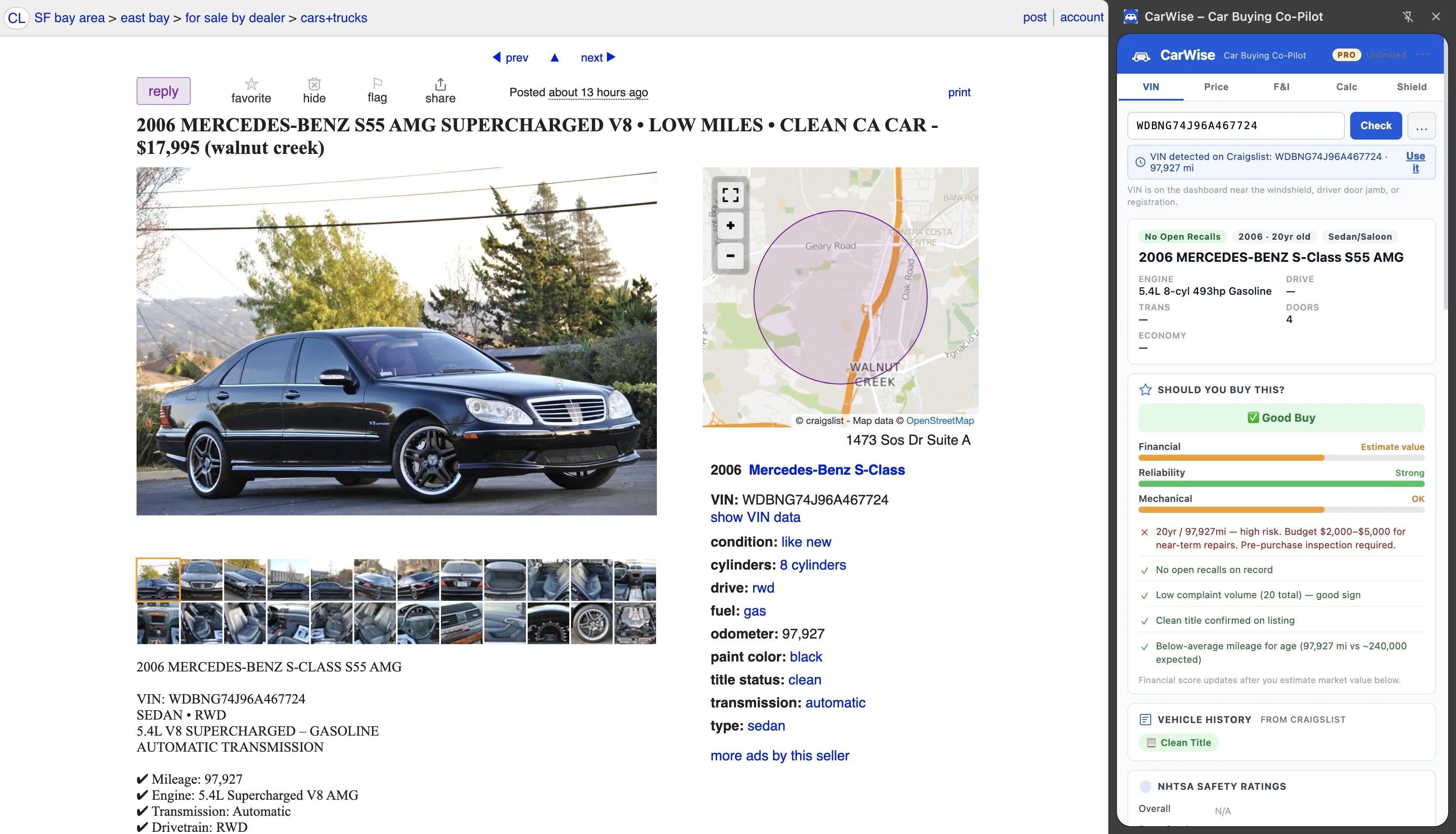
What CarWise shows on any used car listing:
- VIN decode — make, model, trim, engine, drivetrain, production year from the NHTSA vPIC API
- Open recalls — any outstanding safety recalls from the NHTSA recall database (recalls you'd otherwise only discover post-purchase)
- NHTSA safety ratings — overall, frontal, side, and rollover ratings (1–5 stars)
- Market value estimate — depreciation-curve-based value range for the specific year, make, model, and mileage
- EPA fuel economy — real MPG figures so you can calculate true ownership cost
- F&I protection guide — explains dealer finance office upsells (extended warranty, GAP insurance, paint protection) so you know what to decline
CarWise works on 11 used car platforms including CarMax, Carvana, AutoTrader, Cars.com, CarGurus, KBB, Edmunds, TrueCar, CarFax, Craigslist, and Facebook Marketplace. It uses Chrome's Side Panel so it appears alongside the listing without covering any listing content.
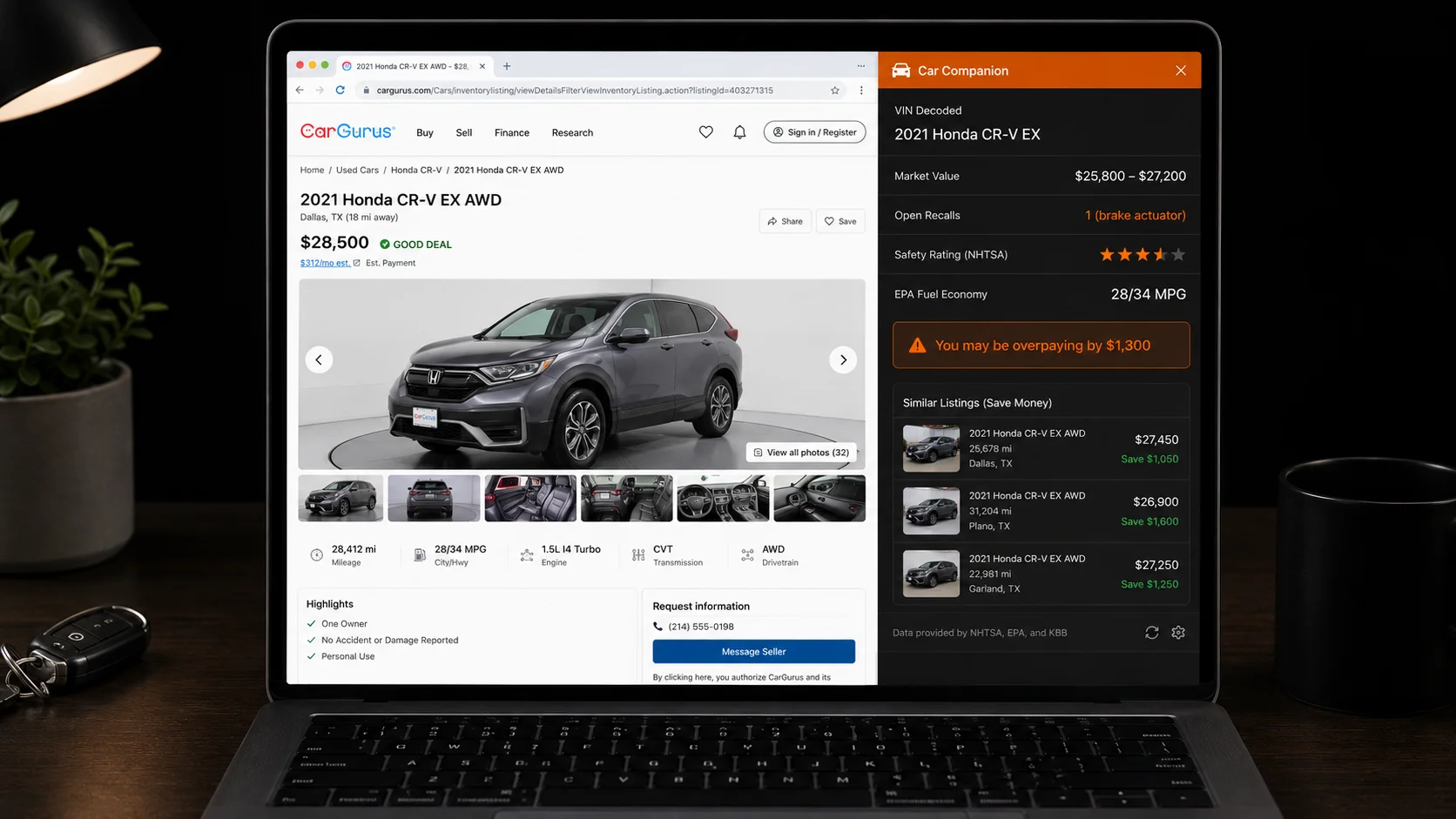
The real savings scenario: A 2021 Honda CR-V EX listed at $28,500 on CarGurus. CarWise shows: market value range $25,800–$27,200, one open recall (brake actuator — unfixed), safety rating 4/5 overall. You now have three negotiating points: (1) the listing is $1,300 above market high, (2) the recall repair is the seller's responsibility, (3) you have independent safety data. That's the difference between paying $28,500 and walking away at $26,500.
Pricing: Free (5 VIN scans/month), Pro $9.99/month for unlimited scans. For buyers evaluating multiple cars before purchasing, Pro pays for itself on the first deal.
HomePilot — True Monthly Cost on Zillow Listings
Home listings on Zillow show the asking price and the photos. They don't show your true monthly cost including property taxes, HOA fees, PMI, insurance, and maintenance. They don't show how the asking price compares to Zillow's own valuation. And they don't show negotiation signals like days on market and price reduction history.
HomePilot adds all of that directly to the browser Side Panel while you browse Zillow, Redfin, and Realtor.com listings:
- True monthly cost — mortgage payment at current rates, property tax estimate, HOA fee (if shown), PMI (if <20% down), homeowners insurance estimate, maintenance reserve
- Price vs. Zestimate — is the listing above or below Zillow's own automated estimate, and by how much
- Negotiation signals — days on market, price history, number of price reductions and total reduction amount
- Offer calculator — model offer scenarios and see monthly payment impact
- Closing costs breakdown — estimate of total out-of-pocket at closing including lender fees, title, escrow
Pricing: Free (5 analyses/month), Pro $19.99/month for unlimited analyses. Free tier is sufficient for most home buyers who evaluate 5–15 properties before making an offer.
Shopping and Coupon Extensions
For everyday online shopping, two extensions handle coupon and cashback automation better than anything else:
Honey (PayPal)
At checkout on any supported retailer, Honey automatically tests every available coupon code and applies the best one. No input required — it runs in the background and pops up when it finds savings. Honey also has a cashback program ("Honey Gold") for select retailers. Average savings when a code works: $10–$35. Works on 30,000+ retailers. Free.
Capital One Shopping
Similar coupon-testing functionality to Honey, with the addition of a price comparison layer that checks whether the item you're buying is cheaper at another retailer. Does not require a Capital One account. Strong on Amazon (shows if a third-party listing is available cheaper through the same seller elsewhere). Free.
Rakuten
Cashback on purchases at 3,500+ retailers. Rakuten pays out real cash (via PayPal or check) rather than points. Cashback rates vary by retailer and season but typically run 1–10% of purchase price. Best for planned purchases at major retailers where you know you're going to spend the money anyway. Free.
Price Tracking Extensions
These extensions protect you from "fake sale" pricing — items listed at an inflated regular price with a discount that doesn't represent real savings.
CamelCamelCamel (for Amazon)
Shows the complete price history for any Amazon product — going back years. When you see an item listed at "$89.99, was $149.99," CamelCamelCamel shows whether it was actually $149.99 historically or whether the "original price" is inflated to make the current price look like a deal. Also lets you set price alerts so you're notified when an item drops to your target price. Free.
Keepa
Similar to CamelCamelCamel but with more granular data (hourly price tracking, third-party seller price history, availability history). Shows whether an item is genuinely at a historic low or just temporarily reduced. More data than most shoppers need, but invaluable for high-value purchases like electronics or appliances where knowing the real price floor matters. Free tier shows basic history; Pro adds more features.
Estimated Savings per Extension
Here's a realistic annual savings estimate for each extension based on usage patterns:
| Extension | Cost | Estimated Annual Savings | Best For |
|---|---|---|---|
| CarWise | Free / $9.99/mo | $500–$5,000 (per car) | Used car buyers |
| HomePilot | Free / $19.99/mo | $3,000–$20,000+ (per home) | Home buyers / renters comparing |
| STRInvest | Free / $9.99/mo | $5,000–$30,000+ (per property) | Real estate investors |
| Honey | Free | $150–$600 | Online shoppers |
| Capital One Shopping | Free | $100–$400 | Online shoppers |
| Rakuten | Free | $50–$300 cashback | Shoppers at major retailers |
| CamelCamelCamel | Free | $100–$500 (prevents overpaying) | Amazon buyers |
Priority order: Install CarWise and HomePilot first if you're buying a car or house — the potential savings on a single transaction dwarf everything else on this list. Add Honey and Capital One Shopping next (zero effort, passive savings). Add CamelCamelCamel if you buy from Amazon regularly. Add Rakuten if you have planned purchases at major retailers where they offer cashback.
The best money-saving Chrome extensions aren't about clipping digital coupons on impulse purchases. They're about having the right information at the moment of a large buying decision — which is when the real money is won or lost. For more on getting the most out of CarWise, see our guide on how to check a used car before buying and how to negotiate a used car price with market data.