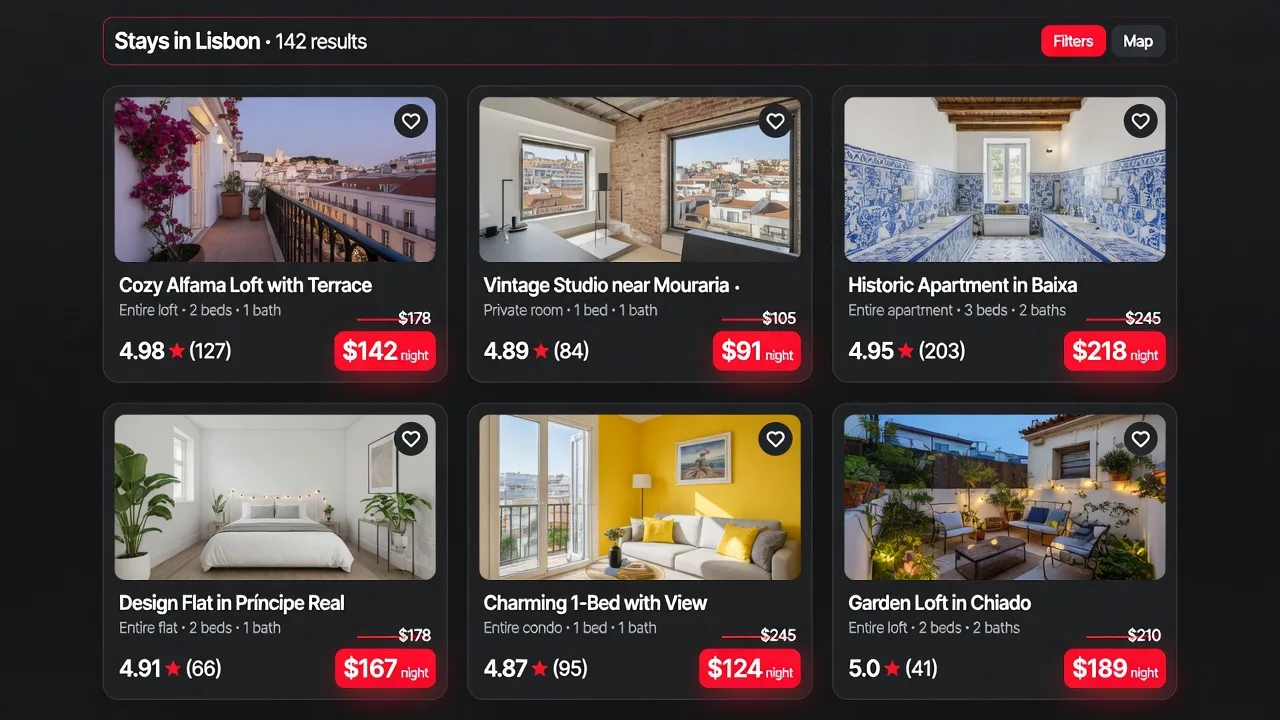
Why bad comps produce bad pricing
Most hosts who manually research pricing make the same mistake: they search Airbnb for "nearby listings" and average the rates they see. The problem is that a nearby listing is not necessarily a comparable listing. A 1-bedroom condo on the 20th floor of a building is not a comp for a 3-bedroom house with a backyard. A brand-new listing with 200 five-star reviews is not a comp for a listing with 12 reviews from 2023.
Pricing against the wrong comps will either systematically underprice you (if you're matching against budget options that aren't competing for your guests) or overprice you (if you're anchoring to premium listings your property doesn't actually compete with). Both outcomes hurt your revenue.
| Criteria | Why It Matters | AirPrice Approach |
|---|---|---|
| Same city/zip | Eliminates market variance | Filters same metro area |
| Bedroom count match | Largest driver of price | Exact match required |
| Room type (entire/private/shared) | 30-50% price variance | Entire home only for accurate comp |
| Guest capacity ±1 | Affects pricing range | Matches similar guest counts |
| Upcoming weekend dates | Forward-looking rates matter | Uses 4 real upcoming weekends |
| Active listings only | Inactive = stale data | Filters for bookable listings |
| Amenities (pool, parking) | +5-20% premium | Use as adjustment factor, not filter |
| Review count | Proxy for booking velocity | Treat new listings (<10 reviews) as separate tier |
| Distance | >5 miles = different micro-market | Stay within 3-5 mile radius in cities |
The five factors that define a true comp
1. Bedroom count
This is the most important filter. Guests searching for a 2-bedroom are not cross-shopping with 1-bedrooms — they have a minimum space requirement. Your comp set should be within one bedroom of your listing, ideally exact match. A 2-bedroom should be compared against other 2-bedrooms, not studios and 3-bedrooms averaged together.
2. Geography
In dense urban markets, a half-mile radius may contain hundreds of listings. In rural or resort markets, the relevant comp radius might be 5–10 miles. The goal isn't a fixed distance — it's listings that guests would actually consider instead of yours. If you're near a specific attraction, beach, or neighborhood, your comps should be too.
Be careful not to use too tight a radius. If your neighborhood has only 4–5 listings, you don't have enough data points for statistical accuracy. Widen slightly until you have 15–25 comps to work with.
3. Property type
Entire homes compete against other entire homes. Private rooms compete against other private rooms. Guests typically filter for property type before looking at individual listings, so mixing types in your comp set produces meaningless averages.
4. Key amenities
Certain amenities meaningfully change the demand and pricing of a listing. A hot tub, private pool, or waterfront access can justify rates 30–50% above otherwise identical listings. If your property has one of these, your comps should too — or you need to account for the premium in your analysis. Similarly, if you don't have a parking spot in a car-dependent market, you shouldn't compare against listings that do.
5. Review count and recency
A listing with 3 reviews and a listing with 300 reviews are in different positions in the search algorithm. New listings often undercut market rates to build review volume. If you have an established listing, comping against brand-new properties will anchor you too low. Filter for listings with at least 10–20 reviews to get rates that reflect a stabilized market position.
The problem with manual comp research
Doing this manually on Airbnb is tedious and imprecise. Airbnb's guest-facing search doesn't show you nightly rates for specific future dates across a grid of listings. You'd need to click into each listing, navigate to the calendar, select your date range, and record the rate — for 20+ properties, repeatedly, as markets shift.
Even if you invest that time, the data is a snapshot. By the time you've checked 20 listings, the first ones you looked at may have updated their rates. You're never looking at a clean dataset.
How AirPrice identifies comps automatically
AirPrice runs the comp identification process automatically when you open any Airbnb listing page. It surfaces nearby listings that match your property's bedroom count and property type, filters for active listings with review history, and shows their current nightly rates — all without leaving your listing page.
Open your listing on Airbnb
With AirPrice installed, the comparable listings panel appears automatically on your listing page. No configuration needed — AirPrice reads the listing's attributes (bedrooms, location, property type) and builds the comp set from those.
Read the comp gallery
The gallery shows comparable listings with their current nightly rates. Scan for the cluster — the range where most comps are priced. Outliers at the high and low end are usually outliers for a reason (exceptional amenity, or a distressed listing trying to fill a gap).
Use the price recommendation as your anchor
AirPrice synthesizes the comp data into a specific nightly rate recommendation. This is your market anchor — the price that reflects where your listing sits relative to the comp set. Use it as your base rate and adjust up or down based on your listing's specific strengths and weaknesses.
When to run comps again
Markets aren't static. New listings open and close, competitors adjust rates, seasonal demand shifts the whole market up or down. A comp analysis that was accurate in November may be significantly off by March. As a rule of thumb:
- Monthly: Run a quick comp check to see if your base rate is still aligned with the market cluster
- Before peak periods: Check comps 4–6 weeks before a high-demand season to ensure you're entering it priced correctly
- After major market changes: New large properties opening, a competitor closing, or a major new attraction nearby can shift market rates quickly
With AirPrice, this check takes under two minutes — open your listing and read the panel.