The core problem: cover letters take too long
The average job seeker spends 20–30 minutes writing a cover letter from scratch. Multiply that by 30 applications and you've burned two full workdays on letters alone — most of which won't get read past the first sentence.
AI is supposed to fix this. And it does, mostly. But the difference between a tool that shaves off 5 minutes per application and one that shaves off 20 minutes is enormous when you're in the middle of a job search. The question is which tool actually delivers that kind of time saving — and whether the output is good enough to work.
How the workflow actually compares
ChatGPT: copy, prompt, copy back
Using ChatGPT to write a cover letter requires you to do a lot of the work yourself. Here's what it looks like in practice:
- Open the job listing in one tab, open ChatGPT in another
- Select and copy the full job description (sometimes hundreds of words)
- Paste it into ChatGPT with a prompt like: "Write a professional cover letter for this job posting for [your name], who has [your background]. Tone should be [formal/conversational]. Keep it under 300 words."
- Read the output, decide if it's generic, iterate on the prompt if needed
- Select all, copy the result
- Go back to the application tab, find the cover letter field, paste it in
- Edit as needed because it probably refers to the company as "the company" or missed a key requirement
This workflow takes 8–15 minutes per application if you do it carefully, and even then the output tends to be formulaic unless you invest heavily in prompt engineering. ChatGPT doesn't know what job boards look like, doesn't know your application history, and has no concept of what a well-performing cover letter actually looks like at scale.
JobPilot: open the listing, click generate
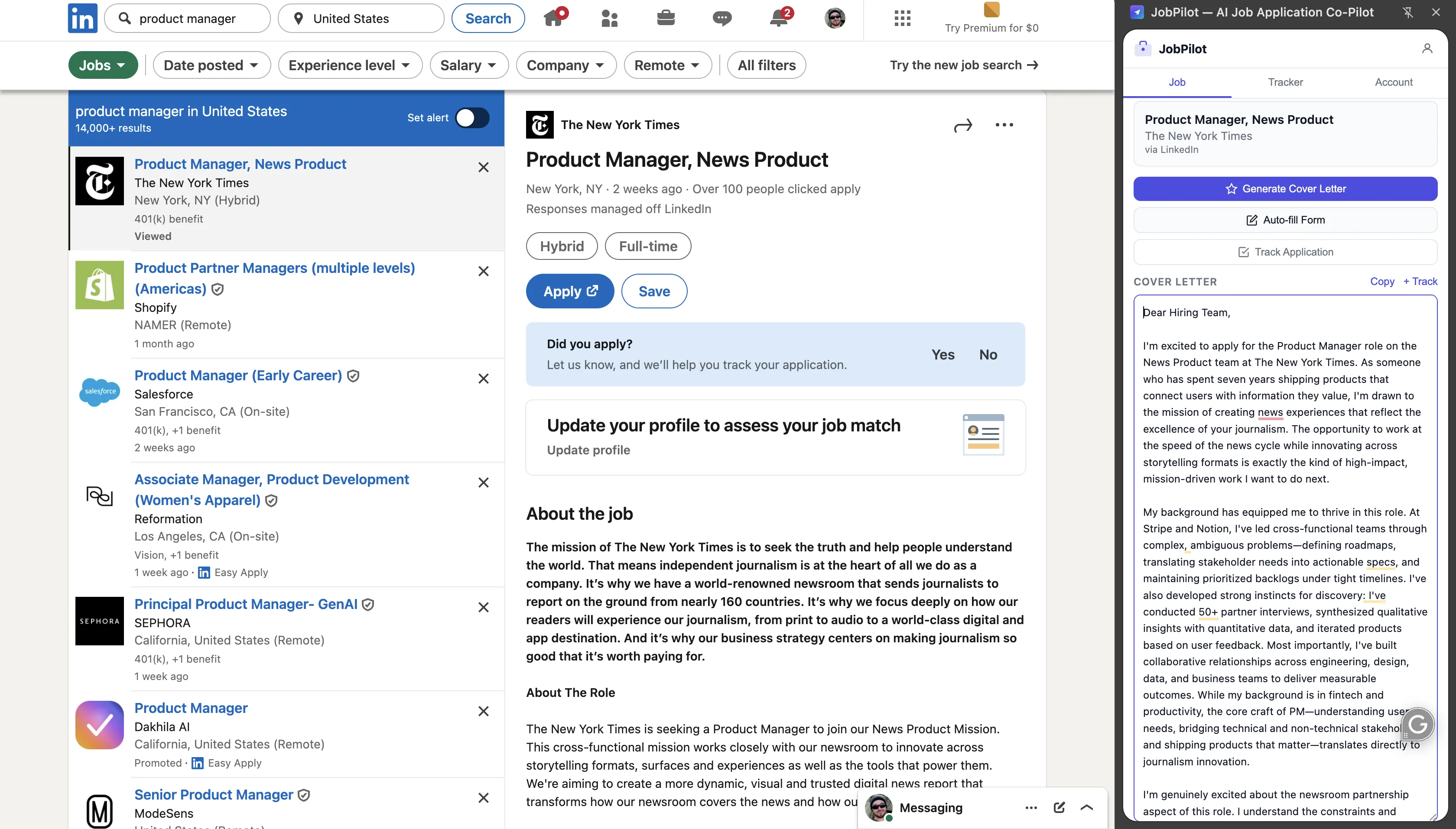
JobPilot is a Chrome extension. When you're on a job listing — on LinkedIn, Indeed, Greenhouse, Lever, Workday, or most company career pages — you click the JobPilot icon in your toolbar. A side panel opens. JobPilot has already read the job description from the active page. It generates a tailored cover letter based on that content and the resume you uploaded when you set it up.
The whole process: open listing → click icon → click generate → review → insert. Under 2 minutes. No context switching, no copy-pasting, no prompt crafting.
Output quality: generic vs. tuned
ChatGPT's cover letter output quality depends almost entirely on how good your prompt is. With a bare-bones prompt ("write a cover letter for this job"), the output is noticeably generic — it uses vague phrases like "I am excited to contribute my skills," doesn't address specific requirements from the posting, and could have been written for any job in the category.
With a well-crafted prompt that includes your background, the specific role requirements, your target tone, and examples of language to avoid, ChatGPT can produce genuinely strong output. But that prompt takes time to develop and refine. Most job seekers don't have a well-tested system prompt ready to go — and even if they do, they have to repeat the paste-and-iterate process every single time.
JobPilot is specifically tuned for job applications. It's trained to identify the key requirements from a posting, match them against your uploaded resume, and produce a letter that's specific to that role rather than the category. It doesn't use filler phrases. It addresses the job title, the company, and the requirements that appear highest in the listing — which are typically the ones hiring managers care most about.
The output isn't perfect every time, but it's consistently better than an unpolished ChatGPT prompt — and the starting point is higher, so you spend less time editing.
The comparison table
| Feature | JobPilot | ChatGPT |
|---|---|---|
| Setup required per application | None — reads the page automatically | Copy job description, craft prompt each time |
| Context awareness | Reads live job listing + your resume | Only what you paste into the prompt |
| Output quality (default) | Tuned for job applications, role-specific | Generic without detailed prompt engineering |
| Application tracking | Automatic — logs every application | None |
| Works directly on job boards | Yes — LinkedIn, Indeed, Greenhouse & more | No — separate tab required |
| Customization control | Moderate — tone & style settings | Full — any prompt, any format |
| Price | Free (3 cover letters/day) | $20/month (ChatGPT Plus) for GPT-4 |
Application tracking: the feature ChatGPT can't touch
One of the most underrated differences is application tracking. When you're actively job searching, keeping track of where you've applied, which version of your resume you used, and when to follow up is its own job. Most people do this in a spreadsheet — which they maintain inconsistently and eventually abandon.
JobPilot logs every application automatically as you go. You can see the company, role, date applied, and the cover letter that was generated — all without touching a spreadsheet. If you applied to the same company twice for different roles, you'll know. If a recruiter reaches out two weeks later and you can't remember what you wrote, you can pull it up instantly.
ChatGPT has no memory of your past applications by default. Each conversation starts fresh. You'd have to build your own tracking system externally — which most people don't do consistently.
Price: free vs. $20/month
ChatGPT's free tier uses GPT-3.5, which produces noticeably weaker cover letter output than GPT-4. If you want the model that can actually write at a level worth using, you need ChatGPT Plus at $20/month.
JobPilot is free for 3 cover letters per day. If you're applying to 3 or fewer jobs on any given day — which is realistic for most active job seekers — you'll never hit the limit. The free plan includes tracking, the side panel, and the full generation quality.
For a job search that runs 4–8 weeks, that's $0 vs. $40–$80 in ChatGPT subscriptions. The math isn't close, especially given that ChatGPT isn't even purpose-built for this use case.
When ChatGPT is actually the better choice
This isn't a one-sided verdict. ChatGPT has a real advantage in one specific situation: high-stakes, heavily customized applications for senior or unusual roles.
If you're applying for a VP of Product role at a company you've researched deeply and you want to write a letter that references a specific product decision they made, incorporates your exact background in a specific way, and uses a tone that matches how the company communicates publicly — ChatGPT with a detailed, well-crafted prompt can produce something truly custom. You're essentially hand-crafting each letter with AI assistance.
For that kind of application, where you're spending 45 minutes total on research and positioning anyway, the extra 10 minutes of prompt work isn't the bottleneck. The letter quality ceiling is higher when you have full control over every input.
JobPilot is optimized for volume and consistency, not for bespoke one-of-a-kind letters. It's the right tool for the 90% of applications in your search — the ones where a good, specific, professional letter gets you through the screening filter. It's not the tool for the 10% where you're doing deep, manual customization.
The verdict
Use JobPilot when you're actively applying to jobs and want to move fast without sacrificing quality. It removes the friction from every step — reading the listing, generating the letter, tracking the application — so you can spend more time on the things that actually differentiate you: researching the company, preparing for interviews, building relationships.
Use ChatGPT when you're applying for a senior or unusual role that requires deep, bespoke customization and you're willing to invest 45+ minutes on that one application. It gives you full control, but full control means full effort.
Most job seekers don't need to choose — use JobPilot for the bulk of your applications and reserve the ChatGPT deep-dive for the roles you really want.
Apply faster. Track everything. Start free.
JobPilot reads the job description, generates a tailored cover letter, and tracks every application — all from a side panel on any job board.
Add JobPilot to Chrome — Free →3 cover letters/day free · No credit card · Works on LinkedIn, Indeed & more