Why One Email Isn't Enough
Most merchants who build a waitlist send one email: the launch notification. "It's here! Buy now." Then they wonder why their waitlist-to-purchase rate is 8–12%.
The problem isn't the email — it's the context. A cold waitlist subscriber who signed up 6 weeks ago and hasn't heard from you since has forgotten why they were excited. The launch email lands in a mailbox alongside 40 other promotional emails. There's no warmth, no anticipation, no specific reason to buy in the next 24 hours rather than "later."
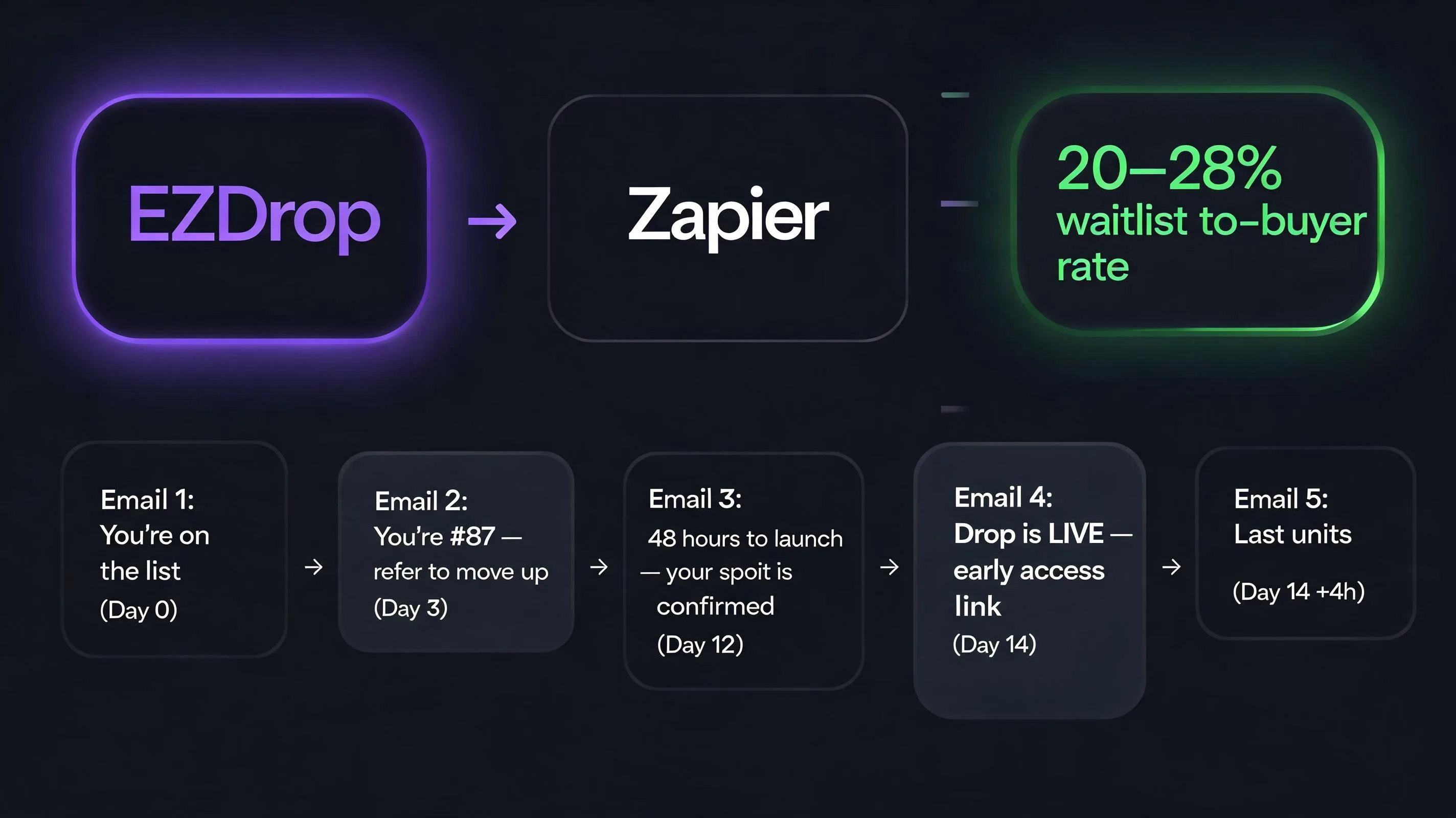
A 5-email sequence — spread from the day of signup to launch day — changes this completely. By the time your launch email arrives, it feels like the conclusion of a conversation rather than a cold announcement. The subscriber remembers why they signed up, has seen the product, knows there's limited stock, and has been watching their queue position move up through referrals. They're not deciding whether to buy. They're deciding when.
How to Connect EZDrop to Klaviyo
EZDrop connects to Klaviyo via Zapier (no-code) or directly via webhook + Klaviyo's API. Both methods add subscribers to a Klaviyo list automatically when they join the EZDrop waitlist.
Option A: Zapier (5 minutes, no code)
- Create a Zap with EZDrop as the trigger app. Select the "New Waitlist Signup" trigger event.
- Authenticate your EZDrop account using your API key (found in EZDrop dashboard → Settings → Integrations).
- Add Klaviyo as the action app. Select "Add Subscriber to List" or "Track Event" — use "Track Event" if you want to trigger a Klaviyo Flow rather than just adding to a static list.
- Map the EZDrop fields: email → Klaviyo email, first name → Klaviyo first name. Optionally pass queue position and referral count as custom properties (these enable personalization in your emails).
- Test with a real signup on your waitlist page to confirm the subscriber appears in Klaviyo within 60 seconds.
Option B: Webhook + Klaviyo API (developer setup)
In EZDrop dashboard → Settings → Webhooks, add your Klaviyo endpoint URL. EZDrop sends a POST request on each new signup containing email, name, queue position, referral count, and drop ID. Your endpoint (or a serverless function) calls the Klaviyo Profiles API to create/update the profile and the Events API to trigger a flow. This method gives full control over what data you pass and how it's used in personalization.
EZDrop captures the waitlist — you supply the Klaviyo sequence
Referral-based queue, viral scoring, theme widget, and webhook integration — EZDrop is the waitlist infrastructure. Build the email side in Klaviyo using the sequence below.
Install EZDrop Free →Or learn more at ezdrop.app — the Shopify waitlist app
The 5-Email Launch Sequence
Tone: Exclusive and warm. They just joined something — make them feel that was the right decision. Keep it short. This email's job is confirmation and incentive setup, not selling.
Tone: Insider, conversational. They're getting access to something others aren't seeing. Don't make this a promotional email — make it feel like a personal update from the team.
Tone: Urgent but honest. If you have 500 units and 150 people on the waitlist, don't manufacture scarcity — just emphasize the early access and your excitement. False scarcity destroys trust for the long term.
Tone: Short. This is the most important email in the sequence and the shortest. The subscriber already knows the product. They've been anticipating this. Don't write a long email — write the clearest path from "open email" to "click buy." Remove every sentence that isn't directly moving toward the CTA.
Klaviyo setup: Suppress this email for anyone who completed a purchase since the launch email was sent. Klaviyo's flow branching (check "Has placed order in last 24 hours" → yes: skip, no: send) handles this automatically. This is the highest-margin email in the sequence because it has no additional acquisition cost and reaches people who were already primed to buy.
What to Personalize With EZDrop Data
EZDrop passes three data points that Klaviyo can use for dynamic personalization:
- Queue position — show the subscriber exactly where they stand. "You're #198" is more motivating than "You're on the list." Position context ("top 20%") makes the number meaningful. Update this in each email — people notice movement and it rewards referral behavior.
- Referral count — "You've referred 3 people and moved up 150 positions." This closes the feedback loop on the referral mechanic and incentivizes more sharing. Use it in emails 2 and 3 where the referral CTA is active.
- Drop ID — if you run multiple drops simultaneously or in a short period, use the drop ID to ensure each subscriber gets emails relevant to the specific drop they signed up for, not all drops at once.
In Klaviyo, these fields become template variables: {{ person.queue_position }}, {{ person.referral_count }}. Pass them from EZDrop via Zapier's "custom properties" field or via the webhook payload's custom attributes object.
Launch Day: The Email That Converts
Email #4 is the one that drives revenue. Everything before it is preparation. Here's the structure that converts best:
- Line 1: One sentence that tells them exactly what's happening. "It's live — [Product name] is available now." No preamble, no "Hi [FirstName], we're so excited to share…"
- Line 2: Their access context. "As a waitlist member, you have access 2 hours before the public." Or, if no access window: "You're getting first look before we announce on social."
- CTA button: Large, mobile-tappable, labeled "Shop Now" or "Get Yours" — not "Learn More" or "Visit Store." The subscriber knows the product. They don't need to learn more. They need to buy.
- One scarcity line (only if true): "We have [X] units for early access." If this is accurate, include it. If not, omit it entirely.
- No footer clutter: Remove or minimize the standard Klaviyo footer nav from this specific email template. Every link that isn't the product page is a distraction.
What to Measure
After your first launch with this sequence, evaluate these numbers to improve future launches:
- Waitlist-to-purchase rate — total purchases / total waitlist signups. Target: 20–30% with a warm sequence. Below 15%: the launch email needs work. Above 35%: you have high-intent demand — increase your next launch's inventory.
- Email 1 open rate — should be 60%+. If below 50%, your subject line or sender name has a deliverability or recognition problem.
- Referral rate — what % of subscribers referred at least one person. Target: 15–25%. If below 10%, the referral incentive (queue position) isn't motivating enough — try increasing the position jump per referral in EZDrop settings.
- Email 5 (follow-up) conversion rate — this should be 8–14% of non-purchasers. If it's below 5%, the follow-up offer isn't compelling enough or it's arriving too late.
Start with EZDrop — the waitlist is the foundation
EZDrop handles the viral waitlist, referral scoring, and theme widget. Connect to Klaviyo via Zapier and the email sequence runs automatically from signup to launch day.
Install EZDrop Free on Shopify →Or learn more at ezdrop.app — the Shopify waitlist app
| Email in Sequence | Avg Open Rate | Avg Conversion Rate |
|---|---|---|
| Email 1: You're on the waitlist (immediate) | 72–85% | — (no purchase CTA) |
| Email 2: Warm-up / behind the scenes (Day 3–5) | 45–60% | — (engagement only) |
| Email 3: Final countdown — 24h (Day before launch) | 55–68% | 8–14% |
| Email 4: You're in — launch day (top winners) | 78–90% | 28–40% |
| Email 5: Last chance — 48h after launch (remaining waitlist) | 38–52% | 6–12% |
| Standard single-blast announce (no waitlist) | 18–24% | 1–3% |
| Waitlist sequence vs. single blast | 3× higher open rate | 8–10× higher conversion |