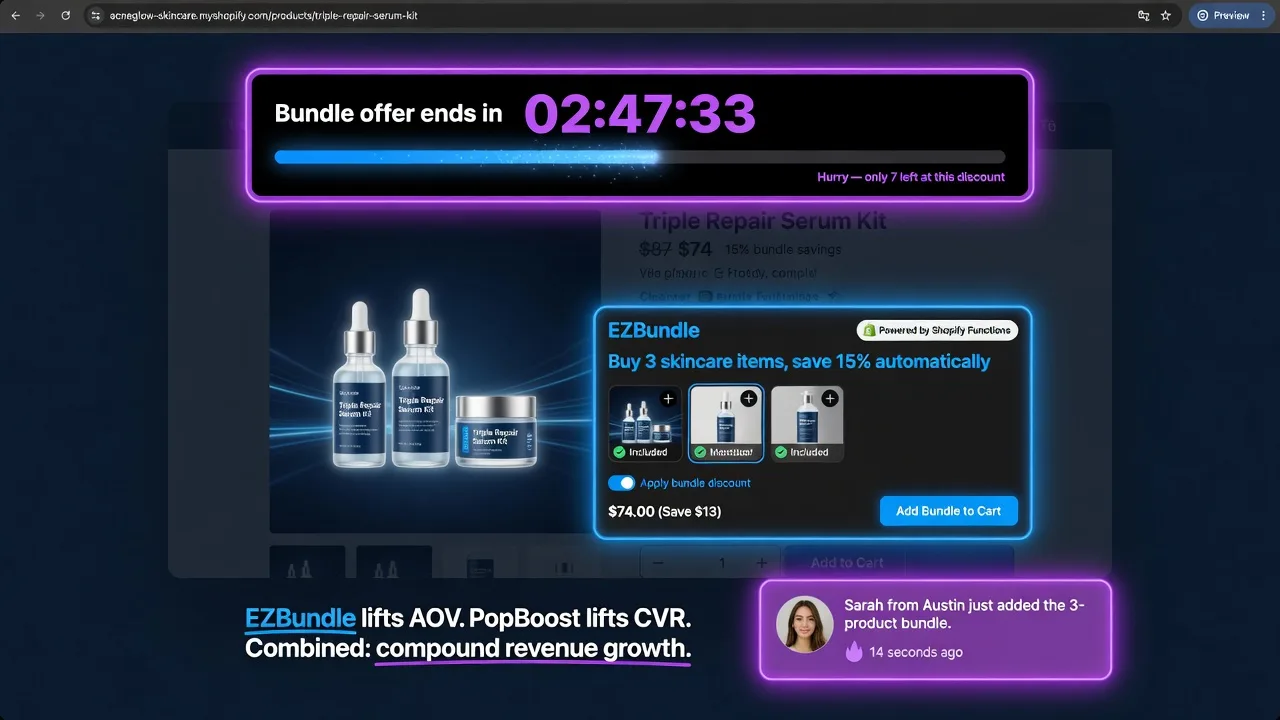
The Revenue Math for Running Both Apps
Every Shopify store's revenue is the product of three variables:
Most merchants focus on one or the other. They install a bundle app to lift AOV, or a social proof app to lift conversion rate — but not both simultaneously. This leaves money on the table, because improvements to each metric compound multiplicatively.
A concrete example: if your current numbers are 5,000 sessions/month, 1.4% conversion rate, and $55 AOV:
(5,000 × 1.4% × $55)
(1.8% CVR, same AOV)
($68.75 AOV, 1.8% CVR)
Improving only one metric gets you to $5,390. Improving both simultaneously gets you to $7,546 — a 96% revenue lift from the same traffic. The compound effect is the reason running both apps together outperforms running either in isolation.
Install EZBundle free — it pairs with PopBoost out of the box
Both apps use Theme App Extension architecture. No conflicts, no performance penalty, no code required.
Install EZBundle Free →| Page | EZBundle Element | PopBoost Element |
|---|---|---|
| Product page | Bundle widget (fixed or M&M) | Low-stock badge + social proof popup |
| Collection page | — | Product badge (SALE / NEW) + announcement bar |
| Cart page | Bundle upsell prompt | Free shipping progress bar + exit intent popup |
| Checkout | Discount code auto-applied | Countdown timer (if sale active) |
| Post-purchase | — | Social proof (recent purchase) |
| Homepage | Featured bundles section | Announcement bar + countdown timer |
What Each App Does on Its Own
EZBundle handles the "how much" side of the transaction. Its three bundle types — fixed bundles (a pre-configured set at a discount), mix-and-match (choose any N items from a category), and frequently-bought-together (recommended add-ons pre-selected on the product page) — all apply discounts automatically at checkout via Shopify Functions. No coupon codes. The buyer adds items, the discount fires, and they see the savings in their cart without any extra steps.
PopBoost handles the "whether to buy" side. Its seven widgets — social proof popups, countdown timers, low-stock badges, free shipping bar, exit intent, announcement bar, and product badges — all work on the visitor's trust and urgency calculus. Social proof answers "is this store real?" Countdown timers answer "do I need to decide now?" Exit intent intercepts the visitor at the moment of leaving. Each widget targets a specific hesitation point in the buying journey.
Neither app changes the other's function. They operate on complementary layers of the buying decision, which is exactly what makes the combination more powerful than the sum of its parts.
Playbook 1: Bundle Countdown Timer
Create urgency around a bundle offer EZBundle + PopBoost
When a bundle discount is tied to a genuine time limit — a sale weekend, a limited launch price, or a promotional window — a countdown timer on the product page creates urgency that drives bundle uptake. Without the timer, a visitor can think "I'll come back to buy the bundle later." With the timer, "later" is tomorrow when the price goes back up.
Playbook 2: Social Proof for Bundle Purchases
Validate the bundle offer with live purchase activity PopBoost → EZBundle
When PopBoost's social proof popup shows a recent bundle purchase — "Maria from Chicago just bought the 3-piece linen set" — it accomplishes two things simultaneously: it validates the store (real people are buying) and it validates the bundle offer specifically (other people are choosing the bundle, not just individual items). This is social proof working in service of AOV, not just conversion.
Playbook 3: Low-Stock Badge on Bundle Components
Turn inventory scarcity into bundle urgency PopBoost → EZBundle
When one component of a bundle is genuinely low in stock, a "Only 4 left" badge on that component's product page creates urgency that lifts both single-item sales and bundle sales — because the bundle that includes that component is also implicitly under scarcity pressure. A visitor who was debating whether to grab "just the pillow cover" sees "Only 3 left" and considers the full bundle at the same moment.
Playbook 4: Free Shipping Bar Tied to Bundle Threshold
Use shipping economics to motivate bundle completion PopBoost → EZBundle
Free shipping thresholds and bundle discounts work together because they create the same motivational structure: "add more items and get more value." A visitor who is $18 from free shipping and sees a "Buy 2, Save 10%" bundle offer at $20 has two reasons to add the second item — both the savings and the free shipping. The double incentive drives higher uptake than either incentive alone.
Setup Order and Configuration Guide
If you're starting from scratch with both apps, this order minimizes setup time and gives you working integrations faster:
- Install EZBundle first. Create your highest-value bundle — your most natural frequently-bought-together pairing. Set the discount to 10–12%. Place the bundle widget on your top-3 product pages using the Shopify theme editor. Don't install PopBoost yet — get the bundle offer working and converting on its own first.
- Run EZBundle for 7 days solo. Measure baseline bundle attach rate (what % of qualifying product page visitors add the bundle). You need this number to isolate PopBoost's additive effect later.
- Install PopBoost. Configure social proof first (product pages, 5s delay), then the free shipping bar (all pages, with your threshold set). These two widgets affect every session immediately.
- Add the countdown timer on your next sale. When you run a time-limited bundle promotion, place the countdown timer on the same product page as the bundle widget, above it in the theme editor so it's the first thing the visitor sees below the product images.
- Enable exit intent. Set a first-order offer that mentions the bundle: "Still thinking? The [Product] bundle is 12% off — and includes free shipping." This recovers visitors who saw the bundle offer but didn't commit.
- Enable low-stock badges. Set the threshold at 5–8 units on your bundle component products. This is the most targeted of the five widgets — it only activates when inventory actually warrants it.
What to Measure
Running both apps creates more variables, so tracking the right metrics keeps the signal clear:
- Bundle attach rate — % of product page visitors who add a bundle item. Measure before and after each PopBoost widget is added to see which one moves this metric.
- AOV (bundle orders vs. non-bundle orders) — EZBundle's dashboard shows this. You want to confirm bundle orders are materially higher AOV than non-bundle orders from the same traffic source.
- Overall conversion rate — PopBoost's primary metric. Should lift within 7–14 days of adding social proof and exit intent.
- Revenue per session — the compound metric: CVR × AOV. This is the number that tells you whether both apps are working together. It should grow faster than either CVR or AOV alone.
Build the complete stack — both apps free to install
EZBundle for fixed bundles, mix-and-match, and frequently-bought-together. PopBoost for social proof, urgency, and exit recovery. Both on Theme App Extensions — no conflicts, no code.
Install EZBundle Free →