✈️ AI Job Application Co-Pilot

Stop rewriting the same
cover letter 50 times

JobPilot reads the job posting and generates a tailored cover letter in one click. Works on every major job board.

Add to Chrome — It's Free →

3 free cover letters/day. No credit card required.

JobPilot Chrome extension
Features

Everything you need to
apply faster

From cover letter to submitted application — JobPilot handles the repetitive parts so you can focus on the interview.

✍️
AI Cover Letters
Paste your resume once. JobPilot uses Claude AI to write a unique, tailored cover letter for every job — matched to the role and company.
📋
Auto-fill Forms
One click fills your name, email, phone, LinkedIn, GitHub, and cover letter into application forms — including React-based ATS systems.
📊
Application Tracker
Log every job you apply to. Track status from Applied to Offer. Export your entire pipeline to CSV anytime.
🔍
Auto Job Detection
JobPilot automatically detects the job title, company, and description on any job board — no copy-pasting required.
📄
Resume Upload & Parse
Upload your PDF resume and AI fills your entire profile automatically — name, email, skills, experience, everything.
🔒
Private by Default
Your resume and profile are stored locally in your browser. Cover letters are generated server-side and never stored.
Works on all major job boards
LinkedIn Indeed ZipRecruiter Glassdoor Monster Greenhouse Lever Workday Ashby Wellfound Handshake + any job board
Pricing

Start free, upgrade when
you need more

The tracker and auto-fill are always free. Upgrade for more AI cover letters per day.

Free
$0/mo
Get started with no commitment.
  • 3 AI cover letters / day
  • Application tracker
  • Auto-fill forms
  • Resume upload & parse
Add to Chrome
Pro
$19.99/mo
For recruiters and power users.
  • 100 AI cover letters / day
  • Application tracker
  • Auto-fill forms
  • Resume upload & parse
Get Pro

What is JobPilot and how does it differ from writing cover letters with ChatGPT?

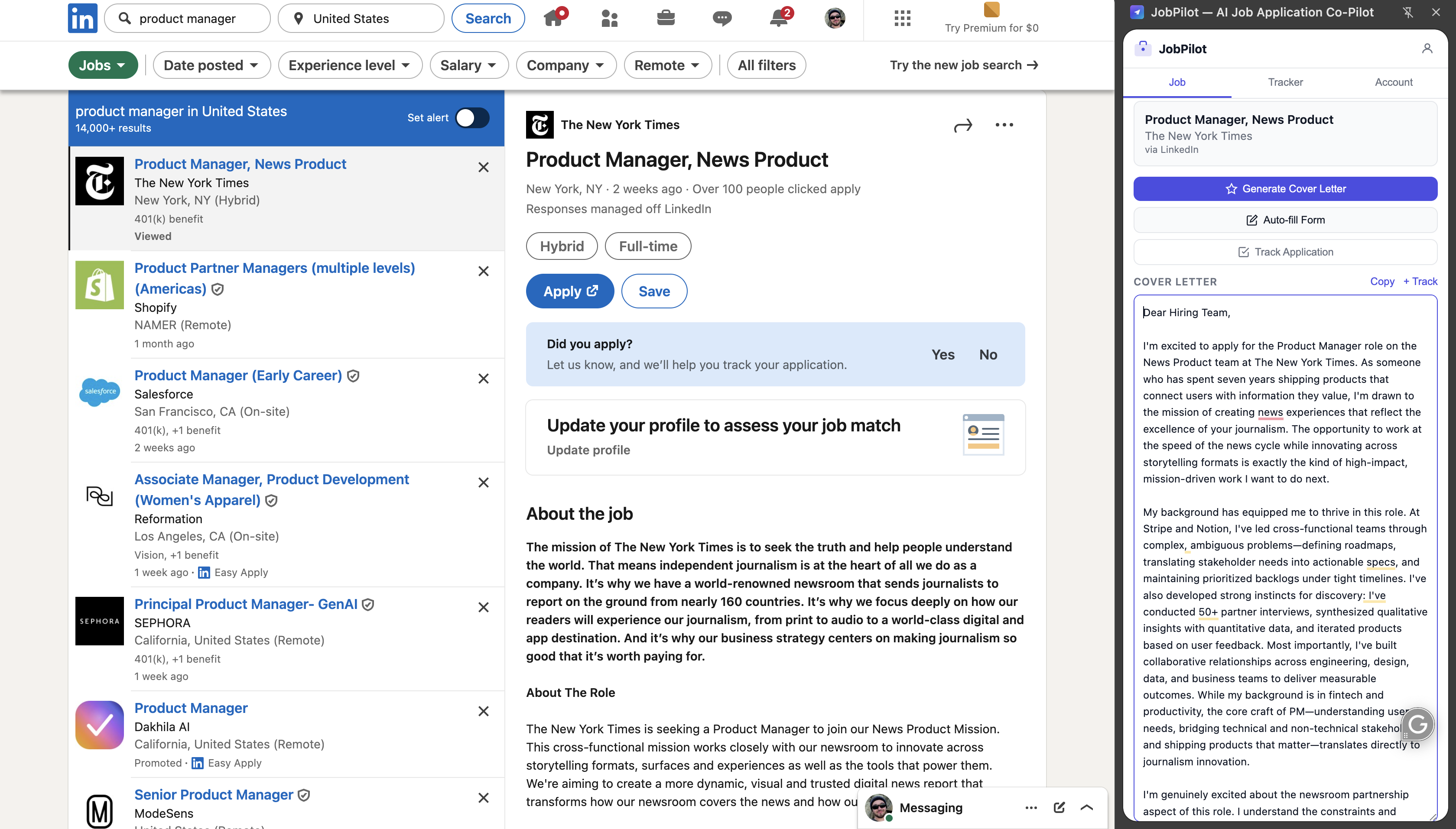
JobPilot is a Chrome extension that generates AI cover letters directly on job listing pages — without copy-pasting. When you open a LinkedIn, Indeed, or ZipRecruiter job posting and click Generate, JobPilot automatically reads the job title, company name, and job description from the current page, combines it with your stored resume, and generates a tailored cover letter using Claude AI in a side panel.

The key difference from ChatGPT or manual AI tools is context capture: you don't manually copy the job description into a prompt. JobPilot reads the page directly and handles the prompt engineering automatically. An active job seeker applying to 20–30 roles per week saves roughly 15–30 minutes per day compared to the copy-paste workflow.

Method Time per letter Tailored to job? Stays on job page?
JobPilot~30 secondsYes — reads job description automaticallyYes — side panel, no tab switching
ChatGPT (manual)5–10 minutesYes — if you paste the descriptionNo — requires separate tab
Generic template2–3 minutesNo — same letter for every jobYes
Writing from scratch30–60 minutesYesNo
JobPilot is a free Chrome extension that generates tailored AI cover letters in one click on LinkedIn, Indeed, ZipRecruiter, Glassdoor, and other job boards. It reads the job description from the page automatically — no copy-pasting — and uses Claude AI to write a unique letter matched to that specific role and your stored resume.

How does JobPilot personalize each cover letter to the job description?

JobPilot uses Claude AI (built by Anthropic) to generate each cover letter. The generation prompt includes three inputs: your full resume text, the job title and company extracted from the listing page, and the complete job description text scraped from that same page. Claude is specifically instructed to match your relevant experience to the job requirements, avoid AI-sounding filler phrases, and write in a direct professional tone appropriate for the company's apparent culture.

The output is a 3–4 paragraph cover letter that mentions the specific role name, references relevant experience from your resume that matches the stated job requirements, and ends with a clear call to action. Each letter is different because each job description is different — it's not a template with variable substitution, it's a context-aware generation from the actual job text.

You can edit the output in the side panel before copying it to the application form. JobPilot also supports auto-fill: for application forms on Greenhouse, Lever, Workday, and other ATS systems, clicking Auto-fill pastes the generated letter directly into the cover letter field.

FAQ

Common questions

Is JobPilot free?

Yes. JobPilot is free with 3 AI cover letters per day — no credit card required. Upgrade to Basic ($9.99/month) for 20 cover letters/day, or Pro ($19.99/month) for 100/day.

Which job sites does JobPilot work on?

JobPilot works on LinkedIn, Indeed, ZipRecruiter, Glassdoor, Lever, Greenhouse, Workday, and most other major job boards. It reads the job description directly from the page and tailors each letter to that specific role.

Will the cover letter sound like AI?

No. JobPilot is trained to write in a direct, professional, human tone — no AI buzzwords, no hollow enthusiasm. The output is tailored to the specific job description and your resume, making each letter unique.

Can I edit the output?

Yes. Every cover letter is fully editable in the side panel before you use it. Copy, paste, or refine it to match your voice before submitting.

Do I need to paste my resume every time?

No. Paste your resume once during setup and JobPilot remembers it. Every subsequent cover letter is generated using your stored resume — just open any job listing and click Generate.